Welcome to Wheeled Chassis Kit repository
For STM32
Control car and read encoder-USART
1.1 Explanation
Please read 《0. Motor introduction and usage》first to understand the motor parameters, wiring method, and power supply voltage you are currently using. To avoid improper operation and damage to the driver board or motor.
I2C and serial communication cannot be shared, only one can be selected. Both STM32C8T6 and RCT6 are compatible with this project.
The 4 motor interfaces on the module correspond to motors on robot car, as shown below
M1 -> Upper left motor (left front wheel of the car)
M2 -> Lower left motor (left rear wheel of the car)
M3 -> Upper right motor (right front wheel of the car)
M4 -> Lower right motor (right rear wheel of the car)
Hardware wiring:
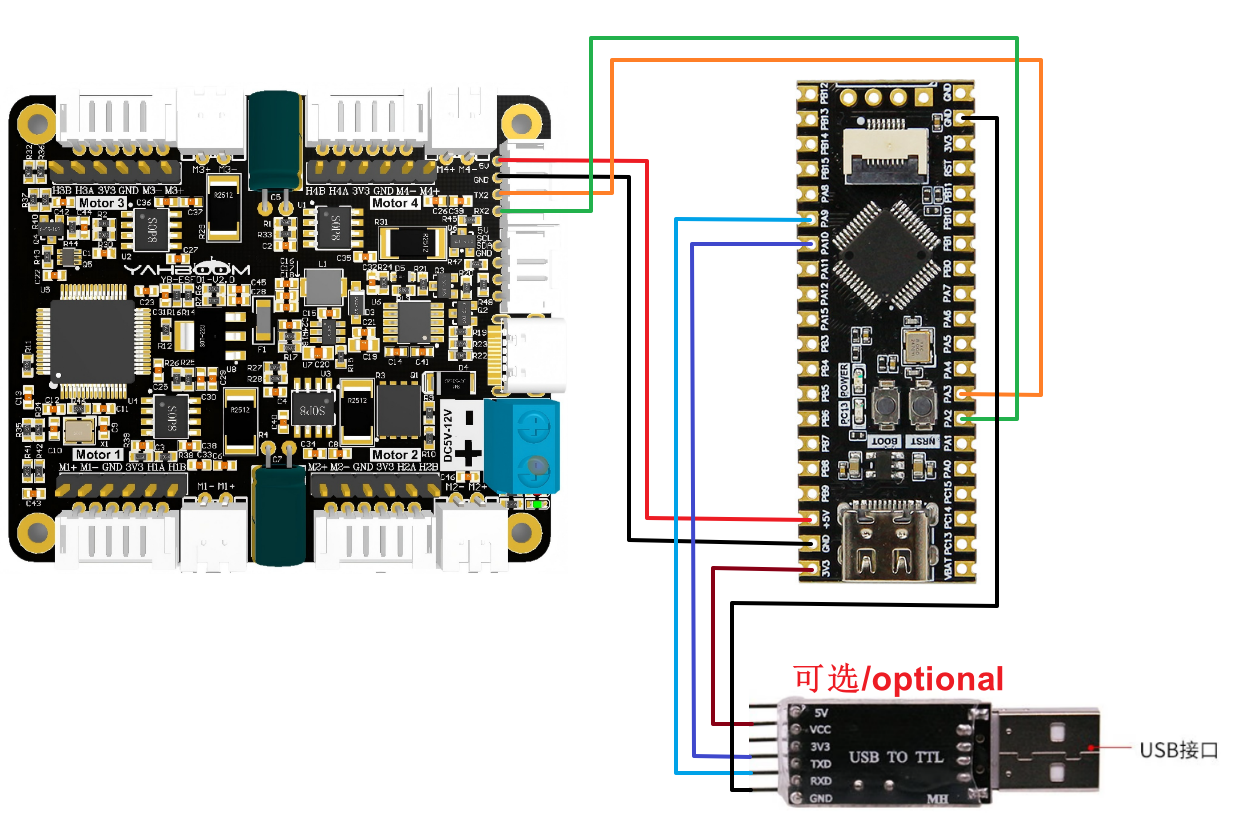
| 4-channel motor drive board | STM32C8T6/STM32RCT6 |
|---|---|
| RX2 | PA2 |
| TX2 | PA3 |
| GND | GND |
| 5V | 5V |
| Motor | 4-channel motor drive board(Motor) |
|---|---|
| M2 | M- |
| V | 3V3 |
| A | H1B |
| B | H1A |
| G | GND |
| M1 | M+ |
USB to TTL serial port module needs to be connected to print the processed encoder data.
If you are using Yahboom STM32, you can directly connect the TYPE-C interface on the STM32 development board to the computer USB port, and you can also achieve serial port printing, so you don't need to connect a USB to TTL serial port module.
| USB TO TTL | STM32C8T6/STM32RCT6 |
|---|---|
| VCC | 3V3 |
| GND | GND |
| RXD | PA9 |
| TXD | PA10 |
Serial port configuration: Baud rate 115200, no parity check, no hardware flow control, 1 stop bit
Note: The serial port here is used to print data on the serial port assistant, not for communication with the driver board
1.2 Code analysis
x// 1:接收总的编码器数据 2:接收实时的编码器 1: Receive total encoder data 2: Receive real-time encoder data
//1:520电机 2:310电机 3:测速码盘TT电机 4:TT直流减速电机 5:L型520电机 //1:520 motor 2:310 motor 3:speed code disc TT motor 4:TT DC reduction motor 5:L type 520 motorUPLOAD_DATA: used to set the data of the motor encoder. Set 1 to the total number of encoder pulses and 2 to the real-time pulse data of 10ms.
MOTOR_TYPE: used to set the type of motor used. Just modify the corresponding numbers according to the comments according to the motor you are currently using. You don’t need to modify the rest of the code.
If you need to drive the motor and observe the data, just modify the two numbers at the beginning of the program. No changes are required to the rest of the code.
xxxxxxxxxx send_motor_type(1);//配置电机类型 Configure motor type delay_ms(100); send_pulse_phase(30);//配置减速比 查电机手册得出 Configure the reduction ratio. Check the motor manual to find out delay_ms(100); send_pulse_line(11);//配置磁环线 查电机手册得出 Configure the magnetic ring wire. Check the motor manual to get the result. delay_ms(100); send_wheel_diameter(67.00);//配置轮子直径,测量得出 Configure the wheel diameter and measure it delay_ms(100); send_motor_deadzone(1900);//配置电机死区,实验得出 Configure the motor dead zone, and the experiment shows delay_ms(100); send_motor_type(2); delay_ms(100); send_pulse_phase(20); delay_ms(100); send_pulse_line(13); delay_ms(100); send_wheel_diameter(48.00); delay_ms(100); send_motor_deadzone(1600); delay_ms(100); send_motor_type(3); delay_ms(100); send_pulse_phase(45); delay_ms(100); send_pulse_line(13); delay_ms(100); send_wheel_diameter(68.00); delay_ms(100); send_motor_deadzone(1250); delay_ms(100); send_motor_type(4); delay_ms(100); send_pulse_phase(48); delay_ms(100); send_motor_deadzone(1000); delay_ms(100); send_motor_type(1); delay_ms(100); send_pulse_phase(40); delay_ms(100); send_pulse_line(11); delay_ms(100); send_wheel_diameter(67.00); delay_ms(100); send_motor_deadzone(1900); delay_ms(100); This is used to store the parameters of the Yahboom motor. By modifying the MOTOR_TYPE parameter above, one-click configuration can be achieved.
In normally, do not modify the code here when using the Yahboom motor.
If you are using your own motor, or if a certain data needs to be modified according to your needs, you can check the course《1.2 Control command》 to understand the specific meaning of each command.
xxxxxxxxxx while(1) { if(times>=250) { Car_Move_PWM(); Car_Move(); times = 0; } if(g_recv_flag == 1) { g_recv_flag = 0; Deal_data_real(); printf("M1:%d,M2:%d,M3:%d,M4:%d\r\n",Encoder_Now[0],Encoder_Now[1],Encoder_Now[2],Encoder_Now[3]); Deal_data_real(); printf("M1:%d,M2:%d,M3:%d,M4:%d\r\n",Encoder_Offset[0],Encoder_Offset[1],Encoder_Offset[2],Encoder_Offset[3]); Deal_data_real(); printf("M1:%.2f,M2:%.2f,M3:%.2f,M4:%.2f\r\n",g_Speed[0],g_Speed[1],g_Speed[2],g_Speed[3]); } }
A 100ms timer is set in the program. Each time the timer interrupt is triggered, the times variable will be incremented by one. When it reaches 25 times, that is, 2.5 seconds, the motion state of the car will be changed.
If the motor type is 4, that is, the motor without encoder, then the pwm version of the car state switching function is used. At the same time, read the data sent by the driver board and print the data out at the same time.
xxxxxxxxxx//检验从驱动板发送过来的数据,符合通讯协议的数据则保存下来//Check the data sent from the driver board, and save the data that meets the communication protocolvoid Deal_Control_Rxtemp(uint8_t rxtemp){    static u16 step = 0;    static u8 start_flag = 0;
    if(rxtemp == '$' &&     start_flag == 0)    {        start_flag = 1;        memset(g_recv_buff,0,RXBUFF_LEN);//清空数据 Clear data    }        else if(start_flag == 1)    {            if(rxtemp == '#')            {                start_flag = 0;                step = 0;                g_recv_flag = 1;                memcpy(g_recv_buff_deal,g_recv_buff,RXBUFF_LEN); //只有正确才会赋值 Only correct ones will be assigned            }            else            {                if(step > RXBUFF_LEN)                {                    start_flag = 0;                    step = 0;                    memset(g_recv_buff,0,RXBUFF_LEN);//清空接收数据   Clear received data                }                else                {                    g_recv_buff[step] = rxtemp;                    step++;                }            }    }    }
//将从驱动板保存到的数据进行格式处理,然后准备打印//Format the data saved from the driver board and prepare it for printingvoid Deal_data_real(void){    static uint8_t data[RXBUFF_LEN];    uint8_t  length = 0;        //总体的编码器    Overall encoder     if ((strncmp("MAll",(char*)g_recv_buff_deal,4)==0))    {        length = strlen((char*)g_recv_buff_deal)-5;        for (uint8_t i = 0; i < length; i++)        {            data[i] = g_recv_buff_deal[i+5]; //去掉冒号 Remove the colon        }                  data[length] = '\0';
                                    char* strArray[10];//指针数组 长度根据分割号定义  char 1字节   char* 4字节    Pointer array The length is defined by the split number char 1 byte char* 4 bytes                char mystr_temp[4][10] = {'\0'};                 splitString(strArray,(char*)data, ", ");//以逗号切割 Split by comma                for (int i = 0; i < 4; i++)                {                        strcpy(mystr_temp[i],strArray[i]);                        Encoder_Now[i] = atoi(mystr_temp[i]);                }                        }        //10ms的实时编码器数据  10ms real-time encoder data        else if ((strncmp("MTEP",(char*)g_recv_buff_deal,4)==0))    {        length = strlen((char*)g_recv_buff_deal)-5;        for (uint8_t i = 0; i < length; i++)        {            data[i] = g_recv_buff_deal[i+5]; //去掉冒号 Remove the colon        }                  data[length] = '\0';
                char* strArray[10];//指针数组 长度根据分割号定义  char 1字节   char* 4字节       Pointer array The length is defined by the split number char 1 byte char* 4 bytes                char mystr_temp[4][10] = {'\0'};                 splitString(strArray,(char*)data, ", ");//以逗号切割 Split by comma                for (int i = 0; i < 4; i++)                {                        strcpy(mystr_temp[i],strArray[i]);                        Encoder_Offset[i] = atoi(mystr_temp[i]);                }        }        //速度    Speed        else if ((strncmp("MSPD",(char*)g_recv_buff_deal,4)==0))    {        length = strlen((char*)g_recv_buff_deal)-5;        for (uint8_t i = 0; i < length; i++)        {            data[i] = g_recv_buff_deal[i+5]; //去掉冒号 Remove the colon        }                  data[length] = '\0';                                    char* strArray[10];//指针数组 长度根据分割号定义  char 1字节   char* 4字节       Pointer array The length is defined by the split number char 1 byte char* 4 bytes                char mystr_temp[4][10] = {'\0'};                 splitString(strArray,(char*)data, ", ");//以逗号切割 Split by comma                for (int i = 0; i < 4; i++)                {                        strcpy(mystr_temp[i],strArray[i]);                        g_Speed[i] = atof(mystr_temp[i]);                }        }}
Deal_Control_Rxtemp: Filter the received data and save those that meet the communication protocol.
Deal_data_real: Extract the saved original data and reconstruct a new print format.
1.3 Experimental phenomenon
After the wiring is correct, write the program into the mainboard. After resetting, you can see that the car will move forward for 2.5S, move backward for 2.5S, rotate right for 2.5S, rotate left for 2.5S, then stop for 2.5S, and continue the above state switching actions.
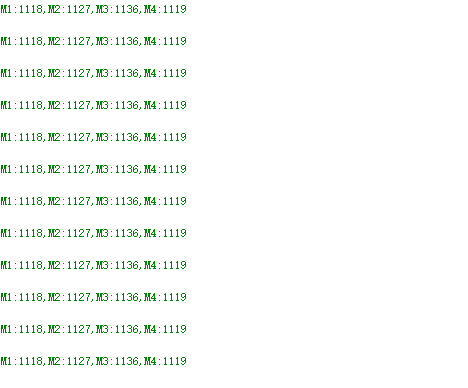
At the same time, you can see that the printed motor values are constantly changing in the serial port assistant.