yahboom
HomeTutorialsProduct
Solution
Blog
Online Store
About Us
EN/中文
Store
Wheeled Chassis Kit📖
0.Chassis installation course
  • Installation Video-1
  • Installation Video-2
  • Installation Video-3
1.4-channel motor drive module tutorials
IIC communication
  • For Arduino
  • For ESP32
  • For JetsonNANO
  • For MSPM0
  • For PICO2
  • For RDK X5
  • For RPi5
  • For STM32
Motor introduction and commissioning
  • 1. Motor introduction and usage
  • 2.PC host
USART communication
  • For Arduino
  • For ESP32
  • For JetsonNANO
  • For MSPM0
  • For PICO2
  • For RDK X5
  • For RPi5
  • For STM32
2.Kinematic analysis
  • Kinematic Analysis of Two-wheel Drive Vehicles
  • Kinematic Analysis of Four-wheel Drive Vehicles
3.MSPM0 chassis tutorials(MSPM0G3507/MSPM0G3519)
CCS basic case
  • 1. Turn on the LED light
  • 2. System delay
  • 3. Button control
  • 4. External interruption
  • 5. Serial communication
  • 6. Timer
  • 7. PWM breathing light
  • 8. ADC acquisition
  • 9. DMA transfer
  • 10. Get MPU6050 data (I2C)
  • 11. LCD Display (SPI)
Development environment construction
  • 01.CCS Theia Development
  • 02.MDK Arm Development
  • 03.UniFlash Downloader
  • 04.DAP-LINK download program
  • 05.Program simulation and debugging
  • 06.Engineering transplantation
Keil basic case
  • 1. Turn on the LED light
  • 2. System delay
  • 3. Button control
  • 4. External interruption
  • 5. Serial communication
  • 6. Timer
  • 7. PWM breathing light
  • 8. ADC acquisition
  • 9. DMA transfer
  • 10. Get MPU6050 data (I2C)
  • 11. LCD Display (SPI)
MSPM0 Basic Course
  • 1. Introduction to MSPM0
MSPM0 Robot Expansion Board Example
  • 1. Introduction to MSPM0 robot expansion board
  • 2. Customize buttons
  • 3. Drive the buzzer
MSPM0 Sensor extension information
  • 01.3-channel tracking
  • 02.4-channel tracking
  • 03.8-channel tracking
  • 04.CCD tracking
  • 05.Electric PTZ control
  • 06.2.4G handle control
  • 07.Servo ultrasonic avoid
  • 08.Bluetooth remote control
  • 09.K210-Automatic Driving
  • 10.K210-Color follow
  • 11.K210-Number recognition
  • 12.K210-Color reaction
  • 13.K210-Road signs
  • 14.K210-Machine code following
  • 15.K210-QR code recognition
  • 16.K230-Visual tracking
  • 17.K230-Color tracking
  • 18.K230-Color response
  • 19.K230-Road sign recognition
  • 20.K230-Machine code tracking
  • 21.K230-QR code recognition action
  • 22.K230-Autonomous avoid
  • 23.K230-License plate tracking
  • 24.K230-Face tracking
  • 25.K230-Gaze direction tracking
  • 26.K230-Palm tracking
  • 27.K230-Target tracking
  • 28.K230-Human body tracking
  • 29.K230-OCR character recognition action
4.STM32 chassis tutorials
  • 01.3-channel tracking
  • 02.4-channel tracking
  • 03.8-channel tracking
  • 04.CCD tracking
  • 05.Electric PTZ control
  • 06.2.4G handle control
  • 07.Servo ultrasonic avoid
  • 08.Bluetooth remote control
  • 09.K210-Automatic Driving
  • 10.K210-Color follow
  • 11.K210-Number recognition
  • 12.K210-Color Reaction
  • 13.K210-Road signs
  • 14.K210-Machine code following
  • 15.K210-QR code recognition
  • 16.K230-Visual tracking
  • 17.K230-Color tracking
  • 18.K230-Color response
  • 19.K230-Road sign recognition
  • 20.K230-Machine code tracking
  • 21.K230-QR code recognition action
  • 22.K230-Autonomous avoid
  • 23.K230-License plate tracking
  • 24.K230-Face tracking
  • 25.K230-Gaze direction tracking
  • 26.K230-Palm tracking
  • 27.K230-Target tracking
  • 28.K230-Human body tracking
  • 29.K230-OCR character recognition action
5.Expand course
  • 1.Autonomous driving car
  • 2.Vehicle-mounted balance ball motion control systemnew
Download
  • Code
  • 3D_Model_File
Download ZIP

Welcome to Wheeled Chassis Kit repository

Kinematic Analysis of Four-wheel Drive Vehicles

14.3, Kinematic analysis of four-wheel drive car

14.3, Kinematic analysis of four-wheel drive car14.3.1, Limitations14.3.2, Establish kinematic model14.3.3 Kinematic Analysis

14.3.1, Limitations

This section will analyze the kinematic equation of four-wheel drive car from the perspective of four-wheel drive car kinematics. Due to the structural errors of real cars, there will be resistance and friction during the movement, which is relatively complicated. For the sake of simplicity, the analysis here is limited to the four-wheel drive car in an ideal state.

14.3.2, Establish kinematic model

The four-wheel drive car is abstracted into the model shown below, where W represents the interval between the center points of the left and right motors; L represents the interval between the center points of the front and rear motors; motors M1, M2, M3, and M4 represent the four drive motors of the car; V represents the linear velocity of the car (forward and backward speed), and ω represents the angular velocity of the car (rotation speed).

In an ideal state, the linear velocity V and angular velocity ω are controlled to control the four motors, thereby controlling the movement of the four-wheel drive car.
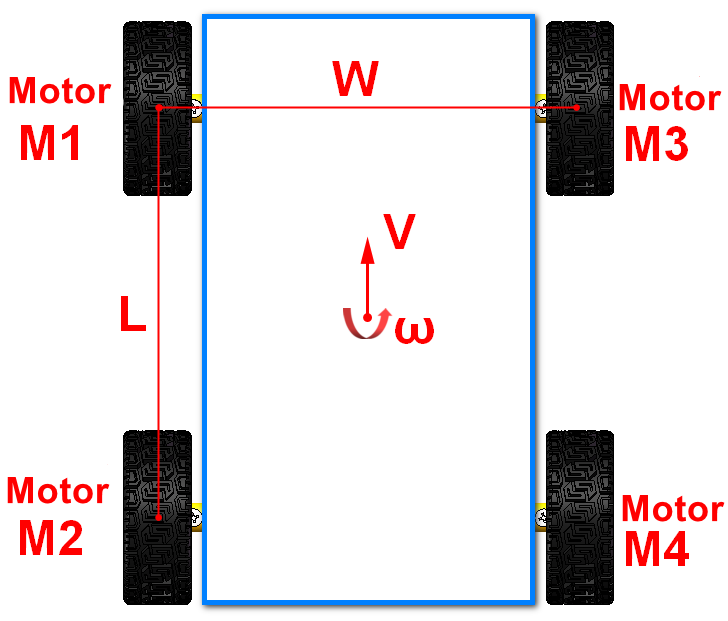
image-20221114174200854

14.3.3 Kinematic Analysis

Let V~m1~, V~m2~, V~m3~, and V~m4~ be the speed values ​​of motors M1, M2, M3, and M4, that is, the rotation speed of the wheels. V~x~ is the linear speed of the car. V~x~ is positive for forward movement and V~x~ is negative for backward movement. V~z~ is the angular speed of the car. V~z~ is positive for left movement and V~z~ is negative for right movement. A is half the distance W between the center points of the left and right motors of the car, A=$\frac{W}{2}$. B is half the distance L between the center points of the front and rear motors of the car, B=$\frac{L}{2}$.

When the car moves forward or backward,

V~m1~=V~x~

V~m2~=V~x~

V~m3~=V~x~

V~m4~=V~x~

When the car rotates around the geometric center point,

V~m1~=-V~z~*(A+B)

V~m2~=-V~z~*(A+B)

V~m3~=V~z~*(A+B)

V~m4~=V~z~*(A+B)

According to the above formula, we can get

V~m1~=V~x~-V~z~*(A+B)

V~m2~=V~x~-V~z~*(A+B)

V~m3~=V~x~+V~z~*(A+B)

V~m4~=V~x~+V~z~*(A+B)

Kinematic Analysis of Two-wheel Drive Vehicles
Turn on the LED light

COMPANY

  • About us
  • Team Style
  • Blog

LEARNING & EXPLORATION

  • Tutorials
  • Edge AI hardware
  • Educational robots
  • Embedded intelligent hardware

WHERE TO BUY

  • Yahboom Online Store
  • Amazon
  • Alibaba
  • AliExpress
  • Mercado

TECHNOLOGY SUPPORT

  • Email: support@yahboom.com

BE A DISTRIBUTOR

  • Email: sales@yahboom.com
QR Code

Copyright © 2017-2026 Yahboom. All Rights Reserved.

EN/中文