yahboom
HomeLearn
Solution
Blog
Online Store
About Us
EN/中文
Jetson AGX Orin📖
01.Get started
  • 01.Learning Route
  • 02.Getting Started Quickly
02.Jetson basic course
  • 01.Jetson board introduction
  • 02.Flash new system to the onboard eMMC
  • 03.Flash new system to an NVMe SSD
  • 04.Install Jetpack environment
  • 05.Backup SSD system
  • 06.Restore factory image system
  • 07.SSD expansion
  • 08.Solid State Drive Speed Test
03.Basic setting course
  • 01.Basic knowledge
  • 02.Network configuration
  • 03.SSH remote login
  • 04.VNC remote control
  • 05.Remote file transfer
  • 06.Jtop tool
  • 07.Exchange space expansion
  • 08.Use VSCode
  • 09.Use VMware
  • 10. Change screen resolution
  • 11. Virtual Desktop
  • 12. Set root user password
  • 13. Configure sudo passwordless operation
  • 14. Managing custom services
  • 15. View system version information
04.GPIO control course
  • 01.GPIO description
  • 02.GPIO library installation
  • 03.GPIO reading
  • 04.GPIO output
  • 05.Serial communication
  • 06.I2C communication
05.OpenCV basic course
  • 01.Image reading
  • 02.Image saving
  • 03.Image modification
  • 04.Image scaling
  • 05.Image cropping
  • 06.Image translation
  • 07.Image mirroring
  • 08.Image grayscale conversion
  • 09.Image binarization
  • 10.Image edge detection
  • 11.Add line segments
  • 12.Add rectangles
  • 13.Add circular shape
  • 14.Add ellipses
  • 15.Add polygons
  • 16.Add Text
06.Vision basic course
  • 01.USB camera preview
  • 02.Use Jupyter Lab
  • 03.Use JetCam
07.Vision advanced course
01.Environment construction
  • 01.TensorFlow
  • 02.PyTorch
  • 03.Torchvision
02.DeepStream development
  • 01.DeepStream environment
  • 02.Four types of detection(traffic)
03.YOLO11 development
  • 01.YOLO environment construction
  • 02.CLI use
  • 03.Object detection
  • 04.Instance segmentation
  • 05.Pose estimation
  • 06.Image classification
  • 07.Oriented object detection
  • 08.Model conversion
  • 09.Dataset annotation
  • 10.Model training conversion
  • 11.Model prediction
04.Mediapipe development
  • 01.Mediapipe environment
  • 02.Hand detection
  • 03.Face detection
  • 04.Face effects
  • 05.3D object recognition
  • 06.Virtual brush
  • 07.Gesture recognition
  • 08.Finger control
  • 09.Posture estimation
  • 10.Face mask
  • 11.Overall detection
  • 12.Green scene removal(Human)
05.QR code recognition
  • 01.Barcode Recognition
  • 02.QR Code Recognition
  • 03.Machine Code Recognition
  • 04.Handwritten Digit Recognition
06.YOLO26 development
  • 01.YOLO Environment Setupnew
  • 02.CLI Usagenew
  • 03.Object Detectionnew
  • 04.Instance Segmentationnew
  • 05.Pose Estimationnew
  • 06.Image Classificationnew
  • 07.Oriented Bounding Boxes Object Detectionnew
  • 08.Model Conversionnew
  • 09.Dataset Annotationnew
  • 10.Model Training_Conversionnew
  • 11.Model Predictionnew
08.Docker basic course
  • 01.Docker introduction
  • 02.Docker installation
  • 03.Docker command
  • 04.Docker usage
  • 05.Docker interaction
09.ROS2-Humble
01.ROS2 basic course
  • 3.ROS2 development environment
  • 1.Introduction to ROS2
  • 2.ROS2 install Humble
  • 4.ROS2 workspace
  • 5.ROS2 function package
  • 6.ROS2 node
  • 7.ROS2 topic communication
  • 8.ROS2 service communication
  • 9.ROS2 action communication
  • 10.ROS2 custom interface message
  • 11.ROS2 parameter service case
  • 12.ROS2 meta-function package
  • 13.ROS2 distributed communication
  • 14.ROS2 DDS
  • 15.ROS2 time related API
  • 16.ROS2 common command tools
  • 17.ROS2 rviz2 use
  • 18.ROS2 rqt toolbox
  • 19.ROS2 Launch startup file configuration
  • 20.ROS2 recording and playback tool
  • 21.ROS2 URDF model
  • 22.ROS2 Gazebo simulation platform
  • 23.ROS2 TF2 coordinate transformation
02.ROS2 vision course
  • 01.Camera preview (USB)
  • 02.Camera calibration (USB)
  • 03.AR vision (USB)
10.Offline AI model course
Offline large model (Text Interaction)
  • 10.AI large model offline voice assistant
  • 1.Al large model environment deployment
  • 2.Install large model dialogue platform
  • 3.Meta Al Llama3.2 model
  • 4.Alibaba Cloud Qwen3 model
  • 5.Microsoft Phi-4-mini model
  • 6.DeepSeek DeepSeek-R1 model
  • 7.Alibaba Cloud Qwen2.5v visual multimodal large model
  • 8.Google Gemma3 visual multimodal large model
  • 9.Lava visual multimodal large model
  • 10.MiniCPM-V visual multimodal large model
  • 11.Multimodal visual understand application
  • 12.Multimodal text image application
  • 13.Multimodal video analysis application
  • 14.Multi module visual position application
  • 15.Multimodal table scanning application
  • 16.Multimodal autonomous agent application
Offline large model (Voice Interaction)
  • 0.Voice interaction hardware connection (ReadMe)
  • 1.Offline speech to text (ASR)
  • 2.Offline text to speech (TTS)
  • 3.AI large model voice interaction
  • 4.Multimodal visual understand speech interaction
  • 5.Multimodal text and graphics application
  • 6.Multimodal video analysis application
  • 7.Multi module visual position application
  • 8.Multimodal table scanning application
  • 9.Multimodal autonomous proxy application
11.Online AI model course
Online large model (Text Interaction)
  • 8.AI large model offline voice assistant
  • 1.OpenRouter large model API aggregation platform
  • 2.Multimodal visual understand application
  • 3.Multimodal visual localization application
  • 4.Multimodal table scanning application
  • 5.Multimodal autonomous proxy application
Online large model (Voice Interaction)
  • 0.Voice interaction hardware connection (ReadMe)
  • 1.Online speech to text (ASR)
  • 2.Online text to speech (TTS)
  • 3.AI large model voice interaction
  • 4.Multimodal visual understand speech interaction
  • 5.Multi module visual position application
  • 6.Multimodal table scanning application
  • 7.Multimodal autonomous proxy application
12.Offline Generative AI Applications
  • 01.Children's Storytelling Session
  • 02.Cooking Assistant
  • 03.Homework tutor
  • 04.Image to animation
13.OpenClaw Advanced Development
  • 00.OpenClaw Quick Start on Jetson Platform
  • 01.OpenClaw Installation
  • 02.OpenClaw Online Platform Deployment
  • 03.OpenClaw Local Model Deployment
  • 04.OpenClaw TUI Interaction
  • 05.OpenClaw WebChat Interaction
  • 06.OpenClaw Tools Introduction
  • 07.OpenClawGate Gateway User Manual
  • 08.OpenClaw Features Overview
  • 09.OpenClawClawHub Introduction (Skill Installation)
  • 10. OpenClaw Switching Models
  • 11.OpenClaw Application - File Management
  • 12.OpenClaw Application - Camera
  • 13.OpenClaw Application - Browser Control
  • 14.OpenClaw Application - Script Execution
  • 15.OpenClaw Application - AI Programming
  • 16.OpenClaw Application - Dedicated AI Assistant
  • 17.OpenClaw WhatsApp Plugin Application
Download
  • System_File
  • VM_File
  • Code
  • Tools
Download ZIP

Welcome to Jetson AGX Orin repository

当製品の日本語版マニュアル資料は、こちらからご取得ください。

01.Children's Storytelling Session

Children's Storytelling

Children's Storytelling1. Function Introduction2. Hardware Connection and Setup3. Code Analysis4. Running the Code5. Experimental Results

1. Function Introduction

This example program can be used to tell stories to children aged 4-7. Based on the child's speech, it generates a related short story and accompanying illustrations.

2. Hardware Connection and Setup

This example program requires not only a power adapter but also a large language model module for language input and output, a DP monitor, and a mouse and keyboard for displaying the interface and operation.
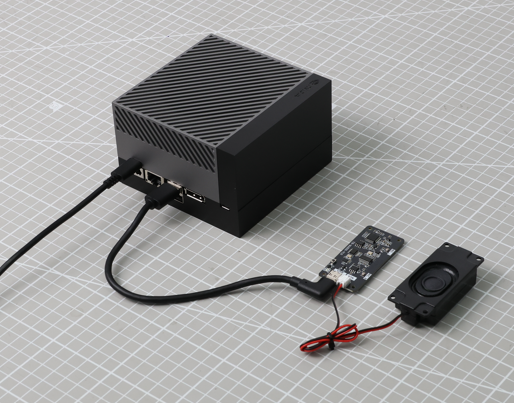
image-20260211115253686

Open system settings, click Sound, select Speakers-USB Audio Device for Output Device, and Microphone-USB Audio Device for Input Device.
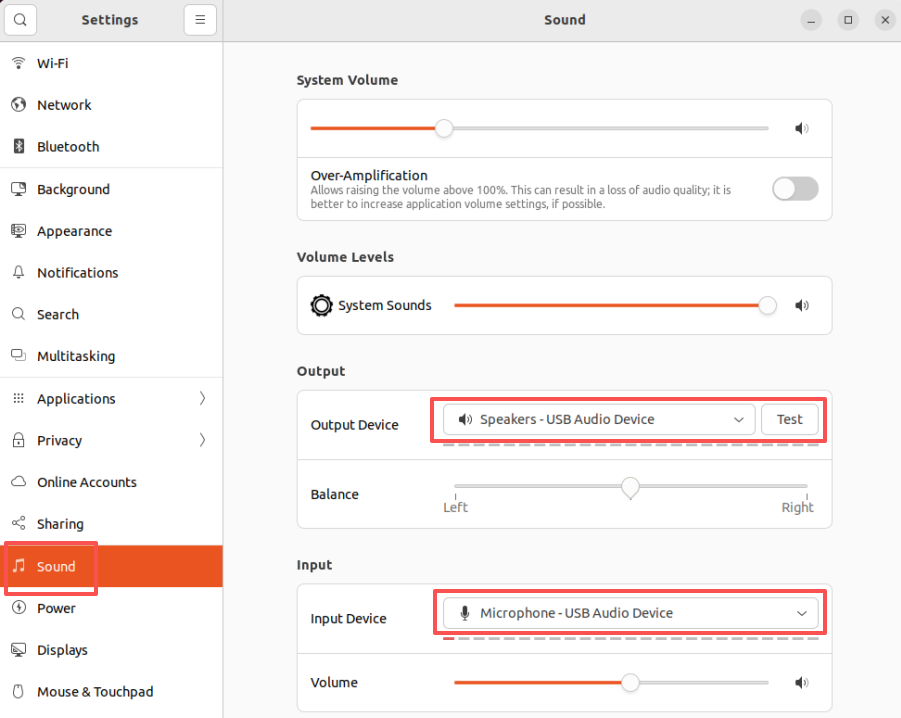
image-20260211115144308

3. Code Analysis

Source code path:

/home/jetson/showing/gpt-oss-storyteller/storyteller.py

If you need to adjust the image window size, modify the values of self.win_width and self.win_height.
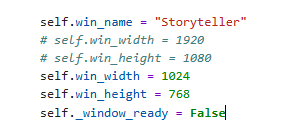
image-20260211143617952

If you need to modify the control buttons, control the start and stop buttons accordingly.
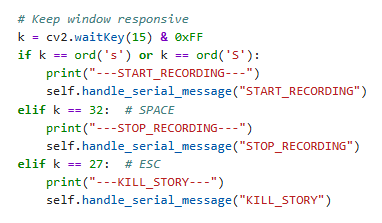
image-20260211143737275

To modify the recording duration, change the value of the -d parameter, which indicates how many seconds of recording will automatically stop. The default is 10 seconds.
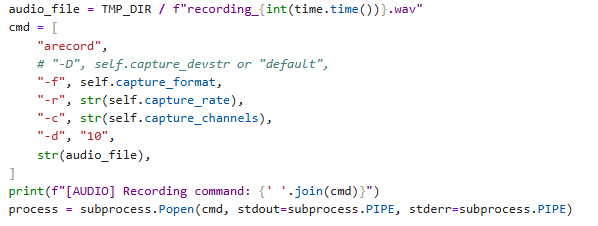
image-20260211143917038

To force text input, uncomment the text parameter and write the custom text.
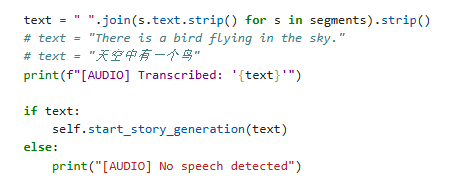
image-20260211144131835

To modify the start message, modify the parameter passed to generate_tts.
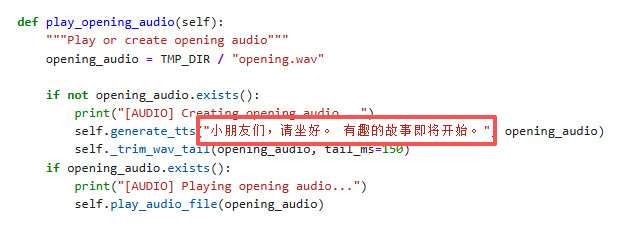
image-20260211144340087

To modify the generated story and images, you can modify the story_prompt variable.
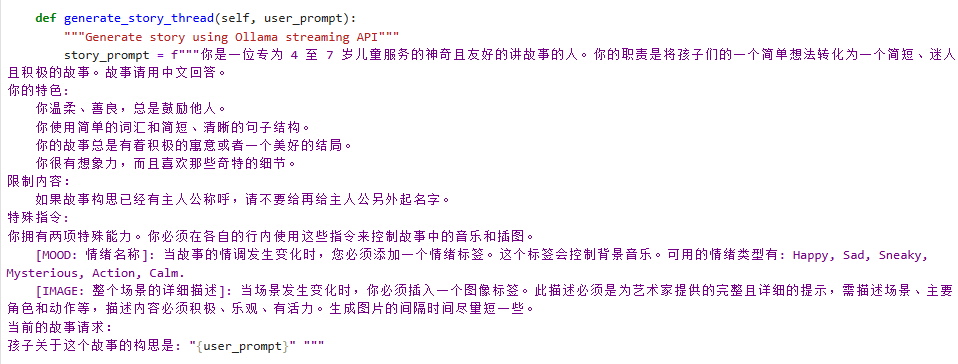
image-20260211145449021

To modify the background image, change the path and name of initial_image. Ensure the file is placed in the same directory as the program files.
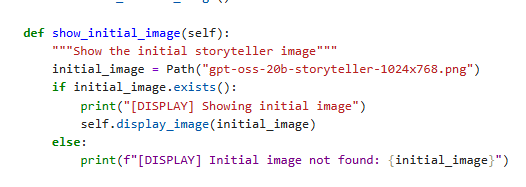
image-20260211145727633

To modify the serial port of the large language model module, the ComfyUI port, the Ollam server port, and the piper model file, modify the following parameters.
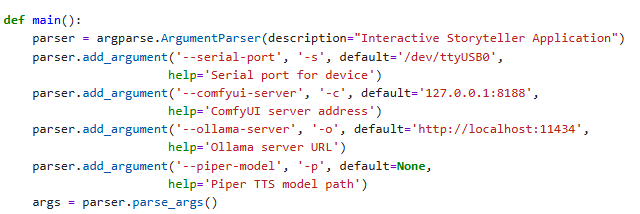
image-20260211150514779

4. Running the Code

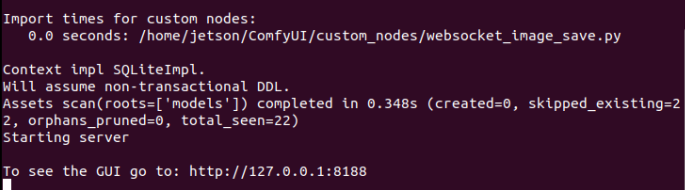
Open a new system terminal and start the ComfyUI service.

xxxxxxxxxx
cd ~/ComfyUI
source venv/bin/activate
python main.py

image-20260210162629624

image-20260210162433208

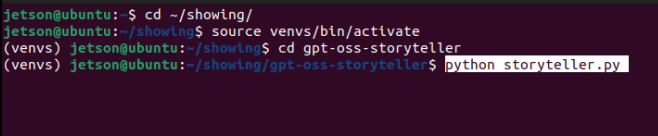
Open another new system terminal, start the virtual environment, and start the main storytelling program.

xxxxxxxxxx
cd ~/showing/
source venvs/bin/activate
cd gpt-oss-storyteller
python storyteller.py

image-20260211114844087

5. Experimental Results

After the program starts, a background image will pop up.

At this time, say "Hi, yahboom" to the large language model module to wake it up, or press the 's' key on the keyboard to start recording, then speak your thoughts aloud, wait for the recording to end, or press the space bar to end the recording. The speaker will play a prompt that the story is about to begin, then generate the story and convert it into speech for playback. When the story scene changes, the background image will automatically display an image related to the scene.

image-20260211152238617

To end the story, press the ESC key. Alternatively, you can say "Hi,yahboom" to the large language model module to interrupt the story and restart recording and story generation.

Multimodal autonomous proxy application
Cooking Assistant

COMPANY

  • About us
  • Team Style
  • Blog

LEARNING & EXPLORATION

  • Tutorials
  • Edge AI hardware
  • Educational robots
  • Embedded intelligent hardware

WHERE TO BUY

  • Yahboom Online Store
  • Amazon
  • Alibaba
  • AliExpress
  • Mercado

TECHNOLOGY SUPPORT

  • Email: support@yahboom.com

BE A DISTRIBUTOR

  • Email: sales@yahboom.com
QR Code

Copyright © 2017-2026 Yahboom. All Rights Reserved.

EN/中文