Welcome to Jetson AGX Orin repository
当製品の日本語版マニュアル資料は、こちらからご取得ください。
9.Lava visual multimodal large model
Llava
Llava1. Model Scale2. Performance3. Using Llava3.1 Running Llava3.2 Starting a Conversation3.3 Visual Function3.4 Ending the ConversationReferences
Demonstration Environment
Development Board: Jetson AGX Orin Series Motherboard
1. Model Scale
| Model | Volume |
|---|---|
| llava:7b | 4.7GB |
2. Performance
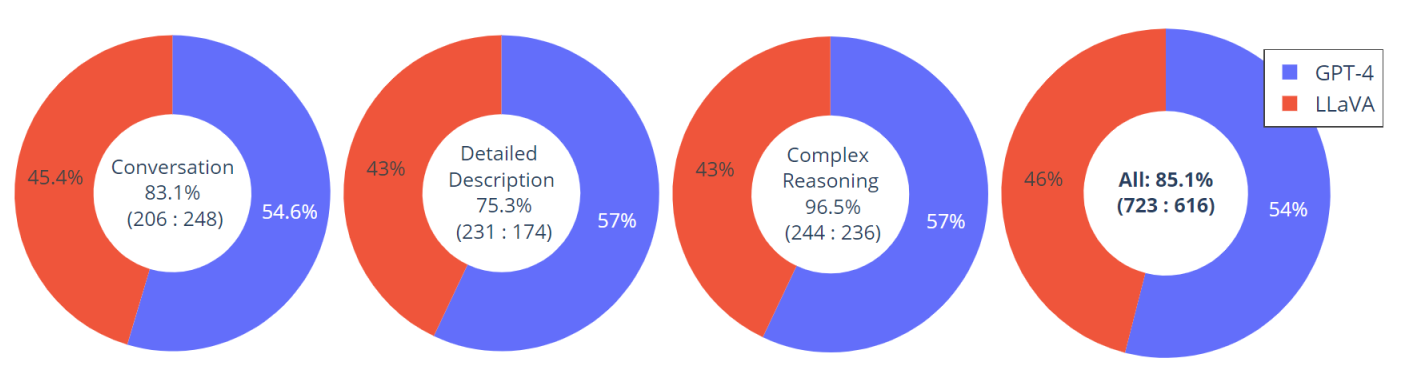
3. Using Llava
3.1 Running Llava
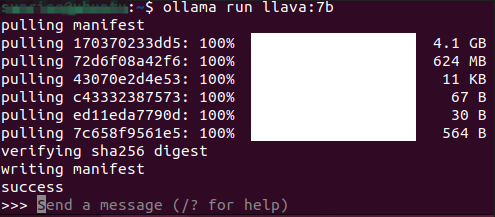
Use the run command to start running the model. If the model has not been downloaded, it will automatically pull the model from the Ollama model library:
ollama run llava:7b
3.2 Starting a Conversation
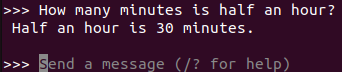
xxxxxxxxxxHow many minutes is half an hour?
Response time depends on your hardware configuration. Please be patient!
3.3 Visual Function

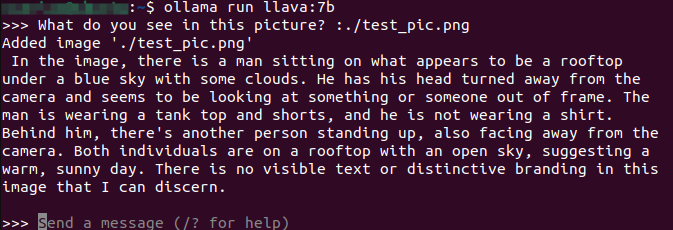
xxxxxxxxxxWhat do you see in this picture? :./test_pic.png#Use ": + image path" in the conversation to enable the model to use its visual function and interpret the information in the image.
3.4 Ending the Conversation
Use the Ctrl+d shortcut or /bye to end the conversation!
References
Ollama
Official Website: https://ollama.com/
GitHub: https://github.com/ollama/ollama
Llava
Ollama Model: https://ollama.com/library/llava