Welcome to Muto S2 Robot repository
8.Control head
8.Control head
8.Control head1.Experimental purpose2.Experiment preparation3.Experimental process8.4 Experiment summary
1.Experimental purpose
This course mainly learns how to control the robot's head-up and head-down functions.
2.Experiment preparation
The functions of the Muto hexapod robot Python library involved in this course are:
head_move(level): Control the robot to raise and lower its head. The level value range is [0-10], and the default is 5.
3.Experimental process
Open the jupyterLab client and find the code path:
muto/Samples/Control/8.control_head.ipynb
By default g_ENABLE_CHINESE=False, if you need to display Chinese, please set g_ENABLE_CHINESE=True.
x# 中文开关,默认为英文 Chinese switch. The default value is Englishg_ENABLE_CHINESE = FalseName_widgets = {'End': ("End", "结束")}
Click to run all cells, and then scroll to the bottom to see the generated controls.

You can control different functions by operating different controls separately.
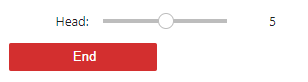
Each time you slide the Head slider, when the value of the slider changes, the robot will immediately be controlled to raise or lower its head.
xxxxxxxxxxdef on_slider_head(value):global g_startif g_start:g_bot.head_move(value)print("head:", value)else:g_start = True
8.4 Experiment summary
This time, JupyterLab control is used to control the function of the six-legged robot to raise and lower its head.
Note: The head-up and head-down functions cannot be combined with other functions.
Press the End button to exit the program.