Welcome to Muto S2 Robot repository
16.Line segment drawing
16.Line segment drawing
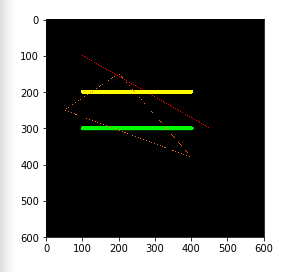
When using OpenCV to process images, we sometimes need to draw line segments, rectangles, etc. on the image. OpenCV uses the line(dst, pt1, pt2, color, thickness=None, lineType=None, shift=None) function to draw line segments.
Parameter Description:
dst: output image.
pt1, pt2: required parameters. The coordinate points of the line segment represent the starting point and the ending point respectively.
color: required parameter. Used to set the color of line segments
thickness: optional parameter. Used to set the width of the line segment
lineType: optional parameter. Used to set the type of line segment, optional 8 (8 adjacent connecting lines - default), 4 (4 adjacent connecting lines) and cv2.LINE_AA is anti-aliasing
Code path:muto/Samples/OpenCV/03_Image processing and text drawing/04 Line segment drawing.ipynb
ximport cv2import numpy as npimport matplotlib.pyplot as pltnewImageInfo = (600, 600, 3)dst = np.zeros(newImageInfo,np.uint8)
# line# Draw line segment 1 dst 2 begin 3 end 4 colorcv2.line(dst, (100,100), (450,300), (0,0,255))# 5 line wcv2.line(dst, (100,200), (400,200), (0,255,255), 10)# 6 line typecv2.line(dst, (100,300), (400,300), (0,255,0), 10, cv2.LINE_AA)
cv2.line(dst, (200,150), (50,250), (25,100,255))cv2.line(dst, (50,250), (400,380), (25,100,255))cv2.line(dst, (400,380), (200,150), (25,100,255))
# cv2.imshow('dst',dst)# cv2.waitKey(0)dst = cv2.cvtColor(dst, cv2.COLOR_BGR2RGB)plt.imshow(dst) plt.show()