Welcome to Jetson ORIN NANO SUPER repository
当製品の日本語版マニュアル資料は、こちらからご取得ください。
05. Subscribers
5.Subscribers
5.1 Subscribers
The subscriber receives the data published by the publisher and then enters its callback function, where the received data is processed. The core content is the callback function, which is available for each topic subscribed to by subscribers.
5.2Create a subscriber
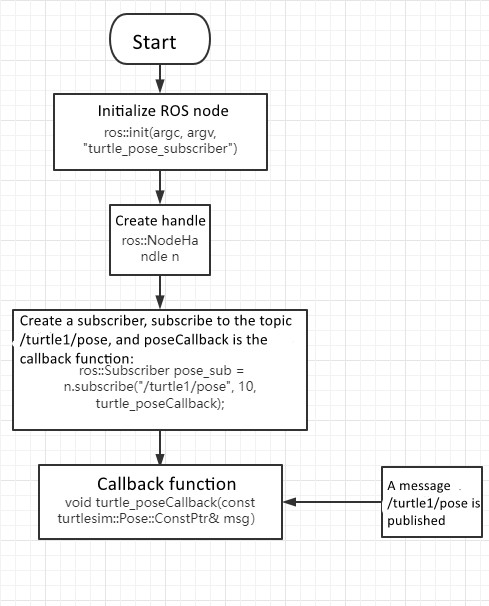
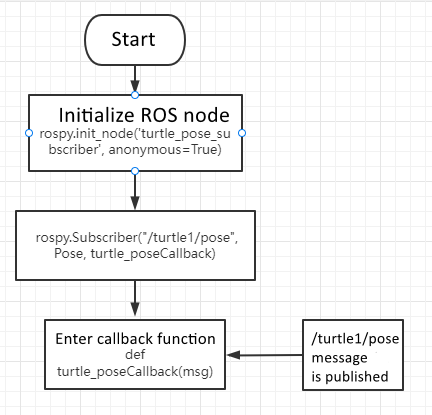
5.2.1 Creation steps
- Initialize ROS node
- Create handle
- Subscribe to the required
- topicsWait for topic messages in a loop, and upon receiving the message, enter the callback function
- Complete message processing in the callback function.
5.2.2. C++Language Implementation
- In the "Publisher" tutorial, create a new C++file under the src folder of the created feature pack and name it turtle_ pose_ subscriber.cpp
- Copy and paste the program code below into the title_ pose_ In the subscriber.cpp file
x#include <ros/ros.h>#include "turtlesim/Pose.h"void turtle_poseCallback(const turtlesim::Pose::ConstPtr& msg){ROS_INFO("Turtle pose: x:%0.3f, y:%0.3f", msg->x, msg->y);}int main(int argc, char **argv){ros::init(argc, argv, "turtle_pose_subscriber");ros::NodeHandle n;ros::Subscriber pose_sub = n.subscribe("/turtle1/pose", 10, turtle_poseCallback);ros::spin(); // Loop waiting callback functionreturn 0;}
- Program flowchart, which can be viewed according to 5.2.1 content
- Configure in CMakelist.txt, under the build area, add the following content
xxxxxxxxxxadd_executable(turtle_pose_subscriber src/turtle_pose_subscriber.cpp)target_link_libraries(turtle_pose_subscriber ${catkin_LIBRARIES})
- Compiling code under workspace directory
xxxxxxxxxxcd ~/catkin_wscatkin_makesource devel/setup.bash
- Run program
- Run score
xxxxxxxxxxroscore
- Running the Little Turtle Node
xxxxxxxxxxrosrun turtlesim turtlesim_node
- Run subscription and continuously receive posture data sent by the little turtle
xxxxxxxxxxrosrun learning_topic turtle_pose_subscriber
- Operation screenshot

- Program operation instructions
- After running the little turtle's node, the little turtle will continuously send its own pose information, and the topic name sent is/turtle1/pose
- And turnle_ pose_ After the subscriber runs, it will receive the data message sent by the turtle and print out this information in the callback function
5.2.3. Python Language Implementation
- In the feature pack directory, create a new folder called scripts, and then create a new Python file (with the suffix. py) under the scripts folder, named 'turn'_ pose_ subscriber.py
- Copy and paste the program code below into the title_ pose_ In the subscriber.py file
x#!/usr/bin/env python# -*- coding: utf-8 -*-import rospyfrom turtlesim.msg import Posedef poseCallback(msg):rospy.loginfo("Turtle pose: x:%0.3f, y:%0.3f", msg.x, msg.y)def turtle_pose_subscriber():rospy.init_node('turtle_pose_subscriber', anonymous=True)# ROS node initializationrospy.Subscriber("/turtle1/pose", Pose, poseCallback)rospy.spin()# Loop waiting callback functionif __name__ == '__main__':turtle_pose_subscriber()
- Process Flow Chart
4.run a program
- Run score
xxxxxxxxxxroscore
- Running the Little Turtle Node
xxxxxxxxxxrosrun turtlesim turtlesim_node
- Run subscription and continuously receive posture data sent by the little turtle
xxxxxxxxxxrosrun learning_topic turtle_pose_subscriber
5.Refer to 5.2.2 for operational effects and program instructions.