Welcome to RDK S100(P) Board repository
7. Human Detection and Tracking (Ultralytics YOLO Pose)
Human Detection and Tracking(Yolo-Pose)
1.Overview
This example uses yolo-pose for human detection and tracking. The algorithm subscribes to image topics, performs inference using the BPU, and publishes messages containing human bounding boxes and keypoint detection results. Multi-target tracking (MOT) is also supported to track detected objects.
The supported detection categories and their corresponding data types in the algorithm messages are as follows:
| Category | Description | Data Type |
|---|---|---|
| body | Human bounding box | Roi |
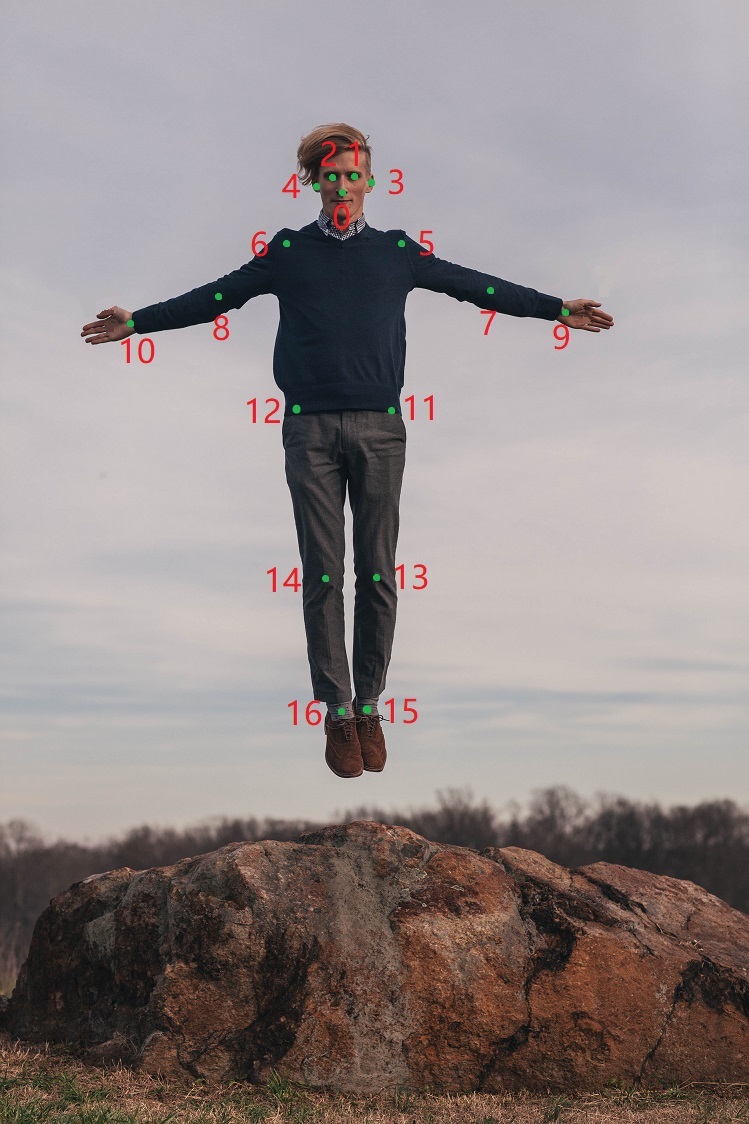
| body_kps | Human keypoints | Point |
The keypoint index mapping is shown below:
Code repository: https://github.com/D-Robotics/mono2d_body_detection
Application scenarios: Human detection and tracking algorithms are essential for visual analysis of human motion, enabling pose analysis and people counting. They are mainly used in human-computer interaction, gaming, and entertainment.
Pose detection example: 4.3. Pose Detection Robot following example: 4.4. Robot Human Following Game character control using pose and gesture recognition: Play with X3Pi, Fitness and Gaming Combined
2.Preparation
- RDK is flashed with Ubuntu 22.04 system image.
- TogetheROS.Bot is installed on RDK.
- MIPI or USB camera is connected to RDK.
- Ensure the PC can access the RDK via network.
3.Usage
3.1Using USB Camera
The human detection and tracking (mono2d_body_detection) package subscribes to images published by the sensor package, performs inference, and publishes algorithm messages. The results can be visualized in a browser via the websocket package.
- Enable USB camera node
x
# Configure the tros.b environmentsource /opt/tros/humble/setup.bash
x
# Copy the configuration files needed to run the example from the installation path of tros.b.cp -r /opt/tros/${TROS_DISTRO}/lib/mono2d_body_detection/config/ .# Configure USB cameraexport CAM_TYPE=usb# Launch fileros2 launch mono2d_body_detection mono2d_body_detection.launch.py kps_model_type:=1 kps_image_width:=640 kps_image_height:=640 kps_model_file_name:=config/yolo11x_pose_nashe_640x640_nv12.hbm- Output Results
The terminal will output the following information:
xxxxxxxxxx[mono2d_body_detection-3] [WARN] [1660219823.214730286] [example]: This is mono2d body det example![mono2d_body_detection-3] [WARN] [1747724998.166714029] [mono2d_body_det]: Parameter:[mono2d_body_detection-3] is_sync_mode_: 0[mono2d_body_detection-3] model_file_name_: config/yolo11x_pose_nashe_640x640_nv12.hbm[mono2d_body_detection-3] is_shared_mem_sub: 1[mono2d_body_detection-3] ai_msg_pub_topic_name: /hobot_mono2d_body_detection[mono2d_body_detection-3] ros_img_topic_name: /image_raw[mono2d_body_detection-3] image_gap: 1[mono2d_body_detection-3] dump_render_img: 0[mono2d_body_detection-3] model_type: 1[mono2d_body_detection-3] [BPU][[BPU_MONITOR]][281473010090784][INFO]BPULib verison(2, 1, 2)[0d3f195]![mono2d_body_detection-3] [DNN] HBTL_EXT_DNN log level:6[mono2d_body_detection-3] [DNN]: 3.3.3_(4.1.17 HBRT)[mono2d_body_detection-3] [WARN] [1747724998.912552895] [mono2d_body_det]: Get model name: yolo11x_pose_nashe_640x640_nv12 from load model.[mono2d_body_detection-3] [WARN] [1747724998.916663825] [mono2d_body_det]: Enabling zero-copy[mono2d_body_detection-3] [WARN] [1747724998.916748774] [mono2d_body_det]: Create hbmem_subscription with topic_name: /hbmem_img[mono2d_body_detection-3] [WARN] [1660219824.895102286] [mono2d_body_det]: input fps: 31.34, out fps: 31.22[mono2d_body_detection-3] [WARN] [1660219825.921873870] [mono2d_body_det]: input fps: 30.16, out fps: 30.21[mono2d_body_detection-3] [WARN] [1660219826.922075496] [mono2d_body_det]: input fps: 30.16, out fps: 30.00[mono2d_body_detection-3] [WARN] [1660219827.955463330] [mono2d_body_det]: input fps: 30.01, out fps: 30.01[mono2d_body_detection-3] [WARN] [1660219828.955764872] [mono2d_body_det]: input fps: 30.01, out fps: 30.00Friendly Reminder:
You must enter the above information in the terminal and then view it on the webpage.
The log shows the program is running successfully, with inference input and output at 30fps, and frame rate statistics updated every second.
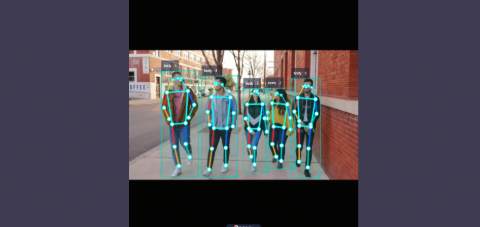
Open http://IP:8000 in your browser (replace IP with the RDK/X86 device IP address) to view the rendered images and algorithm results (human, head, face, hand detection boxes, box types, tracking IDs, and keypoints):
3.2Local image reflow
- Running the recharge node
x
# Configure the tros.b environmentsource /opt/tros/humble/setup.bashx
# Copy the configuration files needed to run the example from the installation path of tros.b.cp -r /opt/tros/${TROS_DISTRO}/lib/mono2d_body_detection/config/ .cp -r /opt/tros/${TROS_DISTRO}/lib/dnn_node_example/config/ .# Configure local image reflowexport CAM_TYPE=fb# Launch fileros2 launch mono2d_body_detection mono2d_body_detection.launch.py publish_image_source:=config/person_body.jpg publish_image_format:=jpg kps_model_type:=1 kps_image_width:=640 kps_image_height:=640 kps_model_file_name:=config/yolo11x_pose_nashe_640x640_nv12.hbm- Recharge Results
The following information will be output in the terminal:
xxxxxxxxxx[mono2d_body_detection-3] [WARN] [1660219823.214730286] [example]: This is mono2d body det example![mono2d_body_detection-3] [WARN] [1747724998.166714029] [mono2d_body_det]: Parameter:[mono2d_body_detection-3] is_sync_mode_: 0[mono2d_body_detection-3] model_file_name_: config/yolo11x_pose_nashe_640x640_nv12.hbm[mono2d_body_detection-3] is_shared_mem_sub: 1[mono2d_body_detection-3] ai_msg_pub_topic_name: /hobot_mono2d_body_detection[mono2d_body_detection-3] ros_img_topic_name: /image_raw[mono2d_body_detection-3] image_gap: 1[mono2d_body_detection-3] dump_render_img: 0[mono2d_body_detection-3] model_type: 1[mono2d_body_detection-3] [BPU][[BPU_MONITOR]][281473010090784][INFO]BPULib verison(2, 1, 2)[0d3f195]![mono2d_body_detection-3] [DNN] HBTL_EXT_DNN log level:6[mono2d_body_detection-3] [DNN]: 3.3.3_(4.1.17 HBRT)[mono2d_body_detection-3] [WARN] [1747724998.912552895] [mono2d_body_det]: Get model name: yolo11x_pose_nashe_640x640_nv12 from load model.[mono2d_body_detection-3] [WARN] [1747724998.916663825] [mono2d_body_det]: Enabling zero-copy[mono2d_body_detection-3] [WARN] [1747724998.916748774] [mono2d_body_det]: Create hbmem_subscription with topic_name: /hbmem_img[mono2d_body_detection-3] [WARN] [1660219824.895102286] [mono2d_body_det]: input fps: 31.34, out fps: 31.22[mono2d_body_detection-3] [WARN] [1660219825.921873870] [mono2d_body_det]: input fps: 30.16, out fps: 30.21[mono2d_body_detection-3] [WARN] [1660219826.922075496] [mono2d_body_det]: input fps: 30.16, out fps: 30.00[mono2d_body_detection-3] [WARN] [1660219827.955463330] [mono2d_body_det]: input fps: 30.01, out fps: 30.01[mono2d_body_detection-3] [WARN] [1660219828.955764872] [mono2d_body_det]: input fps: 30.01, out fps: 30.00The log shows the program is running successfully, with inference input and output at 30fps, and frame rate statistics updated every second.
Open http://IP:8000 in your browser (replace IP with the RDK/X86 device IP address) to view the rendered images and algorithm results (human, head, face, hand detection boxes, box types, tracking IDs, and keypoints):