yahboom
HomeLearn
Solution
Blog
Online Store
About Us
EN/中文
RDK S100(P) Board📖
0. RDK S100(P) Developer Kit
  • 1. RDK S100(P) Official Tutorial
1. Introduction to RDK S100(P) Development Board
  • 1.1 Introduction to the RDK S100(P) Development Board
  • 1.2 Install Operating System
  • 1.3 Interface Descriptions
  • 1.4 Accessory installation
  • 1.5 Camera Expansion Board
  • 1.6 MCU Port Expansion Board
  • 1.7 Precautions for using 15.6-inch screens
2. Basic Settings Course
  • 2.1 Network Configuration
  • 2.2 Remote Login
  • 2.3 System Update
  • 2.4 Boot Auto-Start Configuration
  • 2.5 RDK Exclusive Command Usage
  • 2.6 Linux Command Usage
  • 2.7 Example of GPIO read and write operations
  • 2.8 Using USB Camera
  • 2.9 Using MIPI Camera
  • 2.10 SSD mounting
  • 2.11 Binocular camera depth algorithm
3. TogetheROS.Bot Vision Applications
  • 1. About TogetheROS. Bot
  • 2. System Installation
  • 3. Object Detection(YOLO)
  • 4. Image Classification(mobilenetv2)
  • 5. Image Segmentation(mobilenet_unet)
  • 6. Perception Algorithm(BEV)
  • 7. Human Detection and Tracking (Ultralytics YOLO Pose)
4.Offline AI model course
Offline large model (Text Interaction)
  • 1. AI large model environment deployment
  • 2. Install large model dialogue platform
  • 3. Meta AI Llama 3.2 model
  • 4. Alibaba Cloud Qwen3 model
  • 5. Microsoft Phi-4 mini model
  • 6. DeepSeek - DeepSeek-R1 model
  • 7. Alibaba Cloud Qwen2.5vl Visual Multimodal Large Model
  • 8. Google Gemma3 Visual Multimodal Large Model
  • 9. Lava Visual Multimodal Large Model
  • 10. MiniCPM-V Visual Multimodal Large Model
  • 11. Multimodal visual understand application
  • 12. Multimodal text to image application
  • 13. Multimodal visual localization application
  • 14. Multimodal table scanning application
  • 15. Multimodal Autonomous Agent Applications
Offline large model (Voice Interaction)
  • 0. Voice Interaction Hardware Connection (Must Read)
  • 1. Offline speech-to-text (ASR)
  • 2. Offline Text-to-Speech (TTS)
  • 3.AI large model voice interaction
  • 4. Multimodal visual understanding voice interaction
  • 5. Multimodal Text-to-Image application
  • 6. Multimodal video analytics application
  • 7. Multimodal visual localization application
  • 8. Multimodal table scanning application
  • 9. Multimodal autonomous agent application
  • 10. AI Large Model Offline Voice Assistant
5.Online AI model course
Online large model (Text Interaction)
  • 1.OpenRouter large model API aggregation platform
  • 2.Multimodal visual understand application
  • 3.Multimodal visual localization application
  • 4.Multimodal table scanning application
  • 5.Multimodal autonomous agent application
Online large model (Voice Interaction)
  • 0.Voice interaction hardware connection (ReadMe)
  • 1.Online speech to text (ASR)
  • 2.Online text to speech (TTS)
  • 3.AI large model voice interaction
  • 4.Multimodal visual understand speech interaction
  • 5.Multimodal visual localization application
  • 6.Multimodal table scanning application
  • 7.Multimodal autonomous proxy application
  • 8.AI large model online voice assistant
6.YOLO26 tutorials
  • 01.YOLO26 environment
  • 02.CLI use
  • 03.Object detection
  • 04.Instance segmentation
  • 05.Pose estimation
  • 06.Image classification
  • 07.Oriented object detection
  • 08.Model conversion
  • 09.Dataset annotation
  • 10.Model training - conversion
  • 11.Model prediction
7.OpenClaw Advanced Development
  • 1.OpenClaw Deployment
  • 2.OpenClaw WhatsApp Plugin Application
  • 3.OpenClaw WebChat Interaction
  • 4.OpenClaw TUI Interaction
  • 5.OpenClaw Tools Introduction
  • 6.OpenClawGate Gateway User Manual
  • 7.OpenClaw Features Overview
  • 8.OpenClawClawHub Introduction (Skill Installation)
  • 9.OpenClaw Application - File Management
  • 10.OpenClaw Application - Camera
  • 11.OpenClaw Application - Browser Control
  • 12.OpenClaw Application - Script Execution
  • 13.OpenClaw Application - AI Programming (Peripheral & GPIO Control)
  • 14.OpenClaw Application - Dedicated AI Assistant
  • 15.OpenClaw Web Search Capability Configuration
8.ROS2 basic course
  • 1.Introduction to ROS2
  • 2.ROS2 install Humble
  • 3.ROS2 development environment
  • 4.ROS2 workspace
  • 5.ROS2 function package
  • 6.ROS2 node
  • 7.ROS2 topic communication
  • 8.ROS2 service communication
  • 9.ROS2 action communication
  • 10.ROS2 custom interface message
  • 11.ROS2 parameter service case
  • 12.ROS2 meta-function package
  • 13.ROS2 distributed communication
  • 14.ROS2 DDS
  • 15.ROS2 time related API
  • 16.ROS2 common command tools
  • 17.ROS2 rviz2 use
  • 18.ROS2 rqt toolbox
  • 19.ROS2 Launch startup file configuration
  • 20.ROS2 recording and playback tool
  • 21.ROS2 URDF model
  • 22.ROS2 Gazebo simulation platform
  • 23.ROS2 TF2 coordinate transformation
Download
  • Annex_File
  • Code
Download ZIP

Welcome to RDK S100(P) Board repository

10. MiniCPM-V Visual Multimodal Large Model

MiniCPM-V

MiniCPM-V1. Model Size2. Performance3. Using MiniCPM-V3.1 Running MiniCPM-V3.2 Engaging in a Dialogue3.3 Visual Functions3.4 Ending the Dialogue3.5 Chinese DialogueReferences

Demo Environment

Development Board: RDK S100(P) series motherboard

1. Model Size

ModelSize
minicpm-v:8b5.5GB

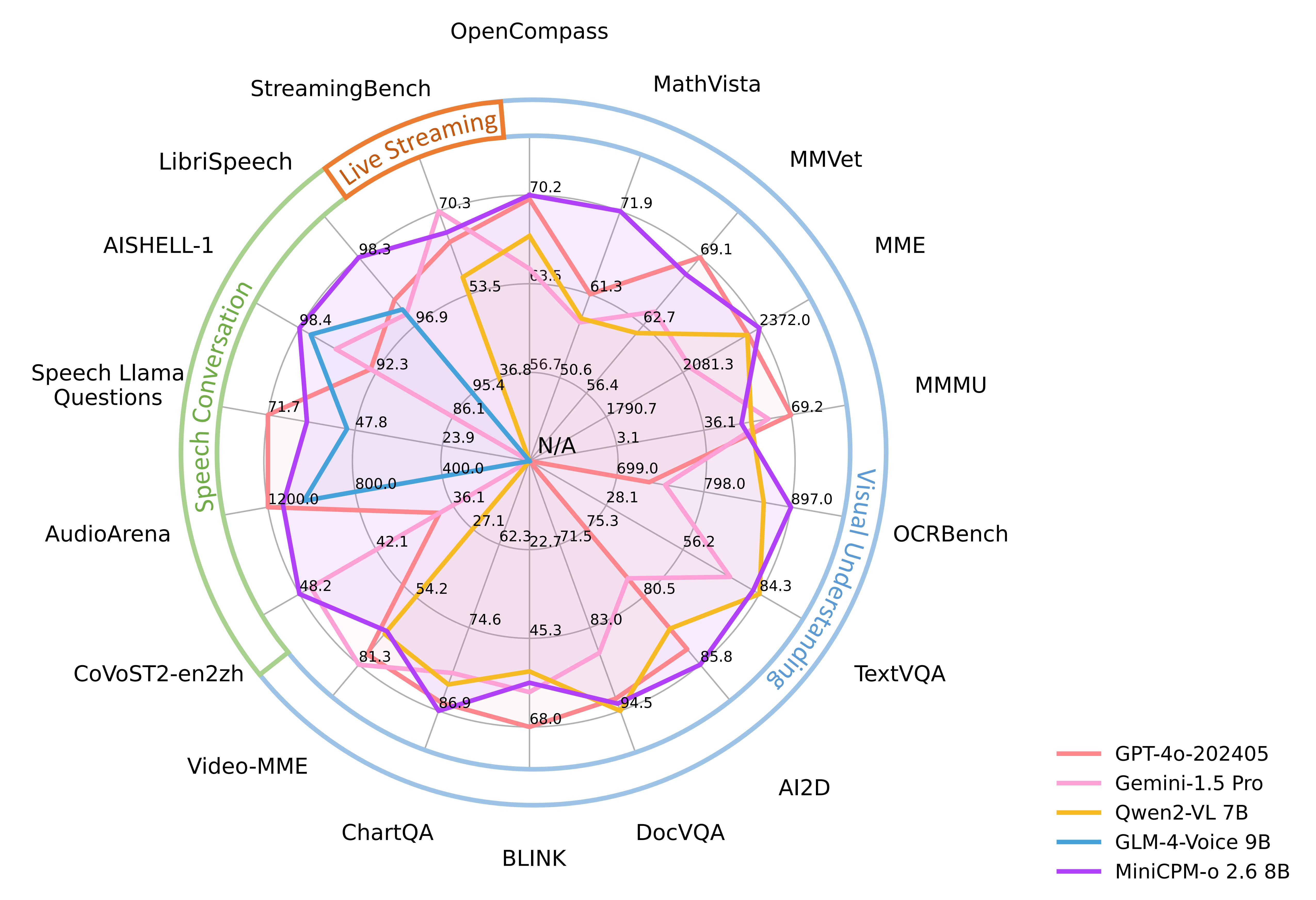
2. Performance

img

3. Using MiniCPM-V

3.1 Running MiniCPM-V

If the system does not have a running model, it will automatically pull the TinyLlama 1.1B model and run it:

xxxxxxxxxx
ollama run minicpm-v:8b

3.2 Engaging in a Dialogue

xxxxxxxxxx
Tell me a mathematician story

Response time depends on hardware configuration; please be patient!
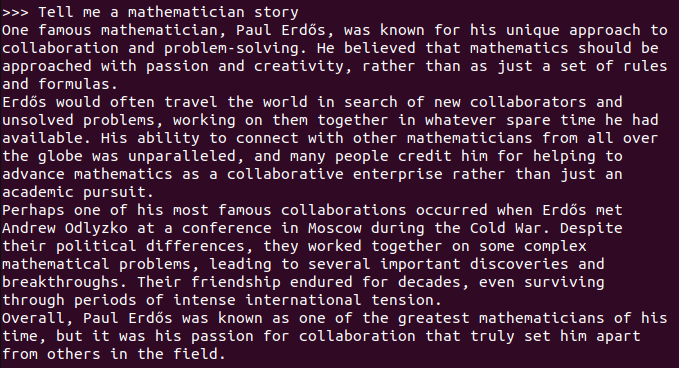
image-20250630153524527

3.3 Visual Functions

test_pic

xxxxxxxxxx
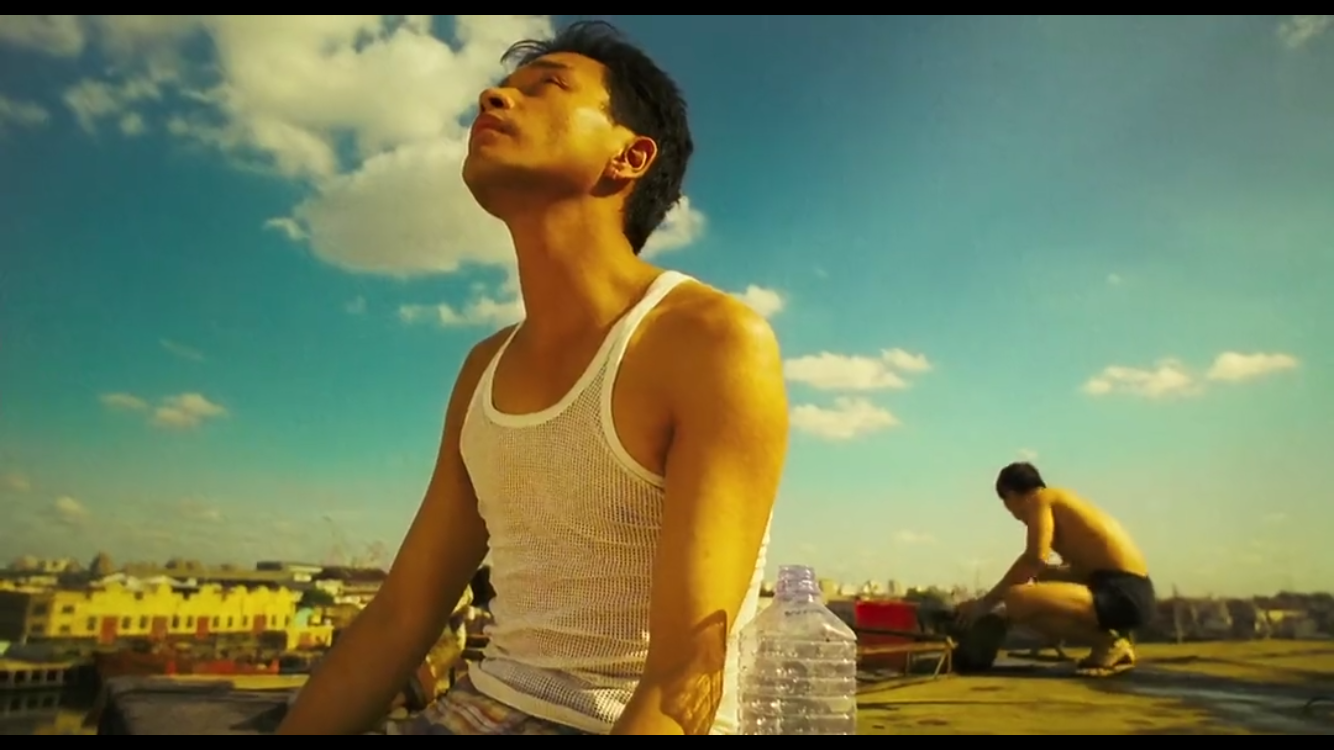
What do you see in this picture? :./test_pic.png
#Using ": + image path" in the dialogue allows the model to use its visual functions to interpret information from the image.
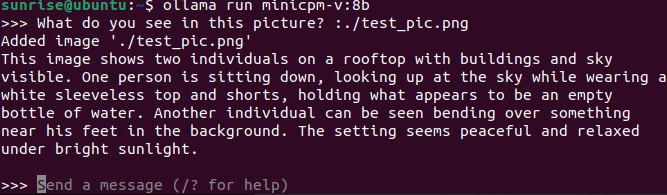
image-20250702100800718

3.4 Ending the Dialogue

Use the shortcut Ctrl+d or /bye to end the dialogue!

3.5 Chinese Dialogue

For those without a Chinese input method, please refer to the Chinese input method switching tutorial.

Chinese Dialogue:

image-20250630153831435

References

Ollama

Official Website: https://ollama.com/

GitHub: https://github.com/ollama/ollama

MiniCPM-V

GitHub: https://github.com/OpenBMB/MiniCPM-o

Ollama Corresponding Model: https://ollama.com/library/minicpm-v

Lava Visual Multimodal Large Model
Multimodal visual understand application

COMPANY

  • About us
  • Team Style
  • Blog

LEARNING & EXPLORATION

  • Tutorials
  • Edge AI hardware
  • Educational robots
  • Embedded intelligent hardware

WHERE TO BUY

  • Yahboom Online Store
  • Amazon
  • Alibaba
  • AliExpress
  • Mercado

TECHNOLOGY SUPPORT

  • Email: support@yahboom.com

BE A DISTRIBUTOR

  • Email: sales@yahboom.com
QR Code

Copyright © 2017-2026 Yahboom. All Rights Reserved.

EN/中文