yahboom
HomeLearn
Solution
Blog
Online Store
About Us
EN/中文
RDK S100(P) Board📖
0. RDK S100(P) Developer Kit
  • 1. RDK S100(P) Official Tutorial
1. Introduction to RDK S100(P) Development Board
  • 1.1 Introduction to the RDK S100(P) Development Board
  • 1.2 Install Operating System
  • 1.3 Interface Descriptions
  • 1.4 Accessory installation
  • 1.5 Camera Expansion Board
  • 1.6 MCU Port Expansion Board
  • 1.7 Precautions for using 15.6-inch screens
2. Basic Settings Course
  • 2.1 Network Configuration
  • 2.2 Remote Login
  • 2.3 System Update
  • 2.4 Boot Auto-Start Configuration
  • 2.5 RDK Exclusive Command Usage
  • 2.6 Linux Command Usage
  • 2.7 Example of GPIO read and write operations
  • 2.8 Using USB Camera
  • 2.9 Using MIPI Camera
  • 2.10 SSD mounting
  • 2.11 Binocular camera depth algorithm
3. TogetheROS.Bot Vision Applications
  • 1. About TogetheROS. Bot
  • 2. System Installation
  • 3. Object Detection(YOLO)
  • 4. Image Classification(mobilenetv2)
  • 5. Image Segmentation(mobilenet_unet)
  • 6. Perception Algorithm(BEV)
  • 7. Human Detection and Tracking (Ultralytics YOLO Pose)
4.Offline AI model course
Offline large model (Text Interaction)
  • 1. AI large model environment deployment
  • 2. Install large model dialogue platform
  • 3. Meta AI Llama 3.2 model
  • 4. Alibaba Cloud Qwen3 model
  • 5. Microsoft Phi-4 mini model
  • 6. DeepSeek - DeepSeek-R1 model
  • 7. Alibaba Cloud Qwen2.5vl Visual Multimodal Large Model
  • 8. Google Gemma3 Visual Multimodal Large Model
  • 9. Lava Visual Multimodal Large Model
  • 10. MiniCPM-V Visual Multimodal Large Model
  • 11. Multimodal visual understand application
  • 12. Multimodal text to image application
  • 13. Multimodal visual localization application
  • 14. Multimodal table scanning application
  • 15. Multimodal Autonomous Agent Applications
Offline large model (Voice Interaction)
  • 0. Voice Interaction Hardware Connection (Must Read)
  • 1. Offline speech-to-text (ASR)
  • 2. Offline Text-to-Speech (TTS)
  • 3.AI large model voice interaction
  • 4. Multimodal visual understanding voice interaction
  • 5. Multimodal Text-to-Image application
  • 6. Multimodal video analytics application
  • 7. Multimodal visual localization application
  • 8. Multimodal table scanning application
  • 9. Multimodal autonomous agent application
  • 10. AI Large Model Offline Voice Assistant
5.Online AI model course
Online large model (Text Interaction)
  • 1.OpenRouter large model API aggregation platform
  • 2.Multimodal visual understand application
  • 3.Multimodal visual localization application
  • 4.Multimodal table scanning application
  • 5.Multimodal autonomous agent application
Online large model (Voice Interaction)
  • 0.Voice interaction hardware connection (ReadMe)
  • 1.Online speech to text (ASR)
  • 2.Online text to speech (TTS)
  • 3.AI large model voice interaction
  • 4.Multimodal visual understand speech interaction
  • 5.Multimodal visual localization application
  • 6.Multimodal table scanning application
  • 7.Multimodal autonomous proxy application
  • 8.AI large model online voice assistant
6.YOLO26 tutorials
  • 01.YOLO26 environment
  • 02.CLI use
  • 03.Object detection
  • 04.Instance segmentation
  • 05.Pose estimation
  • 06.Image classification
  • 07.Oriented object detection
  • 08.Model conversion
  • 09.Dataset annotation
  • 10.Model training - conversion
  • 11.Model prediction
7.OpenClaw Advanced Development
  • 1.OpenClaw Deployment
  • 2.OpenClaw WhatsApp Plugin Application
  • 3.OpenClaw WebChat Interaction
  • 4.OpenClaw TUI Interaction
  • 5.OpenClaw Tools Introduction
  • 6.OpenClawGate Gateway User Manual
  • 7.OpenClaw Features Overview
  • 8.OpenClawClawHub Introduction (Skill Installation)
  • 9.OpenClaw Application - File Management
  • 10.OpenClaw Application - Camera
  • 11.OpenClaw Application - Browser Control
  • 12.OpenClaw Application - Script Execution
  • 13.OpenClaw Application - AI Programming (Peripheral & GPIO Control)
  • 14.OpenClaw Application - Dedicated AI Assistant
  • 15.OpenClaw Web Search Capability Configuration
8.ROS2 basic course
  • 1.Introduction to ROS2
  • 2.ROS2 install Humble
  • 3.ROS2 development environment
  • 4.ROS2 workspace
  • 5.ROS2 function package
  • 6.ROS2 node
  • 7.ROS2 topic communication
  • 8.ROS2 service communication
  • 9.ROS2 action communication
  • 10.ROS2 custom interface message
  • 11.ROS2 parameter service case
  • 12.ROS2 meta-function package
  • 13.ROS2 distributed communication
  • 14.ROS2 DDS
  • 15.ROS2 time related API
  • 16.ROS2 common command tools
  • 17.ROS2 rviz2 use
  • 18.ROS2 rqt toolbox
  • 19.ROS2 Launch startup file configuration
  • 20.ROS2 recording and playback tool
  • 21.ROS2 URDF model
  • 22.ROS2 Gazebo simulation platform
  • 23.ROS2 TF2 coordinate transformation
Download
  • Annex_File
  • Code
Download ZIP

Welcome to RDK S100(P) Board repository

10.Model training - conversion

Model Training and Conversion

Model Training and Conversion1. Model Training2. Model Conversion

After completing the dataset annotation tutorial content, we can use the main board to start training the model.

This tutorial only introduces CLI model training and conversion. You can refer to the official website for Python case modifications.

1. Model Training

Use CLI commands to directly train the model: Copy the yolo26n.pt file to the directory where the configuration file is located, then open a terminal in the configuration file directory:

xxxxxxxxxx
cd /home/jetson/ultralytics/ultralytics/data/yahboom_data/orange_data/
xxxxxxxxxx
yolo detect train data=orange.yaml model=/home/jetson/ultralytics/yolo26n.pt epochs=100 imgsz=640

data: Dataset configuration file

model: Pre-trained model file

epochs: Number of training epochs

imgsz: Specify input image size
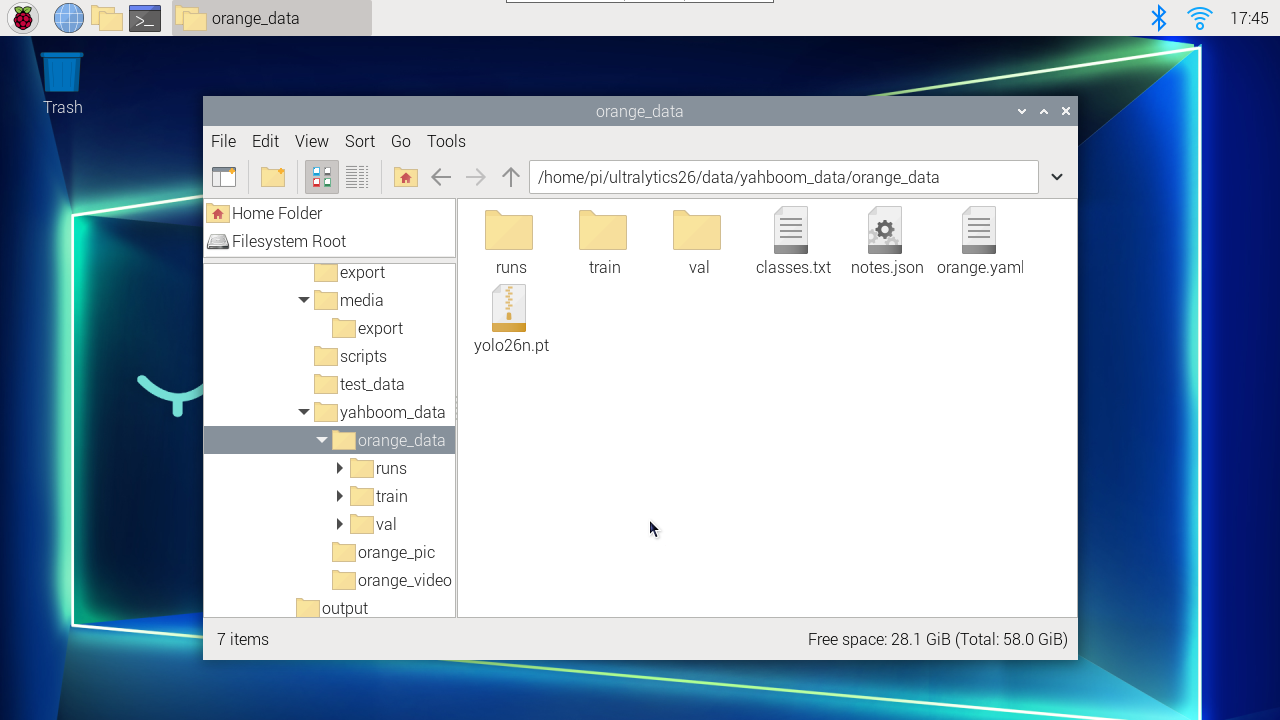
image-20260311174549425

image-20260321210208656

2. Model Conversion

The final model will be generated in the runs folder: Generally select the best.pt file for use

xxxxxxxxxx
/home/jetson/ultralytics/ultralytics/data/yahboom_data/orange_data/runs/detect/train2/weights

Convert pt model to engine model:

xxxxxxxxxx
cd /home/jetson/ultralytics/ultralytics/data/yahboom_data/orange_data/runs/detect/train2/weights
xxxxxxxxxx
yolo export model=best.pt format=engine
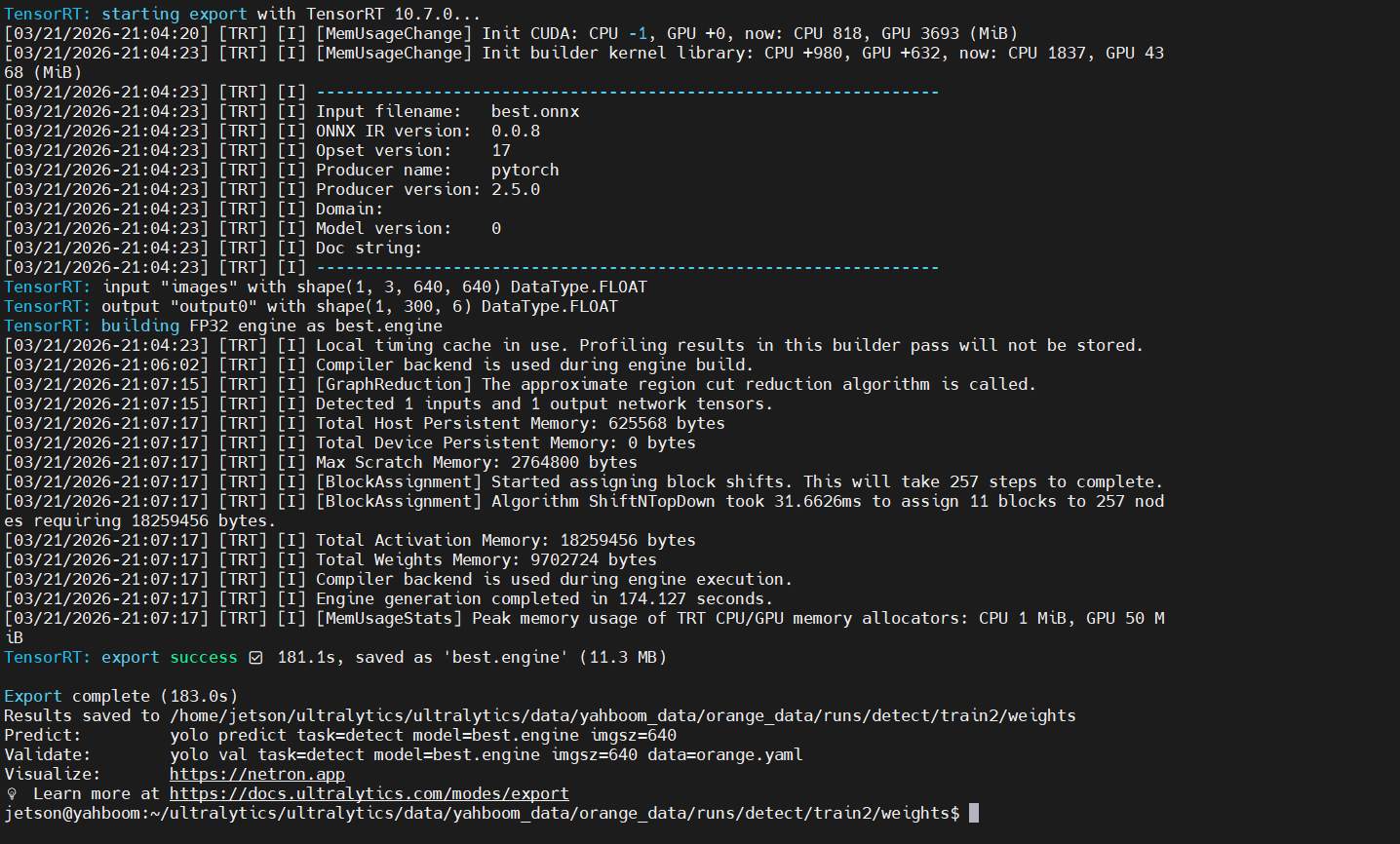
image-20260321210937865

Dataset annotation
Model prediction

COMPANY

  • About us
  • Team Style
  • Blog

LEARNING & EXPLORATION

  • Tutorials
  • Edge AI hardware
  • Educational robots
  • Embedded intelligent hardware

WHERE TO BUY

  • Yahboom Online Store
  • Amazon
  • Alibaba
  • AliExpress
  • Mercado

TECHNOLOGY SUPPORT

  • Email: support@yahboom.com

BE A DISTRIBUTOR

  • Email: sales@yahboom.com
QR Code

Copyright © 2017-2026 Yahboom. All Rights Reserved.

EN/中文