Welcome to STM32-BoardCar repository
4. Introduction to HAL library and LL library
Introduction to HAL library and LL library
Introduction to HAL library and LL library1、STM32 library overview1.1 Introduction to the standard library1.2. Features of the standard library2. HAL library2.1 Introduction to HAL library2.2 Characteristics of HAL library3. LL library3.1 Characteristics of LL library4. Comparison between HAL library and LL library
1、STM32 library overview
1.1 Introduction to the standard library
The Standard Peripheral Library is the most basic library provided by STMicroelectronics. It provides direct access to the low-level registers and peripherals of the STM32 microcontroller. The standard library is designed to provide a high degree of flexibility and low-level hardware control to meet stringent performance and resource requirements. Using the standard library, developers can directly manipulate registers to configure and control the functionality of the microcontroller, but this requires manually writing a large amount of low-level code. The standard library is suitable for applications with higher performance requirements and projects that have strict requirements on code size and efficiency.
1.2. Features of the standard library
advantage:
(1) Portable: The standard library functions are suitable for all C language compilers and can be used in different development environments.
(2) Good compatibility: The standard library functions have good compatibility on different platforms and can be easily transplanted and debugged.
(3) Easy to learn and use: The calling method of standard library functions is similar to the function calling method of C language, making it easy to learn and use.
shortcoming:
(1) Low execution efficiency: The standard library functions have low execution efficiency and are suitable for some application scenarios that do not require high performance.
(2) The functions are relatively simple: The functions provided by the standard library functions are relatively simple and cannot meet some high-level needs.
(3) Hardware abstraction layer is not supported: The standard library functions cannot directly operate the hardware, and the hardware abstraction layer needs to be implemented through the underlying driver.
The comparison between the standard library, HAL library and LL library is as shown below
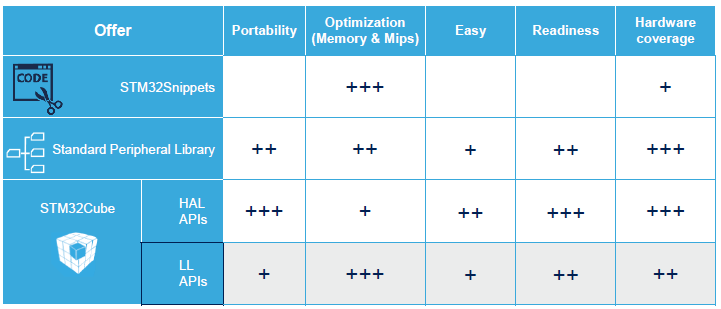
Each of the three libraries has its own advantages and disadvantages. However, HAL and LL are currently the official libraries that are mainly recommended and maintained and updated. So we will focus on the HAL library and LL library.
2. HAL library
2.1 Introduction to HAL library
HAL is the abbreviation of Hardware Abstraction Layer, Chinese name: Hardware Abstraction Layer.
The HAL library is an abstraction layer embedded software launched by ST for STM32, which can better ensure the maximum portability of STM32 products. The library provides a consistent set of middleware components such as RTOS, USB, TCP/IP and graphics. The HAL library is open source code released under a non-restrictive BSD license (Berkeley Software Distribution). The middleware stack (USB Host and Device Library, STemWin) produced by ST comes with a licensing model that allows easy reuse, as long as it is used on ST's MCU chips. The middleware in the library (USB Host/Device Library, STemWin) protocol The stack is allowed to be modified at will and can be used repeatedly. All in all, the HAL library allows users to use code across chips, and different MCU chips (F1/F2...) can be used.