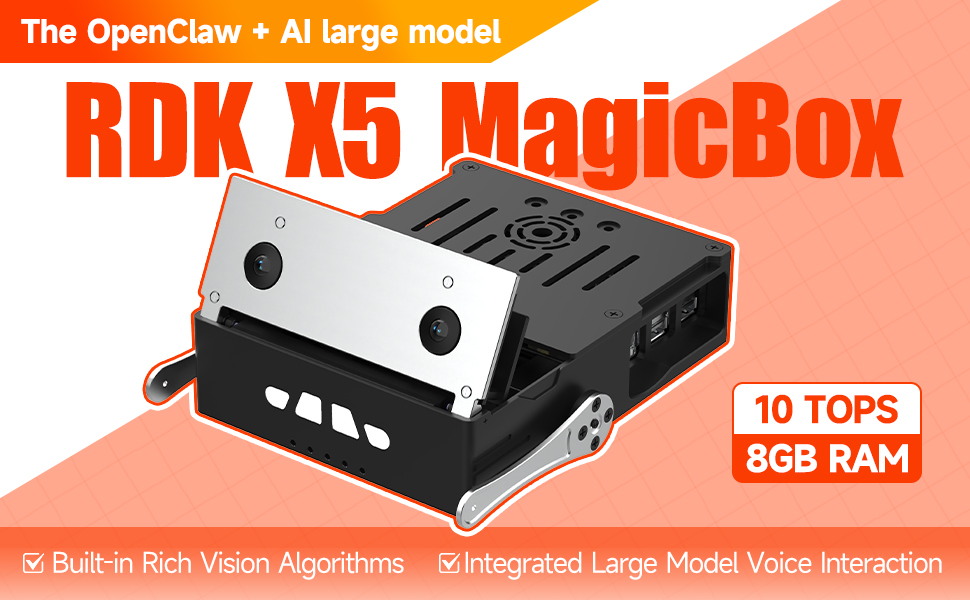
1.RDK MagicBox
2.RDK MagicBox Introduction
3.RDK MagicBox User Guide
- Quick Start
- Basic Peripheral Usage
- 1. Stereo Depth Estimation
- 2. Gesture Interaction
- 3. Voice Interaction
1. Quick Start
2. Basic Peripheral Usage
3. Algorithm Development
4.RDK MagicBox Basic Settings
5.RDKX5 Magicbox Basic Development Course
- 1. Camera Image Acquisition and Display
- 2. Camera Image Local Saving
- 3. Camera Image Acquisition and Encoding
- 4. Video File Decoding and Display
- 5. RTSP Stream Decoding
- 6. VPS Scaling Example
- 7. Target Detection Algorithm — focs
- 8. Target Detection Algorithm — YOLOv5s
- 9. Using CAN
- 1. Prerequisites Before Using Pin Functions
- 2. Using GPIO
- 3. Using PWM
- 4. Use serial port
- 5. Using I2C
- 6. Using SPI
- Linux Development Guide
For C language
For Python language
For Linux Development
6.Online AI Model Course
- 0. Preparation before use
- 1. OpenRouter Large Model API Aggregation Platform
- 2. Multimodal Visual Understanding Application
- 3. Multimodal Visual Positioning Application
- 4. Multimodal Table Scanning Application
- 5. Multimodal Autonomous Agent Application
- 1. Online Speech‑to‑Text (ASR)
- 2. Online Text‑to‑Speech (TTS)
- 3. AI Large Model Voice Interaction
- 4. Multimodal Visual Voice Interaction
- 5. Multimodal Visual Positioning Application
- 6. Multimodal Table Scanning Application
- 7. Multimodal Autonomous Agent Application
- 8. AI Large Model Online Voice Assistant
Online AI Model Course(Text Interaction)
Online AI Model Course(Voice Interaction)

7.OpenClaw Embodied AI Development
- 1. Introduction to OpenClaw
- 2. OpenClaw Deployment
- 3. OpenClaw Whatsapp Plugin Application
- 4. OpenClaw WebChat Interaction
- 5. OpenClaw TUI Interaction
- 6. OpenClaw Tool Introduction
- 7. OpenClawGate Gateway User Manual
- 8. OpenClaw Plugin Feature Introduction
- 9. OpenClaw ClawHub Introduction (skill installation)
- 10. OpenClaw Application - File Management
- 11. OpenClaw Application - Camera
- 12. OpenClaw Application - Browser Control
- 13. OpenClaw Application - Script Execution
- 14. OpenClaw Application - AI‑programmed Status Light Control
- 15. OpenClaw Application - AI‑programmed Servo Control
- 16. OpenClaw Application - Dedicated AI Assistant
8.ROS2 Basic Tutorial
- 1.Introduction to ROS2
- 2.ROS2 install Humble
- 3.ROS2 development environment
- 4.ROS2 workspace
- 5.ROS2 function package
- 6.ROS2 node
- 7.ROS2 topic communication
- 8.ROS2 service communication
- 9.ROS2 action communication
- 10.ROS2 custom interface message
- 11.ROS2 parameter service case
- 12.ROS2 meta-function package
- 13.ROS2 distributed communication
- 14.ROS2 DDS
- 15.ROS2 time related API
- 16.ROS2 common command tools
- 17.ROS2 rviz2 use
- 18.ROS2 rqt toolbox
- 19.ROS2 Launch startup file configuration
- 20.ROS2 recording and playback tool
- 21.ROS2 URDF model
- 22.ROS2 Gazebo simulation platform
- 23.ROS2 TF2 coordinate transformation
Download