Welcome to RDK X5 MagicBox repository
3. AI Large Model Voice Interaction
AI Large Model Voice Interaction
AI Large Model Voice Interaction1. Concept Introduction1.1 What is "AI Large Model Voice Interaction"?1.2 Implementation Principles Overview2. Project Architecture2.1 Key Code Analysis3. Practical Operations3.1 Configure Online LLM3.2 Start and Test the Function
1. Concept Introduction
1.1 What is "AI Large Model Voice Interaction"?
In the largemodel project, AI Large Model Voice Interaction connects the previously introduced offline ASR and offline TTS with the core of Large Language Models (LLM), forming a complete dialogue system that can listen, speak, and think.
This is no longer an isolated function, but a prototype of a true voice assistant. Users can have natural language conversations with the robot through voice, and the robot can understand questions, think of answers, and respond with voice. The entire process is completed locally without requiring a network.
The core of this function is the model_service ROS2 node. It acts as the brain and nerve center, subscribing to ASR recognition results, calling the LLM to think, and then publishing the LLM's text response to the TTS node for speech synthesis.
1.2 Implementation Principles Overview
The implementation principle of this function is a classic data flow pipeline:
- Sound -> Text (ASR): The
asrnode continuously listens to ambient sound. Once it detects that the user has finished speaking a sentence, it converts it to text and publishes it to the/asr_texttopic. - Text -> Think -> Text (LLM): The
model_servicenode subscribes to the/asr_texttopic. When it receives text from ASR, it uses it as a Prompt to send to a locally deployed large language model (such asQwenrunning throughOllama). The LLM generates a text answer based on the context. - Text -> Sound (TTS): After the
model_servicenode gets the LLM's answer, it publishes it to the/tts_texttopic. - Sound Playback: The
tts_onlynode subscribes to the/tts_texttopic. After receiving the text, it immediately calls the offline TTS model to synthesize it into audio and plays it through the speaker.
This process forms a complete closed loop of voice input -> text processing -> text output -> voice output.
2. Project Architecture
2.1 Key Code Analysis
The core of the entire process lies in how the model_service node connects inputs and outputs.
1. Subscribe to ASR Results (Located in largemodel/model_service.py)
The model_service node has a subscriber to receive text recognized by ASR.
x def init_ros_comunication(self): """Initialize ROS2 communication""" self.get_logger().info("Initializing ROS2 communication...") # ASR text input subscription self.asr_subscriber = self.create_subscription( String, '/prompt_text', self.asr_callback, 10 ) self.get_logger().info("Subscribed to /prompt_text topic") self.large_model_interface = LargeModelInterface(self)Explanation: The node's __init__ method clearly defines its role: an intermediary that can both "listen" to ASR results and "command" TTS to speak, and has an internal "brain" (LargeModelInterface).
2. Process ASR Text and Call LLM (Located in largemodel/model_service.py)
When ASR has new recognition results, asr_callback is triggered.
xxxxxxxxxxdef asr_callback(self, msg): """ASR text input callback function""" try: prompt_text = msg.data.strip() if not prompt_text: return self.get_logger().info(f"ASR input: {prompt_text}") # Debug: Check document files doc_files = self.check_document_files() self.get_logger().info(f"Found document files: {len(doc_files)}") # Load historical messages from file messages_to_use = self.load_message_from_file() # Check historical message validity if not messages_to_use or not any(d.get('role') == 'system' for d in messages_to_use): self.get_logger().info("Using new dialogue template") messages_to_use = self.model_client.messages.copy() # Call large model interface result = self.model_client.infer_with_text(prompt_text, message=messages_to_use) # Debug: Log return result self.get_logger().debug(f"Model returned raw result type: {type(result)}") if isinstance(result, dict): self.get_logger().debug(f" - Contains keys: {list(result.keys())}") # Process model result self.process_model_result(result) except Exception as e: self.get_logger().error(f"ASR callback error: {e}")Explanation: This is the core logic of the system. After the callback function receives text, it immediately sends it to the LLM through large_model_interface. Internally, the call_llm method decides whether to connect to local Ollama or an online API based on the llm_platform configuration.
3. Send LLM Response to TTS (Located in largemodel/model_service.py)
The speak method is a simple wrapper for publishing text to the topic monitored by the TTS node.
xxxxxxxxxx# largemodel/model_service.py (Core logic illustration) def speak(self, text): msg = String() msg.data = text self.tts_publisher.publish(msg)Explanation: This function completes the final step of the data flow, passing the text result "thought" by the "brain" to the "mouth", thereby completing the closed loop of the entire voice interaction.
3. Practical Operations
3.1 Configure Online LLM
Update the key in the configuration file, open the model interface configuration file
large_model_interface.yaml:xxxxxxxxxxvim ~/yahboomcar_ws/src/largemodel/config/large_model_interface.yamlFill in your API Key: Find the corresponding section and paste the API Key you just copied. Here taking Qwen configuration as an example
xxxxxxxxxx# large_model_interface.yaml## Qwenqianwen_api_key"sk-xxxxxxxxxxxxxxxxxxxxxxxxxxxxxxxx" # Paste your Keyqianwen_model"qwen-vl-max-latest" # You can choose models as needed, such as qwen-turbo, qwen-plusOpen the main configuration file
yahboom.yaml:xxxxxxxxxxvim ~/yahboomcar_ws/src/largemodel/config/yahboom.yamlSelect the online platform to use: Modify the
llm_platformparameter to the platform name you want to usexxxxxxxxxx# yahboom.yamlmodel_serviceros__parameters# ...llm_platform'tongyi' # Optional platforms: 'tongyi', 'spark', 'qianfan', 'openrouter'When using the voice module for broadcast, check if a device is occupying the voice module. You can first enter
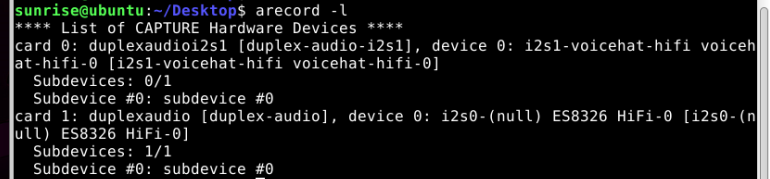
If the output is as shown in the image above, you can directly use the broadcast device number without modification. If different, open the configuration file
xxxxxxxxxxvim ~/yahboomcar_ws/src/largemodel/largemodel/model_service.pyFind the location in the image and modify it to plughw:1,0 or hw:1,0, then save.
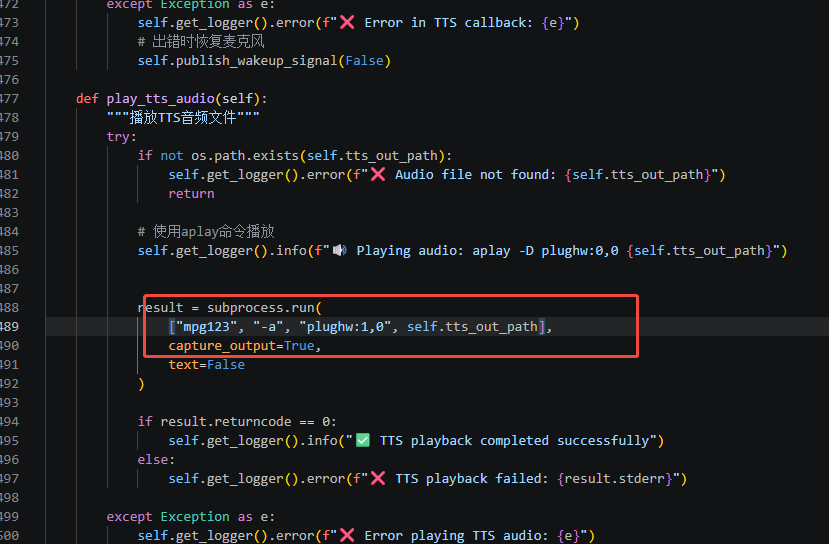
After modifying the configuration file, you need to recompile in the workspace and source:
xxxxxxxxxxcd ~/yahboomcar_wscolcon build && source install/setup.bash
3.2 Start and Test the Function
1.Open a new terminal and start the audio_io main program:
Run the following command to enable the microphone and wake-up program:
xxxxxxxxxxros2 launch audio_io audio_io_yahboom.launch.py2.Open a new terminal and start the largemodel main program:
Run the following command to enable voice interaction:
xxxxxxxxxxros2 launch largemodel largemodel_control.launch.py3.Test:
Wake-up: Say to the microphone: "Hello, Digua."
Dialogue: After the speaker responds, you can say what you want to ask.
Observe logs: In the terminal running the
launchfile, you should be able to see:- The ASR node recognizes your question and prints it out.
- The
model_servicenode receives the text, calls the LLM, and prints out the LLM's response.
Listen to the answer: After a while, you should hear the answer from the speaker.