Welcome to RDK X5 MagicBox repository
1. Introduction to RDK MagicBox
Product Overview
D-Robotics RDK X5 Magicbox is a multimodal intelligent platform integrating vision, hearing, and motion. Equipped with the high-performance computing core RDK X5, integrated dual cameras, circular light strip, microphone, speaker, and multi-functional adjustable support feet, it enables natural interaction experiences of "seeing, listening, speaking, and moving". Whether used for teaching research, creative development, or intelligent interaction display, RDK X5 Magicbox helps users quickly start their exploration journey in multimodal artificial intelligence.

Physical Structure

Interface, Buttons and Indicator Lights Description
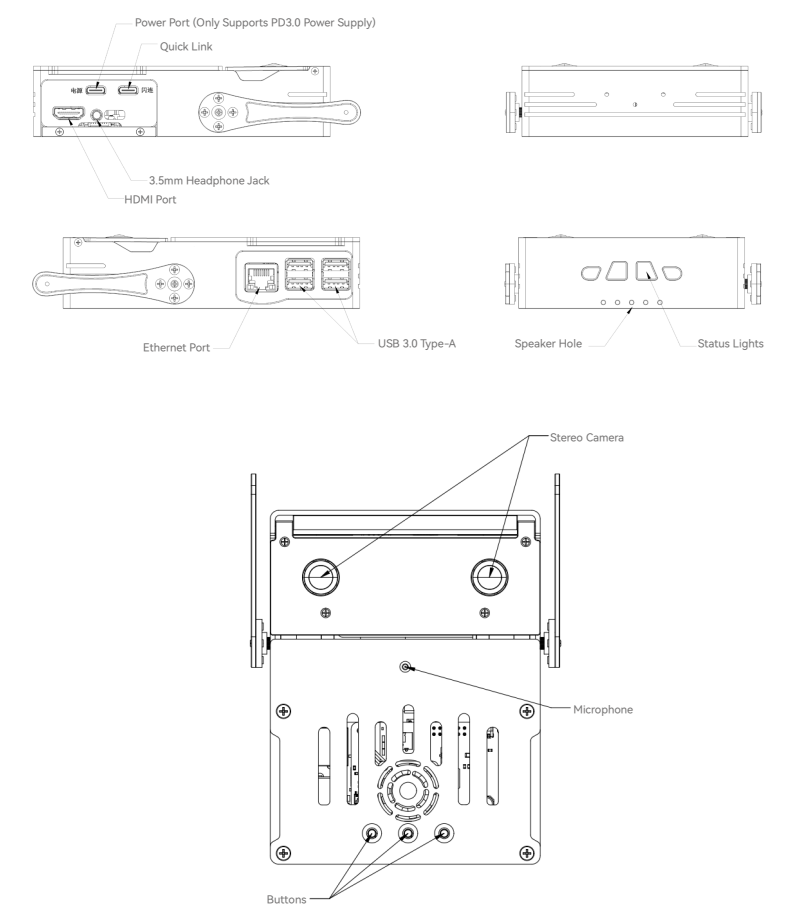
| Name | Description |
|---|---|
| Dual Cameras | Used for image perception and depth information acquisition, supporting scenarios such as gesture recognition, target positioning, and spatial measurement. |
| Power Port | Used to power the Magicbox, please use a power adapter supporting PD 3.0 protocol. |
| Flash Connect Port | Can be used for connection, system flashing, and debugging. |
| HDMI Interface | Used to output Ubuntu system desktop on a monitor, supporting real-time camera and network stream display. |
| 3.5mm Headphone Jack | Used for audio input and output. |
| Ethernet Port | Used to establish wired network connection with the host computer, achieving high-speed, stable data communication. |
| USB Interface | Used to connect peripherals. |
| Speaker Vents | Used for audio output. |
| Microphone | Used to receive voice commands. |
| Function Buttons and Status Lights | Power on: White lights light up in sequence, wait approximately 50s. White light flashes with sound effect: Startup complete. Function buttons: Start preset examples; with the light strip facing the user from left to right: Button 1: Start dual-camera depth estimation function, light turns red. Button 2: Start gesture interaction function, light turns green. Button 3: Start voice interaction function, light turns blue. |
Hardware Specifications
Technical Specifications
RDK X5 8G Main Control
D-Robotics RDK™ X5 is equipped with D-Robotics Sunrise™ 5 intelligent computing chip, providing up to 10 TOPS computing power. It is an all-in-one development kit for intelligent computing and robotics applications, with rich interfaces, extremely easy to use, supporting Transformer, RWKV, Occupancy, Stereo Perception and other complex models and latest algorithms, accelerating the rapid implementation of intelligent applications.
Category Specification Description Controller Controller Model RDK X5 8G CPU 8 x 1.5GHz Arm® Cortex®-A55 BPU 1 x Bayers BPU, with 10TOPS (INT8) computing power GPU 1 x GPU, with 32GFLOPS computing power Memory 8 GB LPDDR4 Storage Onboard 1 Gbit NAND Flash provides microSD card slot, supports UHS-I mode, pre-installed 32GB TF card Interconnect 4 x USB 3.0 Type-A (host) 1 x USB 2.0 Type-C (device) Display 1 x HDMI Type-A interface, supports up to 1080p@60fps Audio 3.5mm audio jack, supports stereo input/output Network 1 x RJ45 interface, supports 10/100/1000 Mbps Gigabit Ethernet 2.4/5 GHz dual-band wireless LAN, complies with IEEE 802.11ax (Wi-Fi 6) standard Supports Bluetooth® 5.4 protocol Onboard high-performance antenna Power 5V / 5A DC input, Type-C interface Provides 5V and 3.3V external power supply capability Equipped with Digu Robotics Dual Cameras: RDK Stereo Camera GS130WI
RDK™ Stereo Camera GS130WI is a MIPI interface-based stereo depth camera, equipped with dual SC132GS global shutter image sensors and ICM-42688-P six-axis IMU, supporting stereo synchronous exposure and external triggering. Camera baseline 70mm, single channel resolution 1280×1080, maximum frame rate 120fps, with high dynamic range (HDR), high signal-to-noise ratio (40dB) and 850/940nm near-infrared enhancement capability, suitable for robotics vision, machine vision inspection and motion posture perception applications.
Specification Description Camera Model RDK Stereo Camera GS130WI Chip Model SC132GS IMU ICM-42688-P Max Resolution & Frame Rate 1080×1280@120fps FOV Diagonal 157.2° / Horizontal 96.8° / Vertical 115.6° ±3° Stereo Baseline (mm) 70 Max Tilt Angle 110° Servo: PTK 7465 MG-D
PTK 7465 MG-D is equipped with high-voltage hollow cup motor and high-precision positioner. High torque and ±180° working angle can handle various usage scenarios; middle shell aluminum alloy material comprehensively enhances reliability and stability.
Specification Description Servo Model PTK 7465 MG-D Angle Range ±180° No-load Speed 0.11–0.070 sec/60° Stall Torque 3.8–5.8 kg·cm Other Onboard Resources
- 4 WS2812B programmable LEDs composing status lights, supporting 24-bit full-color display.
- Equipped with 1 microphone, 1 speaker, and 3 customizable function buttons.
Packaging and Bare Machine Specifications
| Specification | Description |
|---|---|
| Outer Packaging | Nylon knit packaging, EVA foam inner support |
| Bare Machine Dimensions (mm) | 162 x 129 x 36.4 |
| Bare Machine Weight (g) | 517 |
Pre-installed Software
| System Software | Description |
|---|---|
| RDK OS | Pre-installed RDK OS, if you need to re-flash, please click here to download the image, for flashing steps please refer to the System Flashing chapter to use RDK Studio and Rufus tools. |
| ROS | Pre-installed ROS, providing standardized tools and libraries for robot development. |
| Program Examples | Pre-installed dual-camera depth estimation, gesture interaction, and voice interaction examples. |
| Performance Monitoring Application | Directly visualize resource usage rate through the web page. |