yahboom
HomeLearn
Solution
Blog
Online Store
About Us
EN/中文
RDK X5 MagicBox📖
1.RDK MagicBox
  • 1. RDK MagicBox Official Materials
  • 2. Troubleshooting boot failure
  • 3. Linux memory query
2.RDK MagicBox Introduction
  • 1. Introduction to RDK MagicBox
  • 2. Write System File
  • 3. Hardware Interface Description
3.RDK MagicBox User Guide
1. Quick Start
  • Quick Start
2. Basic Peripheral Usage
  • Basic Peripheral Usage
3. Algorithm Development
  • 1. Stereo Depth Estimation
  • 2. Gesture Interaction
  • 3. Voice Interaction
4.RDK MagicBox Basic Settings
  • 1.Network configuration
  • 2.Remote login
  • 3.Update system
  • 4.srpi-config user guide
  • 5.config. txt configuration file
  • 6.Self-startup setting
  • 7.RDK exclusive command usage
  • 8.Linux command usage
  • 9.GPIO readwrite operation
  • 10.Image classification algorithm
  • 11.Use USB camera
  • 12.MIPI Camera Usage
5.RDKX5 Magicbox Basic Development Course
For C language
  • 1. Camera Image Acquisition and Display
  • 2. Camera Image Local Saving
  • 3. Camera Image Acquisition and Encoding
  • 4. Video File Decoding and Display
  • 5. RTSP Stream Decoding
  • 6. VPS Scaling Example
  • 7. Target Detection Algorithm — focs
  • 8. Target Detection Algorithm — YOLOv5s
  • 9. Using CAN
For Python language
  • 1. Prerequisites Before Using Pin Functions
  • 2. Using GPIO
  • 3. Using PWM
  • 4. Use serial port
  • 5. Using I2C
  • 6. Using SPI
For Linux Development
  • Linux Development Guide
6.Online AI Model Course
Online AI Model Course(Text Interaction)
  • 0. Preparation before use
  • 1. OpenRouter Large Model API Aggregation Platform
  • 2. Multimodal Visual Understanding Application
  • 3. Multimodal Visual Positioning Application
  • 4. Multimodal Table Scanning Application
  • 5. Multimodal Autonomous Agent Application
Online AI Model Course(Voice Interaction)
  • 1. Online Speech‑to‑Text (ASR)
  • 2. Online Text‑to‑Speech (TTS)
  • 3. AI Large Model Voice Interaction
  • 4. Multimodal Visual Voice Interaction
  • 5. Multimodal Visual Positioning Application
  • 6. Multimodal Table Scanning Application
  • 7. Multimodal Autonomous Agent Application
  • 8. AI Large Model Online Voice Assistant
7.OpenClaw Embodied AI Development
  • 1. Introduction to OpenClaw
  • 2. OpenClaw Deployment
  • 3. OpenClaw Whatsapp Plugin Application
  • 4. OpenClaw WebChat Interaction
  • 5. OpenClaw TUI Interaction
  • 6. OpenClaw Tool Introduction
  • 7. OpenClawGate Gateway User Manual
  • 8. OpenClaw Plugin Feature Introduction
  • 9. OpenClaw ClawHub Introduction (skill installation)
  • 10. OpenClaw Application - File Management
  • 11. OpenClaw Application - Camera
  • 12. OpenClaw Application - Browser Control
  • 13. OpenClaw Application - Script Execution
  • 14. OpenClaw Application - AI‑programmed Status Light Control
  • 15. OpenClaw Application - AI‑programmed Servo Control
  • 16. OpenClaw Application - Dedicated AI Assistant
8.ROS2 Basic Tutorial
  • 1.Introduction to ROS2
  • 2.ROS2 install Humble
  • 3.ROS2 development environment
  • 4.ROS2 workspace
  • 5.ROS2 function package
  • 6.ROS2 node
  • 7.ROS2 topic communication
  • 8.ROS2 service communication
  • 9.ROS2 action communication
  • 10.ROS2 custom interface message
  • 11.ROS2 parameter service case
  • 12.ROS2 meta-function package
  • 13.ROS2 distributed communication
  • 14.ROS2 DDS
  • 15.ROS2 time related API
  • 16.ROS2 common command tools
  • 17.ROS2 rviz2 use
  • 18.ROS2 rqt toolbox
  • 19.ROS2 Launch startup file configuration
  • 20.ROS2 recording and playback tool
  • 21.ROS2 URDF model
  • 22.ROS2 Gazebo simulation platform
  • 23.ROS2 TF2 coordinate transformation
Download
  • Code
  • Software_tools
  • SystemFile
Download ZIP

Welcome to RDK X5 MagicBox repository

1.Introduction to ROS2

1.Introduction to ROS2

1. Overview of ROS2

ROS2 is the second-generation Robot Operating System, an upgrade to ROS1 that addresses some of its issues. The first ROS2 version, Arden, was released in 2017. With continuous updates and optimizations, it now has a stable version. As with ROS1, the choice of Linux version is also relevant to the ROS2 version. The corresponding versions are listed below.
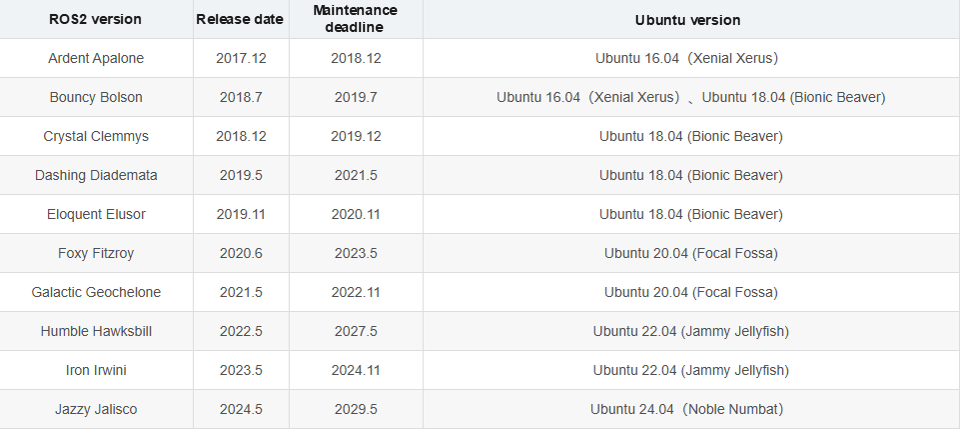
image-1

  • Note: Download the appropriate ROS2 version for your Linux distribution. This series of courses uses the Humble version as an example. The programs and examples presented in the course are applicable to all ROS2 versions.

2. Features of ROS2

2.1. ROS2 Fully Supports Three Platforms

  • Ubuntu
  • Mac OS X
  • Windows 10

2.2. Implemented a Distributed Architecture

The master node is eliminated, enabling distributed node discovery, publish/subscribe, and request/response communication.

2.3. Real-time Support

2.4. New Programming Language

  • C++11
  • Python 3.5+

2.5. Using the new build system Ament (Catkin for ROS)

2.6. ROS1 can communicate with ROS 2 via rosbridge

3. Differences between ROS2 and ROS1

3.1. Platform

ROS1 currently only supports Linux, and is commonly built and used in Ubuntu. ROS2, on the other hand, can be built and used in Ubuntu, Windows, and even on embedded development boards, making it a more widely used platform.

3.2. Language

  • C++

ROS1's core is C++03, while ROS2 makes extensive use of C++11.

  • Python

ROS1 uses Python 2, while ROS2 requires at least Python 3.5. Foxy uses Python 3.8.

3.3 Middleware

ROS 1 requires starting roscore before starting. This master controls all inter-node communication. ROS 2, however, does not have this. Instead, it uses an abstract middleware interface for data transmission. Currently, all implementations of this interface are based on the DDS standard. This enables ROS 2 to provide various high-quality QoS policies, improving communication across different networks.
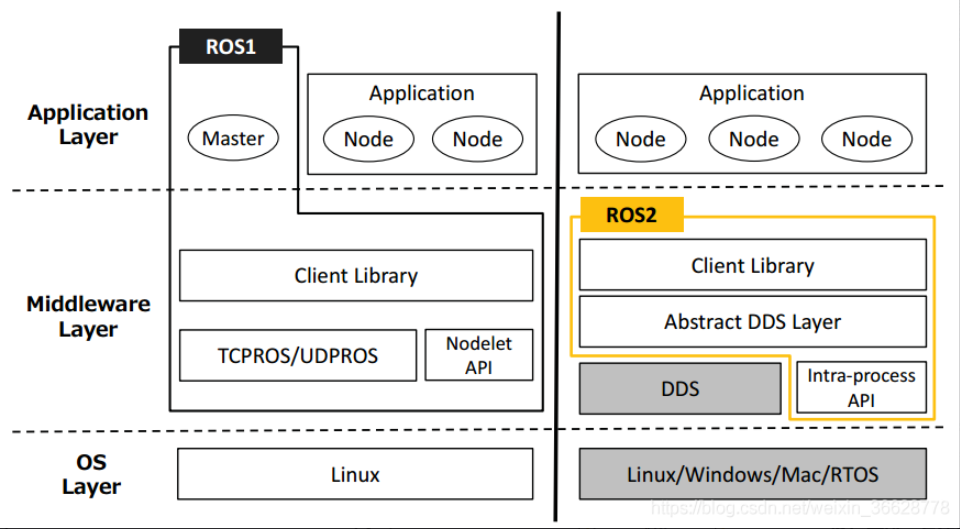
image-20230427150532854

3.4 Compilation Commands

ROS 1 compiles using the catkin_make command, while ROS 2 compiles using the colcon build command.

OpenClaw Application - Dedicated AI Assistant
ROS2 install Humble

COMPANY

  • About us
  • Team Style
  • Blog

LEARNING & EXPLORATION

  • Tutorials
  • Edge AI hardware
  • Educational robots
  • Embedded intelligent hardware

WHERE TO BUY

  • Yahboom Online Store
  • Amazon
  • Alibaba
  • AliExpress
  • Mercado

TECHNOLOGY SUPPORT

  • Email: support@yahboom.com

BE A DISTRIBUTOR

  • Email: sales@yahboom.com
QR Code
QR Code

Copyright © 2017-2026 Yahboom. All Rights Reserved.

EN/中文