yahboom
HomeLearn
Solution
Blog
Online Store
About Us
EN/中文
Rider Pi Robot📖
0.Quick Start
  • 0. Notes (Must Read)new
  • 1.APP control experience
  • 2.Web page image transmission controlnew
  • 3.Manual
1.RPi Basic course
  • 1.SSH remote login
  • 2.VNC remote login desktop
  • 3. Remote file transfer
  • 4. JupyterLab environment construction and use
  • 5. Write system image
  • 6. Connect to WiFi
  • 7. Close startup programs(MustRead)
  • 8. Raspberry Pi system expansion
2.Car basic control course
  • 1. Car screen display control
  • 2. Car recording audio
  • 3. Car plays audio
  • 4. Car recording video
  • 5. Car plays video
  • 6. RGB light control
  • 7. Car attitude angle reading
  • 8. Read the battery level of the car
3.Car motion control
  • 1. Car forward and backward
  • 2. Car rotation movement
  • 3. Adjust car height
  • 4. Adjust car posture
  • 5. Car self-stabilization mode
  • 6. Car squats and shakes
4.Open Source CV
A. Getting started with OpenCV
  • 1. Introduction to OpenCV
  • 2. OpenCV image reading and display
  • 3. OpenCV image writing
  • 4. OpenCV Image Quality
  • 5.OpenCV pixel operations
B. OpenCV geometric transformation
  • 1. Image scaling
  • 2. Image cutting
  • 3. Image translation
  • 4. Image mirroring
  • 5. Affine Transformation
  • 6. Image Rotation
  • 7. Perspective Transformation
C. OpenCV image processing and drawing text segments
  • 1. Grayscale processing
  • 2. Image Binarization
  • 3. Edge Detection
  • 4. Line drawing
  • 5. Rectangle and circle drawing
  • 6. Text and picture drawing
D. Image beautification
  • 1. Color Image Histogram
  • 2. Histogram Equalization
  • 3. Image repair
  • 4. Brightness enhancement
  • 5. Skin whitening
  • 6. Gaussian mean filtering
  • 7. Median Filter
5.AI Visual recognition course
  • 1. Camera driver tutorial
  • 2. Color recognition
  • 3. HSV value test
  • 4. Object Recognition
  • 5. QR code recognition
  • 6. Human face mask
  • 7. License Plate Recognition
  • 8. Human Pose Estimation
  • 9. Object Detection
  • 10.Yolo detection
  • 11. Face Detection
  • 12. Face effects
  • 13. 3D Object Recognition
  • 14. Paintbrush
  • 15. Finger recognition
  • 16. Gesture Recognition
  • 17.Facial Recognitionnew
  • 18.Emotion Recognitionnew
  • 19.Motion Detectionnew
6.AI Visual interaction course
  • 1. Color tracking
  • 2. Color follows
  • 3. QR code recognition action
  • 4. Face tracking
  • 5. Finger control
  • 6. Gesture following
  • 7. Gesture control car
  • 8. Human Body Followingnew
7. AI Large Model Interaction
  • 0.Principles of Large AI Models
  • 1.Large model premise use configuration
  • 2.Q&A(For cm5)
  • 3.Q&A and ChatGPT(For cm4)
  • 4.Speech recognition
  • 5.Picture to Text
  • 6.Embodied intelligence
Download
  • APP(iOS/Android)
  • System_File
  • Code
  • Hareware_Info
  • AI_Model_File
  • 3D_Model_File
  • Instruction_Manual
Download ZIP

Welcome to Rider Pi Robot repository

4. Image mirroring

4. Image mirroring

4. Image mirroring4.1. Image mirroring4.2. Actual effect display

4.1. Image mirroring

The principle of image mirroring

There are two types of image mirroring transformations: horizontal mirroring and vertical mirroring. Horizontal mirroring uses the vertical center line of the image as the axis to swap the pixels of the image, that is, swap the left and right halves of the image. Vertical mirroring uses the horizontal center line of the image as the axis to swap the upper and lower halves of the image.

Transformation principle:

Let the width of the image be width and the length be height. (x, y) are the transformed coordinates, (x0, y0) are the coordinates of the original image

Horizontal mirror transformation

Forward mapping: x=width-x0-1, y=y0

Backward mapping: x0=width-x-1, y0=y

Vertical mirror transformation

Upward mapping: x=x0, y=height-y0-1

Downward mapping: x0=x, y0=height-y-1

Summary:

During horizontal mirror transformation, the entire image is traversed, and then each pixel is processed according to the mapping relationship. In fact, horizontal mirror transformation is to swap the image coordinate column to the right and the right column to the left, which can be transformed in columns. The same is true for vertical mirror transformation, which can be transformed in rows.

4.2. Actual effect display

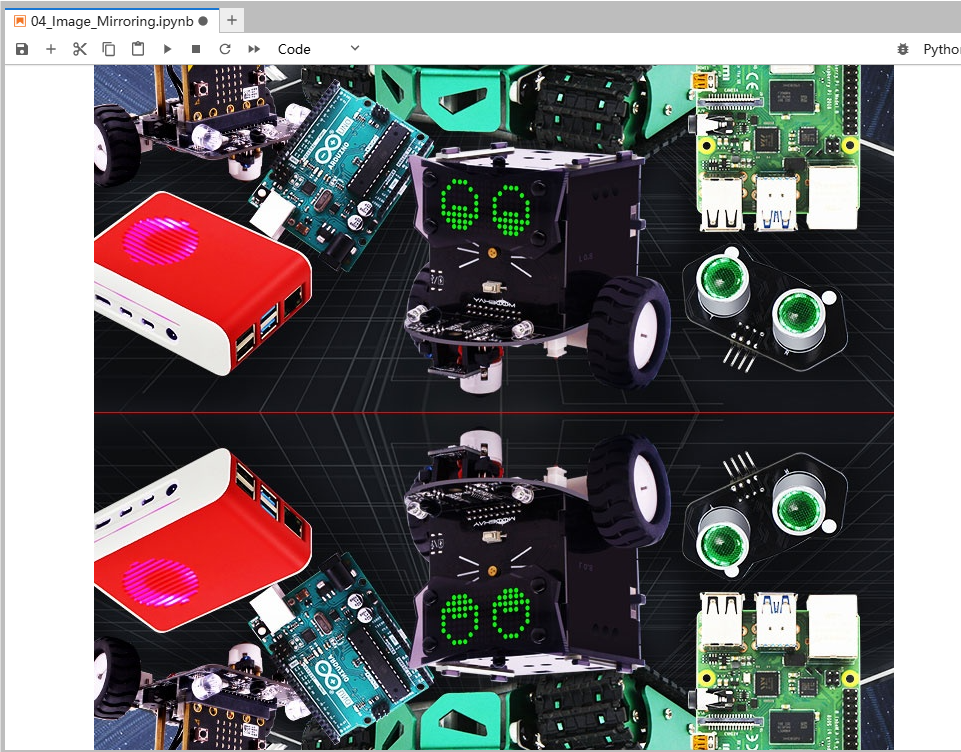
Let's take vertical transformation as an example to see how Python is written:

Code path:

/home/pi/Rider-pi_class/4.Open Source CV/B.Geometric_Transformations/04_Image_Mirroring.ipynb

import cv2
import numpy as np
img = cv2.imread('yahboom.jpg',1)
#cv2.imshow('src',img)
imgInfo = img.shape
height = imgInfo[0]
width = imgInfo[1]
deep = imgInfo[2]
newImgInfo = (height*2,width,deep)
dst = np.zeros(newImgInfo,np.uint8)#uint8 
for i in range(0,height):
    for j in range(0,width):
        dst[i,j] = img[i,j]
        #x y = 2*h - y -1
        dst[height*2-i-1,j] = img[i,j]
for i in range(0,width):
    dst[height,i] = (0,0,255)#BGR
#cv2.imshow('dst',dst)
#cv2.waitKey(0)
​x
#bgr8转jpeg格式 bgr8 to jpeg format
import enum
import cv2
​
def bgr8_to_jpeg(value, quality=75):
    return bytes(cv2.imencode('.jpg', value)[1])
xxxxxxxxxx
import ipywidgets.widgets as widgets
​
image_widget1 = widgets.Image(format='jpg', )
# image_widget2 = widgets.Image(format='jpg', )
# create a horizontal box container to place the image widget next to eachother
# image_container = widgets.HBox([image_widget1, image_widget2])
​
# display the container in this cell's output
display(image_widget1)
#display(image_widget2)
​
image_widget1.value = bgr8_to_jpeg(dst)

Image translation
Affine Transformation

COMPANY

  • About us
  • Team Style
  • Blog

LEARNING & EXPLORATION

  • Tutorials
  • Edge AI hardware
  • Educational robots
  • Embedded intelligent hardware

WHERE TO BUY

  • Yahboom Online Store
  • Amazon
  • Alibaba
  • AliExpress
  • Mercado

TECHNOLOGY SUPPORT

  • Email: support@yahboom.com

BE A DISTRIBUTOR

  • Email: sales@yahboom.com
QR Code

Copyright © 2017-2026 Yahboom. All Rights Reserved.

EN/中文