Welcome to Rider Pi Robot repository
7. License Plate Recognition
License Plate Recognition
1. Experimental purpose
Drive the car to detect the license plate
2. Experimental path source code
Enter the car system, end the car program, enter "ip (ip is the car's ip): 8888" in the browser, enter the password "yahboom"
 Then log in
Enter the path of Rider-pi_class/5.AI Visual Recognition Course/7. License Plate Recognition and run Camera-Based_License_plate_recognition.ipynb.
You can also enter the command in the terminal to directly start the python script
Then log in
Enter the path of Rider-pi_class/5.AI Visual Recognition Course/7. License Plate Recognition and run Camera-Based_License_plate_recognition.ipynb.
You can also enter the command in the terminal to directly start the python script
python3 camera_license.py3. Experimental phenomenon
After running the source code, you can see that the car can recognize the license plate.
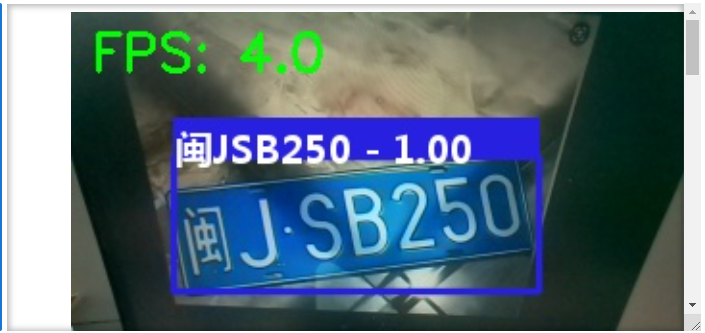
4. Main source code analysis
xtry: code=0 confidence=0 type_idx=0 box=0 image=0 display(image_widget) # 中文字体加载 Chinese font loading font_ch = ImageFont.truetype("platech.ttf", 20, 0) # 实例化识别对象 Instantiate the recognition object catcher = lpr3.LicensePlateCatcher(detect_level=lpr3.DETECT_LEVEL_LOW)#DETECT_LEVEL_HIGH640*640 camera = cv2.VideoCapture(0) # 定义摄像头对象,参数0表示第一个摄像头,默认640x480 Define the camera object. Parameter 0 indicates the first camera. The default resolution is 640x480. camera.set(3, 320) camera.set(4, 240) pTime, cTime = 0, 0 while True: ret, frame = camera.read() # 执行识别算法 results = catcher(frame) # 计算帧率 cTime = time.time() fps = 1 / (cTime - pTime) pTime = cTime text = "FPS : " + str(int(fps)) cv2.putText(frame, f"FPS: {fps:.1f}", (10, 30), cv2.FONT_HERSHEY_SIMPLEX, 0.9, (0, 255, 0), 2) # 初始化图像变量 Initialize image variables image = frame.copy() # 使用原始帧作为默认图像 Use original frame as default image for code, confidence, type_idx, box in results: text = f"{code} - {confidence:.2f}" image = draw_plate_on_image(frame, box, text, font=font_ch) if results and len(results) > 0: code, confidence, _, _ = results[0] carcher_str = f'carcher : {code}' confidence_str = f'confidence: {confidence:.2f}' image_widget.value = bgr8_to_jpeg(image) #显示在小车的lcd屏幕上 b,g,r = cv2.split(frame) img = cv2.merge((r,g,b)) imgok = Image.fromarray(img) mydisplay.ShowImage(imgok) # cv2.imshow('frame', frame) cher_list = results[0] if results and results[0] is not None else None if cher_list is not None: print(cher_list) # if cv2.waitKey(1) & 0xFF == ord('q'): # breakexcept KeyboardInterrupt: # picam2.stop() # picam2.close() camera.release()Through the program, the car will call the camera and then, based on the corresponding model, the camera will recognize the license plate information and display it on the car screen and the computer screen at the same time.