Welcome to myCobot 320 Arm repository
1.Firmware Description
Firmware Description
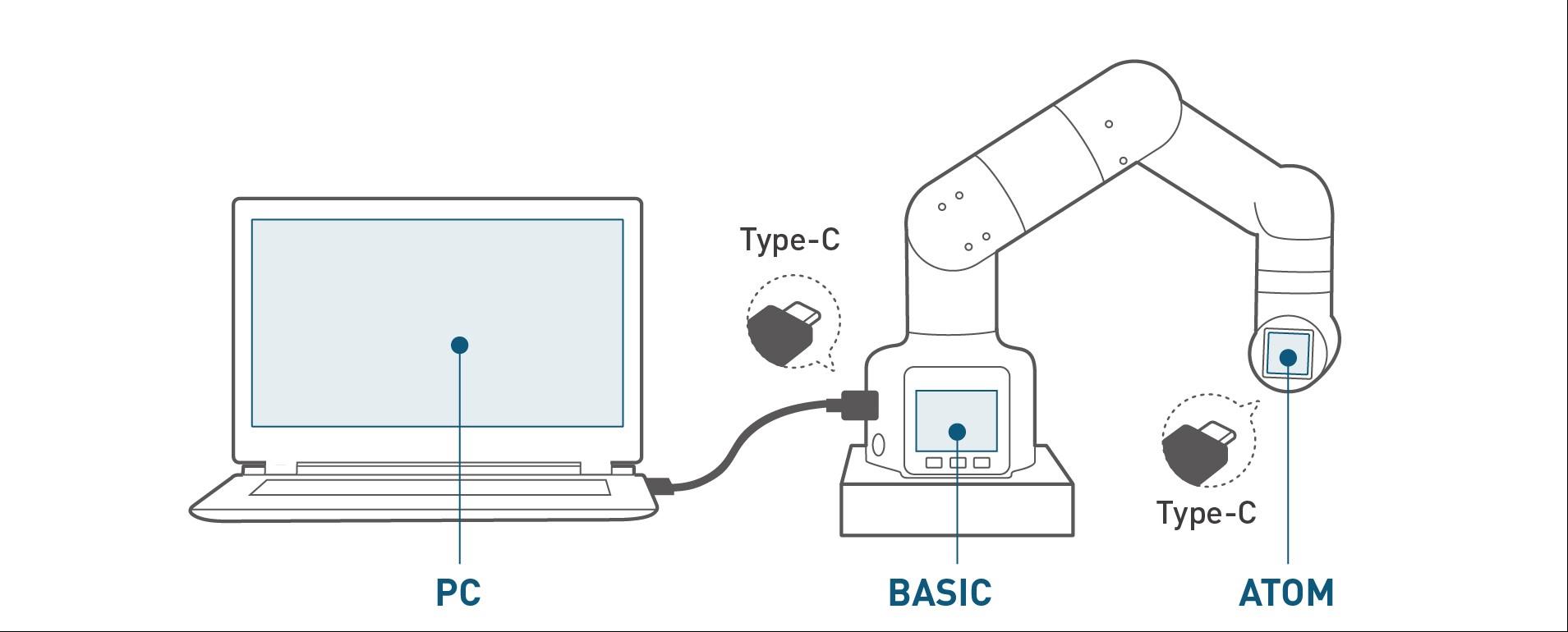
The myCobot 320 robot consists of three controller parts: Basic (a small screen with buttons at the base), Pico (a chip inside the flat Type-C interface on the base), and Atom (the LED light board at the robot's end-effector).
The Basic controller is responsible for handling external interactions, converting data into information that the robot can recognize. So you can use USB Line Connect computer By Basic Type-C Port. (On the left side of the screen.)
The Pico controller manages robot motion algorithms, joint control, and bottom IO control. (No connection is required for normal use.)
The Atom controller is in charge of processing data information from the tool interface and IO control. Together, these three components collaborate to ensure the proper functioning of the robot. (No connection is required for normal use.)
Atom(atommain) firmware update instructions
| Version | Firmware function description (function items) | Version iteration record | Firmware usage instructions | Applicable devices |
|---|---|---|---|---|
| V1.1 | Robot control: 1. Single/multi-angle/coordinate control 2. Obtain angle/coordinates 3. Clamp, pump control | 1. This version Requires use of 2020 devices | ||
| V2.8 | Basic functions remain unchanged | Function repairs: Fixed motion algorithm error Bus repairs: Fixed known bugs | 1. In this version, the basic firmware needs to be burned into miniRobotV1.0 | 1. This The version needs to be used on 2020 devices |
| V3.1 | Basic functions remain unchanged | Function optimization: Communication module optimization Function repair: Repair coordinate control | 1. In this version, the basic firmware needs to be burned into miniRobotV1.0 | 1. This version needs to be used until the 2020 model Equipment |
| V4.1 | Basic functions remain unchanged | New features: Added potential value acquisition Function fixes: 1. Fixed single coordinate control 2. Fixed gripper movement problem />3. Repair jog control 4. Repair free movement | 1. In this version, the basic firmware needs to be burned into miniRobotV1.0 | 1. This version needs to be used in 2020 devices |
| V4.2 | Basic functions remain unchanged | New features: New electric gripper control | 1. In this version, the basic firmware needs to be burned into miniRobotV1.0 | 1. This version needs to be used in 2020 devices |
| V5.0 (the version number cannot be the same as the old version) | 1. Control LED lights 2. Atom io control | 1. In this version, basic burns the latest firmware 2. Servo firmware is required Supports synchronous reading and writing 3. Pico burns the latest firmware | 1. 2022 devices - so far |
miniRobot firmware update instructions
| Version | Firmware function description (function items) | Version iteration record | Firmware usage instructions | Applicable devices |
|---|---|---|---|---|
| v1.0 | 1. Drag teaching 2. Zero calibration 3. Serial communication 4. Information viewing (joint connection status, firmware version) | Suitable for atommainV4. 1Previous Firmware | This version requires up to 2020 devices | |
| v2.0 | 1. Drag teaching 2. Zero calibration 3. Communication (serial port, wifi, Bluetooth communication) 4. Information viewing (joint connection status, firmware version ) | Function optimization: Optimize drag teaching to support recording of speed during drag New features: Add wifi and Bluetooth communication to communication; Bug fix: At the same time, power on the wifi and uart communication interface before shutting down. It will automatically jump to the interface before shutting down | 1. This version of atom needs to be burned to v5.0 2. The servo needs to support synchronous reading and writing 3. Pico needs to be burned to V1.0 | 2022 device - so far |
| v2.1 | 1. Drag teaching 2. Zero calibration 3. Communication (serial port, wifi, Bluetooth communication) 4. Information viewing (joint connection status, firmware version ) | Repair function: 1. Continuous jog control will cause basic to restart; 2. After unplugging and restarting, uart needs to be entered a second time to be effective; 3. Optimize the use of drag teaching Effect. | 1. This version of atom needs to be programmed with v5.0 2. The servo needs to support synchronous reading and writing 3. Pico needs to be programmed with V1.1 | 2022 device - so far |
| v2.2 | 1. Drag teaching 2. Zero calibration 3. Communication (serial port, wifi, Bluetooth communication) 4. Information viewing (joint connection status, firmware version ) | Optimized functions: bt is upgraded to ble, supports Bluetooth 5.0, and supports the use of Mycobot APP. Repair functions: Drag teaching: 1. Relax the joints before starting recording to make them more sensitive; 2. Fix the jitter problem after hardware changes. | 1. This version of atom needs to be burned with v5.0 2. The servo needs to support synchronous reading and writing 3. Pico needs to be burned with V1.2 | 2022 device--so far |
| v2.3 | 1. Drag teaching 2. Zero calibration 3. Communication (serial port, wifi, Bluetooth communication) 4. Information viewing (joint connection status, firmware version) | basic all function, the overall use effect is better. Optimization content: 1. Zero calibration, only need to calibrate once, fully relax when entering (with damping), fully relax during single joint calibration 2. Drag teaching: recording is completed It will be powered on automatically, and the LED light at the end will turn yellow during recording and turn green when recording ends; 3. The transponder will not fall when it exits communication. | 1. This version of atom needs to be burned to v5.0 2. The servo needs to support synchronous reading and writing 3. Pico is burned to V1.2 or V1.3 (with damping function) | 2022 device - so far |
pico firmware update instructions
| Version | Firmware function description (function items) | Version iteration record | Firmware usage instructions | Applicable devices |
|---|---|---|---|---|
| V1.0 | Robot control communication speed is within 20ms 1. Single/multi-angle/coordinate control; 2. Obtain angle/coordinates 3. Adaptive/electric gripper, system Pump control... | 1. This version of atom needs to be burned with v5.0 2. The servo needs to support synchronous reading and writing 3. This version, the basic firmware needs to be burned with miniRobotV2.0 | 1 , 2022 devices--so far | |
| V1.2 | Robot control communication speed is within 20ms 1. Single/multi-angle/coordinate control; 2. Obtain angle/coordinates 3. Adaptive/electric gripper, system Pump control... | New functions: 1. Modify the servo pdi: save the last modified value when power off; 2. Adapt to the new adaptive gripper: add io control compared to before Clamp; Optimization content: 1. Control LED lights, terminal IO control, electric clamp control, optimize control reliability, and it will not take effect after several clicks like before. Modification content: 1. releaseServo, releaseallservos, the damping mode can be canceled when releasing, and the default is damping mode (there is resistance when the joint is relaxed, making it difficult to drag). | 1. This version of atom needs to be burned with v5.0 2. The servo needs to support synchronous reading and writing 3. This version, the basic firmware needs to be burned with miniRobotV2.2 | 1. 2022 device-- So far |
| V1.3 | Robot control communication speed is within 20ms 1. Single/multi-angle/coordinate control; 2. Obtain angle/coordinates 3. Adaptive/electric gripper, system Pump control... | Repair content: 1. When turning on the machine, the initial sending point will not return to zero first and will move normally; 2. When stopped during motion, the robotic arm will not fall. Optimization content: Motion control optimization. | Applicable to all | 1. 2023 devices--so far |