Welcome to DOFBOT-Ultra repository
1. AI Butler-Intent Inference
AI Butler-Intent Inference
Please ensure that the web control program backend process is not running in the background. To close it, refer to the [Get Started Quickly - 2. Access the Terminal] section in [Disable the Auto-Start Web Control Backend Process]. After closing, please restart DofbotUltra!!!
Before starting this function, you need to close the web control program backend process.
1. Function Description
After the program starts, describe symptoms to the large model, such as "I have a headache" or "My stomach feels uncomfortable." The program will search for medications on the desktop that can alleviate the symptoms and control the robotic arm to point to that medication.
2. Startup
Taking the text version as an example, Raspberry Pi (DofbotUltra) users can directly open a terminal and enter the following command:
xxxxxxxxxxros2 launch largemodel largemodel_control.launch.py text_chat_mode:=TrueThen open a second terminal and enter the following command:
xxxxxxxxxxros2 run text_chat text_chat
Then input symptoms in the text_chat terminal, such as "My stomach is a bit uncomfortable", and press Enter; if it's the voice version, wake up the voice module and directly say to the voice module "My stomach is a bit uncomfortable", then wait for the large model to think and reply, as shown in the figure below:

As shown below, the robotic arm will point to the target medication:
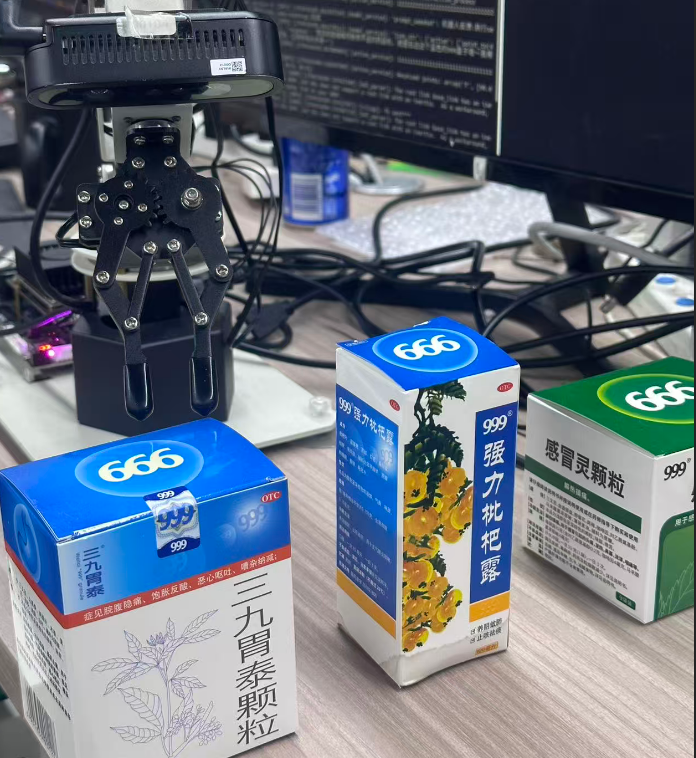
3. Task Planning
Call the
seewhat()function to observe which medications are on the desktop and reply with the therapeutic effect of each medication.Based on the symptom of stomach discomfort, reply with the name of the medication that can alleviate the discomfort.
Call the
seewhat()function to check the position of the medication that can alleviate the discomfort, and obtain the coordinates of the top-left and bottom-right corners of the outer bounding box (x1, y1, x2, y2).Call the
point_to(x1, y1, x2, y2)function to point to the position of the medication that can alleviate the discomfort.
4. Core Code Analysis
Let's mainly look at the point_to function. This function is in action_service.py. The path to action_service.py is:
Raspberry Pi: /home/yahboom/dofbot_ultra_ws/src/llm/largemodel/largemodel/
RDK: /home/sunrise/dofbot_ultra_ws/src/llm/largemodel/largemodel/
xxxxxxxxxxdef point_to(self, x1, y1, x2, y2): # Start two programs: one is the execution program ALM_Point_To, the other is the program for calculating object position information ALM_KCF_Tracker cmd1 = "ros2 run largemodel_arm ALM_Point_To" cmd2 = "ros2 run largemodel_arm ALM_KCF_Tracker" subprocess.Popen( [ "gnome-terminal", "--title=ALM_KCF_Tracker", "--", "bash", "-c", f"{cmd2}; exec bash", ] ) time.sleep(5.0) # Wait for ALM_KCF_Tracker_Node to start subprocess.Popen( [ "gnome-terminal", "--title=grasp_desktop", "--", "bash", "-c", f"{cmd1}; exec bash", ] ) time.sleep(2.0) if self.stack_flag == True: self.get_logger().info('Publish the stack_step topic...') step_ = Int16() step_.data = self.step self.step_pub.publish(step_) self.step = self.step + 1 # Package the bounding box coordinates and publish them via a topic. The ALM_KCF_Tracker node will subscribe to this topic. x1 = int(x1) y1 = int(y1) x2 = int(x2) y2 = int(y2) self.object_position_pub.publish(Int16MultiArray(data=[x1, y1, x2, y2]))ALM_KCF_Tracker Node Program
Source path:
Raspberry Pi: /home/yahboom/dofbot_ultra_ws/src/llm/largemodel_arm/largemodel_arm/ALM_KCF_Tracker.py
RDK: /home/sunrise/dofbot_ultra_ws/src/llm/largemodel_arm/largemodel_arm/ALM_KCF_Tracker.py
xxxxxxxxxx# In the kcfTrack function, based on the center point (self.cx, self.cy) and depth image information, obtain the depth distance of the center point, then publish it via the topic /pos_xyzif self.cx!=0 and self.cy!=0 and self.circle_r>10 : center_x, center_y = self.cx,self.cy cv2.circle(depth_to_color_image,(int(center_x),int(center_y)),1,(255,255,255),10) self.cur_distance = depth_image_info[int(center_y),int(center_x)]/1000.0 #print("self.cur_distance: ",self.cur_distance) dist = round(self.cur_distance,3) dist = 'dist: ' + str(dist) + 'm' cv.putText(result_frame, dist, (30, 30), cv.FONT_HERSHEY_SIMPLEX, 1.0, (255, 0, 0), 2) pos = Position() pos.x = center_x pos.y = center_y pos.z = self.cur_distance Track_pos = Position() Track_pos.x = center_x Track_pos.y = center_y self.pub_track_pos.publish(Track_pos)ALM_Point_To Node Program
Source path:
Raspberry Pi: /home/yahboom/dofbot_ultra_ws/src/llm/largemodel_arm/largemodel_arm/ALM_Point_To.py
RDK: /home/sunrise/dofbot_ultra_ws/src/llm/largemodel_arm/largemodel_arm/ALM_Point_To.py
xxxxxxxxxx# Process the /pos_xyz message data published by the ALM_KCF_Tracker node, and call the Point_To_Move method of the dofbot_tracker object, passing the obtained message data and the current end-effector pose of the robotic armdef TrackAndGrap(self,position): center_x, center_y = position.x,position.y self.cur_distance = position.z if self.done == True: self.get_current_end_pos() self.get_logger().info('-*-*-*-*-*-*-*-*-*-*') print("self.CurEndPos: ",self.CurEndPos) self.dofbot_tracker.Point_To_Move(center_x,center_y,self.cur_distance,self.CurEndPos) self.done = FalseThe Point_To_Move function source code is in the
Raspberry Pi: /home/yahboom/dofbot_ultra_ws/src/llm/largemodel_arm/largemodel_arm/Dofbot_Track.py
RDK: /home/sunrise/dofbot_ultra_ws/src/llm/largemodel_arm/largemodel_arm/Dofbot_Track.py library.
def Point_To_Move(self,cx,cy,cz,CurEndPos): # Calculate the end-effector pose of the robotic arm self.CurEndPos = CurEndPos camera_location = self.pixel_to_camera_depth((cx,cy),cz) print("cz: ",cz) PoseEndMat = np.matmul(self.EndToCamMat, self.xyz_euler_to_mat(camera_location, (0, 0, 0))) EndPointMat = self.get_end_point_mat() WorldPose = np.matmul(EndPointMat, PoseEndMat) pose_T, pose_R = self.mat_to_xyz_euler(WorldPose) pose_T[0] = pose_T[0] + self.x_offset pose_T[1] = pose_T[1] + self.y_offset pose_T[2] = pose_T[2] + self.z_offset print("pose_T: ",pose_T) request = Kinemarics.Request() request.tar_x = pose_T[0] request.tar_z = pose_T[2] + 0.03 request.tar_y = pose_T[1] request.kin_name = "ik" request.roll = -1.0 #self.CurEndPos[3] print("calcutelate_request: ",request) # Inverse kinematics to get the values for servos 1-4 try: future = self.client.call_async(request) rclpy.spin_until_future_complete(self, future, timeout_sec=10.0) response = future.result() joints = [0.0, 120.0, 10.0, 10.0, 90.0,150.0] joints[0] = response.joint1 #response.joint1 joints[1] = response.joint2 #response.joint1 joints[2] = response.joint3 #response.joint1 joints[3] = response.joint4 #response.joint1 # Control the robotic arm to move to this pose self.Arm.Arm_serial_servo_write6_array(joints,2000) grasp_done = Bool() grasp_done.data = True self.pubGraspStatus.publish(grasp_done) except Exception: pass