yahboom
HomeLearn
Solution
Blog
Online Store
About Us
EN/中文
Self-balancing Robot Car📖
00.Get started quickly
  • 01.Balance car manual
  • 02.Balancing car assembly
  • 03.Get started quickly
  • 04.Balance car interface description
  • 05.Common Problem Analysis
  • 06.Balance Car V2 Library Function Development Manual
01.Environment development
  • 01.MDK-ARM installation
  • 02.STM32CubeIDE installation
  • 03.Common driver installation
  • 04.Download the program
  • 05.MDK-ARM project usage
  • 06.Program simulation
  • 07. VSCode Installation
02.STM32 getting started course
  • 01.Project creation
  • 02.LED Control(GPIO)
  • 03.Buzzer control(GPIO)
  • 04.Button control(EXTI)
  • 05.Serial communication(USART)
  • 06.Voltage detection(ADC)
  • 07.Basic timer(TIM)
  • 08.Universal timer(TIM)
  • 09.Advanced Timer(TIM)
  • 10.I2C Communication(I2C)-OLED
  • 11.SPI communication(SPI)-2.4G handle
  • 12.Independent Watchdog (IWDG)
  • 13.Window Watchdog (WWDG)
  • 14.DMA-USART
  • 15.DMA-I2C
03.STM32 expansion course
  • 01.Battery voltage detection (ADC)
  • 02.Ultrasonic module-measuring distance (TIM)
  • 03.Motor drive+encoder (TIM)
  • 04.OLED Data-Display(I2C)
  • 05.MPU6050-Data Read (I2C)
  • 06.Bluetooth module-Data reading (USART)
  • 07.2.4G handle-Data reading (SPI)
  • 08.Tracking module-Read status (GPIO)
  • 09.CCD module-Reading data (ADC)
  • 10.Electromagnetic module-Reading data (ADC)
  • 11.K210 module-Serial communication (USART)
  • 12.Tmini-Plus lidar-Reading data (USART)
04.Robot car PID control course
  • 01.PID basic concept
  • 02.PID example analysis
  • 03.P, PI, PD controller theory
  • 04.Position PID
  • 05.Incremental PID
  • 06.Cascade PID
  • 07.Balance principle of car
  • 08.Car upright control (PD)
  • 09.Car speed ​​control (PI)
  • 10.Car steering control (PD)
  • 11.Got angle and angular velocity (DMP algorithm)
  • 12.Got angle and angular velocity (Kalman filter algorithm)
  • 13.Got angle and angular velocity(Complementary filter algorithm)
05.Robot car basic course
  • 01.Car parameter adjustment
  • 02.Ultrasonic obstacle avoidance
  • 03.Ultrasonic follow
  • 04.Bluetooth remote control
  • 05.Load balance
06.Robot car advanced course
  • 01.4-channel tracking
  • 02.4-channel tracking avoid
  • 03.2.4G handle control
  • 04.CCD tracking
  • 05.CCD tracking avoid
  • 06.Electromagnetic tracking
  • 07.K210-QR code recognition
  • 08.K210-Color line tracking
  • 09.K210-Color follow
  • 10.K210-Self learning
  • 11.K210-Number recognition
  • 12.Lidar avoid
  • 13.Lidar guard
  • 14.Lidar follow
  • 15.Lidar patrol
  • 16.Lidar wall tracking-straight line
  • 17.Lidar wall tracking-multiple walls
  • 18. DIY Automatic driving car
07.Robot car LQR control
  • Robot car LQR control
08.Circuit design
  • 01.Overall circuit design
  • 02.STM32 minimum system
  • 03.Serial port circuit design
  • 04.Power circuit design
  • 05.MPU6050 Circuit Design
  • 06.Motor drive circuit design
09.Mathematical model
  • Mathematical model
10.Expand course
  • Autonomous Driving
Download
  • APP(Android)
  • Codes
  • Hardware-Info
  • SCH
  • Software Tools
  • STM32_Chip_DataSheet
  • 3D_Model_File
  • Video_PPT
Download ZIP

Welcome to Self-balancing Robot Car repository

13.Window Watchdog (WWDG)

Window Watchdog (WWDG)

Window Watchdog (WWDG)

Window Watchdog (WWDG)Hardware connectionControl principleSoftware ConfigurationSoftware CodeControl FunctionExperimental phenomenon

The tutorial combines LED, buzzer, and KEY to demonstrate the hardware fault detection function of the window watchdog (WWDG).

Hardware connection
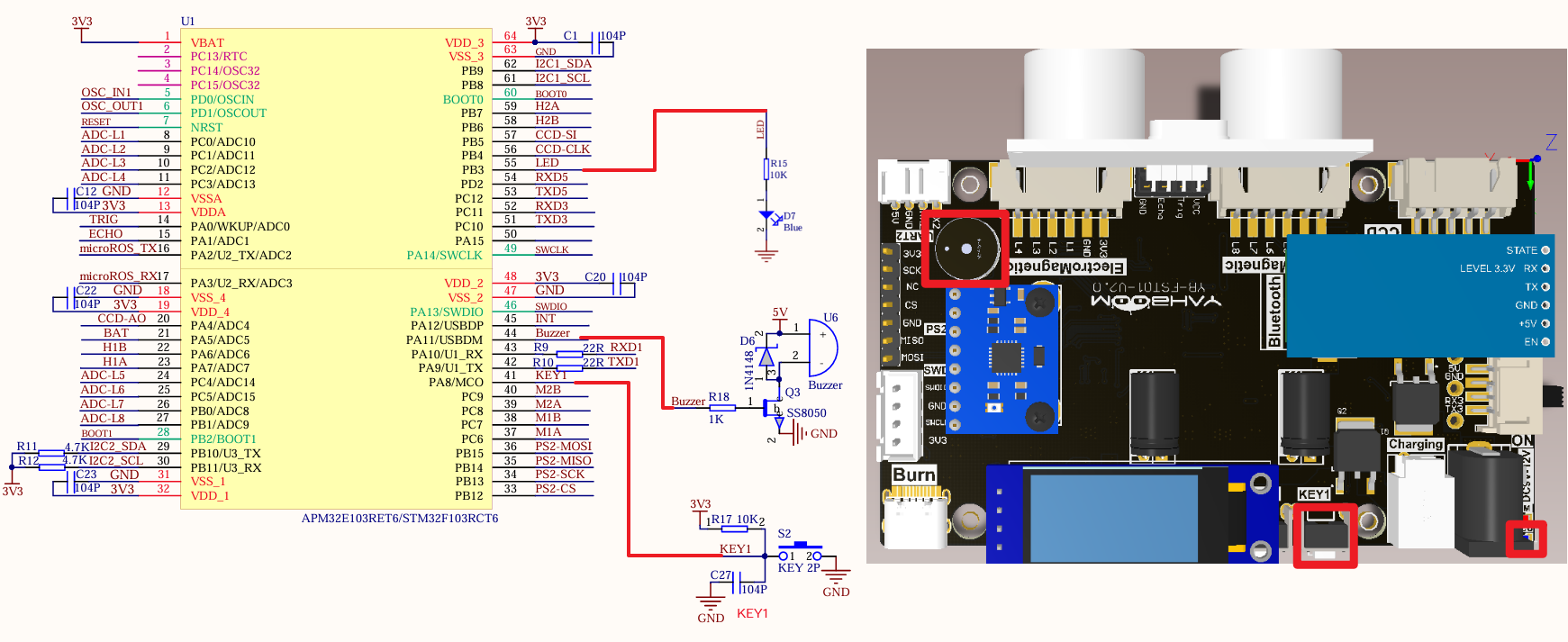
image-20240825210433047

PeripheralsDevelopment boardDescription
LEDPB3The anode of the LED is connected to the development board PB3, and the cathode is connected to the development board GND
KEY1PA8One end of the KEY is connected to the PA8 pin, and the other end is connected to GND
Buzzer (active buzzer)PA11 

Control principle

The STM32F103RCT6 has two built-in watchdogs (independent watchdog and window watchdog), which are mainly used for system fault detection and recovery.

WatchdogFunction
Independent WatchdogUsed to detect whether the system is running normally
Window WatchdogUsed to detect system failures
  • Window Watchdog

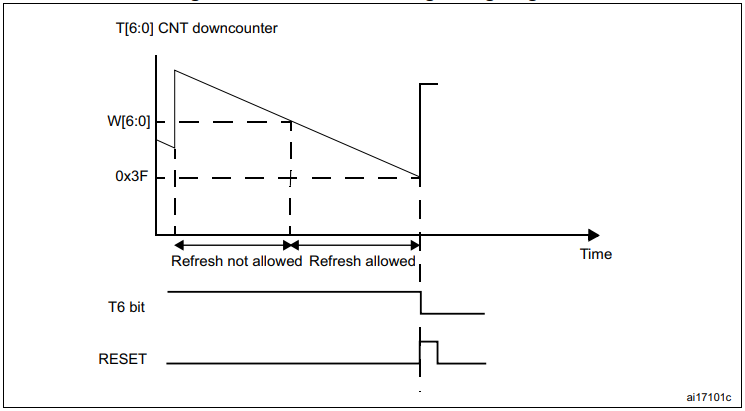
The window watchdog (WWDG) is driven by the clock obtained by dividing the APB1 clock. It detects abnormal late or early operations of the application by configuring the time window.

Window WatchdogStatus
Feed the watchdog when the count value > window upper limitReset
Feed the watchdog when the window upper limit > count value > window lower limitDo not reset
Count value < window lower limitReset
The main function of the window watchdog is to monitor the working status of the system and prevent deadlock or infinite loop caused by software errors or unexpected events
  • Independent watchdog feature

  • Free-running down counter

  • Conditional reset

  • A reset is generated when the down counter is reloaded outside the window

  • A reset is generated when the down counter value is less than 0x40

  • If the watchdog is enabled and interrupts are enabled

  • When the down counter is equal to 0x40, an early wake-up interrupt (EWI) is generated to reload the counter to avoid WWDG reset
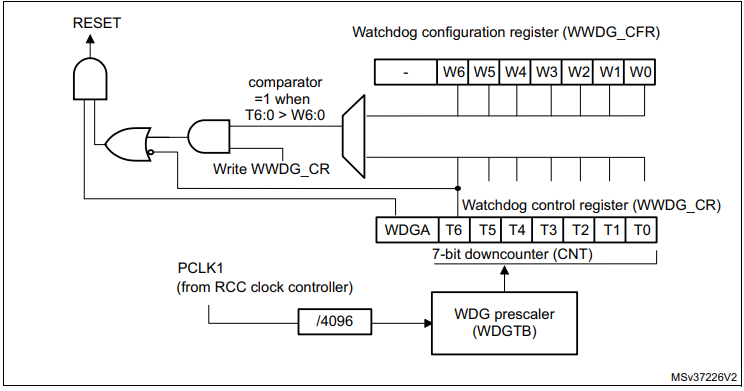
image-20240903164619741

  • Window watchdog timeout: PCLK1=36MHz

image-20240903164635243

WDGBMinimum timeoutMaximum timeout
0113us7.28ms
1227us14.56ms
xxxxxxxxxx
The frequency division number set in the tutorial is 8, the window value is 43, and the count value is 54
TWWDG(ms)=TPCLK1∗4096∗2WDGTB∗(T[5:0]+1)

TWWDG: WWDG timeout time

TPCLK1: APB1 time interval in ms

Example: Counter minus 1 time (PCLK1=36MHz, frequency division number is 8)

TWWDG(ms)=TPCLK1∗4096∗2WDGTB∗(T[5:0]+1)=136000∗4096∗23∗(1)=0.910ms

Software Configuration

Software Code

Configure the Window Watchdog (WWDG) hardware fault detection function, no need to configure specific pins.

Independent Watchdog (IWDG)
DMA-USART

COMPANY

  • About us
  • Team Style
  • Blog

LEARNING & EXPLORATION

  • Tutorials
  • Edge AI hardware
  • Educational robots
  • Embedded intelligent hardware

WHERE TO BUY

  • Yahboom Online Store
  • Amazon
  • Alibaba
  • AliExpress
  • Mercado

TECHNOLOGY SUPPORT

  • Email: support@yahboom.com

BE A DISTRIBUTOR

  • Email: sales@yahboom.com
QR Code

Copyright © 2017-2026 Yahboom. All Rights Reserved.

EN/中文