yahboom
HomeTutorialsProduct
Solution
Blog
Online Store
About Us
EN/中文
Store
STM32 Self-balancing Car📖
00.Get started quickly
  • 01.Balance car manual
  • 02.Balancing car assembly
  • 03.Get started quickly
  • 04.Balance car interface description
  • 05.Common Problem Analysis
  • 06.Balance Car V2 Library Function Development Manual
01.Environment development
  • 01.MDK-ARM installation
  • 02.STM32CubeIDE installation
  • 03.Common driver installation
  • 04.Download the program
  • 05.MDK-ARM project usage
  • 06.Program simulation
  • 07. VSCode Installation
02.STM32 getting started course
  • 01.Project creation
  • 02.LED Control(GPIO)
  • 03.Buzzer control(GPIO)
  • 04.Button control(EXTI)
  • 05.Serial communication(USART)
  • 06.Voltage detection(ADC)
  • 07.Basic timer(TIM)
  • 08.Universal timer(TIM)
  • 09.Advanced Timer(TIM)
  • 10.I2C Communication(I2C)-OLED
  • 11.SPI communication(SPI)-2.4G handle
  • 12.Independent Watchdog (IWDG)
  • 13.Window Watchdog (WWDG)
  • 14.DMA-USART
  • 15.DMA-I2C
03.STM32 expansion course
  • 01.Battery voltage detection (ADC)
  • 02.Ultrasonic module-measuring distance (TIM)
  • 03.Motor drive+encoder (TIM)
  • 04.OLED Data-Display(I2C)
  • 05.MPU6050-Data Read (I2C)
  • 06.Bluetooth module-Data reading (USART)
  • 07.2.4G handle-Data reading (SPI)
  • 08.Tracking module-Read status (GPIO)
  • 09.CCD module-Reading data (ADC)
  • 10.Electromagnetic module-Reading data (ADC)
  • 11.K210 module-Serial communication (USART)
  • 12.Tmini-Plus lidar-Reading data (USART)
04.Robot car PID control course
  • 01.PID basic concept
  • 02.PID example analysis
  • 03.P, PI, PD controller theory
  • 04.Position PID
  • 05.Incremental PID
  • 06.Cascade PID
  • 07.Balance principle of car
  • 08.Car upright control (PD)
  • 09.Car speed ​​control (PI)
  • 10.Car steering control (PD)
  • 11.Got angle and angular velocity (DMP algorithm)
  • 12.Got angle and angular velocity (Kalman filter algorithm)
  • 13.Got angle and angular velocity(Complementary filter algorithm)
05.Robot car basic course
  • 01.Car parameter adjustment
  • 02.Ultrasonic obstacle avoidance
  • 03.Ultrasonic follow
  • 04.Bluetooth remote control
  • 05.Load balance
06.Robot car advanced course
  • 01.4-channel tracking
  • 02.4-channel tracking avoid
  • 03.2.4G handle control
  • 04.CCD tracking
  • 05.CCD tracking avoid
  • 06.Electromagnetic tracking
  • 07.K210-QR code recognition
  • 08.K210-Color line tracking
  • 09.K210-Color follow
  • 10.K210-Self learning
  • 11.K210-Number recognition
  • 12.Lidar avoid
  • 13.Lidar guard
  • 14.Lidar follow
  • 15.Lidar patrol
  • 16.Lidar wall tracking-straight line
  • 17.Lidar wall tracking-multiple walls
  • 18. DIY Automatic driving car
07.Robot car LQR control
  • Robot car LQR control
08.Circuit design
  • 01.Overall circuit design
  • 02.STM32 minimum system
  • 03.Serial port circuit design
  • 04.Power circuit design
  • 05.MPU6050 Circuit Design
  • 06.Motor drive circuit design
09.Mathematical model
  • Mathematical model
10.Expand course
  • Autonomous Driving
Download
  • APP(Android)
  • Codes
  • Hardware-Info
  • SCH
  • Software Tools
  • STM32_Chip_DataSheet
  • 3D_Model_File
  • Video_PPT
Download ZIP

Welcome to STM32 Self-balancing Car repository

02.Balancing car assembly

Installation Video for standard kit
Installation Video for line tracking kit
Installation Video for handle control kit
Installation Video for K210 vision kit
Installation Video for lidar kit

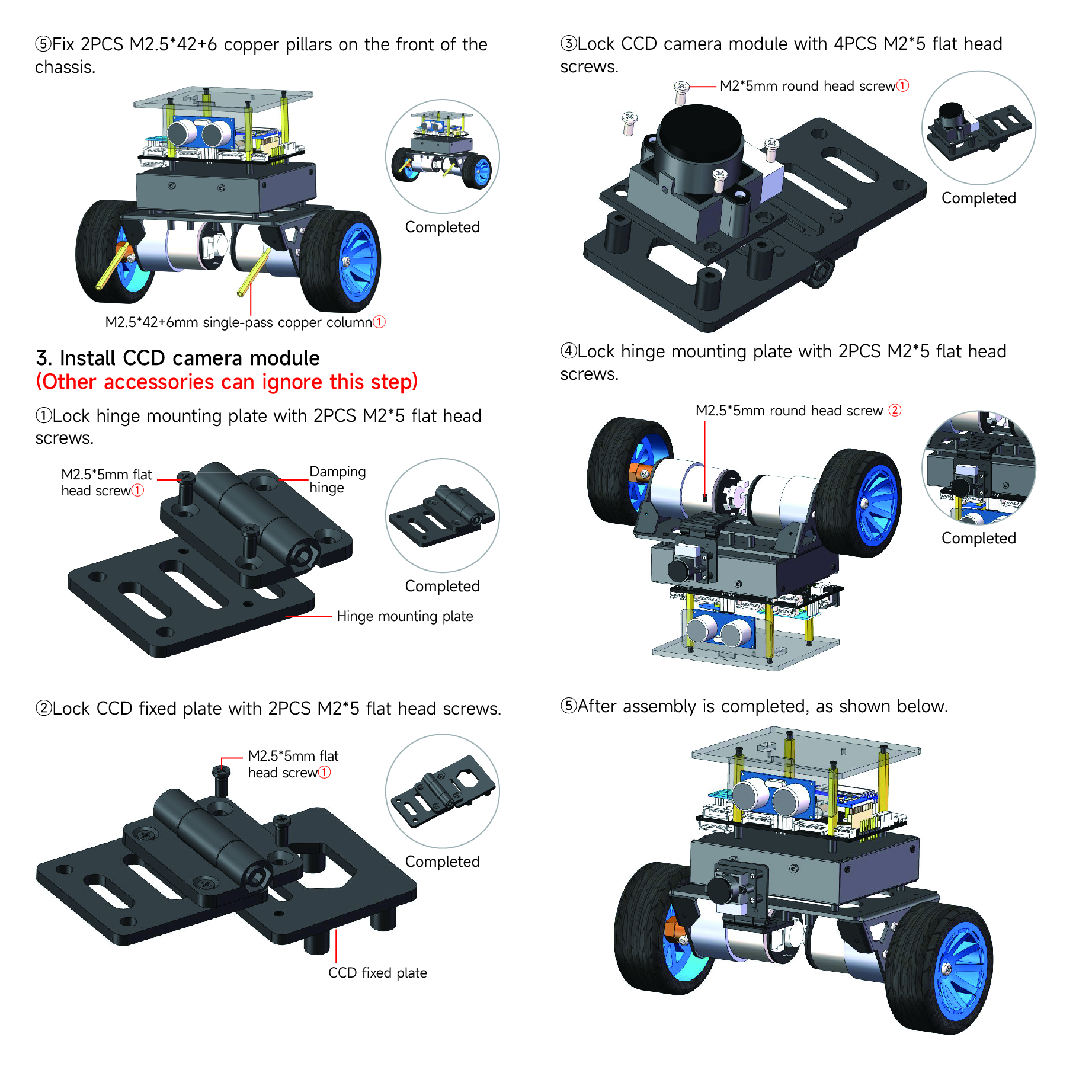
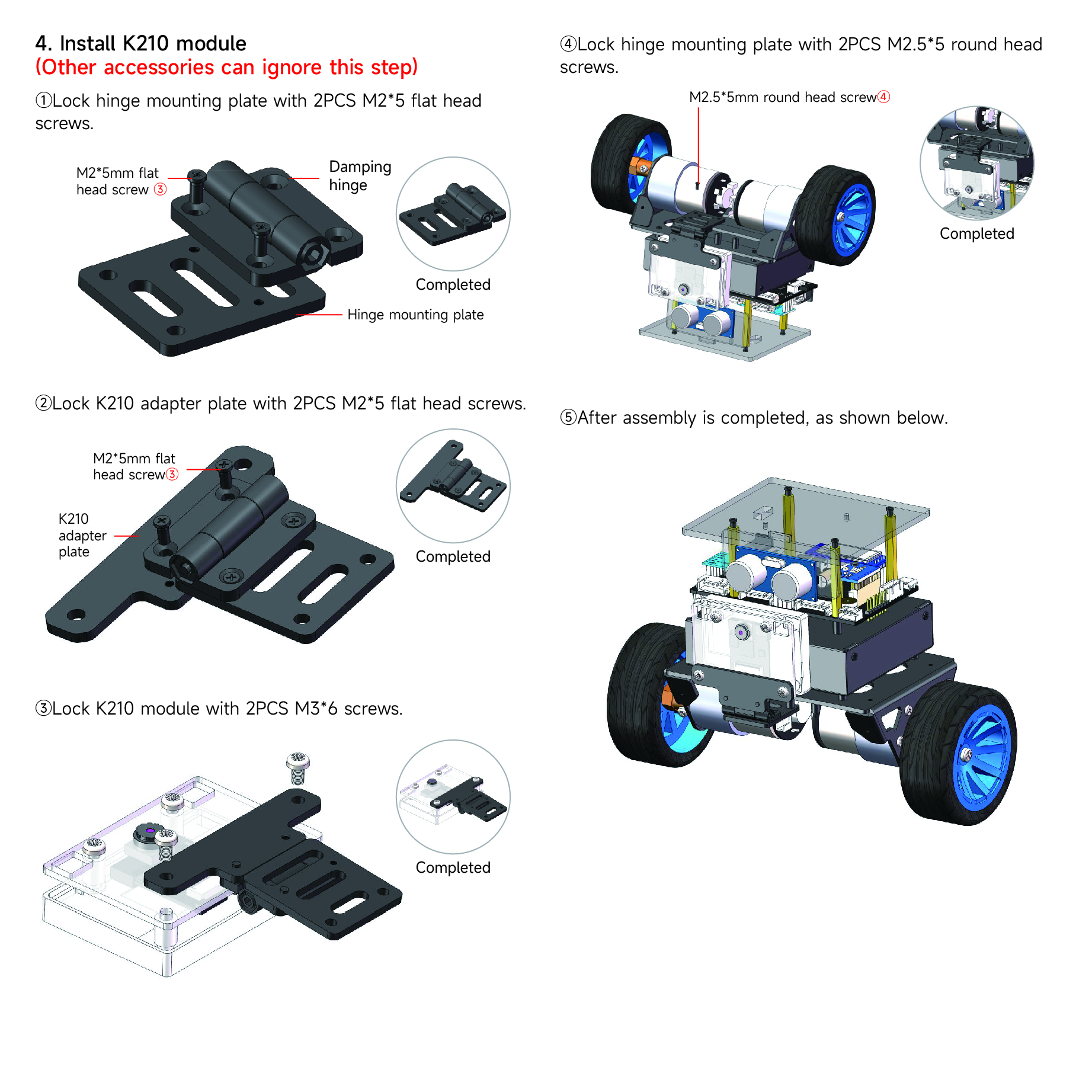
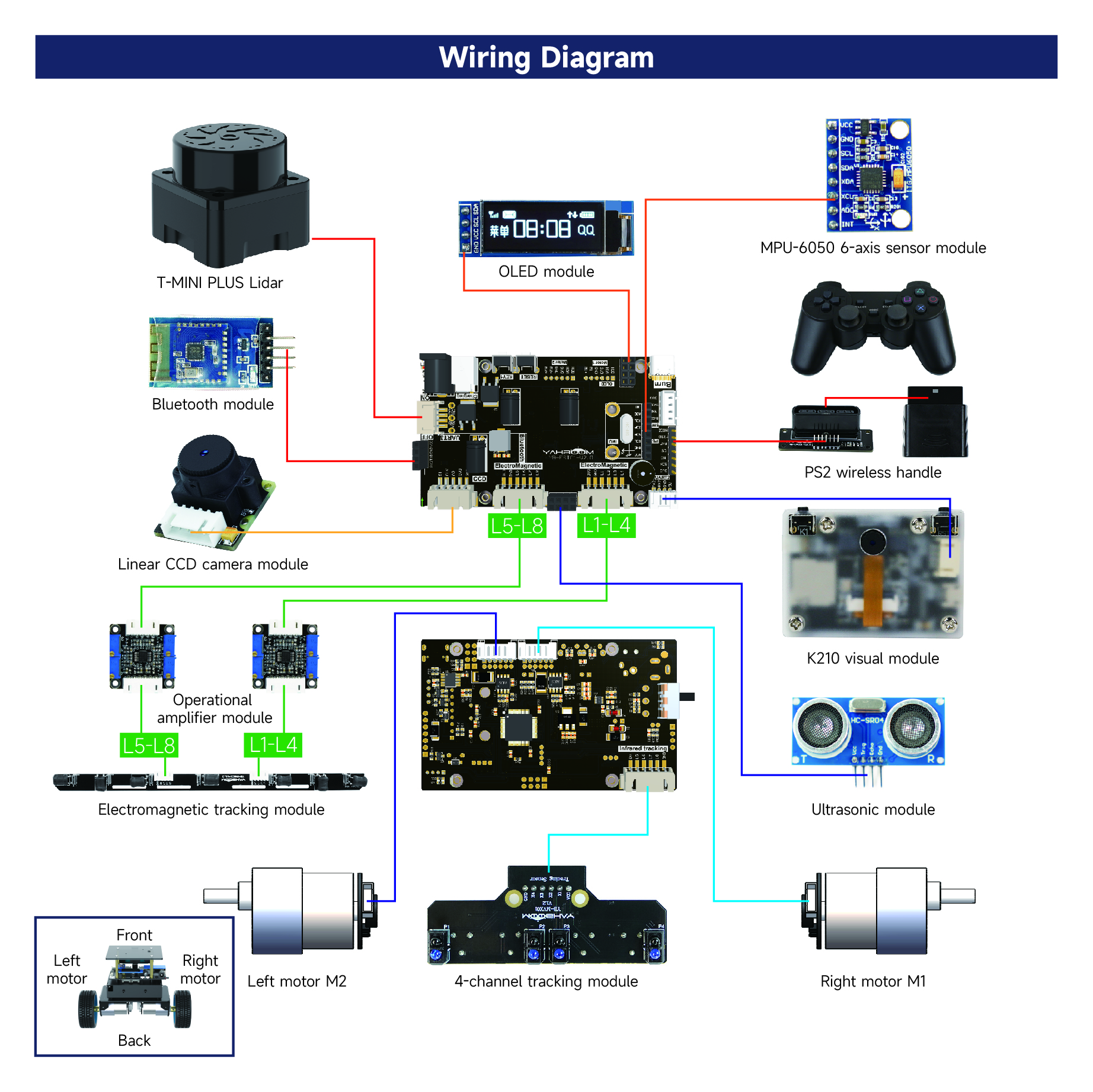
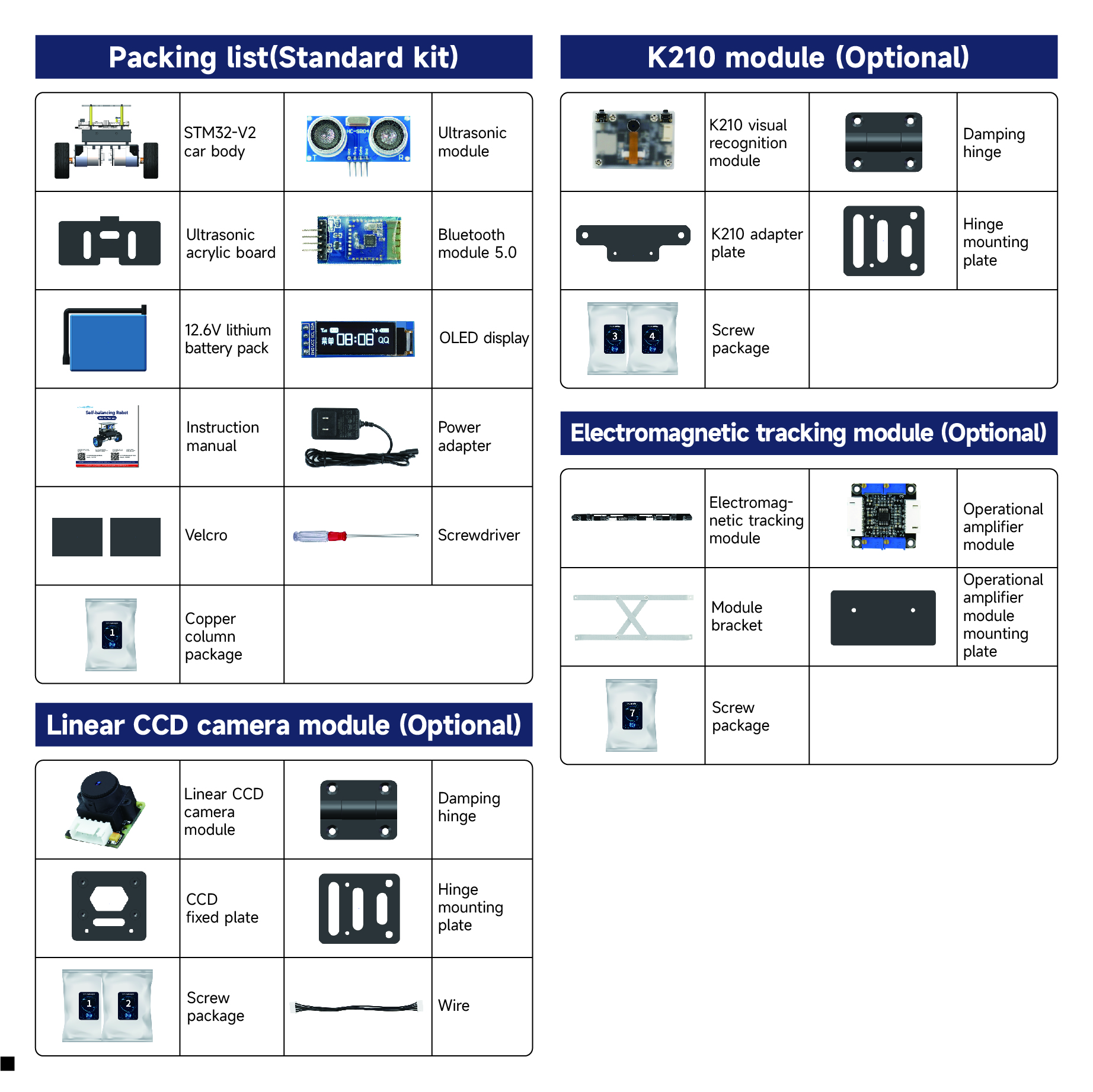
Balancing car assembly
平衡车-02

平衡车-06

平衡车-07

平衡车-10

Balance car manual
Get started quickly

COMPANY

  • About us
  • Team Style
  • Blog

LEARNING & EXPLORATION

  • Tutorials
  • Edge AI hardware
  • Educational robots
  • Embedded intelligent hardware

WHERE TO BUY

  • Yahboom Online Store
  • Amazon
  • Alibaba
  • AliExpress
  • Mercado

TECHNOLOGY SUPPORT

  • Email: support@yahboom.com

BE A DISTRIBUTOR

  • Email: sales@yahboom.com
QR Code

Copyright © 2017-2026 Yahboom. All Rights Reserved.

EN/中文