yahboom
HomeLearn
Solution
Blog
Online Store
About Us
EN/中文
NUWA-HP60C Depth Camera📖
1.ROS1-Depth camera usage course
  • 1. Environment Construction
  • 2. Camera recording video
2.ROS1-ROS+OpenCV application
  • 1.ROS+Opencv Basics
  • 2.Face recognition
  • 3.Harris corner detection
  • 4. Target Tracking Algorithm
  • 5. Contour moment
  • 6. Polygonal Outlines
  • 7. Discrete Fourier Transform Algorithm
  • 8. Edge Detection Algorithm
  • 9. Face Detection Algorithm
  • 10. Optical flow detection algorithm
  • 11. Contour Detection
  • 12. General contour detection
  • 13. Feature point tracking
  • 14.HLS Color Filtering
  • 15. Hough circle detection
  • 16. Hough Line Detection
  • 17.HSV color filtering
  • 18.LK optical flow algorithm
  • 19. Human Detection Algorithm
  • 20. Phase-correlated displacement detection
  • 21. Image pyramid sampling algorithm
  • 22.RGB color filtering
  • 23. Clear background detection algorithm
  • 24. Streamlining the optical flow algorithm
  • 25. Simple Filter
  • 26. Threshold Image Processing
  • 27. Watershed segmentation algorithm
3.ROS1-Mediapipe course
  • 1.Hand detection
  • 2.Posture detection
  • 3.Overall detection
  • 4.Face Mesh
  • 5.Face recognition
  • 6.Face effects
  • 7.Face Detection
  • 8.3D Object Recognition
  • 9.Paintbrush
  • 10.Finger control
  • 11.Gesture Recognition
4.ROS1-Depth camera application course
  • 1. Camera calibration
  • 2. QR code
  • 3. Human Pose Estimation
  • 4. Target detection
  • 5. Point cloud data viewing
  • 6. AR Vision
  • 7.AR QR code tracking
  • 8. Color Tracking
  • 9. Object Tracking
5.ROS1-Linux basic course
  • 1.Introduction to Linux system
  • 2.Ubuntu file system
  • 3.Ubuntu common commands
  • 4.Ubuntu common editors
  • 5.Ubuntu software operation commands
  • 6.Virtual machine installation
  • 7.SSH remote control
  • 8.VNC remote control
  • 9.Transfer files remotely
  • 10.Driver library and communication
  • 11.Static IP and hotspot mode
  • 12.Bind device ID
  • 13.Capacity expansion and resource allocation
  • 14.Update system software sources
  • 15.Set root user password
  • 16.sudo free password
  • 17.Connect to WiFi network
  • 18.View system version
  • 19.Customized service management
  • 20.Back up system image
6.ROS1-OpenCV course
  • 1.Opencv Source CV Introduction
  • 2.Image reading and display
  • 3.Picture writing
  • 4.Picture Quality
  • 5.Pixel Operation
  • 6.Picture scaling
  • 7.Picture cutting
  • 8.Picture translation
  • 9.Picture mirroring
  • 10.Affine transformation
  • 11.Picture rotation
  • 12.Perspective transformation
  • 13.Grayscale processing
  • 14.Image binarization
  • 15.Edge detection
  • 16.Line segment drawing
  • 17.Rectangle and circle drawing
  • 18.Text and picture drawing
7.ROS1 basic course
  • 1.ROS introduction
  • 2.ROS installation
  • 3.ROS common command tools
  • 4.ROS workspace
  • 5.ROS function package
  • 6.ROS node
  • 7.ROS topic publisher
  • 8.ROS topic subscribers
  • 9.ROS service client
  • 10.ROS service server
  • 11.ROS action client
  • 12.ROS action server
  • 13.ROS custom message reception
  • 14.ROS-launch file
  • 15.ROS-TF transformation
  • 16.ROS parameter service
  • 17.ROS-rviz use
  • 18.ROS-rqt tool usage
  • 19.Topic message recording and playback
  • 20.urdf model introduction
  • 21.gazebo introduction
  • 22.ROS distributed communication
8.ROS2-Depth Camera Application Course
  • 1. Use of Depth Camera
  • 2. Camera internal parameter calibration
  • 3. Color tracking
  • 4. KCF Object Tracking
  • 5. ORBSLAM2 Basics
  • 6. ORB_SLAM2 PCL Mapping
  • 7. ORB_SLAM2 Octomap Mapping
9.ROS2-OpenCV course
  • 1. ROS+OpenCV application
  • 2. QR code creation and recognition
  • 3. AR Vision
10.ROS2-Mediapipe course
  • 1.Hand detection
  • 2.Posture detection
  • 3.Overall detection
  • 4.Face Mess
  • 5.Face recognition
11.ROS2 basic course
  • 1.Introduction to ROS2
  • 2.ROS2 install Humble
  • 3.ROS2 development environment
  • 4.ROS2 workspace
  • 5.ROS2 function package
  • 6.ROS2 node
  • 7.ROS2 topic communication
  • 8.ROS2 service communication
  • 9.ROS2 action communication
  • 10.ROS2 custom interface message
  • 11.ROS2 parameter service case
  • 12.ROS2 meta-function package
  • 13.ROS2 distributed communication
  • 14.ROS2 DDS
  • 15.ROS2 time related API
  • 16.ROS2 common command tools
  • 17.ROS2 rviz2 use
  • 18.ROS2 rqt toolbox
  • 19.ROS2 Launch startup file configuration
  • 20.ROS2 recording and playback tool
  • 21.ROS2 URDF model
  • 22.ROS2 Gazebo simulation platform
  • 23.ROS2 TF2 coordinate transformation
5.Bracket installation video
  • Bracket installation video
Download
  • ROS1_VM
  • ROS2_VM
  • ROS1_Code
  • ROS2_Code
  • DataSheet
  • 3D_Model_File
  • Windows Software
  • ROS2_Basic_VM
Download ZIP

Welcome to NUWA-HP60C Depth Camera repository

7.Face Detection

7. Face Detection

7.1. Introduction

MediaPipe is an open-source data stream processing machine learning application development framework developed by Google. It is a graph-based data processing pipeline used to build data sources in various forms, such as video, audio, sensor data, and any time series data. MediaPipe is cross-platform and can run on embedded platforms (such as Raspberry Pi), mobile devices (iOS and Android), workstations and servers, and supports mobile GPU acceleration. MediaPipe provides cross-platform, customizable ML solutions for real-time and streaming media. The core framework of MediaPipe is implemented in C++ and supports languages such as Java and Objective C. The main concepts of MediaPipe include packets, streams, calculators, graphs, and subgraphs.

Features of MediaPipe:

  • End-to-end acceleration: built-in fast ML inference and processing can be accelerated even on commodity hardware.
  • Build once, deploy anywhere: unified solution for Android, iOS, desktop/cloud, web and IoT.
  • Ready-to-use solution: cutting-edge ML solution that demonstrates the full capabilities of the framework.
  • Free and open source: framework and solution under Apache2.0, fully extensible and customizable.

7.2, Face Detection

7.2.1, Start

Start the camera

roslaunch ascamera hp60c.launch

Terminal input,

xxxxxxxxxx
roslaunch yahboomcar_mediapipe 07_FaceDetection.launch
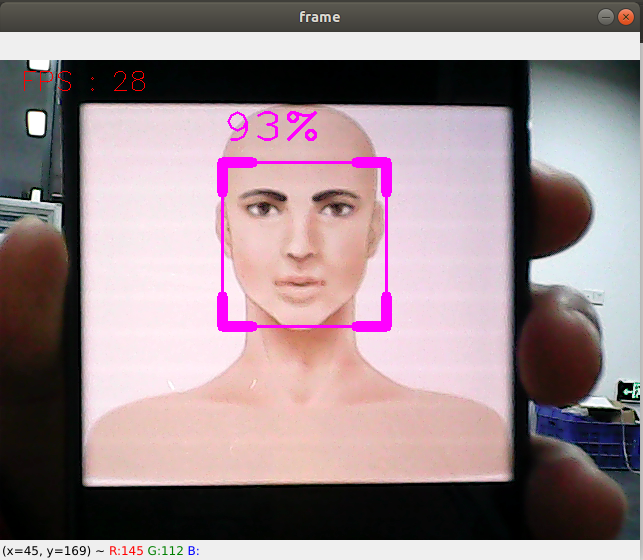
image-20231016103801561

7.2.2, Source code

Source code location: /home/yahboom/ascam_ws/src/yahboomcar_mediapipe/scripts/07_FaceDetection.py

​x
#!/usr/bin/env python3
# encoding: utf-8
import mediapipe as mp
import cv2 as cv
import time
import rospy
from cv_bridge import CvBridge
from sensor_msgs.msg import Image
​
class FaceDetector:
    def __init__(self, minDetectionCon=0.5):
        self.mpFaceDetection = mp.solutions.face_detection
        self.mpDraw = mp.solutions.drawing_utils
        self.facedetection = self.mpFaceDetection.FaceDetection(min_detection_confidence=minDetectionCon)
​
    def findFaces(self, frame):
        img_RGB = cv.cvtColor(frame, cv.COLOR_BGR2RGB)
        self.results = self.facedetection.process(img_RGB)
        bboxs = []
        if self.results.detections:
            for id, detection in enumerate(self.results.detections):
                bboxC = detection.location_data.relative_bounding_box
                ih, iw, ic = frame.shape
                bbox = int(bboxC.xmin * iw), int(bboxC.ymin * ih), \
                       int(bboxC.width * iw), int(bboxC.height * ih)
                bboxs.append([id, bbox, detection.score])
                frame = self.fancyDraw(frame, bbox)
                cv.putText(frame, f'{int(detection.score[0] * 100)}%',
                           (bbox[0], bbox[1] - 20), cv.FONT_HERSHEY_PLAIN,
                           3, (255, 0, 255), 2)
        return frame, bboxs
​
    def fancyDraw(self, frame, bbox, l=30, t=10):
        x, y, w, h = bbox
        x1, y1 = x + w, y + h
        cv.rectangle(frame, (x, y),(x + w, y + h), (255, 0, 255), 2)
        # Top left x,y
        cv.line(frame, (x, y), (x + l, y), (255, 0, 255), t)
        cv.line(frame, (x, y), (x, y + l), (255, 0, 255), t)
        # Top right x1,y
        cv.line(frame, (x1, y), (x1 - l, y), (255, 0, 255), t)
        cv.line(frame, (x1, y), (x1, y + l), (255, 0, 255), t)
        # Bottom left x1,y1
        cv.line(frame, (x, y1), (x + l, y1), (255, 0, 255), t)
        cv.line(frame, (x, y1), (x, y1 - l), (255, 0, 255), t)
        # Bottom right x1,y1
        cv.line(frame, (x1, y1), (x1 - l, y1), (255, 0, 255), t)
        cv.line(frame, (x1, y1), (x1, y1 - l), (255, 0, 255), t)
        return frame
​
class FaceDetectionNode:
    def __init__(self):
        self.bridge = CvBridge()
        rospy.init_node("FaceDetection", anonymous=False)
        self.face_detector = FaceDetector(0.75)
        self.pub_rgb = rospy.Publisher("/FaceDetection/image", Image, queue_size=1)
        self.sub_image = rospy.Subscriber('/ascamera_hp60c/rgb0/image', Image, self.image_callback, queue_size=1)
        self.pTime = 0
​
    def image_callback(self, msg):
        try:
            # Convert the ROS Image message to an OpenCV image
            frame = self.bridge.imgmsg_to_cv2(msg, desired_encoding="bgr8")
            
            # Process the image
            frame, _ = self.face_detector.findFaces(frame)
            
            # Calculate and display FPS
            cTime = time.time()
            fps = 1 / (cTime - self.pTime)
            self.pTime = cTime
            text = f"FPS: {int(fps)}"
            cv.putText(frame, text, (20, 30), cv.FONT_HERSHEY_SIMPLEX, 0.9, (0, 0, 255), 1)
            
            # Display the image
            cv.imshow('frame', frame)
            
            # Publish the processed image
            self.pub_rgb.publish(self.bridge.cv2_to_imgmsg(frame, "bgr8"))
            
            # Check for key press to quit
            if cv.waitKey(1) & 0xFF == ord('q'):
                rospy.signal_shutdown("User requested shutdown")
        except Exception as e:
            rospy.logerr(f"Could not process image: {e}")
​
​
if __name__ == '__main__':
    node = FaceDetectionNode()
    rospy.spin()
    cv.destroyAllWindows()


Face effects
3D Object Recognition

COMPANY

  • About us
  • Team Style
  • Blog

LEARNING & EXPLORATION

  • Tutorials
  • Edge AI hardware
  • Educational robots
  • Embedded intelligent hardware

WHERE TO BUY

  • Yahboom Online Store
  • Amazon
  • Alibaba
  • AliExpress
  • Mercado

TECHNOLOGY SUPPORT

  • Email: support@yahboom.com

BE A DISTRIBUTOR

  • Email: sales@yahboom.com
QR Code
QR Code

Copyright © 2017-2026 Yahboom. All Rights Reserved.

EN/中文