Welcome to NUWA-HP60C Depth Camera repository
9.Paintbrush
9. Paintbrush
9.1. Introduction
MediaPipe is an open-source data stream processing machine learning application development framework developed by Google. It is a graph-based data processing pipeline used to build data sources in various forms, such as video, audio, sensor data, and any time series data. MediaPipe is cross-platform and can run on embedded platforms (Raspberry Pi, etc.), mobile devices (iOS and Android), workstations and servers, and supports mobile GPU acceleration. MediaPipe provides cross-platform, customizable ML solutions for real-time and streaming media.
The core framework of MediaPipe is implemented in C++ and provides support for languages such as Java and Objective C. The main concepts of MediaPipe include packets, streams, calculators, graphs, and subgraphs.
Features of MediaPipe:
- End-to-end acceleration: built-in fast ML inference and processing can be accelerated even on ordinary hardware.
- Build once, deploy anywhere: unified solution for Android, iOS, desktop/cloud, web and IoT.
- Ready-to-use solution: cutting-edge ML solution that demonstrates the full capabilities of the framework.
- Free and open source: framework and solution under Apache2.0, fully extensible and customizable.
9.2, Brush
When the index finger and middle finger of the right hand are combined, it is the selection state, and the color selection box pops up at the same time. When the two fingertips move to the corresponding color position, the color is selected (black is an eraser); when the index finger and middle finger are separated, it is the drawing state, and you can draw anything on the drawing board.
9.2.1, Start
Start the camera
roslaunch ascamera hp60c.launch
Terminal input,
xxxxxxxxxxroslaunch yahboomcar_mediapipe 09_VirtualPaint.launch
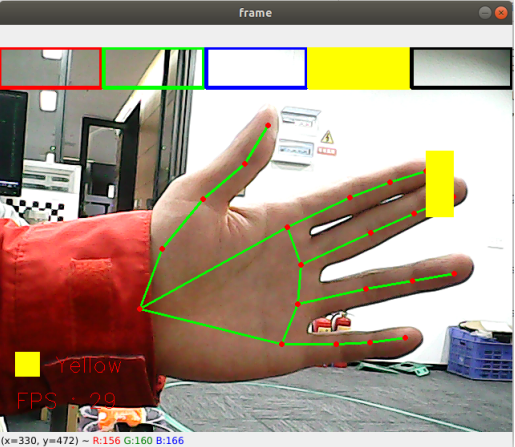
9.2.2, Source code
Source code location: /home/yahboom/ascam_ws/src/yahboomcar_mediapipe/scripts/09_VirtualPaint.py
x#!/usr/bin/env python3# encoding: utf-8import mathimport timeimport rospyimport cv2 as cvimport numpy as npimport mediapipe as mpfrom sensor_msgs.msg import Imagefrom cv_bridge import CvBridgexp = yp = pTime = boxx = 0tipIds = [4, 8, 12, 16, 20]imgCanvas = np.zeros((480, 640, 3), np.uint8)brushThickness = 5eraserThickness = 100top_height = 50Color = "Red"ColorList = { 'Red': (0, 0, 255), 'Green': (0, 255, 0), 'Blue': (255, 0, 0), 'Yellow': (0, 255, 255), 'Black': (0, 0, 0),}class handDetector: def __init__(self, mode=False, maxHands=2, detectorCon=0.5, trackCon=0.5): self.tipIds = [4, 8, 12, 16, 20] self.mpHand = mp.solutions.hands self.mpDraw = mp.solutions.drawing_utils self.hands = self.mpHand.Hands( static_image_mode=mode, max_num_hands=maxHands, min_detection_confidence=detectorCon, min_tracking_confidence=trackCon ) self.lmDrawSpec = mp.solutions.drawing_utils.DrawingSpec(color=(0, 0, 255), thickness=-1, circle_radius=15) self.drawSpec = mp.solutions.drawing_utils.DrawingSpec(color=(0, 255, 0), thickness=10, circle_radius=10) def findHands(self, frame, draw=True): self.lmList = [] img_RGB = cv.cvtColor(frame, cv.COLOR_BGR2RGB) self.results = self.hands.process(img_RGB) if self.results.multi_hand_landmarks: for handLms in self.results.multi_hand_landmarks: if draw: self.mpDraw.draw_landmarks(frame, handLms, self.mpHand.HAND_CONNECTIONS, self.lmDrawSpec, self.drawSpec) else: self.mpDraw.draw_landmarks(frame, handLms, self.mpHand.HAND_CONNECTIONS) for id, lm in enumerate(self.results.multi_hand_landmarks[0].landmark): h, w, c = frame.shape cx, cy = int(lm.x * w), int(lm.y * h) self.lmList.append([id, cx, cy]) return frame, self.lmList def fingersUp(self): fingers=[] if (self.calc_angle(self.tipIds[0], self.tipIds[0] - 1, self.tipIds[0] - 2) > 150.0) and ( self.calc_angle(self.tipIds[0] - 1, self.tipIds[0] - 2, self.tipIds[0] - 3) > 150.0): fingers.append(1) else: fingers.append(0) for id in range(1, 5): if self.lmList[self.tipIds[id]][2] < self.lmList[self.tipIds[id] - 2][2]: fingers.append(1) else: fingers.append(0) return fingers def get_dist(self, point1, point2): x1, y1 = point1 x2, y2 = point2 return abs(math.sqrt(math.pow(abs(y1 - y2), 2) + math.pow(abs(x1 - x2), 2))) def calc_angle(self, pt1, pt2, pt3): point1 = self.lmList[pt1][1], self.lmList[pt1][2] point2 = self.lmList[pt2][1], self.lmList[pt2][2] point3 = self.lmList[pt3][1], self.lmList[pt3][2] a = self.get_dist(point1, point2) b = self.get_dist(point2, point3) c = self.get_dist(point1, point3) try: radian = math.acos((math.pow(a, 2) + math.pow(b, 2) - math.pow(c, 2)) / (2 * a * b)) angle = radian / math.pi * 180 except: angle = 0 return abs(angle)class ImageSubscriber: def __init__(self): self.bridge = CvBridge() self.image_sub = rospy.Subscriber("/ascamera_hp60c/rgb0/image", Image, self.callback) self.frame = None def callback(self, msg): try: self.frame = self.bridge.imgmsg_to_cv2(msg, "bgr8") except Exception as e: rospy.logerr(f"Failed to convert image: {e}") def get_frame(self): return self.framedef main(): global pTime,Color,xp,yp,pTime,boxx rospy.init_node('paint_node', anonymous=True) hand_detector = handDetector(detectorCon=0.85) image_subscriber = ImageSubscriber() rate = rospy.Rate(30) # 30 Hz while not rospy.is_shutdown(): frame = image_subscriber.get_frame() if frame is not None: h, w, c = frame.shape frame, lmList = hand_detector.findHands(frame, draw=False) if len(lmList) != 0: # tip of index and middle fingers x1, y1 = lmList[8][1:] x2, y2 = lmList[12][1:] fingers = hand_detector.fingersUp() if fingers[1] and fingers[2]: # Selection mode if y1 < top_height: if 0 < x1 < int(w / 5) - 1: boxx = 0 Color = "Red" elif int(w / 5) < x1 < int(w * 2 / 5) - 1: boxx = int(w / 5) Color = "Green" elif int(w * 2 / 5) < x1 < int(w * 3 / 5) - 1: boxx = int(w * 2 / 5) Color = "Blue" elif int(w * 3 / 5) < x1 < int(w * 4 / 5) - 1: boxx = int(w * 3 / 5) Color = "Yellow" elif int(w * 4 / 5) < x1 < w - 1: boxx = int(w * 4 / 5) Color = "Black" cv.rectangle(frame, (x1, y1 - 25), (x2, y2 + 25), ColorList[Color], cv.FILLED) cv.rectangle(frame, (boxx, 0), (boxx + int(w / 5), top_height), ColorList[Color], cv.FILLED) cv.rectangle(frame, (0, 0), (int(w / 5) - 1, top_height), ColorList['Red'], 3) cv.rectangle(frame, (int(w / 5) + 2, 0), (int(w * 2 / 5) - 1, top_height), ColorList['Green'], 3) cv.rectangle(frame, (int(w * 2 / 5) + 2, 0), (int(w * 3 / 5) - 1, top_height), ColorList['Blue'], 3) cv.rectangle(frame, (int(w * 3 / 5) + 2, 0), (int(w * 4 / 5) - 1, top_height), ColorList['Yellow'], 3) cv.rectangle(frame, (int(w * 4 / 5) + 2, 0), (w - 1, top_height), ColorList['Black'], 3) if fingers[1] and fingers[2] == False and math.hypot(x2 - x1, y2 - y1) > 50: # Drawing mode if xp == yp == 0: xp, yp = x1, y1 if Color == 'Black': cv.line(frame, (xp, yp), (x1, y1), ColorList[Color], eraserThickness) cv.line(imgCanvas, (xp, yp), (x1, y1), ColorList[Color], eraserThickness) else: cv.line(frame, (xp, yp), (x1, y1), ColorList[Color], brushThickness) cv.line(imgCanvas, (xp, yp), (x1, y1), ColorList[Color], brushThickness) cv.circle(frame, (x1, y1), 15, ColorList[Color], cv.FILLED) xp, yp = x1, y1 else: xp = yp = 0 imgGray = cv.cvtColor(imgCanvas, cv.COLOR_BGR2GRAY) _, imgInv = cv.threshold(imgGray, 50, 255, cv.THRESH_BINARY_INV) imgInv = cv.cvtColor(imgInv, cv.COLOR_GRAY2BGR) frame = cv.bitwise_and(frame, imgInv) frame = cv.bitwise_or(frame, imgCanvas) cTime = time.time() fps = 1 / (cTime - pTime) pTime = cTime text = "FPS : " + str(int(fps)) cv.rectangle(frame, (20, h - 100), (50, h - 70), ColorList[Color], cv.FILLED) cv.putText(frame, Color, (70, h - 75), cv.FONT_HERSHEY_SIMPLEX, 0.9, (0, 0, 255), 1) cv.putText(frame, text, (20, h-30), cv.FONT_HERSHEY_SIMPLEX, 0.9, (0, 0, 255), 1) cv.imshow('frame', frame) if cv.waitKey(1) & 0xFF == ord('q'): break rate.sleep()if __name__ == '__main__': main()