yahboom
HomeLearn
Solution
Blog
Online Store
About Us
EN/中文
NUWA-HP60C Depth Camera📖
1.ROS1-Depth camera usage course
  • 1. Environment Construction
  • 2. Camera recording video
2.ROS1-ROS+OpenCV application
  • 1.ROS+Opencv Basics
  • 2.Face recognition
  • 3.Harris corner detection
  • 4. Target Tracking Algorithm
  • 5. Contour moment
  • 6. Polygonal Outlines
  • 7. Discrete Fourier Transform Algorithm
  • 8. Edge Detection Algorithm
  • 9. Face Detection Algorithm
  • 10. Optical flow detection algorithm
  • 11. Contour Detection
  • 12. General contour detection
  • 13. Feature point tracking
  • 14.HLS Color Filtering
  • 15. Hough circle detection
  • 16. Hough Line Detection
  • 17.HSV color filtering
  • 18.LK optical flow algorithm
  • 19. Human Detection Algorithm
  • 20. Phase-correlated displacement detection
  • 21. Image pyramid sampling algorithm
  • 22.RGB color filtering
  • 23. Clear background detection algorithm
  • 24. Streamlining the optical flow algorithm
  • 25. Simple Filter
  • 26. Threshold Image Processing
  • 27. Watershed segmentation algorithm
3.ROS1-Mediapipe course
  • 1.Hand detection
  • 2.Posture detection
  • 3.Overall detection
  • 4.Face Mesh
  • 5.Face recognition
  • 6.Face effects
  • 7.Face Detection
  • 8.3D Object Recognition
  • 9.Paintbrush
  • 10.Finger control
  • 11.Gesture Recognition
4.ROS1-Depth camera application course
  • 1. Camera calibration
  • 2. QR code
  • 3. Human Pose Estimation
  • 4. Target detection
  • 5. Point cloud data viewing
  • 6. AR Vision
  • 7.AR QR code tracking
  • 8. Color Tracking
  • 9. Object Tracking
5.ROS1-Linux basic course
  • 1.Introduction to Linux system
  • 2.Ubuntu file system
  • 3.Ubuntu common commands
  • 4.Ubuntu common editors
  • 5.Ubuntu software operation commands
  • 6.Virtual machine installation
  • 7.SSH remote control
  • 8.VNC remote control
  • 9.Transfer files remotely
  • 10.Driver library and communication
  • 11.Static IP and hotspot mode
  • 12.Bind device ID
  • 13.Capacity expansion and resource allocation
  • 14.Update system software sources
  • 15.Set root user password
  • 16.sudo free password
  • 17.Connect to WiFi network
  • 18.View system version
  • 19.Customized service management
  • 20.Back up system image
6.ROS1-OpenCV course
  • 1.Opencv Source CV Introduction
  • 2.Image reading and display
  • 3.Picture writing
  • 4.Picture Quality
  • 5.Pixel Operation
  • 6.Picture scaling
  • 7.Picture cutting
  • 8.Picture translation
  • 9.Picture mirroring
  • 10.Affine transformation
  • 11.Picture rotation
  • 12.Perspective transformation
  • 13.Grayscale processing
  • 14.Image binarization
  • 15.Edge detection
  • 16.Line segment drawing
  • 17.Rectangle and circle drawing
  • 18.Text and picture drawing
7.ROS1 basic course
  • 1.ROS introduction
  • 2.ROS installation
  • 3.ROS common command tools
  • 4.ROS workspace
  • 5.ROS function package
  • 6.ROS node
  • 7.ROS topic publisher
  • 8.ROS topic subscribers
  • 9.ROS service client
  • 10.ROS service server
  • 11.ROS action client
  • 12.ROS action server
  • 13.ROS custom message reception
  • 14.ROS-launch file
  • 15.ROS-TF transformation
  • 16.ROS parameter service
  • 17.ROS-rviz use
  • 18.ROS-rqt tool usage
  • 19.Topic message recording and playback
  • 20.urdf model introduction
  • 21.gazebo introduction
  • 22.ROS distributed communication
8.ROS2-Depth Camera Application Course
  • 1. Use of Depth Camera
  • 2. Camera internal parameter calibration
  • 3. Color tracking
  • 4. KCF Object Tracking
  • 5. ORBSLAM2 Basics
  • 6. ORB_SLAM2 PCL Mapping
  • 7. ORB_SLAM2 Octomap Mapping
9.ROS2-OpenCV course
  • 1. ROS+OpenCV application
  • 2. QR code creation and recognition
  • 3. AR Vision
10.ROS2-Mediapipe course
  • 1.Hand detection
  • 2.Posture detection
  • 3.Overall detection
  • 4.Face Mess
  • 5.Face recognition
11.ROS2 basic course
  • 1.Introduction to ROS2
  • 2.ROS2 install Humble
  • 3.ROS2 development environment
  • 4.ROS2 workspace
  • 5.ROS2 function package
  • 6.ROS2 node
  • 7.ROS2 topic communication
  • 8.ROS2 service communication
  • 9.ROS2 action communication
  • 10.ROS2 custom interface message
  • 11.ROS2 parameter service case
  • 12.ROS2 meta-function package
  • 13.ROS2 distributed communication
  • 14.ROS2 DDS
  • 15.ROS2 time related API
  • 16.ROS2 common command tools
  • 17.ROS2 rviz2 use
  • 18.ROS2 rqt toolbox
  • 19.ROS2 Launch startup file configuration
  • 20.ROS2 recording and playback tool
  • 21.ROS2 URDF model
  • 22.ROS2 Gazebo simulation platform
  • 23.ROS2 TF2 coordinate transformation
5.Bracket installation video
  • Bracket installation video
Download
  • ROS1_VM
  • ROS2_VM
  • ROS1_Code
  • ROS2_Code
  • DataSheet
  • 3D_Model_File
  • Windows Software
  • ROS2_Basic_VM
Download ZIP

Welcome to NUWA-HP60C Depth Camera repository

9.Picture mirroring

Image mirroring

There are two types of image mirroring transformation: horizontal mirroring and vertical mirroring. Horizontal mirroring takes the vertical centerline of the image as the axis and swaps the pixels of the image, that is, swapping the left and right halves of the image. Vertical mirroring takes the horizontal centerline of the image as the axis and swaps the upper and lower parts of the image.

Transformation principle: Let the width of the image be width and the length be height. (x,y) are the transformed coordinates, (x0,y0) are the coordinates of the original image

Horizontal mirror transformation
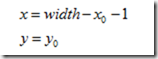
forward mapping

Its inverse transformation is
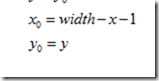
backward mapping

Vertical Mirror Transformation
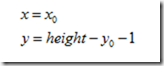
Its inverse transformation is
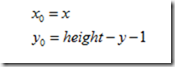
Summarize:

During horizontal mirror transformation, the entire image is traversed, and then each pixel is processed according to the mapping relationship. In fact, the horizontal mirror transformation is to change the image coordinate column to the right, and the right column to the left. The transformation can be done in column units. The same is true for vertical mirror transformation, which can be transformed in row units. Here we take vertical transformation as an example to see how Python is written:

  • Start Docker

After entering the Raspberry Pi 5 desktop, open a terminal and run the following command to start the container corresponding to Dofbot:

xxxxxxxxxx
./Docker_Ros.sh

Access Jupyter Lab within Docker:

xxxxxxxxxx
IP:9999 // Example: 192.168.1.11:9999

Code path: /root/Dofbot/4.opencv/2.Transform/04_mirror_image.ipynb

import cv2
import numpy as np
img = cv2.imread('yahboom.jpg',1)
#cv2.imshow('src',img)
imgInfo = img.shape
height = imgInfo[0]
width = imgInfo[1]
deep = imgInfo[2]
newImgInfo = (height*2,width,deep)
dst = np.zeros(newImgInfo,np.uint8)#uint8
for i in range(0,height):
     for j in range(0,width):
         dst[i,j] = img[i,j]
         #x y = 2*h - y -1
         dst[height*2-i-1,j] = img[i,j]
for i in range(0,width):
     dst[height,i] = (0,0,255) #BGR
xxxxxxxxxx
#bgr8 to jpeg format
import enum
import cv2
def bgr8_to_jpeg(value, quality=75):
     return bytes(cv2.imencode('.jpg', value)[1])
xxxxxxxxxx
import ipywidgets.widgets as widgets
image_widget1 = widgets.Image(format='jpg', )
# image_widget2 = widgets.Image(format='jpg', )
# create a horizontal box container to place the image widget next to each other
# image_container = widgets.HBox([image_widget1, image_widget2])
# display the container in this cell's output
display(image_widget1)
#display(image_widget2)
image_widget1.value = bgr8_to_jpeg(dst)

You can see the mirror image from the picture.

Picture translation
Affine transformation

COMPANY

  • About us
  • Team Style
  • Blog

LEARNING & EXPLORATION

  • Tutorials
  • Edge AI hardware
  • Educational robots
  • Embedded intelligent hardware

WHERE TO BUY

  • Yahboom Online Store
  • Amazon
  • Alibaba
  • AliExpress
  • Mercado

TECHNOLOGY SUPPORT

  • Email: support@yahboom.com

BE A DISTRIBUTOR

  • Email: sales@yahboom.com
QR Code
QR Code

Copyright © 2017-2026 Yahboom. All Rights Reserved.

EN/中文