Welcome to NUWA-HP60C Depth Camera repository
20.urdf model introduction
20.urdf model introduction
URDF is the robot description format in ROS. Its full name is Unified Robot Description Format, which describes the robot's appearance, physical attributes, joint types, etc. URDF files are written in XML language. Let's first understand the commonly used XML tags in URDF files.
20.1 tag
20.1.1 Introduction
In the URDF descriptive language, links are used to describe physical properties. It can be detailed as a human arm, which represents a whole body and has the following tags:
tag: describes the visual display, including size\color\shape. tag: describes collision properties. tag: describes physical inertia.
Each link will be regarded as a coordinate system. The usage example is as follows:
<link name="link1"> <visual> <origin xyz="0 0 0" rpy="0 0 0" /> <geometry> <mesh filename="package://dofbot_moveit/meshes/link1.STL" /> </geometry> <material name=""> <color rgba="0 0.627450980392157 0.235294117647059 1" /> </material> </visual> <collision> <origin xyz="0 0 0" rpy="0 0 0" /> <geometry> <mesh filename="package://dofbot_moveit/meshes/link1.STL" /> </geometry> </collision> </link>The name attribute in the tag is required, describes the current link name, and is unique. In the sample code you can see the following sets of tags:
The
tag describes the pose information; the xyz attribute describes the coordinate position in the general environment, and the rpy attribute describes its own posture. The
tag describes the shape; the main function of the mesh attribute is to load the texture file, and the filename attribute is the file address of the texture path. The tag also includes other tag descriptions: - box
describes the length, width and height of the box through the size attribute. - cylinder is cylindrical
. The length attribute describes the height of the cylinder, and the radius attribute describes the radius of the cylinder. - sphere spherical
, describing the radius of the sphere through the radius attribute.
- box
The
tag describes the material; the name attribute is required, can be empty, and can be repeated. Red, green, blue, and transparency are described through the rgba attribute in the tag, separated by spaces. The color range is [0-1].
20.2 tag
20.2.1 Introduction
Describe the relationship between two joints. Movement position and speed limits. Kinematic and dynamic properties. It can be imagined as the joints of the human body, which include the following types:
- fixed: fixed joint. No movement is allowed and it serves as a connection.
- continuous: rotating joint. Can continue to rotate, there is no limit on the rotation angle.
- revolute: rotate joint. Similar to continuous, there is a limit to the rotation angle.
- prismatic: sliding joint. Move along a certain axis, with position restrictions.
- floating: floating joint.
- planar: plane joint.
A pair of
and represent two s to be connected, corresponding to the name attribute in ; use as a reference here, and rotates around . refers to the relative position of the rotating joint to the coordinate system where the parent is located. indicates which axis the corresponding rotates around. mainly limits . The lower attribute and upper attribute limit the arc range of rotation, and the effort attribute limits the force range during rotation. (positive or negative value value, unit is Newton or N), velocity attribute limits the speed during rotation, unit is meter/second or m/s.
Sample code is as follows,
xxxxxxxxxx<joint name="joint1" type="revolute"> <origin xyz="0 0 0.06605" rpy="-0.010805 0 0" /> <parent link="base_link" /> <child link="link1" /> <axis xyz="0 0 1" /> <limit effort="30" velocity="1.0" lower="-1.5708" upper="1.5708"/> </joint>20.3 tag
The
xxxxxxxxxx<robot name="robot_name"> <link> ... </link> <joint> ... </joint> <link> ... </link> <joint> ... </joint><robot>20.4 Create urdf function package
Generally, urdf files will be placed independently in a function package. Create the learn_urdf function package under src of the original workspace and enter it in the terminal.
xxxxxxxxxxcd ~/ros_ws/srccatkin_create_pkg learn_urdf urdf xacroThen return to the workspace, compile,
xxxxxxxxxxcd ~/ros_wscatkin_makeAfter compilation is completed, four new folders need to be created in the directory of the function package, namely:
- urdf: used to store written urdf model files
- meshes: used to store rendering files for links in URDF
- launch: used to store the launch file that starts the display urdf
- config: rviz file used to store the urdf model
20.5 Write launch to start urdf
In the launch folder under the learn_urdf function package, create a new file named display.launch and copy the following content into it,
x<launch>
<param name="robot_description" command="$(find xacro)/xacro --inorder $(find learn_urdf)/urdf/dofbot.urdf" />
<node name="joint_state_publisher_gui" pkg="joint_state_publisher_gui" type="joint_state_publisher_gui"/> <node name="robot_state_publisher" pkg="robot_state_publisher" type="robot_state_publisher" /> </launch>Exit after saving and reopen the terminal for input.
xxxxxxxxxxroslaunch learn_urdf display.launch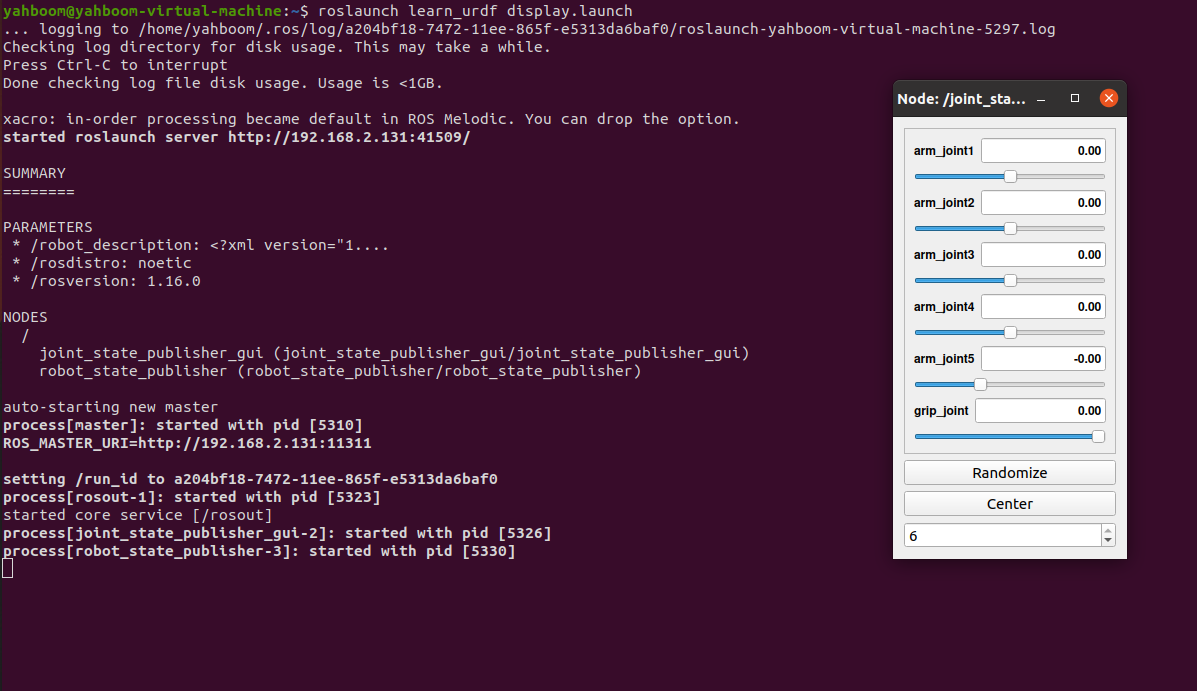
The GUI interface on the right can control the movement of the robotic arm through the slider. Now open rviz to display the robot arm, terminal input,
xxxxxxxxxxrviz
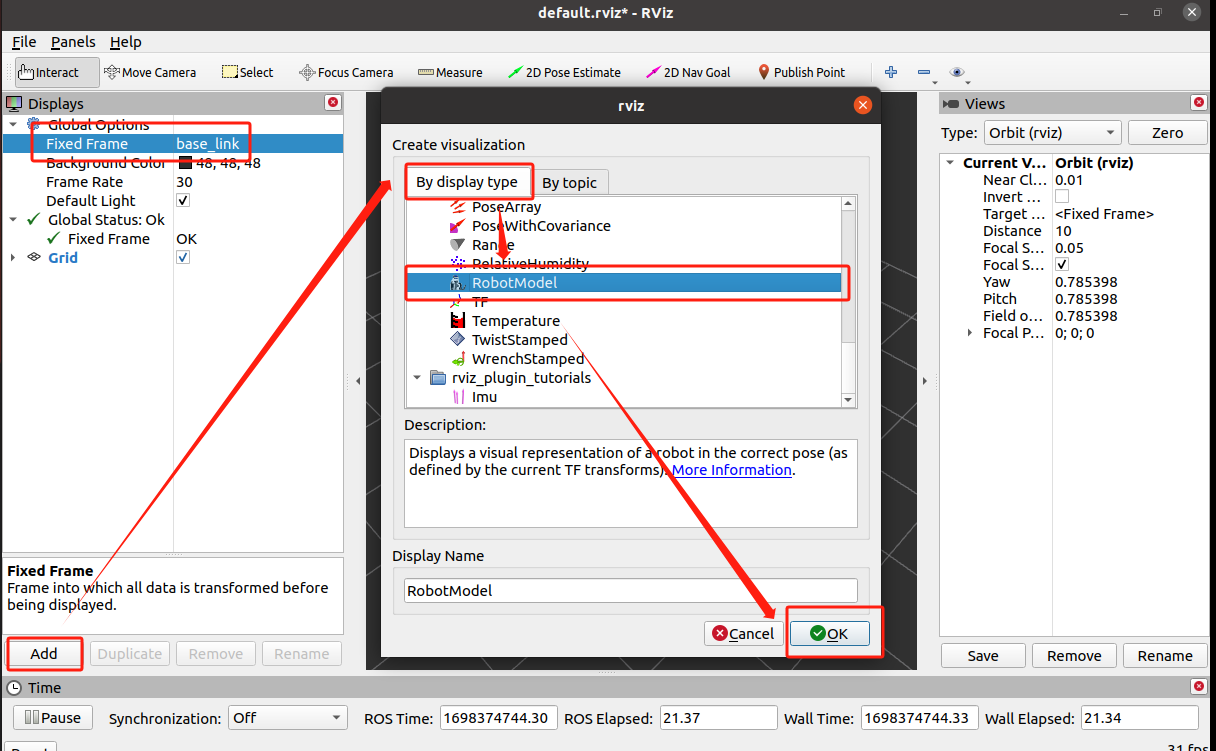
As shown in the picture above, set [Fixed Frame] to base_link, then click [Add], select [By display type], select [RobotModel], and finally click [OK].
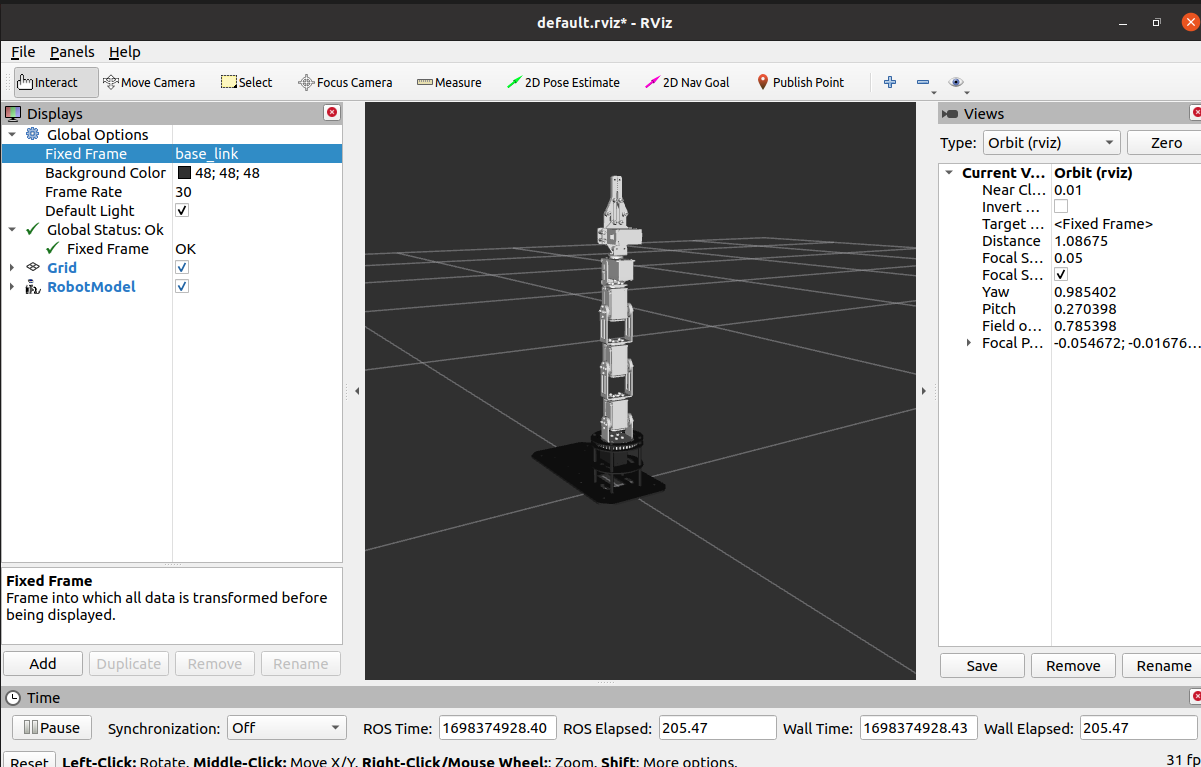
Parse launch files,
xxxxxxxxxx<param name="robot_description" command="$(find xacro)/xacro --inorder $(find learn_urdf)/urdf/dofbot.urdf" />Set the urdf model to be loaded.
xxxxxxxxxx<node name="joint_state_publisher_gui" pkg="joint_state_publisher_gui" type="joint_state_publisher_gui"/>Run the joint_state_publisher node to publish the joint status of the robot, and the joint can be controlled through the UI interface.
xxxxxxxxxx<node name="robot_state_publisher" pkg="robot_state_publisher" type="robot_state_publisher" />Run the robot_state_publisher node, publish tf, and organize it into three-dimensional attitude information for publication.