Welcome to NUWA-HP60C Depth Camera repository
11.Picture rotation
Image rotation
Image rotation refers to the process of rotating an image at a certain angle according to a certain position. The image still maintains its original size during rotation. After the image is rotated, the horizontal symmetry axis, vertical symmetry axis and center coordinate origin of the image may be transformed, so the coordinates in image rotation need to be converted accordingly. As shown below:
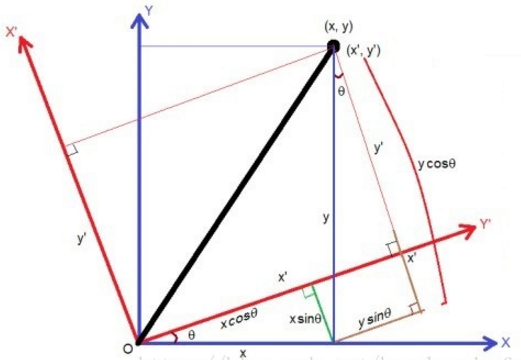
Assuming that the image is rotated counterclockwise by θ, the rotation transformation can be obtained according to the coordinate transformation as:

and

(2) By bringing in (1), we can get:

That is as follows:
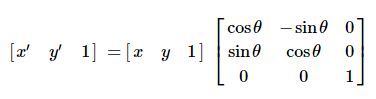
The gray value of the rotated image is equal to the gray value of the corresponding position in the original image as follows:
f(x′,y′)=f(x,y)
The above is the principle of rotation, but the API provided by OpenCV can directly obtain the transformation matrix through functions. The syntax format of this function is:
matRotate = cv2.getRotationMatrix2D(center, angle, scale)
center: center point of rotation
angle: Angle of rotation. Positive numbers are counterclockwise; negative numbers are clockwise.
scale: transformation scale (zoom size). 1 means no change, less than 1 means shrinking, and greater than 1 means enlarging.
Start Docker
After entering the Raspberry Pi 5 desktop, open a terminal and run the following command to start the container corresponding to Dofbot:
xxxxxxxxxx./Docker_Ros.sh
Access Jupyter Lab within Docker:
xxxxxxxxxxIP:9999 // Example: 192.168.1.11:9999
Code path:/root/Dofbot/4.opencv/2.Transform/06_rotation.ipynb
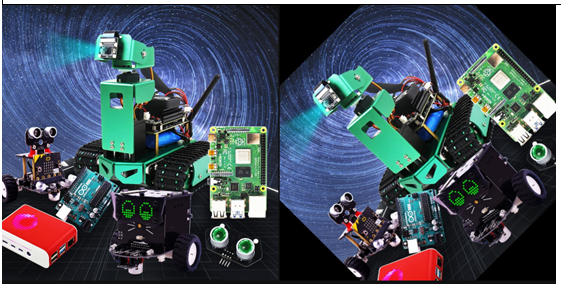
import cv2import numpy as npimg = cv2.imread(yahboom.jpg',1)#cv2.imshow('src',img)imgInfo = img.shapeheight = imgInfo[0]width = imgInfo[1]matRotate = cv2.getRotationMatrix2D((height*0.5, width*0.5), 45, 1)# mat rotate 1 center 2 angle 3 scale#100*100 25dst = cv2.warpAffine(img, matRotate, (height,width))The following will display the comparison between the original image and the rotated image in the jupyterLab control.
xxxxxxxxxx#bgr8 to jpeg formatimport enumimport cv2def bgr8_to_jpeg(value, quality=75): return bytes(cv2.imencode('.jpg', value)[1])ximport ipywidgets.widgets as widgetsimage_widget1 = widgets.Image(format='jpg', )image_widget2 = widgets.Image(format='jpg', )# create a horizontal box container to place the image widget next to each otherimage_container = widgets.HBox([image_widget1, image_widget2])
# display the container in this cell's outputdisplay(image_container)#display(image_widget2)img1 = cv2.imread('image0.jpg',1)image_widget1.value = bgr8_to_jpeg(img1)
image_widget2.value = bgr8_to_jpeg(dst)