Welcome to NUWA-HP60C Depth Camera repository
2.Posture detection
2. Posture detection
2.1. Introduction
MediaPipe is an open-source data stream processing machine learning application development framework developed by Google. It is a graph-based data processing pipeline used to build data sources in various forms, such as video, audio, sensor data, and any time series data. MediaPipe is cross-platform and can run on embedded platforms (Raspberry Pi, etc.), mobile devices (iOS and Android), workstations and servers, and supports mobile GPU acceleration. MediaPipe provides cross-platform, customizable ML solutions for real-time and streaming media.
The core framework of MediaPipe is implemented in C++ and provides support for languages such as Java and Objective C. The main concepts of MediaPipe include packets, streams, calculators, graphs, and subgraphs.
Features of MediaPipe:
- End-to-end acceleration: built-in fast ML inference and processing can be accelerated even on commodity hardware.
- Build once, deploy anywhere: unified solution for Android, iOS, desktop/cloud, web and IoT.
- Ready-to-use solution: cutting-edge ML solution that demonstrates the full capabilities of the framework.
- Free and open source: framework and solution under Apache2.0, fully extensible and customizable.
2.2, MediaPipe Pose
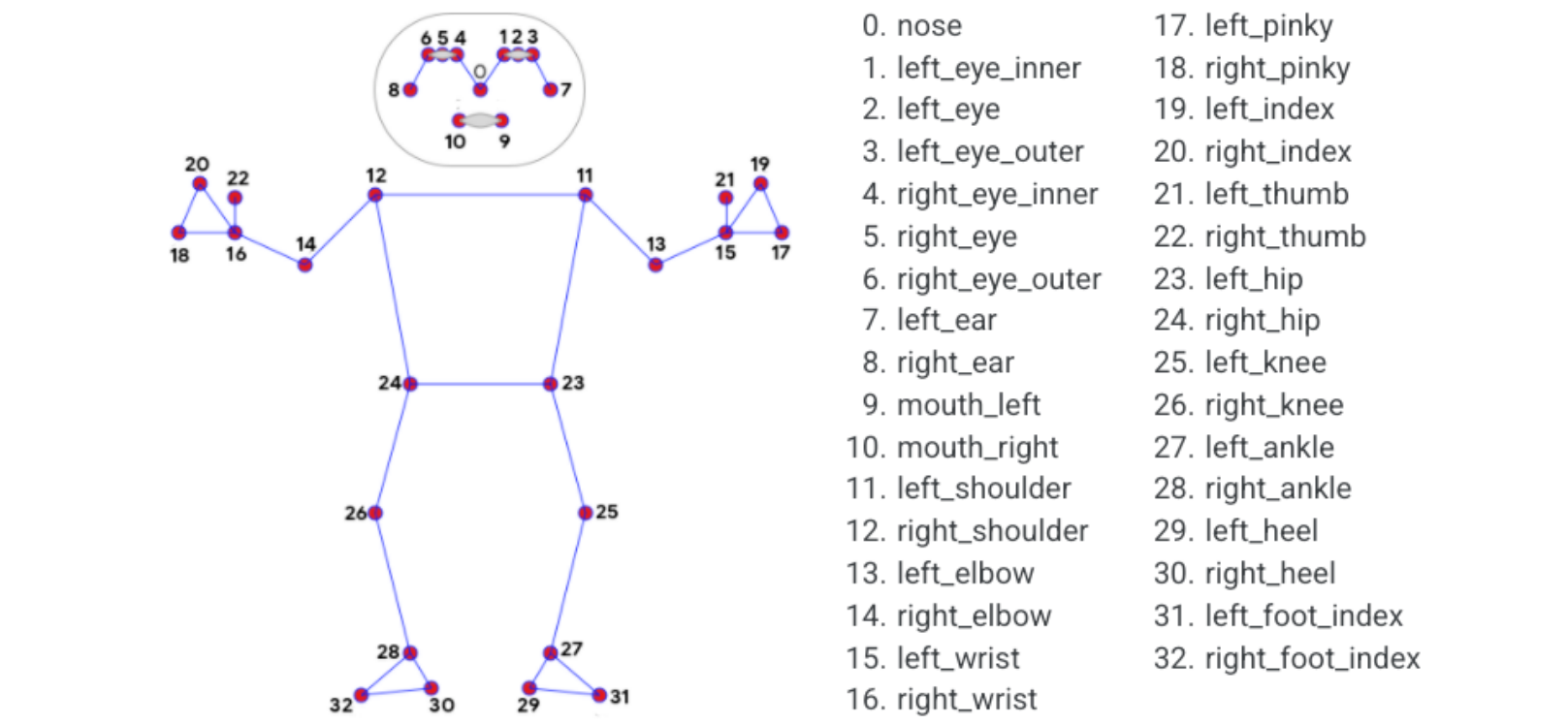
MediaPipe Pose is an ML solution for high-fidelity body pose tracking, leveraging BlazePose research to infer 33 3D coordinates and full-body background segmentation masks from RGB video frames, which also provides power for the ML Kit pose detection API.
The landmark model in MediaPipe Pose predicts the location of 33 pose coordinates (see the figure below).
2.3, Pose detection
2.3.1, Start
Start the camera
ros2 launch ascamera hp60c.launch.py
Open a new terminal and enter,
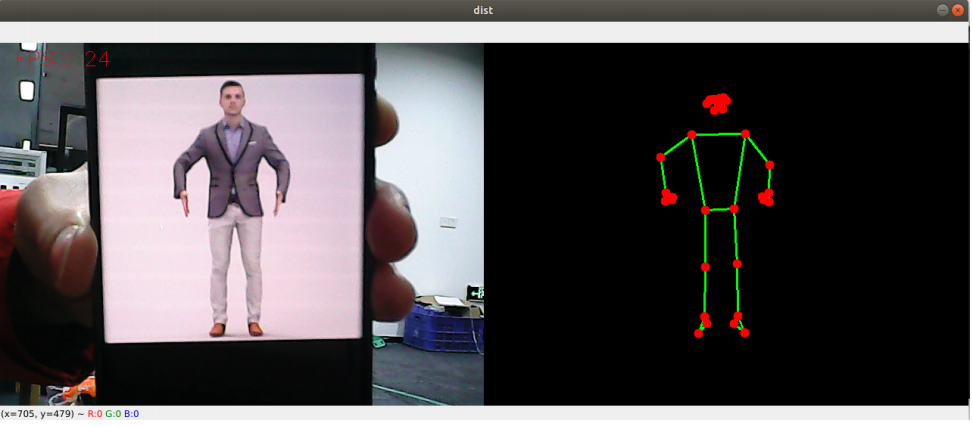
xxxxxxxxxxros2 run yahboomcar_mediapipe 02_PoseDetector
2.3.2, Source code
Source code location: ~/ascam_ros2_ws/src/yahboomcar_mediapipe/yahboomcar_mediapipe/02_PoseDetector.py
x#!/usr/bin/env python3# encoding: utf-8import rclpyfrom rclpy.node import Nodefrom sensor_msgs.msg import Imagefrom geometry_msgs.msg import Pointfrom yahboomcar_msgs.msg import PointArrayimport mediapipe as mpimport cv2 as cvimport numpy as npimport timefrom cv_bridge import CvBridgeprint("import done")class PoseDetector(Node): def __init__(self, name, mode=False, smooth=True, detectionCon=0.5, trackCon=0.5): super().__init__(name) self.mpPose = mp.solutions.pose self.mpDraw = mp.solutions.drawing_utils self.pose = self.mpPose.Pose( static_image_mode=mode, smooth_landmarks=smooth, min_detection_confidence=detectionCon, min_tracking_confidence=trackCon) # Create publisher to publish pose points self.pub_point = self.create_publisher(PointArray, '/mediapipe/points', 1000) # Initialize CvBridge to convert ROS Image messages to OpenCV format self.bridge = CvBridge() # Create subscription to the image topic self.create_subscription(Image, '/ascamera_hp60c/camera_publisher/rgb0/image', self.image_callback, 10) self.lmDrawSpec = mp.solutions.drawing_utils.DrawingSpec(color=(0, 0, 255), thickness=-1, circle_radius=6) self.drawSpec = mp.solutions.drawing_utils.DrawingSpec(color=(0, 255, 0), thickness=2, circle_radius=2) # FPS variables self.pTime = 0 self.exit_flag = False # Flag to indicate exit condition def image_callback(self, msg): # Convert ROS Image message to OpenCV format frame = self.bridge.imgmsg_to_cv2(msg, desired_encoding='bgr8') # Process the frame for pose detection frame, img = self.pubPosePoint(frame, draw=False) # Calculate FPS cTime = time.time() fps = 1 / (cTime - self.pTime) self.pTime = cTime text = "FPS : " + str(int(fps)) # Display FPS on frame cv.putText(frame, text, (20, 30), cv.FONT_HERSHEY_SIMPLEX, 0.9, (0, 0, 255), 1) # Combine the frames (original and pose detection result) dist = self.frame_combine(frame, img) # Show the combined image cv.imshow('Pose Detection', dist) # Exit the program if 'q' is pressed if cv.waitKey(1) & 0xFF == ord('q'): self.exit_flag = True def pubPosePoint(self, frame, draw=True): pointArray = PointArray() img = np.zeros(frame.shape, np.uint8) img_RGB = cv.cvtColor(frame, cv.COLOR_BGR2RGB) self.results = self.pose.process(img_RGB) if self.results.pose_landmarks: if draw: self.mpDraw.draw_landmarks(frame, self.results.pose_landmarks, self.mpPose.POSE_CONNECTIONS, self.lmDrawSpec, self.drawSpec) self.mpDraw.draw_landmarks(img, self.results.pose_landmarks, self.mpPose.POSE_CONNECTIONS, self.lmDrawSpec, self.drawSpec) for id, lm in enumerate(self.results.pose_landmarks.landmark): point = Point() point.x, point.y, point.z = lm.x, lm.y, lm.z pointArray.points.append(point) self.pub_point.publish(pointArray) return frame, img def frame_combine(self, frame, src): if len(frame.shape) == 3: frameH, frameW = frame.shape[:2] srcH, srcW = src.shape[:2] dst = np.zeros((max(frameH, srcH), frameW + srcW, 3), np.uint8) dst[:, :frameW] = frame[:, :] dst[:, frameW:] = src[:, :] else: src = cv.cvtColor(src, cv.COLOR_BGR2GRAY) frameH, frameW = frame.shape[:2] imgH, imgW = src.shape[:2] dst = np.zeros((frameH, frameW + imgW), np.uint8) dst[:, :frameW] = frame[:, :] dst[:, frameW:] = src[:, :] return dst def run(self): # Custom loop for handling ROS 2 callback and OpenCV events while rclpy.ok() and not self.exit_flag: rclpy.spin_once(self) # Process one callback if self.exit_flag: break cv.destroyAllWindows()def main(): print("start it") rclpy.init() pose_detector = PoseDetector('pose_detector') try: pose_detector.run() except KeyboardInterrupt: pass finally: pose_detector.destroy_node() rclpy.shutdown()if __name__ == '__main__': main()