Welcome to ROSMASTER A1 repository
4.Calibrate front wheel servo
Calibrate the Car's Front Wheel Servo
Note: Due to structural issues, the ROSMASTER-A1 robot's front wheel servo may not face completely forward when initialized by the expansion board. This program can be used to set the servo's median value.
1. Run the Program
First, set up the robot and set the appropriate angle so that the front wheels face forward.
Start VNC remotely to the robot, open a terminal, and enter
xxxxxxxxxxpython3 ~/Rosmaster/rosmaster/calibrate_akm_angle.py
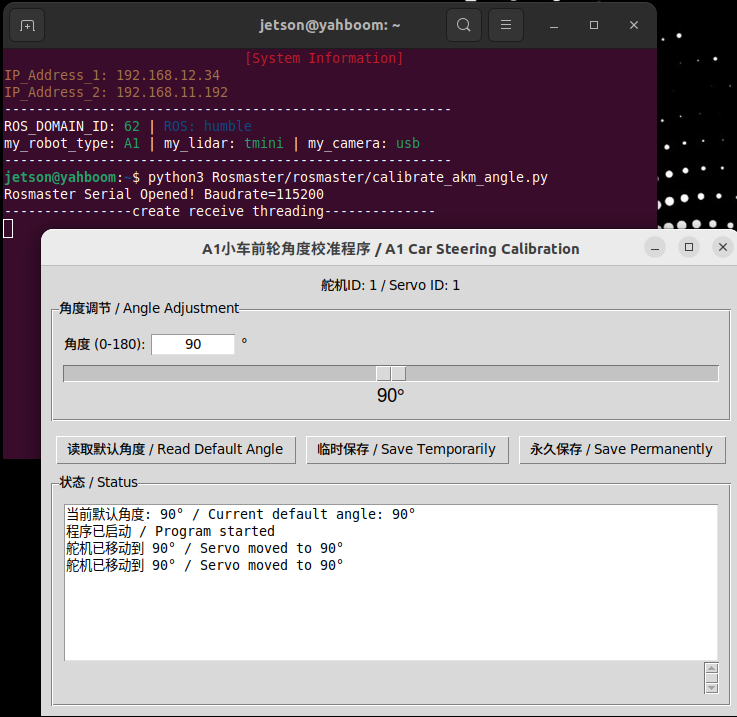
Instructions:
- Median value range: angle=[60, 120]. Values outside this range cannot be written!
- Read Default Angle: Gets the current default servo neutral angle of the ROS expansion board.
- Temporary Save: Temporarily takes effect. The next time the ROS expansion board is powered on or reset, the servo neutral angle will be restored.
- Permanent Save: Permanently takes effect. The servo neutral value is written to the ROS expansion board's FLASH memory and is saved even after a power failure.