Welcome to ROSMASTER A1 repository
6.URDF Model
URDF Model
This lesson uses the Raspberry Pi as an example. For Raspberry Pi and Jetson-Nano boards, you need to open a terminal on the host computer and enter the command to enter the Docker container. Once inside the Docker container, enter the commands mentioned in this lesson in the terminal. For instructions on entering the Docker container from the host computer, refer to [01.Robot Configuration and Operation Guide] -- [5.Enter Docker (For JETSON Nano and RPi 5)]. For Orin and RDK boards, simply open the terminal and enter the commands mentioned in this lesson.
1. Program Function Description
After the program starts, it will display the vehicle's URDF model file in rviz. There will also be a GUI debugging tool window; by sliding the progress bar, you can animate the model file.
2. Program Code Reference Path
For the Raspberry Pi 5 and jetson nano controller, you must first enter the Docker container. For the Orin and RDK controller, this is not necessary.
Entering the Docker container (see [Docker Course] --- [4. Docker Startup Script] for steps).
All the following instructions require the Docker terminal to be in the same Docker container before execution.(see [Docker Course] --- [3. Docker Commit and Multi-Terminal Entry] for steps.)
The source code for this function is located at
~/yahboomcar_ros2_ws/yahboomcar_ws/src/yahboomcar_description/launch/display_A1.launch.py
3. Program Launch
Enter the terminal:
xxxxxxxxxxros2 launch yahboomcar_description display_A1.launch.py
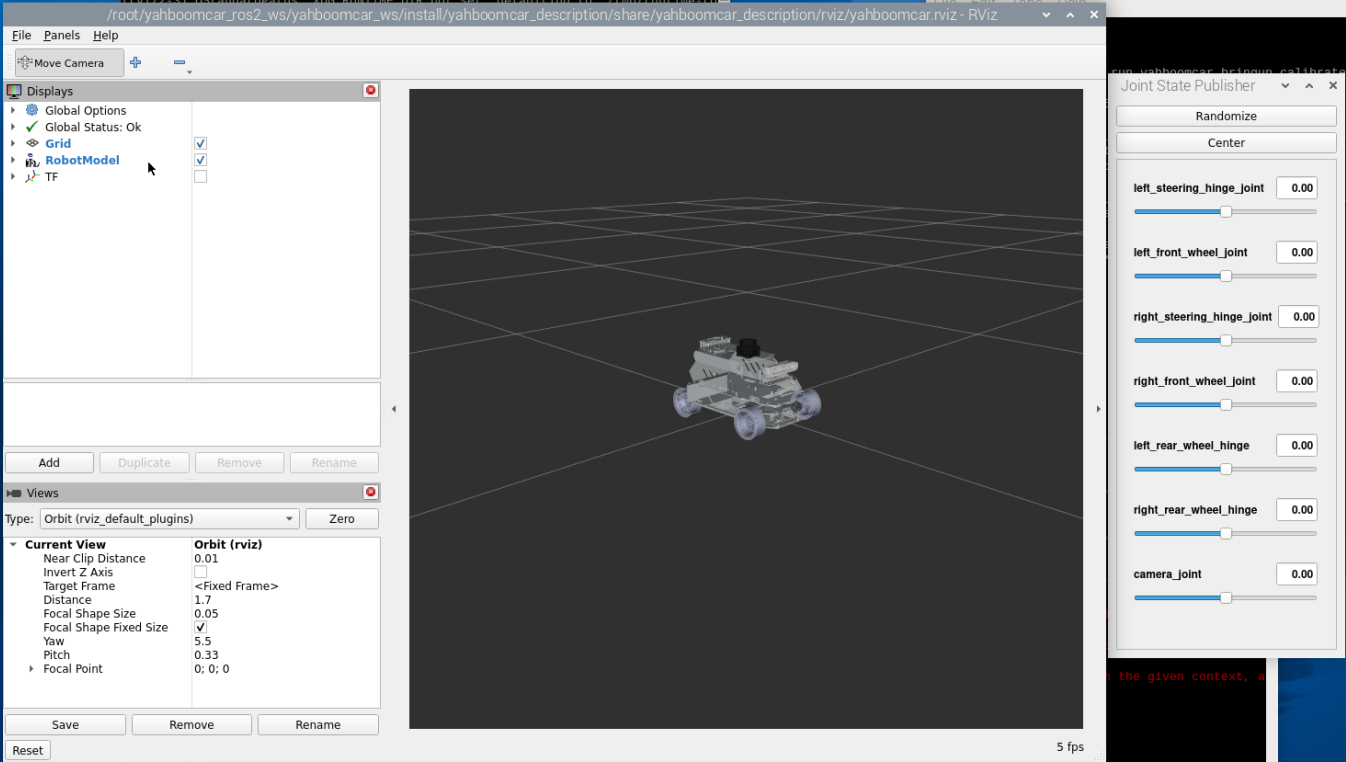
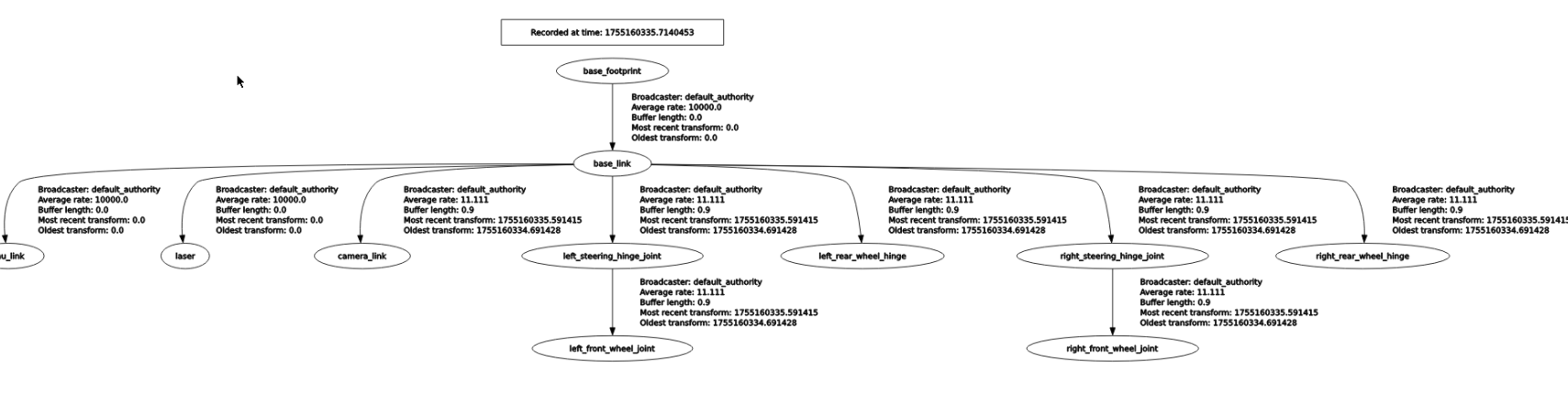
You can view the TF tree by typing in the Docker terminal:
xxxxxxxxxxros2 run rqt_tf_tree rqt_tf_tree
4. URDF Introduction
URDF, short for Unified Robot Description Format, is a file that describes a robot model using XML format, similar to the D-H parameter.
xxxxxxxxxx <robot name="yahboomcar_A1" xmlns:xacro="http://ros.org/wiki/xacro">The first line is mandatory and contains the XML version information.
The second line describes the current robot name; all information about the current robot is contained within the [robot] tag.
4.1 Components
- Links, which can be imagined as a human arm
- Joints, which can be imagined as a human elbow
Relationship between links and joints: Two links are connected by a joint, just like an arm with a forearm (link) and an upper arm (link) connected by an elbow joint (joint).
4.1.1 Links
1) Introduction
In the URDF descriptive language, links are used to describe physical properties.
- Describes visual display, labels.
- Describes collision properties, labels.
- Describes physical inertia, labels are not commonly used.
Links can also describe link size, color, shape, inertial matrix, collision parameters, and other properties. Each link becomes a coordinate system.
2) Sample Code(yahboomcar_A1.urdf.xacro)
xxxxxxxxxx<link name="imu_link"/> <link name="base_link"> <inertial> <origin xyz="-0.015746541514953 -3.81194310309278E-06 0.0445016032560171" rpy="0 0 0" /> <mass value="1.07553948051665" /> <inertia ixx="0.00172418331028207" ixy="-2.35223116839001E-07" ixz="8.3813050960105E-05" iyy="0.00329378069831256" iyz="-2.25863771079264E-07" izz="0.00445732461717744" /> </inertial> <visual> <origin xyz="0 0 0" rpy="0 0 0" /> <geometry> <mesh filename="package://yahboomcar_description/meshes/A1Ackermann/base_link.STL" /> </geometry> <material name=""> <color rgba="0.898039215686275 0.917647058823529 0.929411764705882 1" /> </material> </visual> <collision> <origin xyz="0 0 0" rpy="0 0 0" /> <geometry> <mesh filename="package://yahboomcar_description/meshes/A1Ackermann/base_link.STL" /> </geometry> </collision> </link> <link3) Tag Introduction
origin
Describes the pose information; the xyz attribute describes the coordinate position in the larger environment, and the rpy attribute describes the pose of the object.
mess
Describes the quality of the link.
inertia
For the inertial reference frame, due to the symmetry of the rotational inertia matrix, only the six upper triangular elements ixx, ixy, ixz, iyy, iyz, and izz are required as attributes.
geometry
The tag describes the shape; the mesh attribute is primarily used to load texture files, and the filename attribute specifies the file path of the texture.
material
The tag describes the material; the name attribute is required and can be left blank or repeated. The rgba attribute in the color tag describes the red, green, blue, and transparency values, separated by spaces. The color range is [0-1].
4.1.2 Joints
1) Introduction
Describes the relationship between two joints, their position and velocity constraints, and their kinematic and dynamic properties.
Joint types:
- Fixed: A fixed joint. Does not allow motion and acts as a connection.
- Continuous: A revolute joint. Allows continuous rotation with no rotation angle limit.
- Revolute: A revolute joint. Similar to a continuous joint, but with rotation angle limits.
- Prismatic: A sliding joint. Moves along a specific axis with position constraints.
- Floating: A floating joint. Has six degrees of freedom (3T3R).
- Planar: A planar joint. Allows translation or rotation orthogonal to a plane.
2) Sample Code(yahboomcar_A1.urdf.xacro)
xxxxxxxxxx<joint name="front_right_joint" type="continuous"> <origin xyz="0.08 -0.0845 -0.0389" rpy="-1.5703 0 3.14159"/> <parent link="base_link"/> <child link="front_right_wheel"/> <axis xyz="0 0 1" rpy="0 0 0"/> <limit effort="100" velocity="1"/></joint>The name attribute in the [joint] tag is a required field and uniquely describes the joint name.
The type attribute in the [joint] tag corresponds to one of the six joint types.
3) Tag Introduction
origin
This subtag specifies the relative position of the rotational joint to the parent's coordinate system.
parent, child
The parent and child subtags represent the two links to be connected; the parent is the reference, and the child rotates around the parent.
axis
This subtag specifies the axis (x, y, z) around which the child's corresponding link rotates and the amount of rotation around the fixed axis.
limit
This subtag primarily restricts the child. The lower and upper attributes limit the rotational range, the effort attribute limits the force applied during the rotation (positive or negative values in Newtons, or N), and the velocity attribute limits the rotational velocity in meters per second, or m/s.
mimic
This subtag describes the relationship between this joint and existing joints.
safety_controller
Describes the parameters of the safety controller. It protects the motion of the robot joints.