Welcome to ROSMASTER A1 repository
5. Pixel Operation
5.OpenCV pixel operations
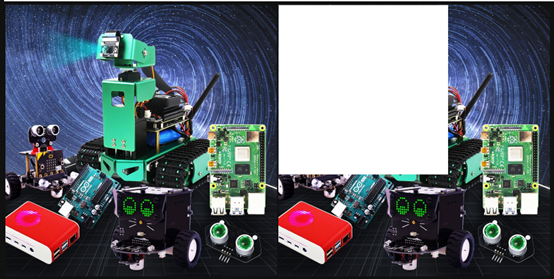
Pixel operations allow us to change the color of any pixel at any position. Here we first read the image and then assign an area to white.
Code path:
xxxxxxxxxxopencv/opencv_basic/01_Getting_Started_with_OpenCV/04_OpenCV pixel operation.ipynb
The main code is as follows:
xxxxxxxxxximport cv2img = cv2.imread('yahboom.jpg',1)(b,g,r) = img[100,100]print(b,g,r)# bgr#10 100 --- 110 100i=j=0for j in range(1,500):img[i,j] = (255,255,255)for i in range(1,500):img[i,j] = (255,255,255)# cv2.imshow('image',img)# cv2.waitKey(0) #1000 ms
xxxxxxxxxx#bgr8 to jpeg formatimport enumimport cv2def bgr8_to_jpeg(value, quality=75):return bytes(cv2.imencode('.jpg', value)[1])
JupyterLab displays the before and after image comparison:
xxxxxxxxxximport ipywidgets.widgets as widgetsimage_widget1 = widgets.Image(format='jpg', )image_widget2 = widgets.Image(format='jpg', )# create a horizontal box container to place the image widget next to 、each otherimage_container = widgets.HBox([image_widget1, image_widget2])# display the container in this cell's outputdisplay(image_container)img1 = cv2.imread('yahboom.jpg',1)image_widget1.value = bgr8_to_jpeg(img1) #originalimage_widget2.value = bgr8_to_jpeg(img) #After pixel operation
After the code block is run, you can see that some of the pixels in the second image have turned into white pixels.