Welcome to ROSMASTER A1 repository
1.QR code
1.QR code
1.1 Introduction to QR Codes
QR codes are a type of two-dimensional barcode. QR stands for "Quick Response," meaning quick response. Its creators hoped that QR codes would allow their content to be quickly decoded. QR codes not only offer large information capacity, high reliability, and low cost, but can also represent various textual information, including Chinese characters and images. They offer strong security and anti-counterfeiting features and are extremely convenient to use. Most importantly, QR code technology is open source.
1.2 Structure of QR Codes
| Image | Analysis |
|---|---|
 | Positioning markings indicate the orientation of the QR code. |
 | Alignment markings: These additional elements aid in positioning when the QR code is large. |
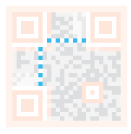 | Timing pattern: These lines allow the scanner to identify the size of the matrix. |
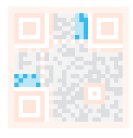 | Version information: This specifies the version of the QR code being used. Currently, there are 40 different versions of QR codes. Versions used in the point-of-sale industry are typically 1-7. |
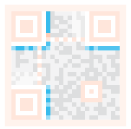 | Format information: The format pattern contains information about error tolerance and data masking patterns, making scanning the code easier. |
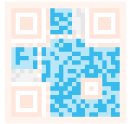 | Data and error correction keys: These patterns store the actual data. |
 | Quiet zone: This area is crucial for the scanner; it serves to separate itself from its surroundings. |
1.2.1 QR Code Characteristics
QR code data values contain repeated information (redundant values). Therefore, even if up to 30% of the QR code structure is corrupted, the code's readability is not affected. QR codes have storage space of up to 7089 bits or 4296 characters, including punctuation and special characters, which can be encoded. In addition to numbers and characters, words and phrases (such as URLs) can also be encoded. As more data is added to the QR code, the code size increases and the code structure becomes more complex.
1.2.2 QR Code Creation and Recognition
For PI5/JETSON NANO controllers, you need to enter a Docker container first; for RDK X5 and Orin motherboards, this is not required.
Source code path: ~/yahboomcar_ros2_ws/yahboomcar_ws/src/yahboomcar_vision
Installation
python3 -m pip install qrcode pyzbarsudo apt-get install libzbar-dev
create
Create a qrcode object
xxxxxxxxxx ''' 参数含义 \ Parameter meaning: version:值为1~40的整数,控制二维码的大小(最小值是1,是个12×12的矩阵)。 \ An integer between 1 and 40 that controls the size of the QR code (the minimum value is 1, which is a 12×12 matrix). 如果想让程序自动确定,将值设置为 None 并使用 fit 参数即可。 \ If you want the program to determine this automatically, set the value to None and use the fit parameter. error_correction:控制二维码的错误纠正功能。可取值下列4个常量。 \ Controls the error correction function of the QR code. It can take the following four constants. ERROR_CORRECT_L:大约7%或更少的错误能被纠正。 \ About 7% or less of the errors can be corrected. ERROR_CORRECT_M(默认 \ default):大约15%或更少的错误能被纠正。 \About 15% or less of the errors can be corrected. ROR_CORRECT_H:大约30%或更少的错误能被纠正。 \ About 30% or less of the errors can be corrected. box_size:控制二维码中每个小格子包含的像素数。 \ Controls the number of pixels contained in each small grid in the QR code. border:控制边框(二维码与图片边界的距离)包含的格子数(默认为4,是相关标准规定的最小值) \ Controls the number of grids contained in the border (the distance between the QR code and the image border) (the default is 4, which is the minimum value specified by the relevant standards) ''' qr = qrcode.QRCode( version=1, error_correction=qrcode.constants.ERROR_CORRECT_H, box_size=10, border=4)Add logo to qrcode
xxxxxxxxxx # If the logo address exists, add the logo image my_file = Path(logo_path) if my_file.is_file(): img = add_logo(img, logo_path)Note: When using Chinese characters, you must add Chinese characters
Launch the camera
xxxxxxxxxx#usb cameraros2 launch usb_cam camera.launch.py#nuwa cameraros2 launch ascamera hp60c.launch.pyCreate a QR code
xxxxxxxxxxros2 run yahboomcar_vision create_qrcode
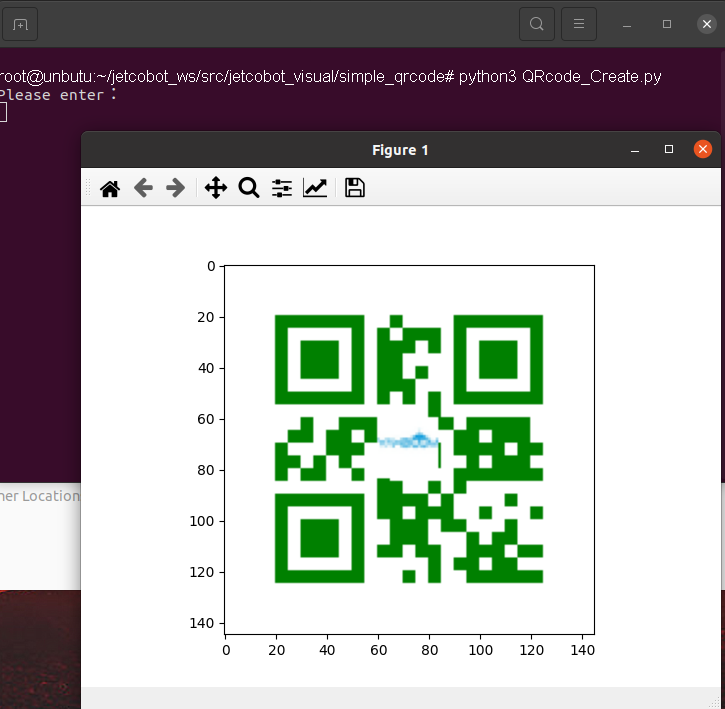
Recognition
xxxxxxxxxxdef decodeDisplay(image, font_path): gray = cv.cvtColor(image, cv.COLOR_BGR2GRAY) # You need to convert the output Chinese characters into Unicode encoding first barcodes = pyzbar.decode(gray) for barcode in barcodes: # Extract the position of the QR code's bounding box (x, y, w, h) = barcode.rect # Draw the bounding box of the barcode in the image cv.rectangle(image, (x, y), (x + w, y + h), (225, 0, 0), 5) encoding = 'UTF-8' # To draw it, you need to convert it into a string first barcodeData = barcode.data.decode(encoding) barcodeType = barcode.type # Plot data and types on the image pilimg = Image.fromarray(image) # Create a brush draw = ImageDraw.Draw(pilimg) # Parameter 1: font file path, parameter 2: font size fontStyle = ImageFont.truetype(font_path, size=12, encoding=encoding) # Parameter 1: Print coordinates, Parameter 2: Text, Parameter 3: Font color, Parameter 4: Font draw.text((x, y - 25), str(barcode.data, encoding), fill=(255, 0, 0), font=fontStyle) # PIL image to cv2 image image = cv.cvtColor(np.array(pilimg), cv.COLOR_RGB2BGR) # Print barcode data and barcode type to the terminal print("[INFO] Found {} barcode: {}".format(barcodeType, barcodeData)) return imageEffect Demonstration
xxxxxxxxxxros2 run yahboomcar_vision parse_qrcode