Welcome to ROSMASTER A1 repository
2.Deep pseudo-color image
Deep pseudo-color image
This lesson uses the Raspberry Pi 5 as an example. For Raspberry Pi and Jetson Nano boards, you need to open a terminal on the host computer and enter the command to enter the Docker container. Once inside the Docker container, enter the commands mentioned in this lesson in the terminal. For instructions on entering the Docker container from the host computer, refer to [01. Robot Configuration and Operation Guide] -- [5.Enter Docker (For JETSON Nano and RPi 5)].
For Orin and RDKX5 boards, simply open a terminal and enter the commands mentioned in this lesson.
1. Program Functionality
Upon startup, the program converts the subscribed black-and-white depth image into a pseudo-color image, displaying varying shades of color based on the depth information.
2. Program Code Reference Path
xxxxxxxxxx~/yahboomcar_ros2_ws/yahboomcar_ws/src/yahboomcar_depth/yahboomcar_depth/Basic/depth_to_color.py
- depth_to_color.py
This function converts depth data into a pseudo-color image by subscribing to depth image information.
3. Program Startup
For PI5/JETSON NANO controllers, you need to enter a Docker container first; for RDK X5 and Orin boards, this is not required.
Entering the Docker container (see the Docker course for steps: 4. Docker Startup Script).
All commands below must be executed within the same Docker container (see the Docker course for steps: 3. Docker Commit and Multi-Terminal Entry).
Terminal input:
xxxxxxxxxxros2 launch ascamera hp60c.launch.pyros2 run yahboomcar_depth depth_to_color
A successful startup will generate a window displaying a pseudo-color image, as shown in the figure below.
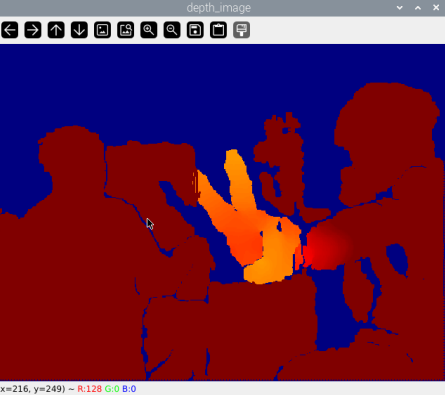
As can be seen from the actual distance, the difference in depth information is clearly reflected in the color.
4. Core Code
depth_to_color.py
This program has the following main functions:
- Subscribes to the original depth image topic
- Converts a single-channel (grayscale) depth image to a pseudo-color image (Jet color mapping)
- Displays the converted color depth image in real time in a window
Part of the core code is as follows.
xxxxxxxxxxdef topic(self, msg): # 将ROS图像消息转换为OpenCV格式 Convert ROS image messages to OpenCV format depth_image_orin = self.depth_bridge.imgmsg_to_cv2(msg, encoding[1]) # 深度图像处理: #Deep Image Processing: # 1. 调整深度值范围:使用convertScaleAbs缩放深度值 # 2. 应用伪彩色映射:使用COLORMAP_JET(蓝->绿->红) # 1. Adjust the depth range: Use convertScaleAbs to scale the depth values. # 2. Apply a pseudo-color map: Use COLORMAP_JET (blue->green->red) depth_to_color_image = cv.applyColorMap( cv.convertScaleAbs(depth_image_orin, alpha=0.45), cv.COLORMAP_JET ) # 显示处理后的图像 Display the processed image cv.imshow(self.window_name, depth_to_color_image) # 保持窗口更新(1ms延迟) Keep the window updated (1ms delay) cv.waitKey(1)