yahboom
HomeLearn
Solution
Blog
Online Store
About Us
EN/中文
Building:bit Superkit📖
0.First Trial Video
1.Assembly Course
  • 1.1Mobile shooter
  • 1.2Pretty car
  • 1.3Clip robot
  • 1.4Proficient carrier
  • 1.5Skip car
  • 1.6Freestyle
  • 1.7Spider
  • 1.8Lifting platform
  • 1.9Biped robot
  • 1.10Changing Face
  • 1.11Carousel
  • 1.12Oscillating fan
  • 1.13Airplane
  • 1.14Unicycle
  • 1.15Auto-door
  • 1.16Dragon knight
  • 1.17Ultrasonic handheld rangefinder
  • 1.18Small flying car obstacle avoidance
  • 1.19Changing face
  • 1.20Adjustable RGB light
  • 1.21Adjustable fan
  • 1.22Photosensitive emergency light
  • 1.23Smart alarm clock
  • 1.24Light-controlled bipedal robot
  • 1.25Swimming robot avoid objects
  • 1.26Fleeing spider
  • 1.27Temperature humidity reminder
  • 1.28Temperature-controlled fan
  • 1.29Color recognition machine
  • 1.30Color-recognizing automatic door
  • 1.31Rokcer color changing light
  • 1.32Rokcer transporter
2.Preparation before class
  • 2.1 About BBC microbit
  • 2.2 Super:bit expansion board
  • 2.3 MakeCode Graphical Programming Guide
  • 2.4 MakeCode graphical API
  • 2.5 Python Programming Guide
  • 2.6 Superbit MicroPython API
  • 2.7 Notes on charging and battery use
3.Basic modeling MakeCode course
0.Basic course
  • 1.Buzzer play music
  • 2.Control RGB color
  • 3.Control all RGB lights
  • 4.Drive 270°building block servo
  • 5.Drive 180° servo
  • 6.Drive motor
A.Mobile shooter
  • 1.Cannonball shooting
  • 2.Music fortress
  • 3.APP control
  • 4.Micro:bit handle control
  • 5.WiFi camera control
B.Pretty car
  • 1.Dancer
  • 2.APP control
  • 3.Micro:bit handle control
  • 4.WiFi camera control
C.Clip robot
  • 1.Dancing and singing
  • 2.Button control clip
  • 3.APP control
  • 4.Micro:bit handle control
  • 5.WiFi camera control
D.Proficient carrier
  • 1.Dancing
  • 2.Button control shovel
  • 3.Transportation
  • 4.APP control
  • 5.Micro:bit handle control
  • 6.WiFi camera control
E.Skip car
  • 1.Dance battle
  • 2.Button control skip car
  • 3.Powerful carrier
  • 4.APP control
  • 5.Micro:bit handle control
  • 6.WiFi camera control
F.Freestyle
  • 1.Dancing and singing
  • 2.Freestyle advance
  • 3.APP control
  • 4.Micro:bit handle control
G.Spider
  • 1.Spider advance
  • 2.The dancing spider
  • 3.APP control
  • 4.Micro:bit handle control
  • 5.WiFi camera control
H.Lifting platform
  • 1.Automatic Lift
  • 2.Button control platform
  • 3.APP control
  • 4.Micro:bit handle control
I.Biped robot
  • 1.Walking
  • 2.Dancing and singing
  • 3.APP control
  • 4.Micro:bit handle control
J.Changing Face
  • 1.Changing face
  • 2.Bite the hand crocodile
  • 3.APP control
  • 4.Micro:bit handle control
K.Carousel
  • 1.Music carousel
  • 2.APP control
  • 3.Micro:bit handle control
L.Oscillating fan
  • 1.Colorful windmill
  • 2.Summer cooling artifact
  • 3.APP control
  • 4.Micro:bit handle control
M.Airplane
  • 1.Sailing Prelude
  • 2.APP control
  • 3.Micro:bit handle control
N.Unicycle
  • 1.Clumsy reptile
  • 2.APP control
  • 3.Micro:bit handle control
O.Auto-door
  • 1.Soldiers on duty
  • 2.Music door
  • 3.APP control
  • 4.Micro:bit handle control
P.Dragon knight
  • 1.Waving wings
  • 2.APP control
  • 3.Microbit handle control
4.Basic modeling Python course
0.Basic course
  • 1.Buzzer play music
  • 2.Control RGB color
  • 3.Control all RGB lights
  • 4.Drive 270° building block servo
  • 5.Drive 180° servo
  • 6.Drive motor
  • 7.Drive stepper motor
A.Mobile shooter
  • 1.Cannonball shooting
  • 2.Music fortress
  • 3.Micro:bit handle control
B.Pretty car
  • 1.Dancer
  • 2.Micro:bit handle control
C.Clip robot
  • 1.Dancing and singing
  • 2.Button control clip
  • 3.Micro:bit handle control
D.Proficient carrier
  • 1.Dancing
  • 2.Button control shovel
  • 3.Transportation
  • 4.Micro:bit handle control
E.Skip car
  • 1.Dance battle
  • 2.Button control skip car
  • 3.Powerful carrier
  • 4.Microbit handle control
F.Freestyle
  • 1.Dancing and singing
  • 2.Freestyle advance
  • 3.Micro:bit handle control
G.Spider
  • 1.Spider advance
  • 2.The dancing spider
  • 3.Micro:bit handle control
H.Lifting platform
  • 1.Automatic Lift
  • 2.Button control platform
  • 3.Micro:bit handle control
I.Biped robot
  • 1.Walking
  • 2.Dancing and singing
  • 3.Micro:bit handle control
J.Changing Face
  • 1.Changing face
  • 2.Bite the hand crocodile
  • 3.Micro:bit handle control
K.Carousel
  • 1.Music carousel
  • 2.Micro:bit handle control
L.Oscillating fan
  • 1.Colorful windmill
  • 2.Summer cooling artifact
  • 3.Micro:bit handle control
M.Airplane
  • 1.Sailing Prelude
  • 2.Micro:bit handle control
N.Unicycle
  • 1.Clumsy reptile
  • 2.Micro:bit handle control
O.Auto-door
  • 1.Soldiers on duty
  • 2.Music door
  • 3.Microbit handle control
P.Dragon knight
  • 1.Waving wings
  • 2.Micro:bit handle control
5.Sensor Advanced MakeCode coursenew
3.Sensor expansion course
  • 3.1 Avoiding car
  • 3.2 Changing Face
  • 3.3 Adjustable fan
  • 3.4 Photosensitive robot
  • 3.5 Swimming robot
  • 3.6 Spiders sense human body
  • 3.7 Temperature control fan
  • 3.8 Automatic safety door
  • 3.9 Rocker carrier car
2.Sensor basic course
  • 2.1 Hand-held range finder
  • 2.2 Adjustable RGB light
  • 2.3 Emergency light
  • 2.4 Vibrating alarm clock
  • 2.5 Infrared detection broadcast
  • 2.6Human body infrared detection broadcast
  • 2.7 Temperature and humidity broadcaster
  • 2.8 Color recognition machine
  • 2.9 Rocker control light
1.Sensor principle
  • 1.1 About ultrasonic sensors
  • 1.2 Ultrasonic ranging
  • 1.3 About potentiometers
  • 1.4 Adjust potentiometer
  • 1.5 About photosensitive sensors
  • 1.6 Read the light intensity
  • 1.7 About infrared modules
  • 1.8 Obstacle detection
  • 1.9 Introduction of module
  • 1.10 Human body detection
  • 1.11 About temperature-humidity modules
  • 1.12 Read temperature humidity
  • 1.13 About color recognition sensors
  • 1.14 Color recognition
  • 1.15 About rocker module
  • 1.16 Control rocker
6.Sensor Advanced Python coursenew
1.Sensor principle
  • 1.1 About ultrasonic sensorsnew
  • 1.2 Ultrasonic rangingnew
  • 1.3 About potentiometersnew
  • 1.4 Adjust potentiometernew
  • 1.5 About photosensitive sensorsnew
  • 1.6 Read the light intensitynew
  • 1.7 About infrared modulesnew
  • 1.8 Obstacle detectionnew
  • 1.9 About human infrared sensing modulesnew
  • 1.10 Human body detectionnew
  • 1.11 About temperature-humidity modulesnew
  • 1.12 Read temperature humiditynew
  • 1.13 About color recognition sensorsnew
  • 1.14 Color recognitionnew
  • 1.15 About rocker modulenew
  • 1.16 Control rockernew
2.Sensor basic course
  • 2.1 Hand-held range findernew
  • 2.2 Adjustable RGB lightnew
  • 2.3 Emergency lightnew
  • 2.4 Vibrating alarm clocknew
  • 2.5 Infrared detection broadcastnew
  • 2.6 Human body infrared detection broadcastnew
  • 2.7 Temperature and humidity broadcasternew
  • 2.8 Color recognition machinenew
  • 2.9 Rocker control lightnew
3.Sensor expansion course
  • 3.1 Avoiding carnew
  • 3.2 Changing Facenew
  • 3.3 Adjustable fannew
  • 3.4 Photosensitive robotnew
  • 3.5 Swimming robotnew
  • 3.6 Spiders sense human bodynew
  • 3.7 Temperature control fannew
  • 3.8 Automatic safety doornew
  • 3.9 Rocker carriernew
Download
  • APP(iOS_Android)
  • Code_PythonLibrary
  • Hardware manual
  • Bluetooth communication protocol
  • Assembly Instructions Manual
  • Makecode offline software
Download ZIP

Welcome to Building:bit Superkit repository

1.5 About photosensitive sensors

About photosensitive sensors

1. Introduction to Photosensitive Sensor

The commonly used materials for making photosensors are cadmium sulfide, and there are also materials such as selenium, aluminum sulfide, lead sulfide and bismuth sulfide. Its working principle is based on the internal photoelectric effect. The stronger the light, the lower the resistance. As the light intensity increases, the resistance value decreases rapidly, and the bright resistance value can be as small as less than 1KΩ. Photoresistors are very sensitive to light. When there is no light, they are in a high-resistance state, and the dark resistance can generally reach 1.5MΩ. Because of its non-contact, fast response, and reliable performance, it occupies a very important position in automatic control and non-electrical electronic technology.


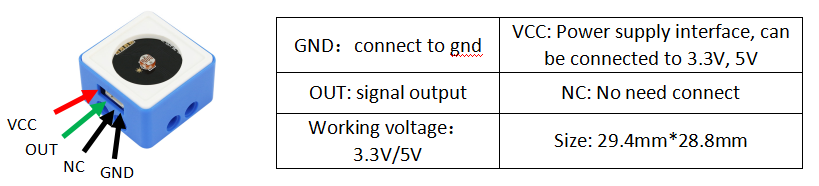
2. Sensor parameters
1667458812691833

Adjust potentiometer
Read the light intensity

COMPANY

  • About us
  • Team Style
  • Blog

LEARNING & EXPLORATION

  • Tutorials
  • Edge AI hardware
  • Educational robots
  • Embedded intelligent hardware

WHERE TO BUY

  • Yahboom Online Store
  • Amazon
  • Alibaba
  • AliExpress
  • Mercado

TECHNOLOGY SUPPORT

  • Email: support@yahboom.com

BE A DISTRIBUTOR

  • Email: sales@yahboom.com
QR Code
QR Code

Copyright © 2017-2026 Yahboom. All Rights Reserved.

EN/中文