yahboom
HomeLearn
Solution
Blog
Online Store
About Us
EN/中文
Building:bit Superkit📖
0.First Trial Video
1.Assembly Course
  • 1.1Mobile shooter
  • 1.2Pretty car
  • 1.3Clip robot
  • 1.4Proficient carrier
  • 1.5Skip car
  • 1.6Freestyle
  • 1.7Spider
  • 1.8Lifting platform
  • 1.9Biped robot
  • 1.10Changing Face
  • 1.11Carousel
  • 1.12Oscillating fan
  • 1.13Airplane
  • 1.14Unicycle
  • 1.15Auto-door
  • 1.16Dragon knight
  • 1.17Ultrasonic handheld rangefinder
  • 1.18Small flying car obstacle avoidance
  • 1.19Changing face
  • 1.20Adjustable RGB light
  • 1.21Adjustable fan
  • 1.22Photosensitive emergency light
  • 1.23Smart alarm clock
  • 1.24Light-controlled bipedal robot
  • 1.25Swimming robot avoid objects
  • 1.26Fleeing spider
  • 1.27Temperature humidity reminder
  • 1.28Temperature-controlled fan
  • 1.29Color recognition machine
  • 1.30Color-recognizing automatic door
  • 1.31Rokcer color changing light
  • 1.32Rokcer transporter
2.Preparation before class
  • 2.1 About BBC microbit
  • 2.2 Super:bit expansion board
  • 2.3 MakeCode Graphical Programming Guide
  • 2.4 MakeCode graphical API
  • 2.5 Python Programming Guide
  • 2.6 Superbit MicroPython API
  • 2.7 Notes on charging and battery use
3.Basic modeling MakeCode course
0.Basic course
  • 1.Buzzer play music
  • 2.Control RGB color
  • 3.Control all RGB lights
  • 4.Drive 270°building block servo
  • 5.Drive 180° servo
  • 6.Drive motor
A.Mobile shooter
  • 1.Cannonball shooting
  • 2.Music fortress
  • 3.APP control
  • 4.Micro:bit handle control
  • 5.WiFi camera control
B.Pretty car
  • 1.Dancer
  • 2.APP control
  • 3.Micro:bit handle control
  • 4.WiFi camera control
C.Clip robot
  • 1.Dancing and singing
  • 2.Button control clip
  • 3.APP control
  • 4.Micro:bit handle control
  • 5.WiFi camera control
D.Proficient carrier
  • 1.Dancing
  • 2.Button control shovel
  • 3.Transportation
  • 4.APP control
  • 5.Micro:bit handle control
  • 6.WiFi camera control
E.Skip car
  • 1.Dance battle
  • 2.Button control skip car
  • 3.Powerful carrier
  • 4.APP control
  • 5.Micro:bit handle control
  • 6.WiFi camera control
F.Freestyle
  • 1.Dancing and singing
  • 2.Freestyle advance
  • 3.APP control
  • 4.Micro:bit handle control
G.Spider
  • 1.Spider advance
  • 2.The dancing spider
  • 3.APP control
  • 4.Micro:bit handle control
  • 5.WiFi camera control
H.Lifting platform
  • 1.Automatic Lift
  • 2.Button control platform
  • 3.APP control
  • 4.Micro:bit handle control
I.Biped robot
  • 1.Walking
  • 2.Dancing and singing
  • 3.APP control
  • 4.Micro:bit handle control
J.Changing Face
  • 1.Changing face
  • 2.Bite the hand crocodile
  • 3.APP control
  • 4.Micro:bit handle control
K.Carousel
  • 1.Music carousel
  • 2.APP control
  • 3.Micro:bit handle control
L.Oscillating fan
  • 1.Colorful windmill
  • 2.Summer cooling artifact
  • 3.APP control
  • 4.Micro:bit handle control
M.Airplane
  • 1.Sailing Prelude
  • 2.APP control
  • 3.Micro:bit handle control
N.Unicycle
  • 1.Clumsy reptile
  • 2.APP control
  • 3.Micro:bit handle control
O.Auto-door
  • 1.Soldiers on duty
  • 2.Music door
  • 3.APP control
  • 4.Micro:bit handle control
P.Dragon knight
  • 1.Waving wings
  • 2.APP control
  • 3.Microbit handle control
4.Basic modeling Python course
0.Basic course
  • 1.Buzzer play music
  • 2.Control RGB color
  • 3.Control all RGB lights
  • 4.Drive 270° building block servo
  • 5.Drive 180° servo
  • 6.Drive motor
  • 7.Drive stepper motor
A.Mobile shooter
  • 1.Cannonball shooting
  • 2.Music fortress
  • 3.Micro:bit handle control
B.Pretty car
  • 1.Dancer
  • 2.Micro:bit handle control
C.Clip robot
  • 1.Dancing and singing
  • 2.Button control clip
  • 3.Micro:bit handle control
D.Proficient carrier
  • 1.Dancing
  • 2.Button control shovel
  • 3.Transportation
  • 4.Micro:bit handle control
E.Skip car
  • 1.Dance battle
  • 2.Button control skip car
  • 3.Powerful carrier
  • 4.Microbit handle control
F.Freestyle
  • 1.Dancing and singing
  • 2.Freestyle advance
  • 3.Micro:bit handle control
G.Spider
  • 1.Spider advance
  • 2.The dancing spider
  • 3.Micro:bit handle control
H.Lifting platform
  • 1.Automatic Lift
  • 2.Button control platform
  • 3.Micro:bit handle control
I.Biped robot
  • 1.Walking
  • 2.Dancing and singing
  • 3.Micro:bit handle control
J.Changing Face
  • 1.Changing face
  • 2.Bite the hand crocodile
  • 3.Micro:bit handle control
K.Carousel
  • 1.Music carousel
  • 2.Micro:bit handle control
L.Oscillating fan
  • 1.Colorful windmill
  • 2.Summer cooling artifact
  • 3.Micro:bit handle control
M.Airplane
  • 1.Sailing Prelude
  • 2.Micro:bit handle control
N.Unicycle
  • 1.Clumsy reptile
  • 2.Micro:bit handle control
O.Auto-door
  • 1.Soldiers on duty
  • 2.Music door
  • 3.Microbit handle control
P.Dragon knight
  • 1.Waving wings
  • 2.Micro:bit handle control
5.Sensor Advanced MakeCode coursenew
3.Sensor expansion course
  • 3.1 Avoiding car
  • 3.2 Changing Face
  • 3.3 Adjustable fan
  • 3.4 Photosensitive robot
  • 3.5 Swimming robot
  • 3.6 Spiders sense human body
  • 3.7 Temperature control fan
  • 3.8 Automatic safety door
  • 3.9 Rocker carrier car
2.Sensor basic course
  • 2.1 Hand-held range finder
  • 2.2 Adjustable RGB light
  • 2.3 Emergency light
  • 2.4 Vibrating alarm clock
  • 2.5 Infrared detection broadcast
  • 2.6Human body infrared detection broadcast
  • 2.7 Temperature and humidity broadcaster
  • 2.8 Color recognition machine
  • 2.9 Rocker control light
1.Sensor principle
  • 1.1 About ultrasonic sensors
  • 1.2 Ultrasonic ranging
  • 1.3 About potentiometers
  • 1.4 Adjust potentiometer
  • 1.5 About photosensitive sensors
  • 1.6 Read the light intensity
  • 1.7 About infrared modules
  • 1.8 Obstacle detection
  • 1.9 Introduction of module
  • 1.10 Human body detection
  • 1.11 About temperature-humidity modules
  • 1.12 Read temperature humidity
  • 1.13 About color recognition sensors
  • 1.14 Color recognition
  • 1.15 About rocker module
  • 1.16 Control rocker
6.Sensor Advanced Python coursenew
1.Sensor principle
  • 1.1 About ultrasonic sensorsnew
  • 1.2 Ultrasonic rangingnew
  • 1.3 About potentiometersnew
  • 1.4 Adjust potentiometernew
  • 1.5 About photosensitive sensorsnew
  • 1.6 Read the light intensitynew
  • 1.7 About infrared modulesnew
  • 1.8 Obstacle detectionnew
  • 1.9 About human infrared sensing modulesnew
  • 1.10 Human body detectionnew
  • 1.11 About temperature-humidity modulesnew
  • 1.12 Read temperature humiditynew
  • 1.13 About color recognition sensorsnew
  • 1.14 Color recognitionnew
  • 1.15 About rocker modulenew
  • 1.16 Control rockernew
2.Sensor basic course
  • 2.1 Hand-held range findernew
  • 2.2 Adjustable RGB lightnew
  • 2.3 Emergency lightnew
  • 2.4 Vibrating alarm clocknew
  • 2.5 Infrared detection broadcastnew
  • 2.6 Human body infrared detection broadcastnew
  • 2.7 Temperature and humidity broadcasternew
  • 2.8 Color recognition machinenew
  • 2.9 Rocker control lightnew
3.Sensor expansion course
  • 3.1 Avoiding carnew
  • 3.2 Changing Facenew
  • 3.3 Adjustable fannew
  • 3.4 Photosensitive robotnew
  • 3.5 Swimming robotnew
  • 3.6 Spiders sense human bodynew
  • 3.7 Temperature control fannew
  • 3.8 Automatic safety doornew
  • 3.9 Rocker carriernew
Download
  • APP(iOS_Android)
  • Code_PythonLibrary
  • Hardware manual
  • Bluetooth communication protocol
  • Assembly Instructions Manual
  • Makecode offline software
Download ZIP

Welcome to Building:bit Superkit repository

1.Changing face

Changing face

Changing face1. Learning Objectives2. Building Blocks3. Motor Wiring4. Code analysis5. Write and download the program6. Experimental phenomenon

1. Learning Objectives

In this course, we mainly learn how to use Python programming to make the Face Changing King building blocks realize the gameplay of "face changing in one second".

2. Building Blocks

For the building block construction steps, please refer to the installation drawings of [Assembly course]-[Changing face] or the building block installation album in the materials.

3. Motor Wiring

Insert the building block servo wiring into the Super:bit expansion board S1 interface, and the servo orange wiring into the yellow pin of S1.

As shown in the figure below:
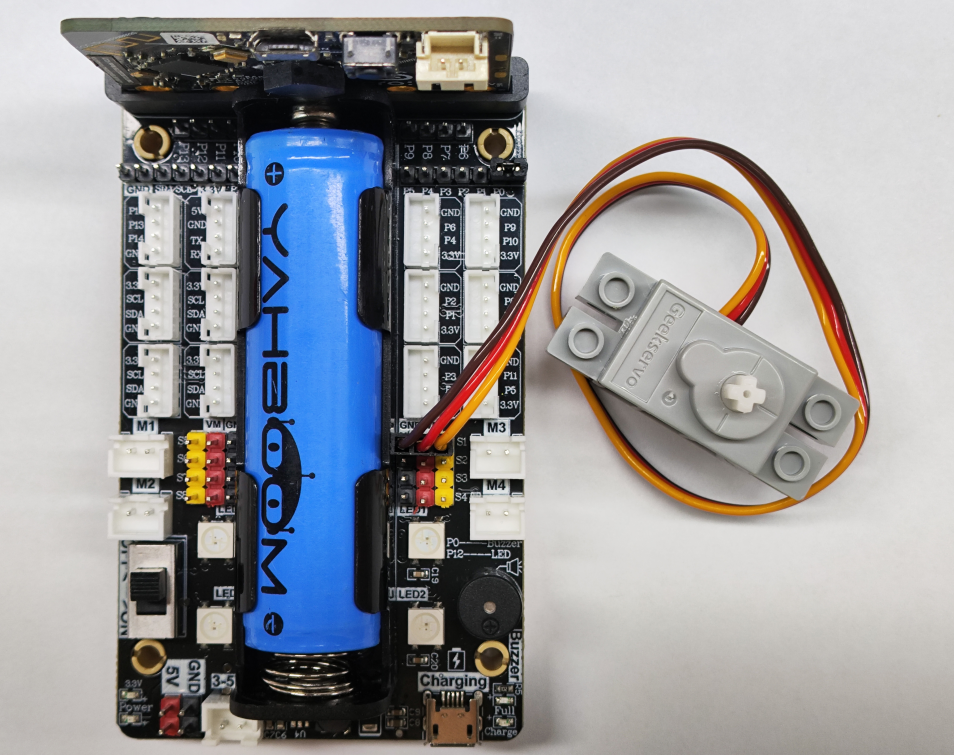
image-20250607163959305

! Notes:

When taking the course related to the building block servo for the first time, we need to remove the white building blocks installed on the servo and upload the program of this course to the micro:bit; then turn on the power switch of the Super:bit expansion board and wait for the building block servo to turn to the initial position; then, we can turn off the power, adjust the mask of the face-changing king to the closed state, as shown in the figure below, and then install the building blocks. (If you have used the program related to the face-changing king and the servo before, you can skip this step)
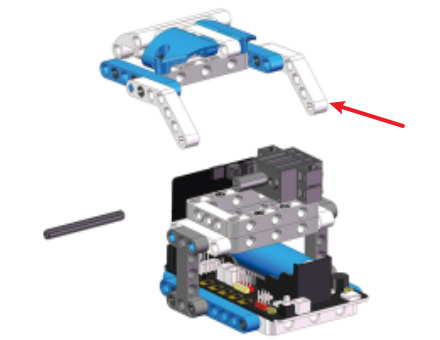
image-20250607094947210

4. Code analysis

For the program of this course, please see the Changing face.py file.

from microbit import *
import superbit
import microbit
import random

First, import the libraries needed for this lesson from microbit: the superbit library is dedicated to the superbit expansion board; the random library is dedicated to generating random numbers;

xxxxxxxxxx
superbit.servo270(superbit.S1, 50)
microbit.sleep(500)
superbit.servo270(superbit.S1, 140)
display.scroll("Go!")

superbit.servo270(superbit.S1, 50): Initialize the building block servo to rotate to 50°;

microbit.sleep(500): Delay 00 milliseconds;

superbit.servo270(superbit.S1, 140): Initialize the building block servo to rotate to 140°;

display.scroll("Go!"): Scroll the string Go! on the dot matrix;

xxxxxxxxxx
def Face_show():
global a
a = random.randint(1, 7)
if a == 1:
display.show(Image.HAPPY)
...

a = random.randint(1, 7): Randomly output 1~6. Here, please note the function random.randint(a, b). The output random number is a~(b-1).

Define a function to randomly display different patterns.

xxxxxxxxxx
while True:
superbit.servo270(superbit.S1, 50)
microbit.sleep(200)
Face_show()
microbit.sleep(200)
superbit.servo270(superbit.S1, 140)
microbit.sleep(1000)

Infinite loop, the servo turns to 50° (the face-changing mask is closed), and after a delay of 200 milliseconds, the random display pattern function Face_show() is called. After another delay of 200 milliseconds, the servo turns to 140° (the face-changing mask is open), and we can see that the pattern on the dot matrix has changed randomly.

5. Write and download the program

  1. Open the Mu software and enter the code in the editing window. Note! All English and symbols should be entered in English mode, use the Tab key (tab key) for indentation, and the last line ends with a blank program.
  2. Click the thumb 'Check' button to check if there are any errors in our code. If a cursor or underline appears in a line, it means a syntax error. Please check and modify it. If there is no error, the lower left corner will prompt that there is no problem with the detection.
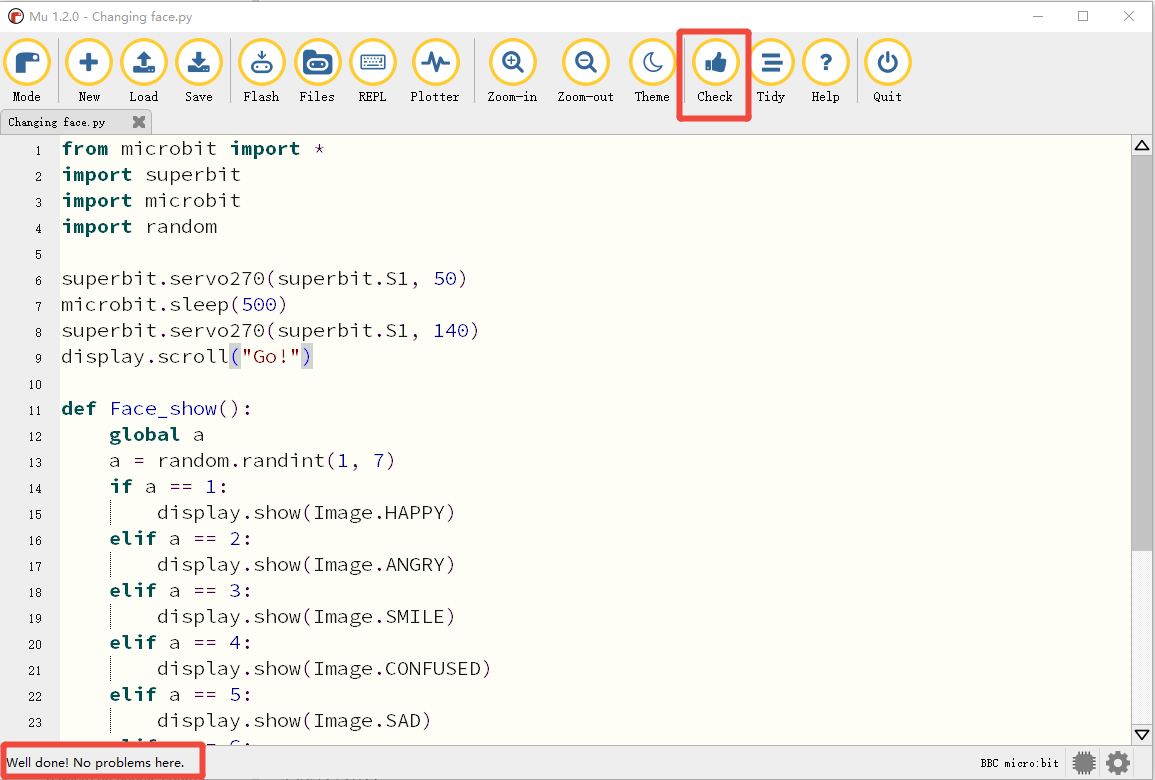
image-20250616213555929

  1. Click the 'REPL' button to check if the Superbit library has been downloaded. If not, please refer to [Preparation before class] --> [2.4 Python Programming Guide].
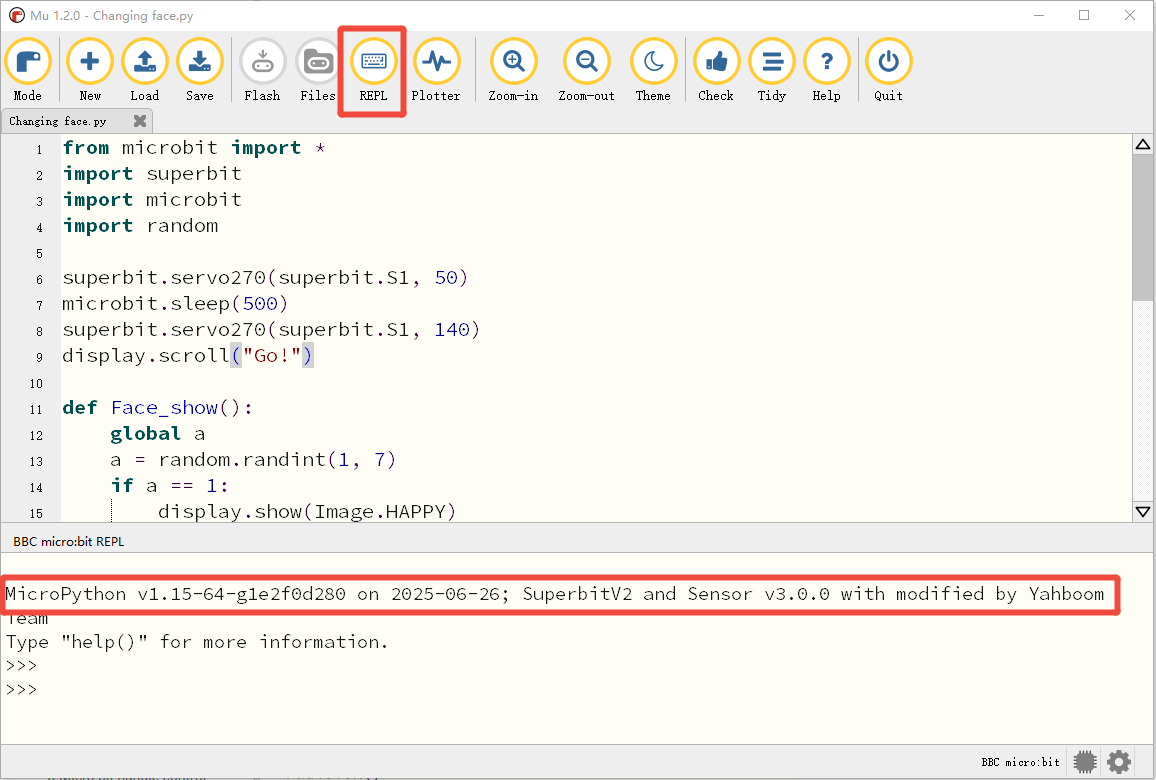
image-20250616213637497

  1. After the program is written, connect the computer and the microbit mainboard with a microUSB data cable. Please click the 'Flash' button to download the program to the micro:bit mainboard. (You need to click the 'REPL' button again to turn off the import library file function before you can download the program normally).
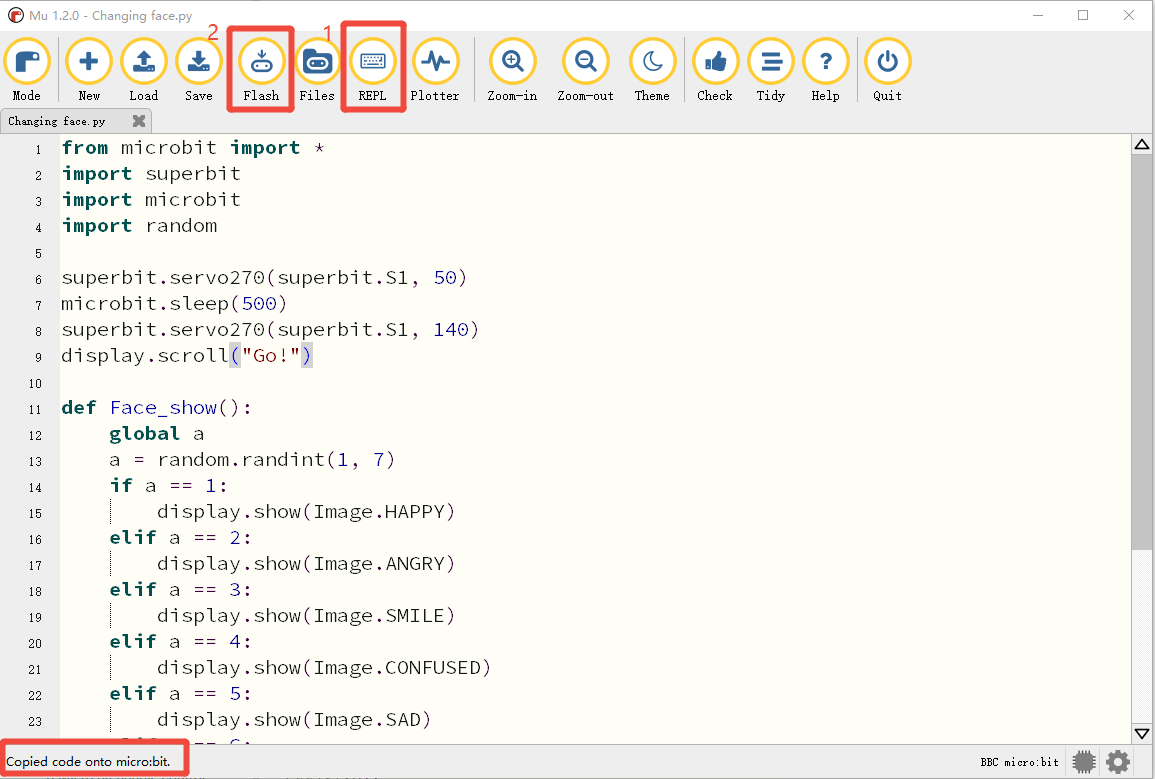
image-20250616213730022

  1. If the download fails, please confirm whether the microbit is properly connected to the computer via the microUSB data cable and the Superbit Python library has been imported.

6. Experimental phenomenon

After the program is successfully downloaded, turn on the power switch, the servo will initialize to 50° (the face-changing mask is closed), and after 500 milliseconds, the servo will rotate to 140° (the face-changing mask is open), and "GO!" will be displayed on the dot matrix. Then it will start to change faces randomly and keep looping in this state.

Six patterns are written in this program. You can modify the program to add more patterns.

Micro:bit handle control
Bite the hand crocodile

COMPANY

  • About us
  • Team Style
  • Blog

LEARNING & EXPLORATION

  • Tutorials
  • Edge AI hardware
  • Educational robots
  • Embedded intelligent hardware

WHERE TO BUY

  • Yahboom Online Store
  • Amazon
  • Alibaba
  • AliExpress
  • Mercado

TECHNOLOGY SUPPORT

  • Email: support@yahboom.com

BE A DISTRIBUTOR

  • Email: sales@yahboom.com
QR Code
QR Code

Copyright © 2017-2026 Yahboom. All Rights Reserved.

EN/中文