Welcome to MicroROS-Pi5 repository
当製品の日本語版マニュアル資料は、こちらからご取得ください。
1. Hand detection
Hand detection
1、Introduction
MediaPipe is an open source data stream processing machine learning application development framework developed by Google. It is a graph-based data processing pipeline for building and using multiple forms of data sources, such as video, audio, sensor data, and any time series data. MediaPipe is cross-platform and can run on embedded platforms (Raspberry Pi, etc.), mobile devices (iOS and Android), workstations and servers, and supports mobile GPU acceleration.
MediaPipe provides cross-platform, customizable ML solutions for real-time and streaming media. The core framework of MediaPipe is implemented in C++ and provides support for languages such as Java and Objective C. The main concepts of MediaPipe include Packet, Stream, Calculator, Graph and Subgraph.
Features of MediaPipe:
End-to-end acceleration: Built-in fast ML inference and processing accelerates even on commodity hardware.
Build once, deploy anywhere: Unified solutions for Android, iOS, desktop/cloud, web and IoT.
Ready-to-use solutions: Cutting-edge ML solutions that showcase the full capabilities of the framework.
Free and open source: frameworks and solutions under Apache2.0, fully extensible and customizable.
2、MediaPipe Hands
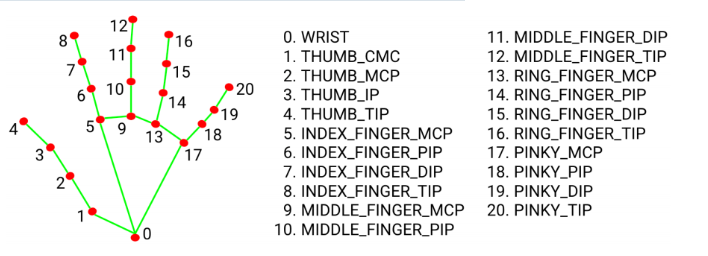 MediaPipe Hands is a type of high fidelity case tracking and resolution system. It uses machine learning (ML) to infer 21 3D coordinates from frames.
After palm detection of the entire image, precise key point localization of 21 3D joint coordinates within the detected region is performed through regression based on a part labeling model, i.e. direct coordinate prediction. This model learns the internal pose table of the human body, and is even robust to partially observable human body and self occlusion.
In order to obtain real-world data, 21 3D coordinates were used to dynamically annotate approximately 30K real-world images, as shown below (obtaining Z values from the image depth map, if each corresponding coordinate has a Z value). In order to better cover possible body postures and provide additional supervision on the properties of the body, a high-quality synthetic body model was drawn in various backgrounds and mapped to the corresponding 3D coordinates.
3、2 Hand detection
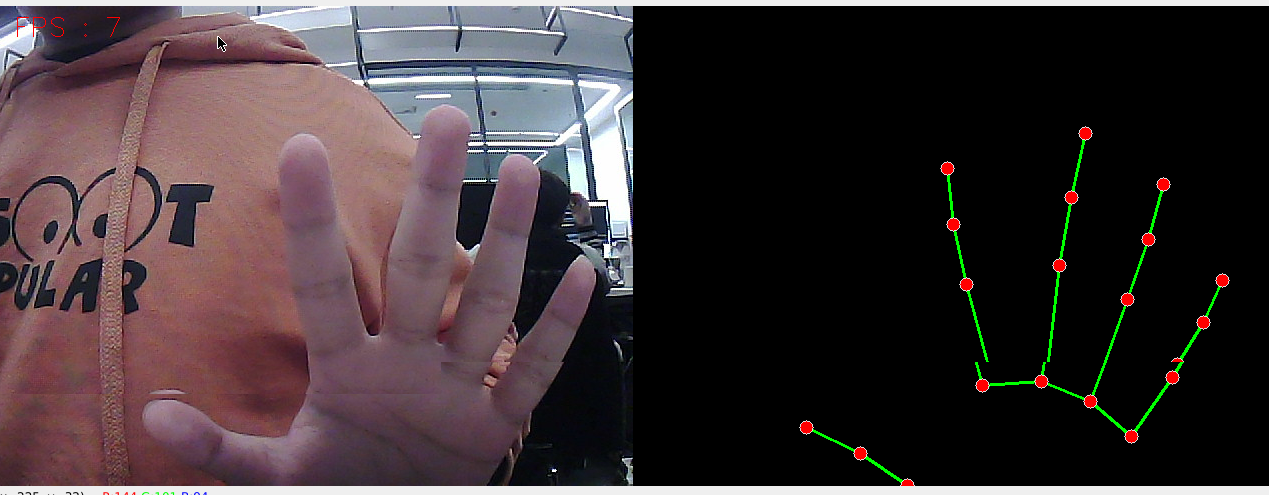
3.1、Start
After entering the docker container, enter in the terminal.
ros2 run yahboomcar_mediapipe 01_HandDetector
3.2、Code analysis
After entering the docker container, the location of the source code of this function is as follows
xxxxxxxxxx/root/yahboomcar_ws/src/yahboomcar_mediapipe/yahboomcar_mediapipe/01_HandDetector.py
x
#!/usr/bin/env python3# encoding: utf-8import rospyimport timeimport cv2 as cvimport numpy as npimport mediapipe as mpfrom geometry_msgs.msg import Pointfrom yahboomcar_msgs.msg import PointArray
class HandDetector: def __init__(self, mode=False, maxHands=2, detectorCon=0.5, trackCon=0.5): self.mpHand = mp.solutions.hands self.mpDraw = mp.solutions.drawing_utils self.hands = self.mpHand.Hands( static_image_mode=mode, max_num_hands=maxHands, min_detection_confidence=detectorCon, min_tracking_confidence=trackCon ) self.pub_point = rospy.Publisher('/mediapipe/points', PointArray, queue_size=1000) self.lmDrawSpec = mp.solutions.drawing_utils.DrawingSpec(color=(0, 0, 255), thickness=-1, circle_radius=6) self.drawSpec = mp.solutions.drawing_utils.DrawingSpec(color=(0, 255, 0), thickness=2, circle_radius=2)
def pubHandsPoint(self, frame, draw=True): pointArray = PointArray() img = np.zeros(frame.shape, np.uint8) img_RGB = cv.cvtColor(frame, cv.COLOR_BGR2RGB) self.results = self.hands.process(img_RGB) if self.results.multi_hand_landmarks: ''' draw_landmarks():Draw landmarks and connections on the image. image: A three-channel RGB image represented as a numpy ndarray. landmark_list: Raw message of a list of normalized landmarks to be annotated on the image. connections: A list of placemark index tuples specifying how to connect placemarks in the drawing. landmark_drawing_spec: Lets you specify drawing settings for a placemark, such as color, line weight, and circle radius. connection_drawing_spec: Lets you specify the connection's drawing settings, such as color and line thickness. ''' for i in range(len(self.results.multi_hand_landmarks)): if draw: self.mpDraw.draw_landmarks(frame, self.results.multi_hand_landmarks[i], self.mpHand.HAND_CONNECTIONS, self.lmDrawSpec, self.drawSpec) self.mpDraw.draw_landmarks(img, self.results.multi_hand_landmarks[i], self.mpHand.HAND_CONNECTIONS, self.lmDrawSpec, self.drawSpec) for id, lm in enumerate(self.results.multi_hand_landmarks[i].landmark): point = Point() point.x, point.y, point.z = lm.x, lm.y, lm.z pointArray.points.append(point) self.pub_point.publish(pointArray) return frame, img
def frame_combine(slef,frame, src): if len(frame.shape) == 3: frameH, frameW = frame.shape[:2] srcH, srcW = src.shape[:2] dst = np.zeros((max(frameH, srcH), frameW + srcW, 3), np.uint8) dst[:, :frameW] = frame[:, :] dst[:, frameW:] = src[:, :] else: src = cv.cvtColor(src, cv.COLOR_BGR2GRAY) frameH, frameW = frame.shape[:2] imgH, imgW = src.shape[:2] dst = np.zeros((frameH, frameW + imgW), np.uint8) dst[:, :frameW] = frame[:, :] dst[:, frameW:] = src[:, :] return dst
if __name__ == '__main__': rospy.init_node('handDetector', anonymous=True) capture = cv.VideoCapture(4) capture.set(6, cv.VideoWriter.fourcc('M', 'J', 'P', 'G')) capture.set(cv.CAP_PROP_FRAME_WIDTH, 640) capture.set(cv.CAP_PROP_FRAME_HEIGHT, 480) print("capture get FPS : ", capture.get(cv.CAP_PROP_FPS)) pTime = cTime = 0 hand_detector = HandDetector(maxHands=2) while capture.isOpened(): ret, frame = capture.read() # frame = cv.flip(frame, 1) frame, img = hand_detector.pubHandsPoint(frame, draw=False) if cv.waitKey(1) & 0xFF == ord('q'): break cTime = time.time() fps = 1 / (cTime - pTime) pTime = cTime text = "FPS : " + str(int(fps)) cv.putText(frame, text, (20, 30), cv.FONT_HERSHEY_SIMPLEX, 0.9, (0, 0, 255), 1) dist = hand_detector.frame_combine(frame, img) cv.imshow('dist', dist) #cv.imshow('frame', frame) # cv.imshow('img', img) capture.release() cv.destroyAllWindows()