Welcome to RDK X5 Board repository
8.Google-Gemma3-Vision-Multimodal-Model
Gemma3
Gemma31. Model Scale2. Performance3. Using Gemma33.1 Running Gemma33.2 Having a Conversation3.3 Vision Capabilities3.4 Ending the Conversation3.5 Chinese ConversationReferences
Note: The RDK X5 4GB version needs to run a small parameter version due to performance limitations.
Gemma is a family of lightweight models built by Google from the same research and technology used to create the Gemini models. The Gemma 3 model is a multimodal model (can process text and images) and has a 128K context window, supporting over 140 languages.
1. Model Scale
| Model | Size |
|---|---|
| gemma3:1b | 815MB |
| gemma3:4b | 3.3GB |
2. Performance
3. Using Gemma3
3.1 Running Gemma3
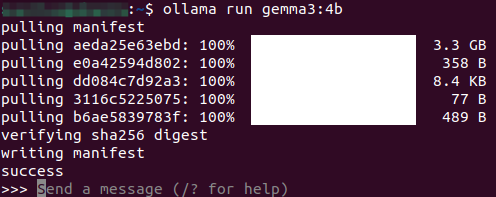
Use the run command to start the model. If you have not downloaded this model before, it will be automatically pulled from the Ollama model library:
ollama run gemma3:4b
3.2 Having a Conversation
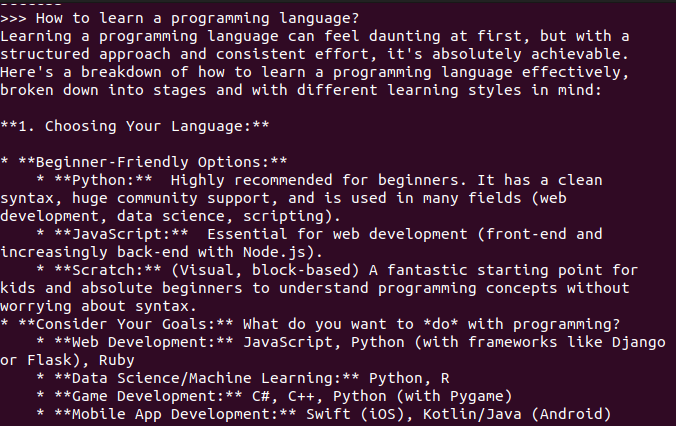
xxxxxxxxxxHow to learn a programming language?
The response time depends on the hardware configuration, please be patient!
3.3 Vision Capabilities

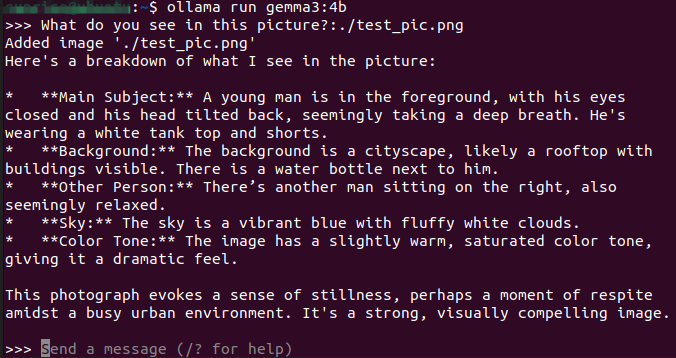
xxxxxxxxxxWhat do you see in this picture? :./test_pic.png#In a conversation, use ": + the path to the image" to enable the model's vision capabilities and have it analyze the information in the picture.
3.4 Ending the Conversation
Use the Ctrl+d shortcut or /bye to end the conversation!
3.5 Chinese Conversation
If you don't have a Chinese input method, you can refer to the tutorial on switching Chinese input methods.
Chinese conversation:

References
Ollama
Official Website: https://ollama.com/
GitHub: https://github.com/ollama/ollama
Gemma3
Ollama Corresponding Model: https://ollama.com/library/gemma3