Welcome to RDK X5 Robot repository
6.Buzzer sound
Buzzer sound
Buzzer sound6.1. Experimental goal6.2. Experimental preparation6.3, Program source code6.4, Experimental operation and phenomenon
6.1. Experimental goal
Control the buzzer switch on the expansion board, and the whistle time is 100 milliseconds, 300 milliseconds, 1 second, etc.
6.2. Experimental preparation
The red box in the picture is the buzzer on the expansion board.
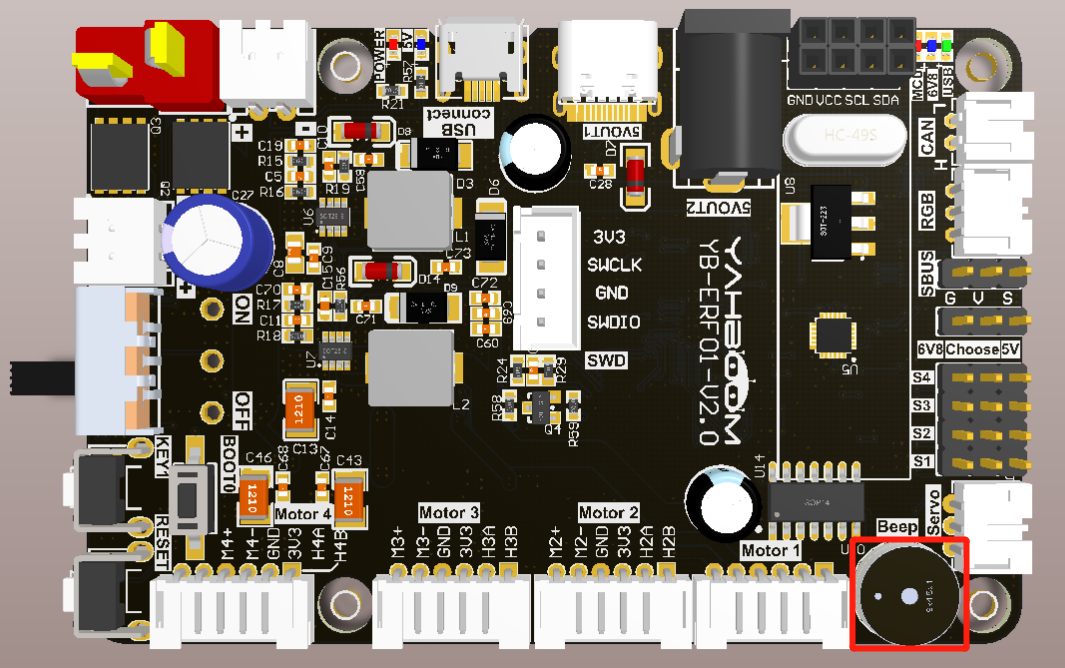
The buzzer on the expansion board is an active buzzer, so it is relatively simple to control. Please check the following function.
SunriseRobotLib library function required to control the buzzer:
xxxxxxxxxxset_beep(on_time)Parameter explanation: on_time=0: off, on_time=1: keep ringing, on_time>=10: automatically turn off after ringing for xx milliseconds (on_time is a multiple of 10).
Return value: None.
6.3, Program source code
Turn on the robot, and open the robot system or the browser of the remote computer to enter the Jupyter lab editor.
Reference code path: /home/sunrise/sunriseRobot/Samples/1_Basic/3_beep.ipynb
6.4, Experimental operation and phenomenon
Open jupyterlab, find the corresponding program source code, please close other running source code files first.
Click the run button in order, run each cell, and you can hear the buzzer sounding effect.