yahboom
HomeLearn
Solution
Blog
Online Store
About Us
EN/中文
RDK X5 Robot📖
01. RDK-X5-Robot Introduction
  • 1.Introduction
  • 2.Common Problem Analysis
  • 3.Battery and charger usage precautions
  • 4.TF card expand capacity
02. Assembly Tutorial
  • Assembly Tutorial
  • Assembly Video-1
  • Assembly Video-2
  • Assembly Video-3
  • Assembly Video-4
03. Remote Control Course
  • 1.Mobile APP remote control
  • 2.USB Wireless Controller Remote Control
04. ROS Driver Board Course
  • 1. Introduction of extension board
  • 2. Set up STM32 development environment
  • 3. Key control buzzer sound
  • 4. FreeRTOS application
  • 5. Serial communication
  • 6. SBUS model remote control
  • 7. CAN bus communication
  • 8. RGB color light strip
  • 9. Timer interrupt control PWM servo
  • 10. Control serial steering gear
  • 11. Nine-axis attitude sensor to obtain data
  • 12. Control motor forward and reverse
  • 13. The timer captures encoder data
  • 14. Theory of robot kinematics analysis
  • 15. PID control robot motion
05. Basic Control Course
  • 1.Update expansion board firmware
  • 2.Install Python driver library
  • 3.Set the car type
  • 4.Open and close APP program control
  • 5.Turn hotspot mode on and off
  • 6.Buzzer sound
  • 7.Control the motor to rotate forward and reverse
  • 8.Controlling robot movement
  • 9.OLED display
  • 10.Control fans and lighting effects
06. Development Environment
  • 1. Virtual machine installation and use
  • 2. Linux Basics
  • 3. Remote connection
  • 4. Multi-machine communication configuration
  • 5. Bind device ID
  • 6. Image installation and backup
07. ROS2 Basic Course
  • 1. Introduction to ROS2
  • 2. ROS2 install Humble
  • 3. ROS2 development environment
  • 4. ROS2 workspace
  • 5. ROS2 function package
  • 6. ROS2 node
  • 7. ROS2 topic communication
  • 8. ROS2 service communication
  • 9. ROS2 action communication
  • 10. ROS2 custom interface message
  • 11. ROS2 parameter service case
  • 12. ROS2 meta-function package
  • 13. ROS2 distributed communication
  • 14. ROS2 DDS
  • 15. ROS2 time related API
  • 16. ROS2 common command tools
  • 17. ROS2 rviz2 use
  • 18. ROS2 rqt toolbox
  • 19. ROS2 Launch startup file configuration
  • 20. ROS2 recording and playback tool
  • 21. ROS2 URDF model
  • 22. ROS2 Gazebo simulation platform
  • 23. ROS2 TF2 coordinate transformation
08. Robot Chassis Control Course
  • 1. PID algorithm theory
  • 2. Robot information release
  • 3. Robot control
  • 4. Robot state estimation
  • 5. Robot calibration
  • 6. Robot trajectory tracking
  • 7. URDF Model
09. LiDAR Course
  • 1. Introduction and use of lidar
  • 2. Lidar obstacle avoidance
  • 3. Lidar tracking
  • 4. Lidar guard
  • 5. Lidar patrol
  • 6. gmapping mapping algorithm
  • 7. Cartographer mapping algorithm
  • 8. Navigation and obstacle avoidance
  • 9. App Mapping and Navigation
10. OpenCV Course
  • 1. Getting started with OpenCV
  • 2. OpenCV geometric transformation
  • 3. OpenCV Image Processing
  • 4. OpenCV image beautification
  • 5. QR code creation and recognition
11. Mipi Camera Course
  • 1. Camera driver
  • 2. Adjust the color HSV value
  • 3. Color recognition
  • 4. Color Tracking
  • 5. Color Follow
  • 6. QR code instructions
  • 7. Face Detection
  • 8. Object Detection
  • 9. Visual line patrol-OpenCV
  • 10. Visual line patrol-deep learning
  • 11. Human body tracking
  • 12. Gesture control
12. Depth Camera Course
  • 1. Use of Depth Camera
  • 2. Camera intrinsic calibration
  • 3. ROS+OpenCV Basics
  • 4. AR Vision
  • 5. Color Tracking
  • 6. Object Tracking
  • 7. RTAB-Map 3D Mapping Navigation
13. Multi-robot Synchronous Control
  • Multi-vehicle synchronous control
Remote login control
  • 1. VNC and SSH remote login
  • 2. Jupyter lab login and case code running
Download
  • System_File
  • Code
  • VM_File
  • Software_Tools
  • Hardware_Info
  • Firmware
  • Instruction_Manual
  • ROS2_Basic_VM
Download ZIP

Welcome to RDK X5 Robot repository

8. Object Detection

Object Detection

Object Detection1. Program Function Description2. FCOS3. YOLO4. MobileNet_SSD5. EfficientNet_Det

1. Program Function Description

RDK X5 provides multiple target detection algorithm models. After the program is started, MIPI cameras can be used to detect objects.

You can view the recognition results in the PC browser.

Note: This case needs to be run as root user, and administrator privileges are required to call the MIPI camera!

Switch to root user

xxxxxxxxxx
su root

Password: yahboom

2. FCOS

FCOS is an open source Onnx model from Horizon, trained using the COCO dataset, and supports 80 types of target detection, including people, animals, fruits, and vehicles.

Application scenarios: FCOS was released in 2019 and is a single-stage target detection algorithm that can realize pedestrian detection, vehicle detection and other functions. It is mainly used in autonomous driving, smart home and other fields.

After SSH connects to the car, run the terminal,

ros2 launch dnn_node_example dnn_node_example.launch.py dnn_example_config_file:=config/fcosworkconfig.json dnn_example_image_width:=480 dnn_example_image_height:=272

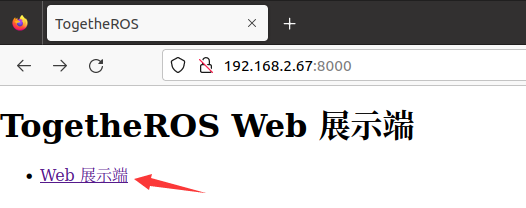
Open the browser on the PC (note that the computer and RDK X5 network must be in the same LAN), enter the URL: car IP: 8000, for example, my car IP is 192.168.2.67, enter the URL in the browser of the virtual machine,

xxxxxxxxxx
192.168.2.67:8000

1684978780956

Click to enter the Web display terminal, the display screen is as follows,
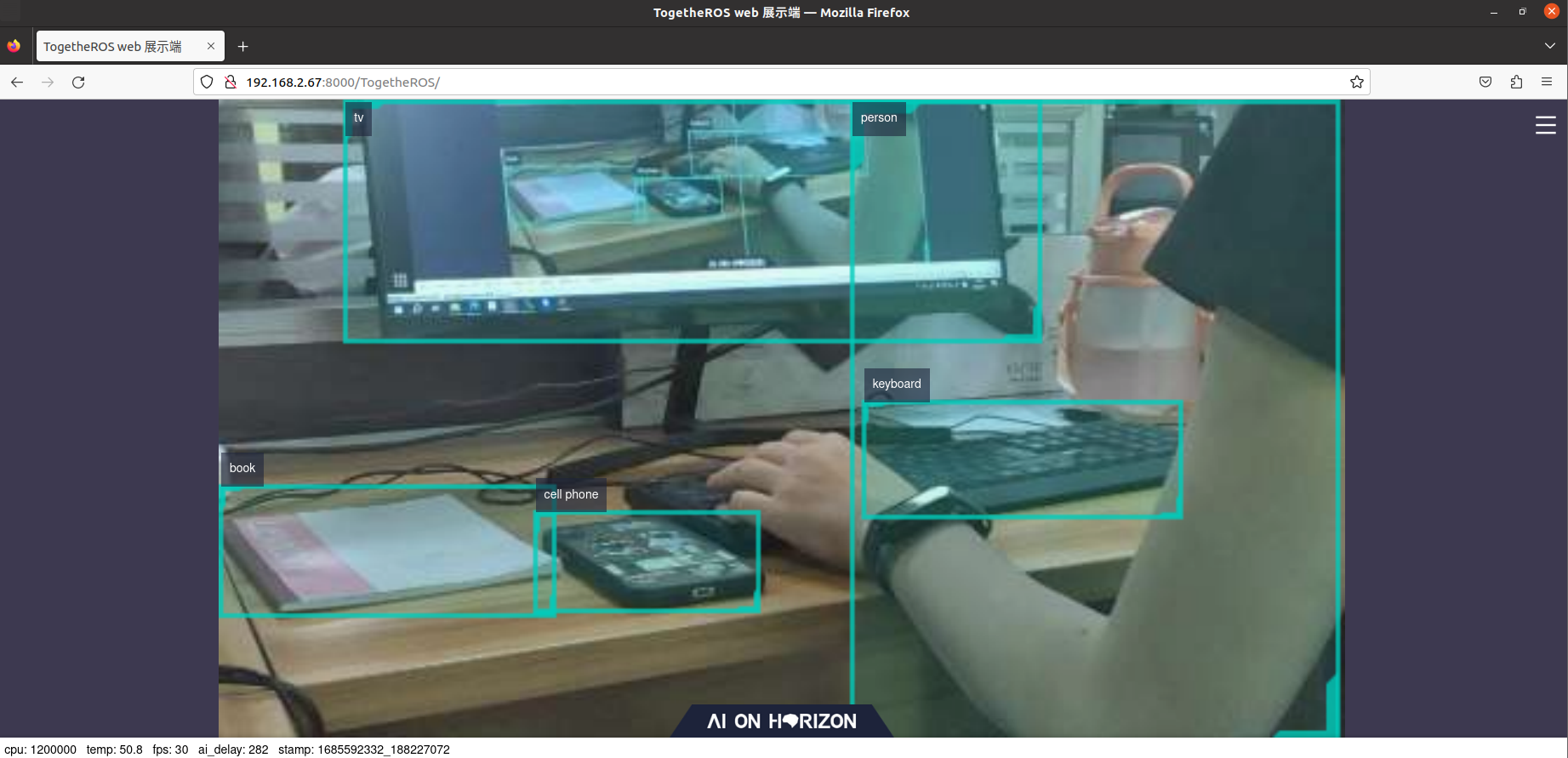
1685592376479

3. YOLO

The YOLO target detection algorithm example uses images as input, uses BPU for algorithm reasoning, and publishes the algorithm msg containing the target category and detection box. Currently supports three versions of yolov2, yolov3, and yolov5. The model is trained using the COCO dataset and supports 80 types of target detection, including people, animals, fruits, vehicles, etc.

Application scenarios: As a representative algorithm in single-stage target detection, the YOLO series has the advantages of fast speed and good generalization. It can realize functions such as garbage recognition and vehicle detection. It is mainly used in fields such as autonomous driving and smart home.

After SSH connects to the car, the terminal runs,

xxxxxxxxxx
ros2 launch dnn_node_example dnn_node_example.launch.py dnn_example_config_file:=config/yolov2workconfig.json dnn_example_image_width:=480 dnn_example_image_height:=272

The web display terminal displays the following screen,
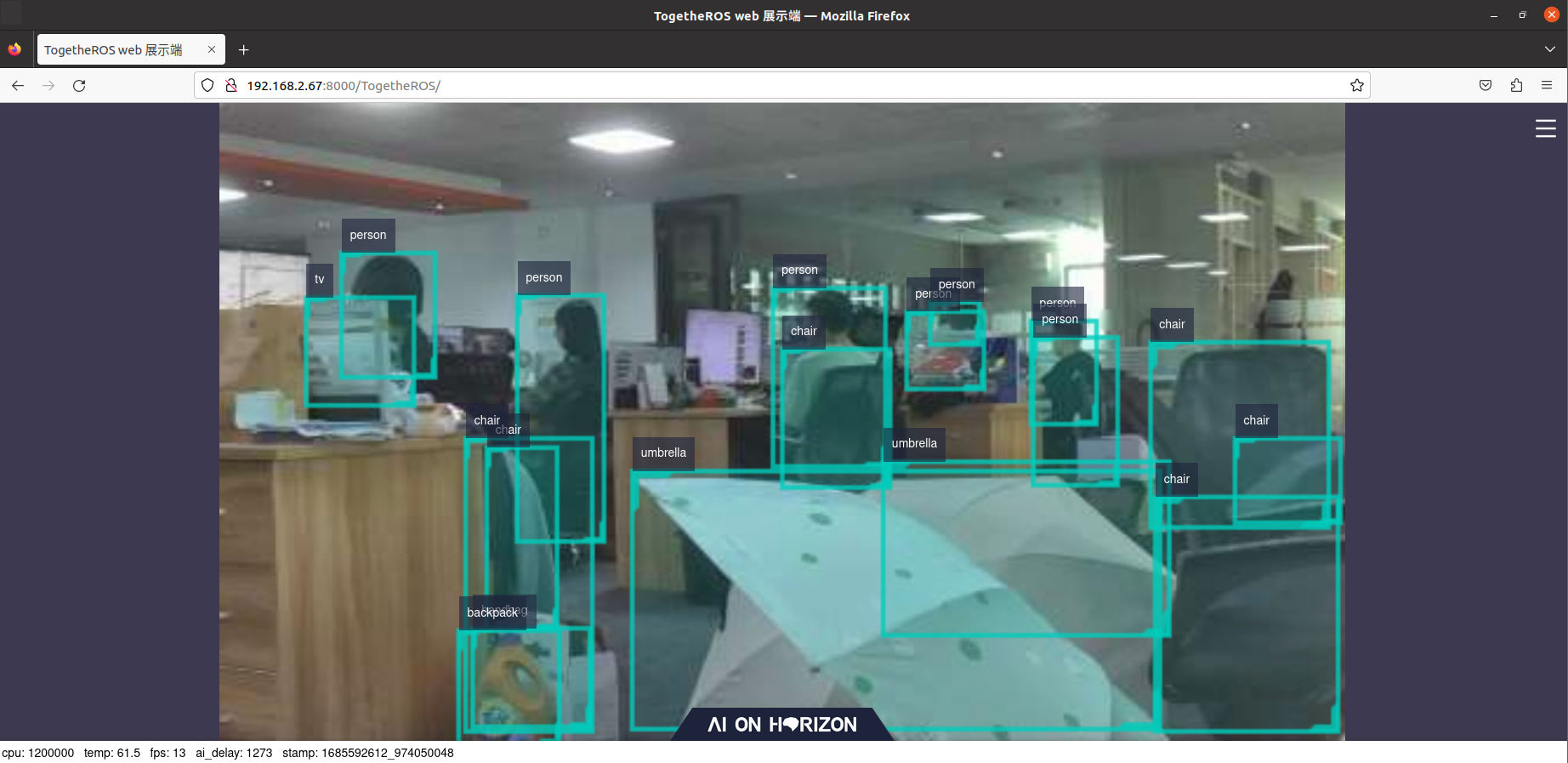
1685592637612

4. MobileNet_SSD

Mobilenet_SSD is a caffe model obtained from https://github.com/chuanqi305/MobileNet-SSD, trained using the VOC dataset, and supports 20 types of target detection, including people, animals, fruits, and vehicles.

Application scenarios: MobileNet_SSD is a target detection algorithm based on MobileNet. It has the advantages of fast speed and easy deployment. It can realize functions such as object detection and garbage recognition. It is mainly used in fields such as autonomous driving and smart home.

After SSH connects to the car, run the terminal,

xxxxxxxxxx
ros2 launch dnn_node_example dnn_node_example.launch.py dnn_example_config_file:=config/mobilenet_ssd_workconfig.json dnn_example_image_width:=480 dnn_example_image_height:=272

The web display terminal displays the following screen,

1685593686336

5. EfficientNet_Det

EfficientNet_Det is an Onnx model obtained from https://github.com/HorizonRobotics-Platform/ModelZoo/tree/master/EfficientDet, trained using the COCO dataset, and supports 80 types of target detection, including people, animals, fruits, and vehicles.

Application scenarios: EfficientNet_Det can realize functions such as vehicle detection, and is mainly used in fields such as autonomous driving and smart home.

After SSH connects to the car, the terminal runs,

xxxxxxxxxx
ros2 launch dnn_node_example dnn_node_example.launch.py dnn_example_config_file:=config/efficientnet_lite0_workconfig.json dnn_example_image_width:=480 dnn_example_image_height:=272

The Web display terminal displays the following screen,
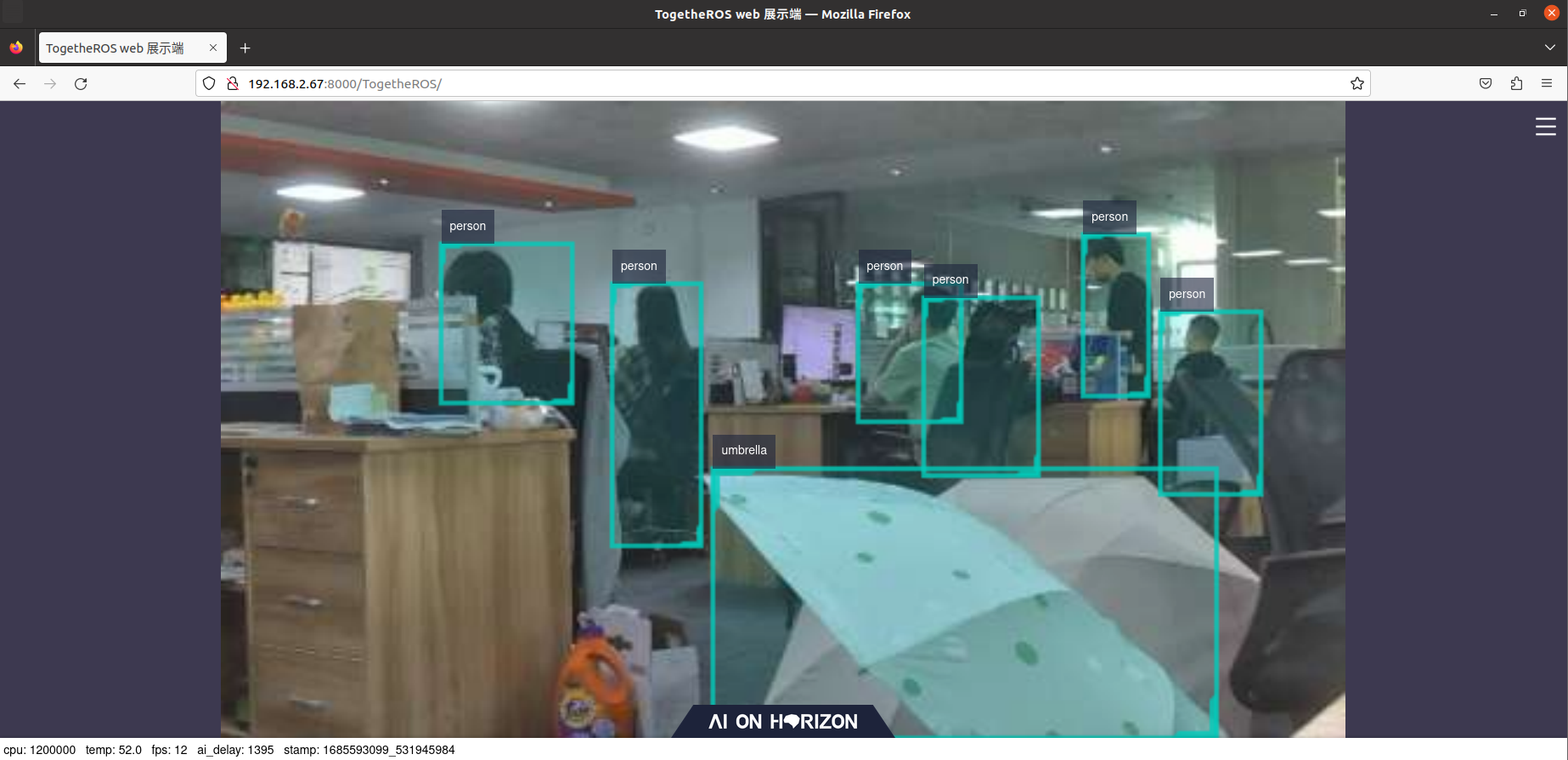
1685593115662

Face Detection
Visual line patrol-OpenCV

COMPANY

  • About us
  • Team Style
  • Blog

LEARNING & EXPLORATION

  • Tutorials
  • Edge AI hardware
  • Educational robots
  • Embedded intelligent hardware

WHERE TO BUY

  • Yahboom Online Store
  • Amazon
  • Alibaba
  • AliExpress
  • Mercado

TECHNOLOGY SUPPORT

  • Email: support@yahboom.com

BE A DISTRIBUTOR

  • Email: sales@yahboom.com
QR Code

Copyright © 2017-2026 Yahboom. All Rights Reserved.

EN/中文