Welcome to MSPM0 Smart Robot Car repository
1.1 Car line tracking-8 channel infrared tracking sensor module
Car Line Tracking - 8 Channel Infrared Tracking Sensor Module
Car Line Tracking - 8 Channel Infrared Tracking Sensor Module1. Hardware Connection2. Partial Code Analysis3.Main Functions4.Experimental Phenomenon
1. Hardware Connection
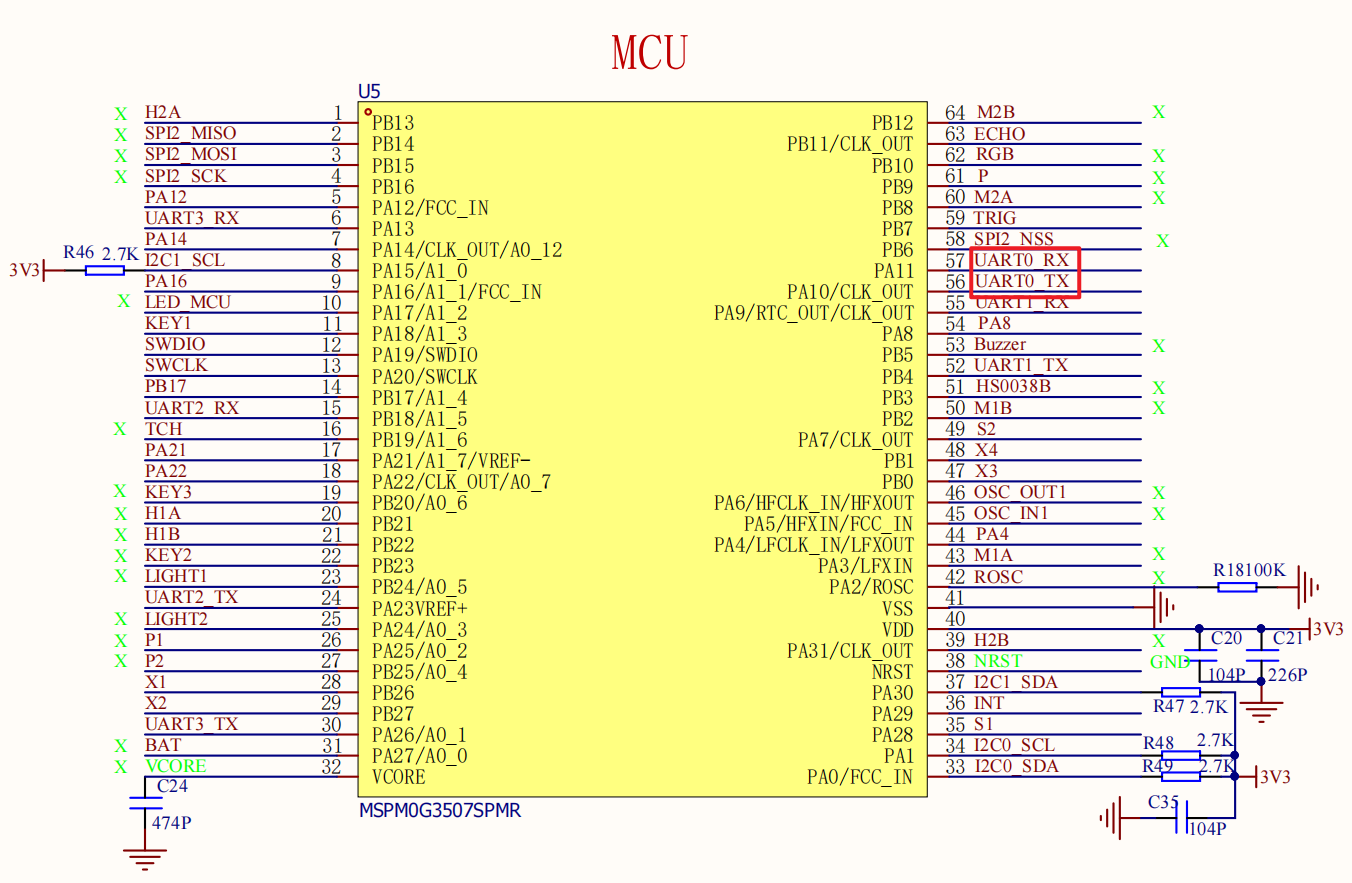
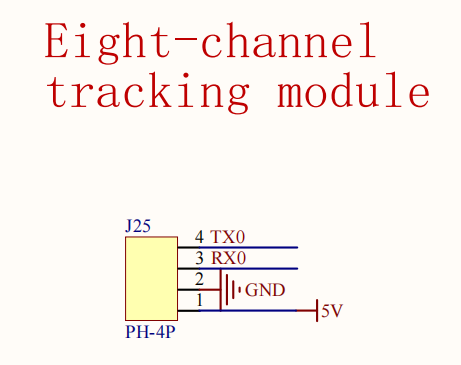
| 8 Channel Infrared Tracking Sensor Module | MSPM0G3507 |
|---|---|
| 5V | 5V |
| GND | GND |
| TX | RX0 |
| RX | TX0 |
.png)
2. Partial Code Analysis
Control Principle
bsp_ir.c
xvoid IRDataAnalysis(void){ ... // 没有接收到数据 或者 数据没有接收完成 则不进行处理 / If no data received or data reception not complete, do not process if (IR_recv_complete_flag == 0) return; // 关中断,防止在解析过程中接收到新数据 / Disable interrupt to prevent receiving new data during parsing __disable_irq(); // 找到格式的头的第一个 '$' / Find the first '$' of the format header while ((IR_recv_buff[head] != '$') && (head < IR_recv_length)) { head++; } if (head == IR_recv_length) { // 未找到数据头,清除接收标志,等待下一次接收 / Data header not found, clear reception flag, wait for next reception IR_recv_complete_flag = 0; IR_recv_length = 0; __enable_irq(); return; } // 设置有效数据起始地址 / Set valid data start address buff = &IR_recv_buff[head]; // 找到结尾 '#' / Find the ending '#' while ((buff[end] != '#') && (end < IR_recv_length)) { end++; } if ((head + end) == IR_recv_length) { // 未找到数据尾,清除接收标志,等待下一次接收 / Data tail not found, clear reception flag, wait for next reception IR_recv_complete_flag = 0; IR_recv_length = 0; __enable_irq(); return; } // 复制数据到 temp 缓冲区 / Copy data to temp buffer if (end + 1 < sizeof(temp)) { strncpy(temp, buff, end + 1); temp[end + 1] = '\0'; // 确保字符串终止 / Ensure string termination // 检查数据格式是否正确($D,...) / Check if data format is correct ($D,...) if (temp[0] == '$' && temp[1] == 'D') { char *token = strtok(temp, ","); int index = 0; while (token != NULL && index < IR_Num) { // 解析 x1:1, x2:1, ..., x8:1 格式的数据 / Parse data in x1:1, x2:1, ..., x8:1 format if (strstr(token, "x") != NULL) { char *colon = strchr(token, ':'); if (colon != NULL) { // 提取 ':' 后的数字字符并转换为数值 / Extract digit character after ':' and convert to value IR_Data_number[index] = (colon[1] - '0'); index++; } } token = strtok(NULL, ","); } } } // 清除接收完成标志位,重置缓冲区,等待下一次接收 / Clear reception completion flag, reset buffer, wait for next reception IR_recv_complete_flag = 0; IR_recv_length = 0; memset(IR_recv_buff, 0, USART_RECEIVE_LENGTH); __enable_irq(); }//串口中断中一直接收传感器返回的数据,然后再定时器中断中每20ms判断是否接收到了帧尾,接收到帧尾关闭中断处理新的数据 / Continuously receive sensor returned data in UART interrupt, then check every 20ms in timer interrupt if frame end is received, close interrupt to process new data when frame end is receivedvoid UART_0_INST_IRQHandler(void){ uint8_t RecvDATA = 0; // 检查中断来源 / Check interrupt source switch (DL_UART_getPendingInterrupt(UART_0_INST)) { case DL_UART_IIDX_RX: RecvDATA = DL_UART_Main_receiveData(UART_0_INST); // 检查缓冲区是否已满 / Check if buffer is full if (IR_recv_length >= USART_RECEIVE_LENGTH - 1) { // 缓冲区满,重置接收状态(丢弃数据) / Buffer full, reset reception state (discard data) IR_recv_complete_flag = 0; IR_recv_length = 0; break; } // 存储接收的数据到缓冲区 / Store received data to buffer IR_recv_buff[IR_recv_length++] = RecvDATA; IR_recv_buff[IR_recv_length] = '\0'; // 收到 '#' 时标记接收完成 / Mark reception complete when '#' is received if (RecvDATA == '#') { IR_recv_complete_flag = 1; } break; default: break; }}app_irtracking.c
xxxxxxxxxx//带死区处理的位置式PID / Positional PID with dead zone processingfloat APP_IR_PID_Calc(int8_t actual_value){ float IRTrackTurn = 0; int8_t error; static int8_t error_last=0; static float IRTrack_Integral;//积分 / Integral error=actual_value; IRTrack_Integral +=error; //位置式pid / Positional PID IRTrackTurn=error*IRTrack_Trun_KP +IRTrack_Trun_KI*IRTrack_Integral +(error - error_last)*IRTrack_Trun_KD; if (IRTrackTurn > (MAX_SPEED - MOTOR_DEAD_ZONE)) IRTrackTurn = (MAX_SPEED - MOTOR_DEAD_ZONE); if (IRTrackTurn < (MOTOR_DEAD_ZONE - MAX_SPEED)) IRTrackTurn = (MOTOR_DEAD_ZONE - MAX_SPEED); return IRTrackTurn;}void LineWalking(void){ static int8_t err = 0; static u8 x1,x2,x3,x4,x5,x6,x7,x8; deal_IRdata(&x1,&x2,&x3,&x4,&x5,&x6,&x7,&x8); if(x3 == 0 && x4 == 0 && x5 == 0 && 6 == 0 ) //俩边都亮,直跑 / Both sides lit, go straight { err = 0; if(trun_flag == 1) { trun_flag = 0;//走到圈了 / Reached the circle } } else if(x1 == 0 && x3 == 0 && x4 == 0 && x5 == 0 && x8 == 0 ) { err = 0; } else if(x1 == 1 && x2 == 1 &&x3 == 1 && x4 == 1 && x5 == 1 && x6 == 1 && x7 == 1 && x8 == 1 ) { if(trun_flag == 0) //出线了 / Out of line { err = 0; trun_flag = 1; } } //添加直角 / Add right angle else if((x1 == 0 || x2 == 0 ) && x8 == 1) { err = -30; //delay_ms(100); } //添加直角 / Add right angle else if((x7 == 0 || x8 == 0) && x1 == 1) { err = 30 ; //delay_ms(100); } …… //剩下的就保持上一个状态 / Keep the previous state for the rest pid_output_IRR = (int)(APP_IR_PID_Calc(err)); Motion_Car_Control(IRR_SPEED, 0, pid_output_IRR); 3.Main Functions
LineWalking
| Function Prototype | void LineWalking(void) |
|---|---|
| Function Description | 8 Channel infrared tracking sensor line tracking control function: obtains sensor status (x1-x8) through deal_IRdata, determines black line position based on different sensor combinations, calculates deviation value err, calls APP_IR_PID_Calc to get steering control amount, and finally controls car movement through Motion_Car_Control (straight line speed is IRR_SPEED) |
| Input Parameters | None |
| Return Value | None |
4.Experimental Phenomenon
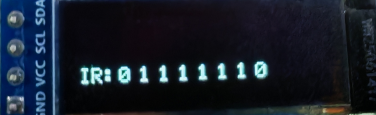
After connecting the car properly, connecting the OLED module, and burning the program to MSPM0, place the car on a white background with black lines map, the car will automatically start line tracking, and sensor data will be displayed on the OLED