yahboom
HomeLearn
Solution
Blog
Online Store
About Us
EN/中文
MSPM0 Smart Robot Car📖
1.Quick Start Guide
  • 1. Assembly Videos
  • 2. Quick Start Videos
  • 3. Battery charging
  • 4. Notes
2.Introduction to the MSPM0 Car
  • 1.About MSPM0
  • 2.Development board interface description
3.Development environment setup and usage
  • 1.CCS Theia development
  • 2.MDK Arm development
  • 3.Uniflash burning
  • 4.External crystal oscillator configuration
  • 5.Project Migration
4.MSPM0 basic course
  • 1. LED light control (GPIO)
  • 2. Buzzer Control (GPIO)
  • 3. Button Control (EXTI)
  • 4. Serial Port (UART)
  • 5. Voltage Detection (ADC)
  • 6. Temperature Detection (ADC)
  • 7. Independent Watchdog (WWDG)
  • 8. Window Watchdog (WWDG)
  • 9. Timer (TIM)
  • 10. Breathing LED (PWM)
  • 11. I2C Communication (I2C)
  • 12. External Flash (SPI)
  • 13. Internal Flash (Flash)
  • 14. DMA
  • 15. FreeRTOS
5.Sensor basic course
  • 1.Servo control
  • 2.Ultrasonic servo PTZ basic use
  • 3.Motor PID control
  • 4.OLED display photosensitive value
  • 5.Infrared avoid sensor
  • 6.1 Infrared line tracking sensor-8 channel infrared tracking sensor module
  • 6.2 Infrared line tracking sensor-4 channel infrared tracking sensor module
  • 7.Infrared remote control
  • 8.Ultrasonic ranging
  • 9.RGB light drive
  • 10.MPU6050 raw data acquisition
  • 11.MPU6050 data fusion
  • 12.K210 vision recognition module
  • 13.K230 vision recognition module
6.Smart car course
  • 1.1 Car line tracking-8 channel infrared tracking sensor module
  • 1.2 Car line tracking-4 channel infrared tracking sensor module
  • 2.1 Drawing a circle-8 channel infrared tracking sensor module
  • 2.2 Drawing a circle-4 channel infrared tracking sensor module
  • 3.Ultrasonic following
  • 4.Ultrasonic avoid
  • 5.Ultrasonic avoid(Servo PTZ)
  • 6.Infrared sensor avoid
  • 7.Light following
  • 8.Gyroscope calibration straight-line walk
  • 9.Infrared remote control
  • 10.Autonomous driving car
7.Vision application course
  • 1.K210 autonomous driving
  • 2.K210 color tracking
  • 3.K210 handwritten digit action
  • 4.K210 color response
  • 5.K210 road sign indication action
  • 6.K210 following machine code
  • 7.K210 QR code command
  • 8.K230 vision line tracking
  • 9.K230 color tracking
  • 10.K230 machine code tracking
  • 11.K230 QR code command
  • 12.K230 autonomous avoid
  • 13.K230 license plate tracking
  • 14.K230 face tracking
  • 15.K230 gaze direction tracking
  • 16.K230 palm tracking
  • 17.K230 target tracking
  • 18.K230 human body tracking
  • 19.K230 OCR character recognition
8.Extended application course (Sold separately)
  • 1.Voice interaction module communication
  • 2.Voice interaction control
  • 3.K230 road sign indication action(Voice)
  • 4.K230 color response(Voice)
  • 5.K230 gesture control(Voice)
  • 6.K230 rock-paper-scissors(Voice)
  • 7.8-channel grayscale color line tracking
  • 8.Bluetooth remote control
  • 9.K210 Scenario-based autonomous driving
  • 10.K230 Scenario-based autonomous driving
Download
  • Code
  • SCH
  • 3D Model File
  • MSPM0 Data Sheet
  • Voice firmware
  • Hardware interface manual
Download ZIP

Welcome to MSPM0 Smart Robot Car repository

4.Ultrasonic avoid

Ultrasonic avoid

Ultrasonic avoid1. Software-Hardware2. Brief Principle2.1 Hardware Schematic Diagram2.2 Physical Connection Diagram2.3 Control Principle3. Main Functions4. Experimental Phenomenon

This tutorial is a comprehensive experiment combining multiple peripherals. You can understand individual peripherals before conducting this experiment.

1. Software-Hardware

  • KEIL5

  • MSPM0G3507 Robot Development Board

    Ultrasonic module, TT encoded motor*2: external

  • Type-C data cable or DAP-Link

    For program download or simulation to the development board

2. Brief Principle

2.1 Hardware Schematic Diagram
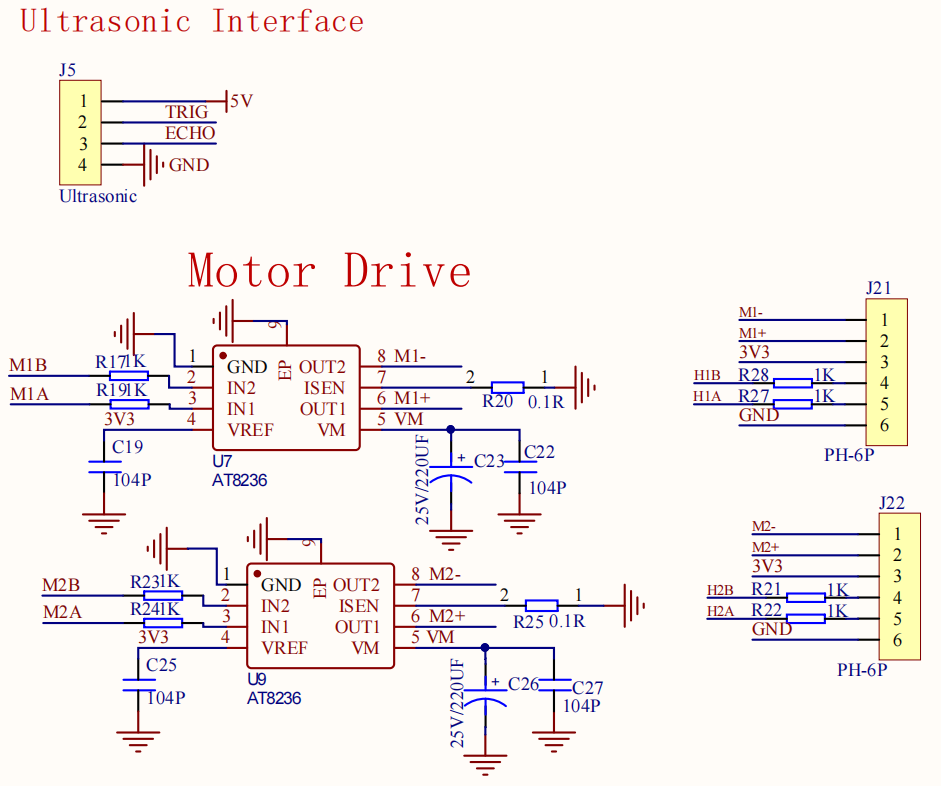
PixPin_2025-11-10_19-57-42

upscalemedia-transformed (50)

2.2 Physical Connection Diagram

  • Wiring

启动小车 (12)

Ultrasonic Module:

Note: When using servo PTZ, you need to add jumper cap to connect 5v and choose, see white line.

2.3 Control Principle

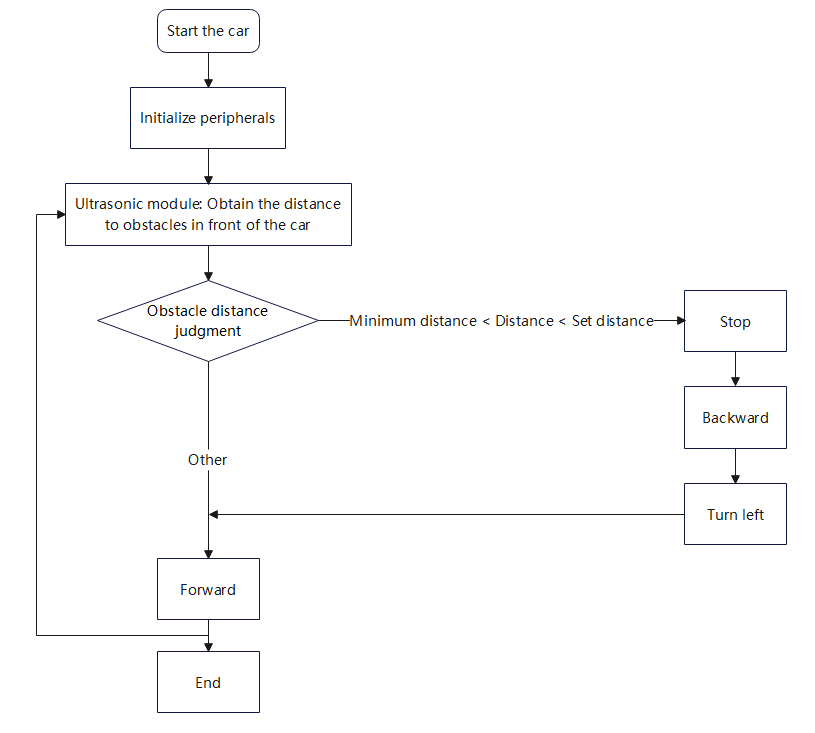
Obtain the distance of objects in front through the ultrasonic module, and control the car to move forward, backward, turn left, and stop based on the distance.

The ultrasonic module can obtain the distance of obstacles in front. We use this distance to determine the obstacle position relative to the car: If the obstacle is within the set distance range of the car, we call the car's stop, reverse, and turn left functions in the corresponding judgment function; If the obstacle is not within the set distance range of the car, we control the car to move forward.

  • Program Flowchart

1

ModuleFunction
Ultrasonic ModuleExternal information collection: obtain obstacle distance
MotorMotion control

3. Main Functions

This tutorial does not use PID control for car movement

xxxxxxxxxx
Functions introduced before will not be explained again!

Function: get_distance

Function Prototypevoid get_distance(uint16_t distance)
Function DescriptionUltrasonic obstacle avoidance program
Input Parametersdistance: maximum distance for ultrasonic steering
Return ValueNone

4. Experimental Phenomenon

After successfully downloading the program, press the RESET button on the development board and observe the car's effect!

xxxxxxxxxx
For program download, refer to [3. Development Environment Setup and Usage: 3.Uniflash Programming]

Phenomenon:

With obstacle: The car first stops, then judges the distance, and turns left based on the distance

Without obstacle: The car moves forward

For specific judgment, refer to the flowchart or code.

Ultrasonic following
Ultrasonic avoid(Servo PTZ)

COMPANY

  • About us
  • Team Style
  • Blog

LEARNING & EXPLORATION

  • Tutorials
  • Edge AI hardware
  • Educational robots
  • Embedded intelligent hardware

WHERE TO BUY

  • Yahboom Online Store
  • Amazon
  • Alibaba
  • AliExpress
  • Mercado

TECHNOLOGY SUPPORT

  • Email: support@yahboom.com

BE A DISTRIBUTOR

  • Email: sales@yahboom.com
QR Code

Copyright © 2017-2026 Yahboom. All Rights Reserved.

EN/中文