yahboom
HomeTutorialsProduct
Solution
Blog
Online Store
About Us
EN/中文
Store
MSPM0 Smart Robot Car📖
1.Quick Start Guide
  • 1. Assembly Videos
  • 2. Quick Start Videos
  • 3. Battery charging
  • 4. Notes
2.Introduction to the MSPM0 Car
  • 1.About MSPM0
  • 2.Development board interface description
3.Development environment setup and usage
  • 1.CCS Theia development
  • 2.MDK Arm development
  • 3.Uniflash burning
  • 4.External crystal oscillator configuration
  • 5.Project Migration
4.MSPM0 basic course
  • 1. LED light control (GPIO)
  • 2. Buzzer Control (GPIO)
  • 3. Button Control (EXTI)
  • 4. Serial Port (UART)
  • 5. Voltage Detection (ADC)
  • 6. Temperature Detection (ADC)
  • 7. Independent Watchdog (WWDG)
  • 8. Window Watchdog (WWDG)
  • 9. Timer (TIM)
  • 10. Breathing LED (PWM)
  • 11. I2C Communication (I2C)
  • 12. External Flash (SPI)
  • 13. Internal Flash (Flash)
  • 14. DMA
  • 15. FreeRTOS
5.Sensor basic course
  • 1.Servo control
  • 2.Ultrasonic servo PTZ basic use
  • 3.Motor PID control
  • 4.OLED display photosensitive value
  • 5.Infrared avoid sensor
  • 6.1 Infrared line tracking sensor-8 channel infrared tracking sensor module
  • 6.2 Infrared line tracking sensor-4 channel infrared tracking sensor module
  • 7.Infrared remote control
  • 8.Ultrasonic ranging
  • 9.RGB light drive
  • 10.MPU6050 raw data acquisition
  • 11.MPU6050 data fusion
  • 12.K210 vision recognition module
  • 13.K230 vision recognition module
6.Smart car course
  • 1.1 Car line tracking-8 channel infrared tracking sensor module
  • 1.2 Car line tracking-4 channel infrared tracking sensor module
  • 2.1 Drawing a circle-8 channel infrared tracking sensor module
  • 2.2 Drawing a circle-4 channel infrared tracking sensor module
  • 3.Ultrasonic following
  • 4.Ultrasonic avoid
  • 5.Ultrasonic avoid(Servo PTZ)
  • 6.Infrared sensor avoid
  • 7.Light following
  • 8.Gyroscope calibration straight-line walk
  • 9.Infrared remote control
  • 10.Autonomous driving car
7.Vision application course
  • 1.K210 autonomous driving
  • 2.K210 color tracking
  • 3.K210 handwritten digit action
  • 4.K210 color response
  • 5.K210 road sign indication action
  • 6.K210 following machine code
  • 7.K210 QR code command
  • 8.K230 vision line tracking
  • 9.K230 color tracking
  • 10.K230 machine code tracking
  • 11.K230 QR code command
  • 12.K230 autonomous avoid
  • 13.K230 license plate tracking
  • 14.K230 face tracking
  • 15.K230 gaze direction tracking
  • 16.K230 palm tracking
  • 17.K230 target tracking
  • 18.K230 human body tracking
  • 19.K230 OCR character recognition
8.Extended application course (Sold separately)
  • 1.Voice interaction module communication
  • 2.Voice interaction control
  • 3.K230 road sign indication action(Voice)
  • 4.K230 color response(Voice)
  • 5.K230 gesture control(Voice)
  • 6.K230 rock-paper-scissors(Voice)
  • 7.8-channel grayscale color line tracking
  • 8.Bluetooth remote control
  • 9.K210 Scenario-based autonomous driving
  • 10.K230 Scenario-based autonomous driving
Download
  • Code
  • SCH
  • 3D Model File
  • MSPM0 Data Sheet
  • Voice firmware
  • Hardware interface manual
Download ZIP

Welcome to MSPM0 Smart Robot Car repository

5.Ultrasonic avoid(Servo PTZ)

Ultrasonic avoid (Servo PTZ)

Ultrasonic avoid (Servo PTZ)1. Software-Hardware2. Brief Principle2.1 Hardware Schematic Diagram2.2 Physical Connection Diagram2.3 Control Principle3. Main Functions4. Experimental Phenomenon

This tutorial is a comprehensive experiment combining multiple peripherals. You can understand individual peripherals before conducting this experiment.

1. Software-Hardware

  • KEIL5

  • MSPM0G3507 Robot Development Board

    Ultrasonic module, Servo PTZ, TT encoded motor*2: external

  • Type-C data cable or DAP-Link

    For program download or simulation to the development board

2. Brief Principle

2.1 Hardware Schematic Diagram
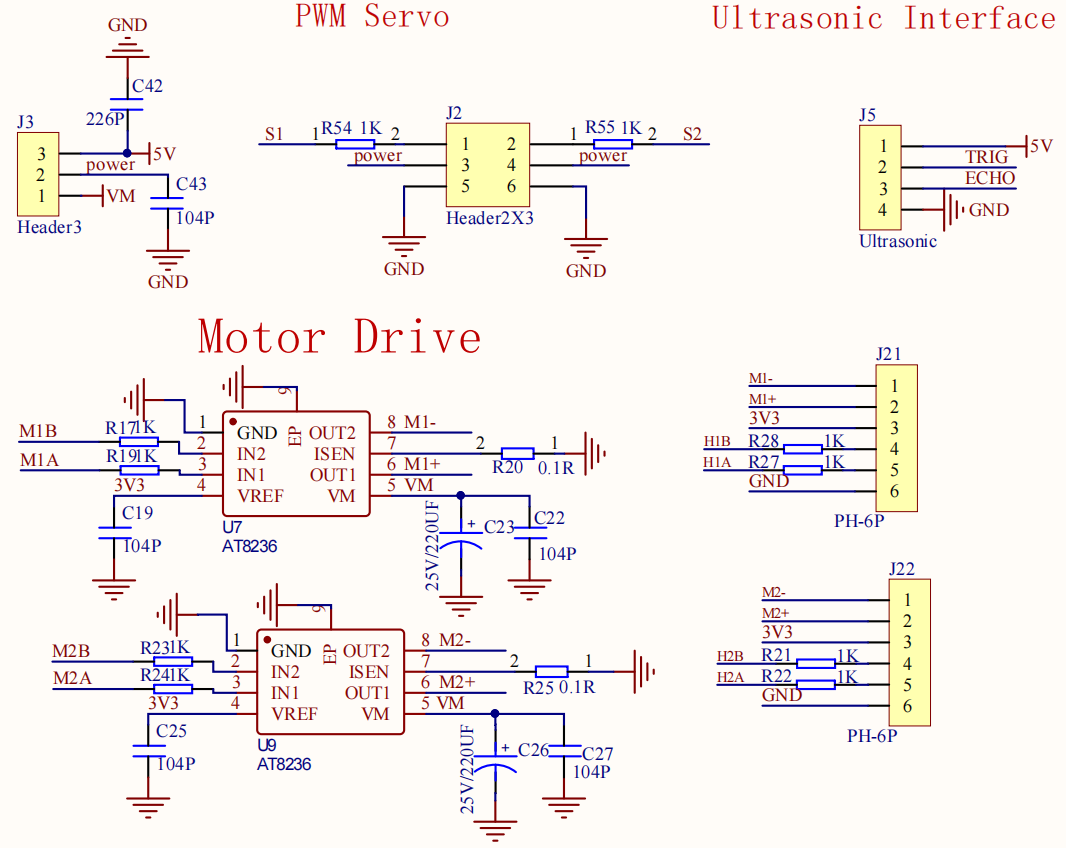
image-20251015202007147

upscalemedia-transformed (13)

2.2 Physical Connection Diagram

  • Wiring

未命名的设计 (49)

Servo (S1)CarSpecific Meaning
Signal line (yellow)PA28 (yellow)Signal line
VCC (red)VCC (red)Power supply
GND (brown)GND (black)Ground line
Servo (S2)CarSpecific Meaning
Signal line (yellow)PA7 (yellow)Signal line
VCC (red)VCC (red)Power supply
GND (brown)GND (black)Ground line

Ultrasonic Module:

Note: When using servo PTZ, you need to add jumper cap to connect 5v and choose, see white line.

2.3 Control Principle

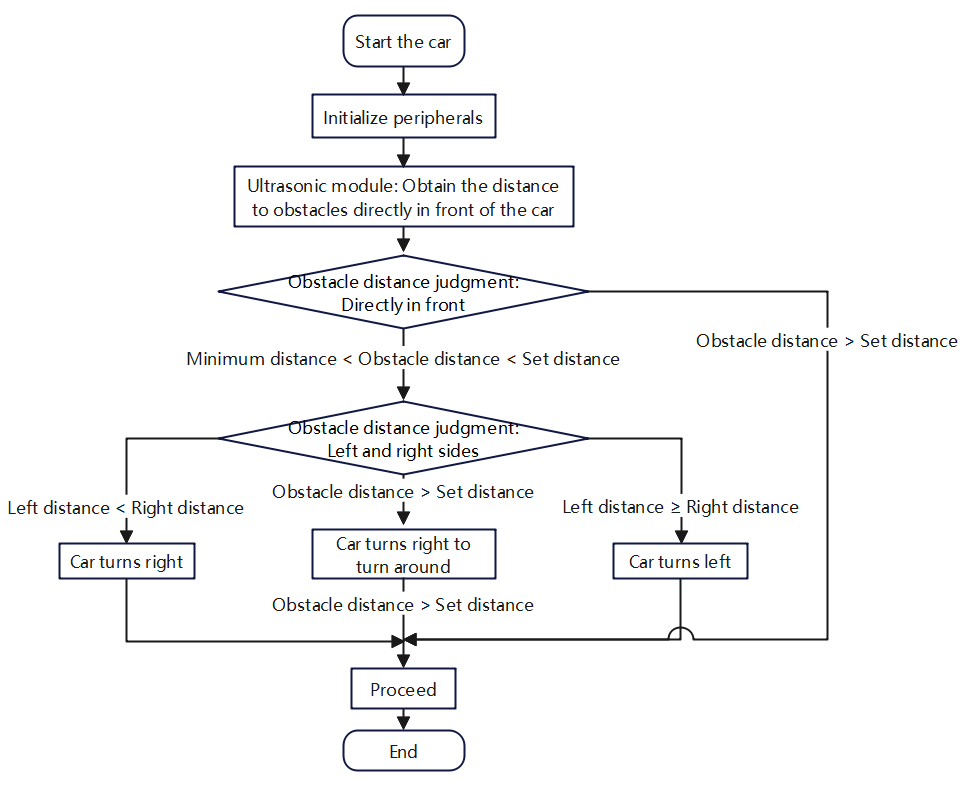
Obtain the distance of objects in front through the ultrasonic module on the 9G servo PTZ, servo controls left, right and front distances, and control the car to move forward, backward, turn left, and stop based on the distance.

The ultrasonic module can obtain the distance of obstacles in front. We use this distance to determine the obstacle position relative to the car: When there is an obstacle directly in front of the car, the servo on the 9G servo PTZ will rotate to the left and right sides, finally obtaining the distances on the left and right sides of the car. We control the car to turn left or right based on these distances. The initial angle and the rotation angles to the left and right sides can be modified by changing the code.

  • Program Flowchart

1

ModuleFunction
Ultrasonic ModuleExternal information collection: obtain obstacle distance
ServoControl ultrasonic module steering
MotorMotion control

3. Main Functions

This tutorial does not use PID control for car movement

xxxxxxxxxx
Functions introduced before will not be explained again!

Function: get_servo_distance

Function Prototypevoid get_servo_distance()
Function DescriptionServo PTZ ultrasonic obstacle avoidance program
Input ParametersNone
Return ValueNone
xxxxxxxxxx
For underlying drivers, refer to Chapter 4 and Chapter 5 tutorials
For application layer, you can read the source code in the project files yourself

4. Experimental Phenomenon

After successfully downloading the program, press the RESET button on the development board and observe the car's effect!

xxxxxxxxxx
For program download, refer to [3. Development Environment Setup and Usage: 3.Uniflash Programming]

Phenomenon:

With obstacle: The car first stops, then judges left and right distances, and turns left or right based on the distances

Without obstacle: The car moves forward

For specific judgment, refer to the flowchart or code.

Ultrasonic avoid
Infrared sensor avoid

COMPANY

  • About us
  • Team Style
  • Blog

LEARNING & EXPLORATION

  • Tutorials
  • Edge AI hardware
  • Educational robots
  • Embedded intelligent hardware

WHERE TO BUY

  • Yahboom Online Store
  • Amazon
  • Alibaba
  • AliExpress
  • Mercado

TECHNOLOGY SUPPORT

  • Email: support@yahboom.com

BE A DISTRIBUTOR

  • Email: sales@yahboom.com
QR Code

Copyright © 2017-2026 Yahboom. All Rights Reserved.

EN/中文