yahboom
HomeLearn
Solution
Blog
Online Store
About Us
EN/中文
Jetson AGX Thor📖
1.Get started
  • 01.Learning Route
  • 02.Getting Started Quickly
2.Jetson basic course
  • 01.Jetson board introduction
  • 02.Flashing a Pure Jetson System via SDK
  • 03.Flashing a Pure Jetson System via USB Drive
  • 04.Flashing the Jetson Bootloader using L4T
  • 05.Replacing the SSD
  • 06.Install Jetpack environment
  • 07.Backup SSD system
  • 08.Restore factory image system
  • 09.SSD expansion
  • 10.SSD Speed Test
3.Basic setting course
  • 01.Basic knowledge
  • 02.Network configuration
  • 03.SSH remote login
  • 04.VNC remote control
  • 05.Remote file transfer
  • 06.Jtop tool
  • 07.Exchange space expansion
  • 08.Use VSCode
  • 09.Use VMware
  • 10.Change screen resolution
  • 11.Virtual Desktop
  • 12.Set root user password
  • 13.Configure sudo passwordless operation
  • 14.Managing custom services
  • 15.View system version information
4.OpenCV basic course
  • 01.Image reading
  • 02.Image saving
  • 03.Image modification
  • 04.Image scaling
  • 05.Image cropping
  • 06.Image translation
  • 07.Image mirroring
  • 08.Image grayscale conversion
  • 09.Image binarization
  • 10.Image edge detection
  • 11.Add line segments
  • 12.Add rectangles
  • 13.Add circular shape
  • 14.Add ellipses
  • 15.Add polygons
  • 16.Add Text
5.Vision basic course
  • 01.USB camera preview
  • 02.Use Jupyter Lab
  • 03.Use JetCam
6.Vision advanced course
01.Environment construction
  • 01.TensorFlow
  • 02.PyTorch
  • 03.Torchvision
  • 04.Torchaudio
02.DeepStream development
  • 01.DeepStream environment
  • 02.Four types of detection(traffic)
03.YOLO26 development
  • 01.YOLO Environment Setup
  • 02.CLI Usage
  • 03.Object Detection
  • 04.Instance Segmentation
  • 05.Pose Estimation
  • 06.Image Classification
  • 07.Oriented Bounding Boxes Object Detection
  • 08.Model Conversion
  • 09.Dataset Annotation
  • 10.Model Training_Conversion
  • 11.Model Prediction
04.Mediapipe development
  • 01.Mediapipe environment
  • 02.Hand detection
  • 03.Face detection
  • 04.Face effects
  • 05.3D object recognition
  • 06.Virtual brush
  • 07.Gesture recognition
  • 08.Finger control
  • 09.Posture estimation
  • 10.Face mask
  • 11.Overall detection
  • 12.Green scene removal(Human)
05.QR code recognition
  • 01.Barcode Recognition
  • 02.QR Code Recognition
  • 03.Machine Code Recognition
  • 04.Handwritten Digit Recognition
7.Docker basic course
  • 01.Docker introduction
  • 02.Docker installation
  • 03.Docker command
  • 04.Docker usage
  • 05.Docker interaction
8.ROS2-jazzy
1.ROS2 basic course
  • 1.Introduction to ROS2
  • 2.ROS2 install Jazzy
  • 3.ROS2 development environment
  • 4.ROS2 workspace
  • 5.ROS2 function package
  • 6.ROS2 node
  • 7.ROS2 topic communication
  • 8.ROS2 service communication
  • 9.ROS2 action communication
  • 10.ROS2 custom interface message
  • 11.ROS2 parameter service case
  • 12.ROS2 meta-function package
  • 13.ROS2 distributed communication
  • 14.ROS2 DDS
  • 15.ROS2 time related API
  • 16.ROS2 common command tools
  • 17.ROS2 rviz2 use
  • 18.ROS2 rqt toolbox
  • 19.ROS2 Launch startup file configuration
  • 20.ROS2 recording and playback tool
  • 21.ROS2 URDF model
  • 22.ROS2 Gazebo simulation platform
  • 23.ROS2 TF2 coordinate transformation
2.ROS2 vision course
  • 01.Camera preview (USB)
  • 02.Camera calibration (USB)
  • 03.AR vision (USB)
9.Offline AI model course
Offline large model (Text Interaction)
  • 1.Al large model environment deployment
  • 2.Install large model dialogue platform
  • 3.Meta Al Llama3.2 model
  • 4.Alibaba Cloud Qwen3 model
  • 5.Microsoft Phi-4-mini model
  • 6.DeepSeek DeepSeek-R1 model
  • 7.Alibaba Cloud Qwen2.5v visual multimodal large model
  • 8.Google Gemma3 visual multimodal large model
  • 9.Lava visual multimodal large model
  • 10.MiniCPM-V visual multimodal large model
  • 11.Multimodal visual understand application
  • 12.Multimodal text image application
  • 13.Multimodal video analysis application
  • 14.Multi module visual position application
  • 15.Multimodal table scanning application
  • 16.Multimodal autonomous agent application
Offline large model (Voice Interaction)
  • 0.Voice interaction hardware connection (ReadMe)
  • 1.Offline speech to text (ASR)
  • 2.Offline text to speech (TTS)
  • 3.AI large model voice interaction
  • 4.Multimodal visual understand speech interaction
  • 5.Multimodal text and graphics application
  • 6.Multimodal video analysis application
  • 7.Multi module visual position application
  • 8.Multimodal table scanning application
  • 9.Multimodal autonomous proxy application
  • 10.AI large model offline voice assistant
10.Online AI model course
Online large model (Text Interaction)
  • 1.OpenRouter large model API aggregation platform
  • 2.Multimodal Video Analysis Applications
  • 3.Multimodal visual localization application
  • 4.Multimodal table scanning application
  • 5.Multimodal autonomous proxy application
Online large model (Voice Interaction)
  • 0.Voice interaction hardware connection (ReadMe)
  • 1.Online speech to text (ASR)
  • 2.Online text to speech (TTS)
  • 3.AI large model voice interaction
  • 4.Multimodal visual understand speech interaction
  • 5.Multi module visual position application
  • 6.Multimodal table scanning application
  • 7.Multimodal autonomous proxy application
  • 8.AI large model offline voice assistant
11.Generative AI Applications
12.OpenClaw Advanced Development
  • 00.OpenClaw Quick Start on Jetson Platform
  • 01.OpenClaw Installation
  • 02.OpenClaw Online Platform Deployment
  • 03.OpenClaw Local Model Deployment
  • 04.OpenClaw TUI Interaction
  • 05.OpenClaw WebChat Interaction
  • 06.OpenClaw Tools Introduction
  • 07.OpenClawGate Gateway User Manual
  • 08.OpenClaw Features Overview
  • 09.OpenClawClawHub Introduction (Skill Installation)
  • 10. OpenClaw Switching Models
  • 11.OpenClaw Application - File Management
  • 12.OpenClaw Application - Camera
  • 13.OpenClaw Application - Browser Control
  • 14.OpenClaw Application - Script Execution
  • 15.OpenClaw Application - AI Programming
  • 16.OpenClaw Application - Dedicated AI Assistant
  • 17.OpenClaw WhatsApp Plugin Application
  • 18.OpenClaw Voice Assistant
Download
  • Code
  • SystemFile
  • VM_File
  • Tools
  • Jetson boot files
Download ZIP

Welcome to Jetson AGX Thor repository

07.Exchange space expansion

Exchange space expansion

Exchange space expansion1. Swap space2. Expand swap space2.1. Disable ZRAM swap configuration2.2, Create 8GB file2.3. Set the swap space format2.4. Enable swap space2.5. Permanently start swap space3. Verify the expansion

1. Swap space

Swap space is a mechanism used by the operating system to expand available memory. It can continue to run when there is insufficient memory, avoiding program crashes or system freezes!

Note: The access speed of swap space is much lower than that of physical memory.

2. Expand swap space

sudo systemctl disable nvzramconfig
sudo fallocate -l 8G /var/8GB.swap
sudo mkswap /var/8GB.swap
sudo swapon /var/8GB.swap
echo "/var/8GB.swap none swap sw 0 0" | sudo tee -a /etc/fstab
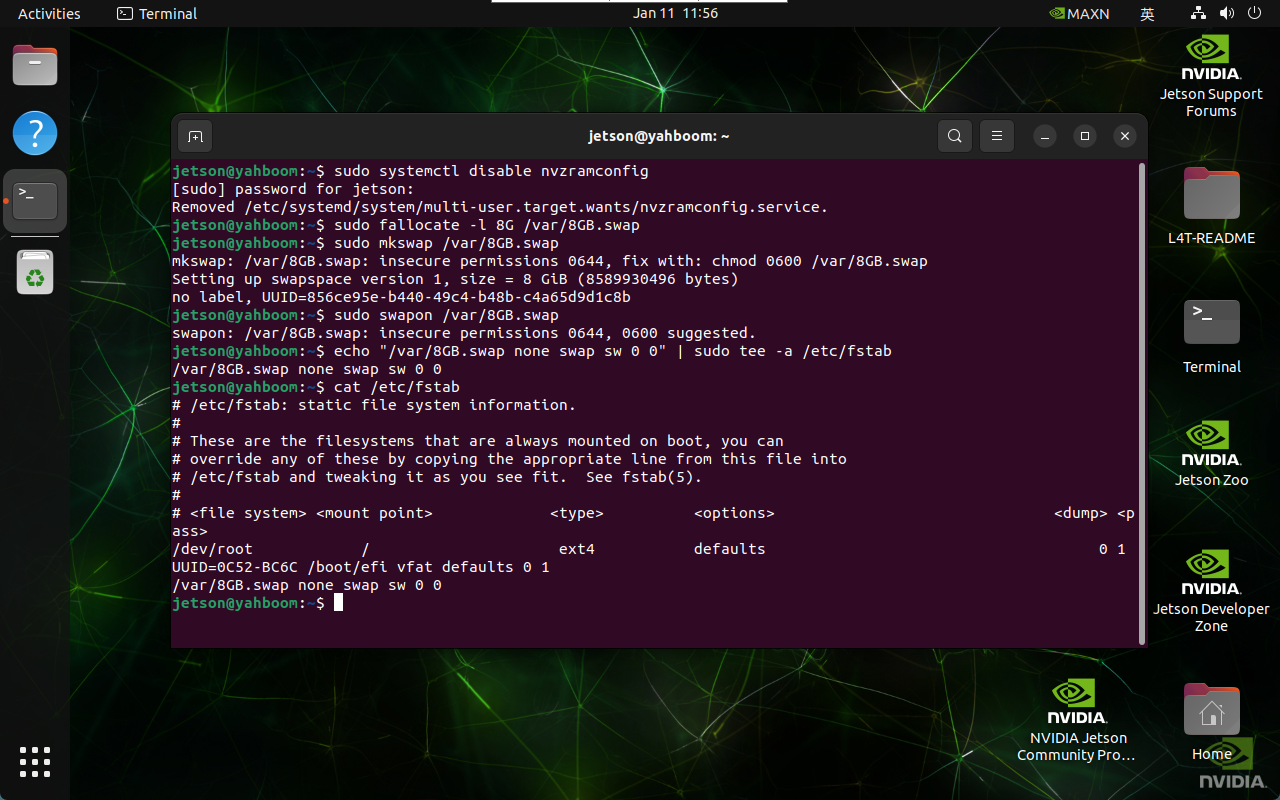
image-20250111115707961

2.1. Disable ZRAM swap configuration

Disable ZRAM swap configuration on Jetson devices: ZRAM compresses and stores memory pages in memory to reduce reliance on disk.

xxxxxxxxxx
sudo systemctl disable nvzramconfig

2.2, Create 8GB file

Use fallocate to create a file of 8GB in size, located in the /var/8GB.swap path.

xxxxxxxxxx
sudo fallocate -l 8G /var/8GB.swap

2.3. Set the swap space format

xxxxxxxxxx
sudo mkswap /var/8GB.swap

2.4. Enable swap space

xxxxxxxxxx
sudo swapon /var/8GB.swap

2.5. Permanently start swap space

xxxxxxxxxx
echo "/var/8GB.swap none swap sw 0 0" | sudo tee -a /etc/fstab

3. Verify the expansion

After restarting the system, the system swap space increased to 15.6GB:
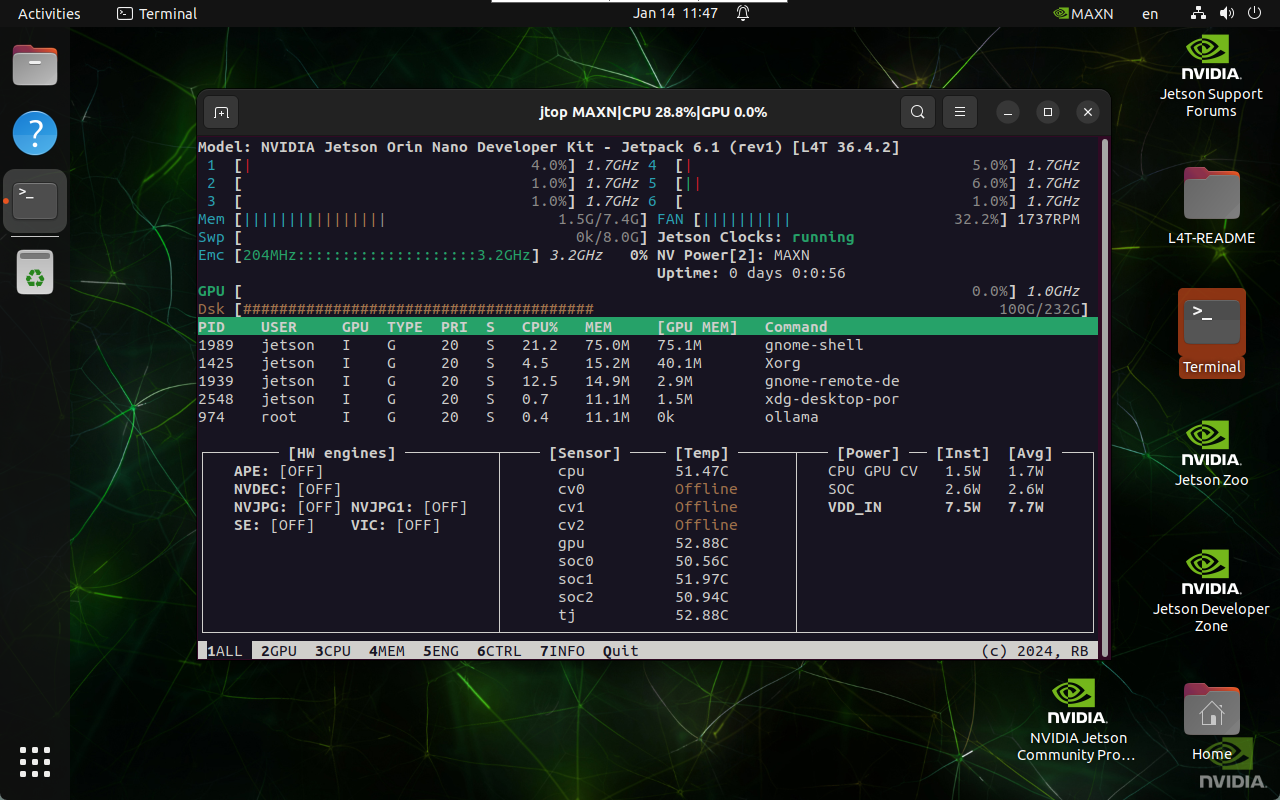
image-20250114114800477

Jtop tool
Use VSCode

COMPANY

  • About us
  • Team Style
  • Blog

LEARNING & EXPLORATION

  • Tutorials
  • Edge AI hardware
  • Educational robots
  • Embedded intelligent hardware

WHERE TO BUY

  • Yahboom Online Store
  • Amazon
  • Alibaba
  • AliExpress
  • Mercado

TECHNOLOGY SUPPORT

  • Email: support@yahboom.com

BE A DISTRIBUTOR

  • Email: sales@yahboom.com
QR Code
QR Code

Copyright © 2017-2026 Yahboom. All Rights Reserved.

EN/中文