Welcome to ROSMASTER R2 repository
6. RGB colorful light bar special effects show
6. RGB colorful light bar special effects show
6. RGB colorful light bar special effects show6.1. Experiment Objectives6.2 Preparation6.3. Experimental results6.4. Program Source Code
6.1. Experiment Objectives
Control the RGB light bar to show different effects, manually control the color of the RGB light bar, and set the color of a single RGB light.
6.2 Preparation
The position of the red box in the following picture is the interface of the RGB light bar. The interface has an anti-reverse connection function, so you don't need to worry about the reverse connection problem during the connection process.
The RGB light bar supports controlling the color of one light individually, as well as controlling the color of all lights.
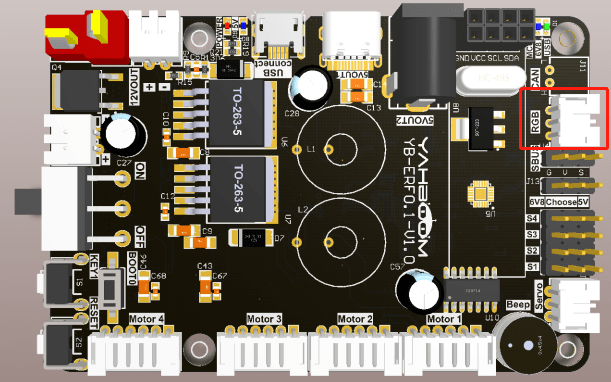
The Rosmaster_Lib library functions needed to control the RGB Razzle Stripe effect are the following:
xxxxxxxxxxset_colorful_effect(effect, speed=255, parm=255)Parameter explanation: RGB programmable light strip effect display.
effect=[0, 6], 0: stop light effect, 1: running light, 2: running light, 3: breathing light, 4: gradient light, 5: star light, 6: power display.
speed=[1, 10], the smaller the value, the faster the speed change.
parm=[1, 10], the smaller the value, the faster the speed change. parm can be optional, as an additional parameter. Usage 1: breathing light effect, pass [0, 6] to change the color of breathing light.
Return value: none.
xxxxxxxxxxset_colorful_lamps(led_id, red, green, blue)Parameter explanation: RGB programmable light strip control, can control individually or all, need to stop RGB light effects before control.
led_id=[0, 16], control the corresponding number of RGB lights; led_id=0xFF, control all the lights.
red,green,blue=[0, 255], indicate the color RGB value.
Return value: none.
6.3. Experimental results
Refer to 4.3.1, 4.3.2 to check the ROS expansion board as well as enter the Docker container, and then run the program, in the jupyter lab interface, double-click to enter the /root/yahboomcar_ros2_ws/Rosmaster/Sample, double-click to select the 5.pwm_servo.ipynb, and then step-by-step click on the 4.3. 3 The button shown in the figure operates the program.
6.4. Program Source Code
Enter docker, refer to the code path: /root/yahboomcar_ros2_ws/Rosmaster/Sample/6.rgb_effect.ipynb