Welcome to ROSMASTER R2 repository
7. Control motor forward and reverse
7. Control motor forward and reverse
7. Control motor forward and reverse7.1. Experimental Objectives7.2. Experiment Preparation7.3. Experimental results7.4 Program Source Code
7.1. Experimental Objectives
To control the forward and reverse rotation of a motor on a Rosmaster, by controlling the PWM duty cycle of the motor, thus controlling the speed of the motor's movement.
7.2. Experiment Preparation
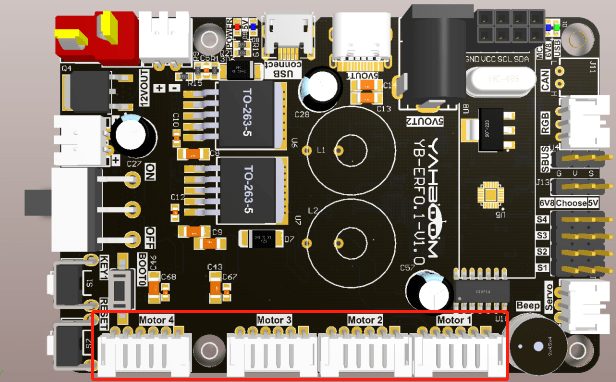
The red boxes in the picture below are the motors MOTOR 1, MOTOR 2, MOTOR 3, MOTOR 4. The motor interface has an anti-reverse function, so you can use the motor wires of Rosmaster to connect to the motors. Here we need to pay attention to different models to connect the motors, here to the McNamee wheel cart as an example, MOTOR 1 is connected to the left front motor of the cart, MOTOR 2 is connected to the left rear motor of the cart, MOTOR 3 is connected to the right front motor of the cart, MOTOR 4 is connected to the right rear motor of the cart.
Rosmaster_Lib library functions needed to control Rosmaster's motors:
xxxxxxxxxxset_motor(speed_1, speed_2, speed_3, speed_4)Parameter Explanation: Controls the motor PWM pulses, thus controlling the motor speed. This function does not use the encoder speed measurement function.
speed_X=[-100, 100], positive number is forward turn, negative number is backward turn.
Return value: none.
7.3. Experimental results
Refer to 4.3.1, 4.3.2 to check the ROS expansion board as well as enter the Docker container, and then run the program, in the jupyter lab interface, double-click to enter the /root/yahboomcar_ros2_ws/Rosmaster/Sample, double-click to select the 5.pwm_servo.ipynb, and then step-by-step click on the 4.3. 3 The button shown in the figure operates the program.
7.4 Program Source Code
Enter the docker, refer to the code path: /root/yahboomcar_ros2_ws/Rosmaster/Sample/7.motor.ipynb