Welcome to ROSMASTER R2 repository
1. docker overview and docker installation
1. docker overview and docker installation
1. docker overview and docker installation1.1, docker overview1.1.1, Why docker came into being1.1.2, the core idea of Docker1.1.3, Comparing Virtual Machines and Docker1.1.4. docker architecture1.1.5 Docker Core Objects1.1.6, Image, Container, Repository1.1.7 Docker operation mechanism1.2, docker installation
Docker official website: http://www.docker.com
Docker Chinese website: https://www.docker-cn.com
Docker Hub (repository) official website: https://hub.docker.com
The operating environment and hardware and software reference configuration are as follows:
- Reference model: ROSMASTER X3
- Robot hardware configuration: Arm series main control, Silan A1 LiDAR, AstraPro Plus depth camera.
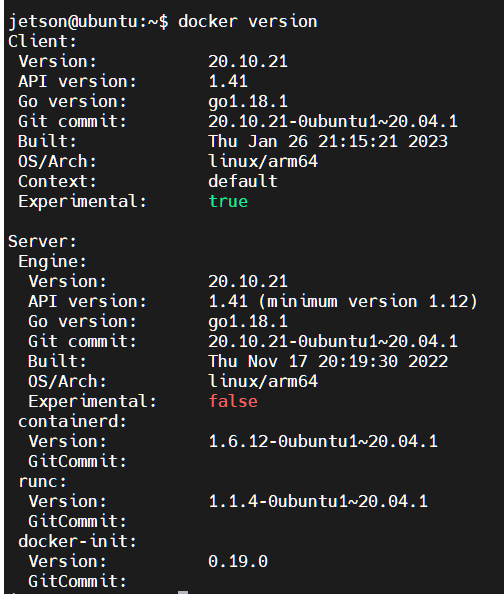
- Robot system: Ubuntu (version not required) + docker (version 20.10.21 and above)
- PC virtual machine: Ubuntu (20.04) + ROS2 (Foxy)
- Usage scenario: use on a relatively clean 2D plane
1.1, docker overview
docker is an application container engine project, based on go language development, open source.
* Currently ros2's courses are all placed inside docker containers, so customers can experience learning to use containerized development methods. *
1.1.1, Why docker came into being
Let's mention a few scenarios first:
- Ops helps you develop a project that is deployed to a server and tells you that there is a problem starting it up. You found no problem in the local run...
- to go online because of some software version of the project updates, resulting in unavailable...
- There are projects involving a lot of environment content, a variety of middleware, a variety of configurations, but also to deploy a number of servers ...
These problems are actually summarized with the environment. To avoid a variety of problems caused by different environments, then it is best to deploy the project, along with the project requires a variety of environments together with the deployment of the best. For example, the project involves redis, mysql, jdk, es and other environments, in the deployment of jar packages when the entire environment with. So the question arises, how can the project bring the environment together?
Docker is here to solve this problem!
1.1.2, the core idea of Docker

This is the logo of docker, a whale full of containers, on the back of the whale, the containers are isolated from each other, which is the core idea of docker. For example, before there are multiple applications running on the same server, there may be a conflict of port occupancy of the software, and now it can run alone after isolation. In addition, docker can maximize the use of the server's capacity.
1.1.3, Comparing Virtual Machines and Docker
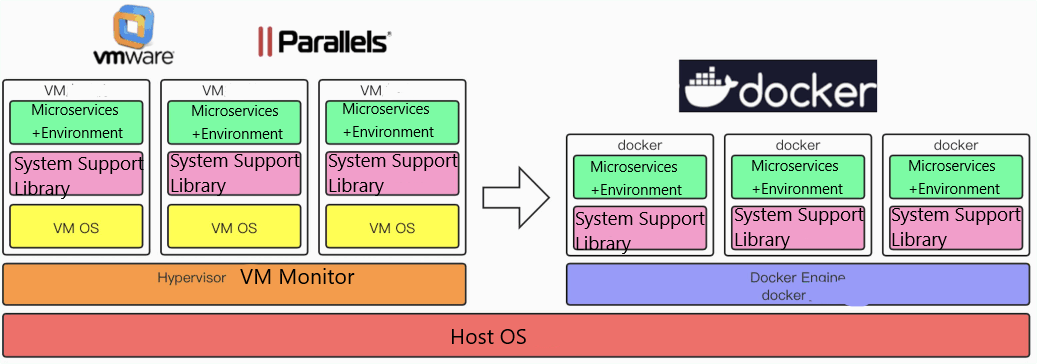
- The docker daemon can communicate directly with the main operating system to allocate resources to individual docker containers; it can also isolate containers from the main operating system and isolate individual containers from each other. While virtual machines take minutes to boot, docker containers can be started in milliseconds. With no bloated slave operating system, docker can save a lot of disk space as well as other system resources.
- Virtual machines are better at completely isolating the entire operating environment. For example, cloud service providers often use virtual machine technology to isolate different users. While docker is usually used to isolate different applications such as front-end, back-end, and databases.
- docker containers are more resource-efficient and faster than virtual machines (startup, shutdown, new, delete)
1.1.4. docker architecture
docker uses a client-server architecture. docker clients communicate with the docker daemon, which is responsible for the burden of building, running, and distributing docker containers. docker clients and daemons can be run on the same system, or docker clients and daemons can be connected to remote databases. The docker client can run on the same system, or you can connect the docker client to a remote docker daemon. docker clients and daemons communicate through UNIX sockets or network interfaces using the REST API. Another docker client is docker compose, which lets you work with applications consisting of a set of containers.
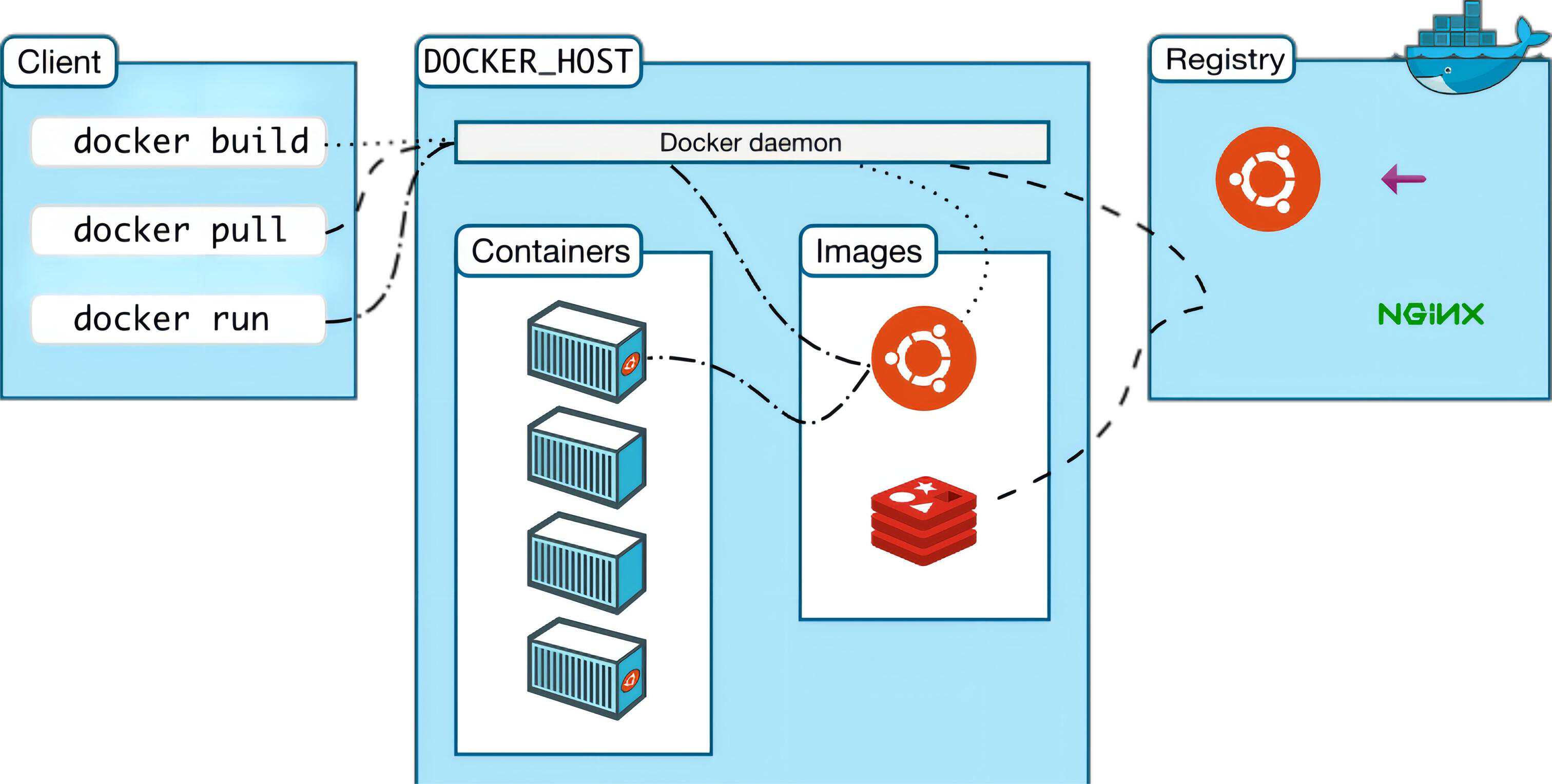
- docker client is the docker command that you use directly after installing docker.
- docker host is our docker host (the operating system where docker is installed).
- docker daemon is docker's background daemon that listens to and processes docker client commands and manages docker objects such as images, containers, networks, and volumes.
- The registry is a remote repository where docker pulls images, provides a large number of images for download, and saves them in images (the local image repository) after they are downloaded.
- images is docker's local image repository, and you can view image files through docker images.
1.1.5 Docker Core Objects
1.1.6, Image, Container, Repository
Image:
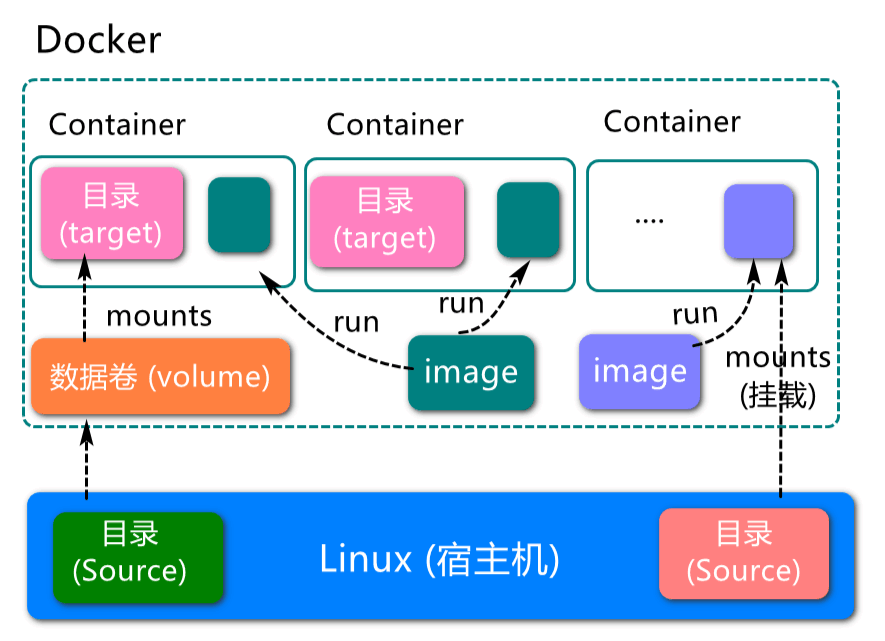
xxxxxxxxxxA docker image (Image) is a read-only template. An image can be used to create docker containers, and an image can create many containers. It is like class and object in Java, class is image and container is object.
Container:
xxxxxxxxxxdocker utilizes containers to run an application or group of applications independently. A container is a running instance created with an image. It can be started, started, stopped, and deleted. Each container is isolated from each other and guaranteed to be a secure platform. Containers can be thought of as a simple version of the linux environment (including root user privileges, process space, user space, network space, etc.) and the applications that run in it. The definition of a container is almost exactly the same as an image and a unified view of a bunch of layers, the only difference being that the top layer of the container is readable and writable.
Repository:
xxxxxxxxxxA repository is a centralized place to store image files. There are two types of repositories: public and private.The largest public repository is docker hub (https://hub.docker.com/), which stores a huge number of images for users to download. Domestic public repositories include AliCloud, NetEaseCloud, and so on.
You need to understand the concepts of storage/images/containers correctly : docker itself is a container.
- docker itself is a container runtime vector or a management engine. We packaged the application and configuration dependencies to form a deliverable runtime environment, this packaged runtime environment seems to image image file. This image file is the template for the container. docker generates instances of the container based on the image file. The same image file can generate multiple instances of containers running at the same time.
- The container instance generated by the image file is also a file itself, called an image file.
- A container runs a service, and when we need it, we can create a running instance of it through the docker client, which is our container.
- As for the repository, it's a place where we put a bunch of images, so we can publish them to the repository and pull them down from the repository when we need them.
1.1.7 Docker operation mechanism
The docker pull execution process:
- The client sends the command to the docker daemon. 2.
- The docker daemon checks if there is a relevant image in the local images. 3.
- if there is no relevant local image, then request to the mirror server to download the remote image to the local
The docker run execution process:
- check if the specified image exists locally, and if not, download it from the public repository
- use the image to create and start a container
- allocate a file system (simple linux) and mount a read-write layer on top of the read-only image layer
- bridge a virtual interface from the host's configured bridge interface to the container
- configure an ip address from the address pool to the container
- execute the user-specified application
1.2, docker installation
1, the official website installation reference manual: https://docs.docker.com/engine/install/ubuntu/
2, You can use the following command to install with one click:
xxxxxxxxxxcurl -fsSL https://get.docker.com | bash -s docker --mirror Aliyun
- Check the docker version
xxxxxxxxxxsudo docker version
- Test commands
xxxxxxxxxxsudo docker run hello-world
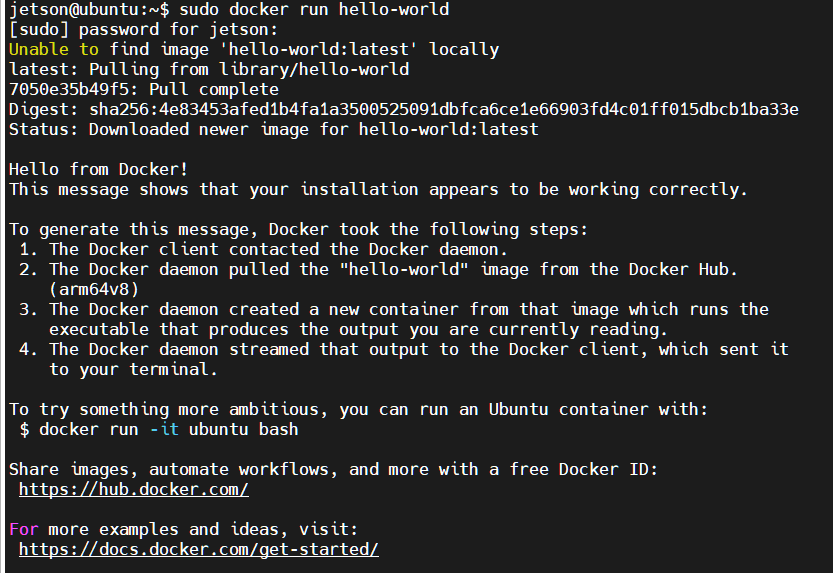
The following output indicates that the Docker installation was successful