Welcome to ROSMASTER R2 repository
4. Voice control color recognition
4. Voice control color recognition
4. Voice control color recognition 4.1. Description 4.2. Steps4.2.1. Function package path 4.2.2. Start 4.3. Code analysis 4.4. Voice module communication protocol
Raspberry Pi PI5 master controller needs to check this step, Orin master controller does not need it
Before running this program, it is necessary to bind the port number of the voice board and the port number of the ROS extension board on the host computer; When entering the docker, you need to mount the voice board to recognize the voice board in the docker.
4.1. Description
Start or stop the color recognition function of ROSMASTER by voice module.
4.2. Steps
4.2.1. Function package path
Raspberry Pi PI5 master control needs to enter the docker container first, Orin master control does not need to enter,
The location of the function source code is located
x~/yahboomcar_ros2_ws/yahboomcar_ws/src/yahboomcar_voice_ctrl/yahboomcar_voice_ctrl/voice_Ctrl_color_identify.py
4.2.2. Start
This part of the program does not involve the ROS part,if you want to use the ros framework,you can modify the program to identify the results through a custom publisher to publish.
x
python3 ~/yahboomcar_ros2_ws/yahboomcar_ws/src/yahboomcar_voice_ctrl/yahboomcar_voice_ctrl/voice_Ctrl_color_identify.pyAfter the program is run, we put the object to be identified in front of the camera, select the color area of the object with the mouse, keep the mouse and do not release it.
Then, say "Hi Yahboom" to the voice module, wait until the voice module replies saying "Hi, i‘m here".
We can say "What color is this?" and the voice module will announce the color of the area selected by the mouse.
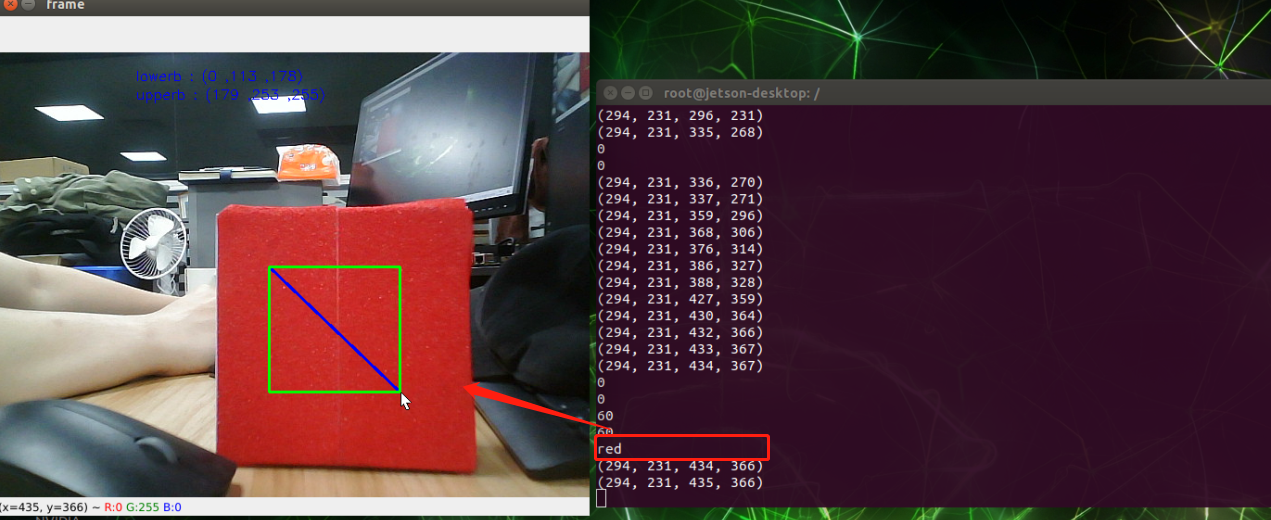
Note: Since the camera is more sensitive to light, the recognition results of the same color will be different in environments with different intensities of light.
4.3. Code analysis
The color is determined by the HSV value of the selected area, then send the corresponding voice command to the voice board according to the recognition result, broadcast recognition result.
Core code:
xxxxxxxxxxif self.Roi_init[0]!=self.Roi_init[2] and self.Roi_init[1]!=self.Roi_init[3]: HSV = cv.cvtColor(rgb_img,cv.COLOR_BGR2HSV) for i in range(self.Roi_init[0], self.Roi_init[2]): for j in range(self.Roi_init[1], self.Roi_init[3]): H.append(HSV[j, i][0]) S.append(HSV[j, i][1]) V.append(HSV[j, i][2]) H_min = min(H); H_max = max(H) S_min = min(S); S_max = 253 V_min = min(V); V_max = 255 #print("H_max: ",H_max) #print("H_min: ",H_min) lowerb = 'lowerb : (' + str(H_min) + ' ,' + str(S_min) + ' ,' + str(V_min) + ')' upperb = 'upperb : (' + str(H_max) + ' ,' + str(S_max) + ' ,' + str(V_max) + ')' cv.putText(rgb_img, lowerb, (150, 30), cv.FONT_HERSHEY_SIMPLEX, 0.5, (255, 0, 0), 1) cv.putText(rgb_img, upperb, (150, 50), cv.FONT_HERSHEY_SIMPLEX, 0.5, (255, 0, 0), 1) command_result = self.spe.speech_read() #self.spe.void_write(56) if command_result !=999: print(command_result) #Here determine whether there is a language instruction if command_result == 60: #Determine the range of HSV values if H_min == 0 and H_max == 179 : #print("red") self.spe.void_write(61) print("red") .........Note: The HSV value can be modified according to the actual situation. Since the camera is more sensitive to light, it may appear that the HSV value here may be different, and the line tracking effect is not very good. The user can adjust the maximum and minimum values of HSV with dynamic parameters, modify the max and min values of the calibrated color HSV into the above code, and use the calibrated values after restarting the code.
4.4. Voice module communication protocol
| Voice command | Speech Recognition Module Results | Voice broadcast content |
|---|---|---|
| What color is this? | 60 | Reply according to the color identified, as following table |
| color | The host sends the result of the recognition | Voice broadcast content |
|---|---|---|
| red | 61 | This is red |
| blue | 62 | This is blue |
| green | 63 | This is green |
| yellow | 64 | This is yellow |