Welcome to ROSMASTER R2 repository
9. Control serial servos
9. Control serial servos
9. Control serial servos1. Experimental Objectives2. Experiment Preparation3. Experimental results4. Program source code
1. Experimental Objectives
Control the movement of the serial servo on Rosmaster, control the serial servo through the slider, and read the current angle value of the serial servo.
2. Experiment Preparation
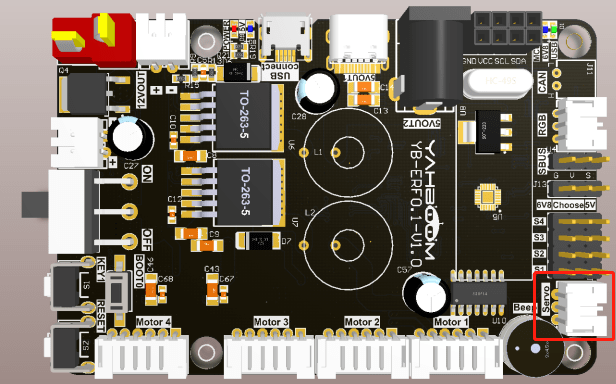
The position of the red box in the following picture is the interface of the serial servo, the interface has the function of anti-reverse connection, so you don't need to worry about the problem of inserting the servo wires in reverse direction when using the servo wires of Rosmaster.
For more information about serial servos, check out the contents of the following pages:
15kg Serial Bus Smart Servos (yahboom.com)
The Rosmaster_Lib library functions needed to control the serial servos are the following:
xxxxxxxxxxset_uart_servo_angle(s_id, s_angle, run_time=500)Parameter explanation: control a serial servo, s_id: corresponding to the ID number: 1~6, run_time control the servo running time, within the valid range, the smaller the time, the faster the servo rotates, the unit is milliseconds, the minimum value is 0.
s_angle: angle value of the corresponding servo, different range according to s_id, 1~4:[0, 180], 5:[0, 270], 6:[30, 180].
Return value: none.
xxxxxxxxxxset_uart_servo_angle_array(angle_s=[90, 90, 90, 90, 90, 180], run_time=500)Parameter explanation: control six serial servos, angle_s control the angle value of six servos, the control range is the same as the range above, run_time control the time of servo running, within the valid range, the smaller the time, the faster the servo rotates, in milliseconds, the minimum value is 0.
Return value: none.
xxxxxxxxxxset_uart_servo_torque(enable)
Parameter explanation: turn off/on serial servo torque force, enable=[0, 1].
enable=0: turn off the servo torque force, you can turn the servo by hand, but the command can not control the rotation; enable=1: turn on the torque force, the command can control the rotation, you can not turn the servo by hand.
Return value: None
xxxxxxxxxxget_uart_servo_angle(s_id)
Parameter explanation: read the angle of the servo of the serial port, s_id means the ID number of the servo to be read, s_id=[1-6]
Return value: return the current angle of input ID, read error return -1.
xxxxxxxxxxget_uart_servo_angle_array()
Parameter explanation: read the angle of six servos at once [xx, xx, xx, xx, xx, xx, xx], if a servo is wrong then that bit is -1.
Return value: [angle_1, angle_2, angle_3, angle_4, angle_5, angle_6].
3. Experimental results
Refer to 4.3.1, 4.3.2 to check the ROS expansion board as well as enter the Docker container, and then run the program, double-click in the jupyter lab interface to enter the /root/yahboomcar_ros2_ws/Rosmaster/Sample, double-click to select the 5.pwm_servo.ipynb, and then step-by-step click on the 4.3. 3 The button shown in the figure operates the program.
4. Program source code
Enter docker, refer to the code path: /root/yahboomcar_ros2_ws/Rosmaster/Sample/9.arm_servo.ipynb