Welcome to ROSMASTER R2 repository
2. Voice control car movement
2. Voice control car movement
2. Voice control car movement2.1. Description 2.2. Start function2.2.1. function package path 2.2.2. start 2.3. Voice control car 2.3.1. Movement state 2.3.2. Light strip effect
Raspberry Pi PI5 master controller needs to check this step, Orin master controller does not need it
Before running this program, it is necessary to bind the port number of the voice board and the port number of the ROS extension board on the host computer, which can be bound by referring to the previous chapter; When entering the docker, you need to mount the voice board to recognize the voice board in the docker.
2.1. Description
Realize voice control car forward, backward, parking, turn left, turn right and light strip effects.
2.2. Start function
2.2.1. function package path
Raspberry Pi PI5 master control needs to enter the docker container first, Orin master control does not need to enter,
the location of the feature source code is located
x
~/yahboomcar_ros2_ws/yahboomcar_ws/src/yahboomcar_voice_ctrl/yahboomcar_voice_ctrl/Voice_Ctrl_Ackman_driver_R2.py2.2.2. start
enter the terminal according to the actual robot type
xros2 run yahboomcar_voice_ctrl Voice_Ctrl_Ackman_driver_R2
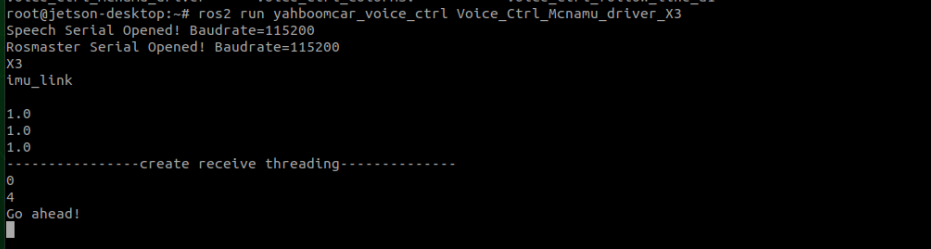
Core code analysis:
xxxxxxxxxx#Import the corresponding speech libraryfrom Speech_Lib import Speech#Import the corresponding underlying driver libraryfrom Rosmaster_Lib import Rosmaster#Create a voice control objectspe = Speech()#Create objects for underlying controlself.car = Rosmaster()#Read the results of voice board recognition,speech_r is the result of recognition,a number is returned after parsing,the instructions are identified by this numberspeech_r = spe.speech_read()if speech_r == 2 or speech_r == 0 : ....#Write instruction,broadcast speech result,when the voice board receives the command,emit relative audio filesspe.void_write(speech_r)#Control robot movement and light belt,directly interconnect with the underlying library,not published via rosself.car.set_car_motion(vx, vy, angular) #motionself.car.set_colorful_effect(6, 6, parm=1) #RGB effect2.3. Voice control car
Say "Hi Yahboom" to ROSMASTER.
Waiting until the voice module reply "Hi , I'm here.".
We can control the car according to the commands in the table below.
2.3.1. Movement state
| function word | Speech Module Recognition Results | Voice broadcast content |
|---|---|---|
| Robot stop | 2 | OK , I'm stop. |
| Go ahead | 4 | OK , let's go. |
| Back | 5 | OK , I‘m back. |
| Turn left | 6 | OK , I‘m turning left. |
| Turn right | 7 | OK , I‘m turning right. |
| Enter A mode | 8 | OK, I‘m working on A mode. |
| Enter B mode | 9 | OK, I‘m working on B mode. |
2.3.2. Light strip effect
| function word | Speech Module Recognition Results | Voice broadcast content |
|---|---|---|
| Close light | 10 | OK, light is closed. |
| Red light up | 11 | OK, red light is on. |
| Green light up | 12 | OK, green light is on. |
| Blue light up | 13 | OK, blue light is on. |
| Yellow light up | 14 | OK, yellow light is on. |
| light A | 15 | OK, light A is on. |
| light B | 16 | OK, light B is on. |
| light C | 17 | OK, light C is on. |
| Display battery value | 18 | OK, battery value has been display. |