yahboom
HomeLearn
Solution
Blog
Online Store
About Us
EN/中文
Transbot SE📖
01.Introduction to Transbot SE
  • 01. Introduction to Transbot SE
  • 02. Precautions for use and battery safety
  • 03. First Trial
02.First Trial
  • 2.1.APP control
  • 2.2.USB wireless handle control(Optional)
  • 2.3.Handle video control Transbot(Optional)
  • 2.4.Network configuration tutorial in hotspot mode
03.Hardware control course
  • 3.1About expansion board and update firmware
  • 3.2.Close self-starting process
  • 3.3.Install Transbot library
  • 3.4.Control buzzer and button
  • 3.5.Control PWM servo
  • 3.6.Control bus servo
  • 3.7.Control motor
  • 3.8.Control robot movement
04.Linux operating system
  • 1. Virtual machine installation and use
  • 2. Linux basics
  • 3. Remote control
  • 4. Multi-machine communication configuration
  • 5. Static IP and hotspot mode
  • 6. Web page real-time monitoring
  • 7. Expansion tutorial
  • 8. Write system images
05.Docker couse(For Pi5)
  • 1.Docker overview and docker installation
  • 2.Common commands for docker image containers
  • 3.Docker images deeply understand and publish images
  • 4.Docker hardware interaction and data processing
  • 5.Start the transbot se container
06.ROS basic course
  • 1.ROS introduction
  • 2.Project file structure
  • 3.Common commands and tools
  • 4.Publisher
  • 5.Subscribers
  • 6.Customize topic messages and use
  • 7.Client
  • 8.Server
  • 9.Custom service messages and usage
  • 10.TF release and monitoring
07.OpenCV courses
  • 1. Getting started with Open Source CV
  • 2. Open Source CV geometric transformation
  • 3. Open Source CV image processing and drawing text line segments
  • 4. Open Source CV image beautification
  • 5. Opencv application
  • 6. AR vision
  • 7. AR QR code
  • 8. ROS+Opencv foundation
  • 9. ROS+Opencv application
  • 10. MediaPipe development
08.ROS robot course
  • 1.PID algorithm
  • 2.Basic communication
  • 3.Keyboard control
  • 4.Handle control(Optional)
  • 5.Robot state estimation
  • 6.Data calibration
09.ROS simple camera course
  • 1.HD camera calibration
  • 2.HD camera color tracking
  • 3.HD camera color tracking (robotic arm)
  • 4.HD camera object tracking
  • 5. KCF target tracking
  • 6.HD camera face tracking
  • 7.HD camera robotic arm carrying
  • 8.HD camera Autopilot
10.ROS robotic arm control tutorial
  • 1.MoveIt configuration
  • 2.MoveIt control the real machine
  • 3.MoveIt moves randomly
  • 4.MoveIt kinematics design
  • 5.MoveIt cartesian path
  • 6.MoveIt avoiding
  • 7.MoveIt scene design
  • 8.MoveIt trajectory planning
  • 9.Mediapipe palm control car
  • 10.Mediapipe gesture control robotic arm
  • 11.Mediapipe gesture control car
  • 12.Mediapipe arm attitude control robotic arm
11.ROS multi-robot control(Optional)
  • 1. Multi-robot control(Optional)
  • 2. Multi-robot queue performance(Optional)
  • 3. Multi-robot robot arm dancing(Optional)
12.Deep learning courses
  • 1.KNN recognizes handwritten digits
  • 2.Basic use of TensorFlow
  • 3.Basic use of PyTorch(jetson)
  • 4.yolov5 model training(jetson)
  • 5.yolov5+tensorrt acceleration(jetson)
  • 6.yolov4-tiny
13.Installation Video
  • Part18
  • Part1-6
  • Part7-12
  • Part13.1-13.3.3
  • Part13.4.1-17
14.FAQnew
  • 1.Using your own Jetson board,Transbot-SE cannot start normally
Download
  • APP(iOS/Android)
  • System_File-Pi5
  • System_File-Pi4
  • System_File-Jetson
  • VM_File
  • Appendix
  • Code
  • InstructionManual
  • Jetson_Boot_USB.tar.gz
  • Hardware_Info
Download ZIP

Welcome to Transbot SE repository

3.MoveIt moves randomly

3. MoveIt moves randomly

3. MoveIt moves randomly3.1. Start3.2. Python source code3.3. C++ source code3.4. Node diagram

This lesson takes the MoveIT simulation as an example. If you need to set the synchronization between the real machine and the simulation, please refer to the lesson [02, MoveIt Precautions and Controlling the Real Machine]. ! ! ! be careful! ! !

The effect demonstration is a virtual machine, and other masters are running (related to the performance of the master, depending on the actual situation).

3.1. Start

Start the MoveIT

roslaunch transbot_se_moveit_config demo.launch  

Start random motion node (choose one of two)

xxxxxxxxxx
rosrun transbot_se_moveit_config 01_random_move.py  # python
rosrun transbot_se_moveit_config 01_random_move  # C++

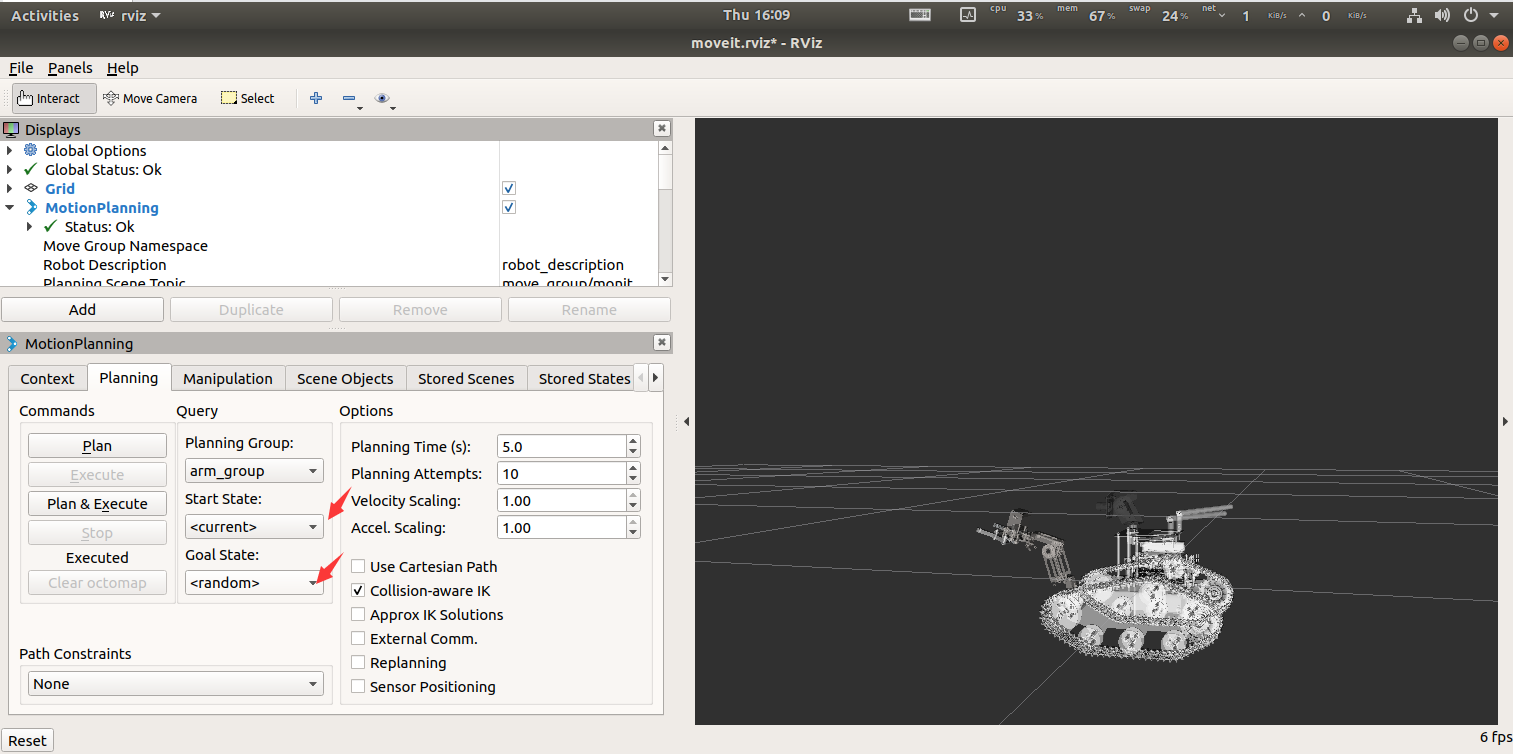
The effect diagram is as follows

0301

The effect of the source code is the same as that of the MoveIT interface [MotionPlanning--->Planning--->Goal State (random)].

3.2. Python source code

Import header file

xxxxxxxxxx
import rospy
from time import sleep
from moveit_commander.move_group import MoveGroupCommander

Initialize nodes and create planning group instances

xxxxxxxxxx
    # 初始化节点 Initialize node
    rospy.init_node("transbot_set_move")
    # 初始化机械臂 Initialize the robotic arm
    transbot = MoveGroupCommander("arm_group")

Set planning parameters

xxxxxxxxxx
    # 当运动规划失败后,允许重新规划 When motion planning fails, re-planning is allowed
    transbot.allow_replanning(True)
    transbot.set_planning_time(5)
    # 尝试规划的次数 Number of planning attempts
    transbot.set_num_planning_attempts(10)
    # 设置允许目标位置误差 Set the allowable target position error
    transbot.set_goal_position_tolerance(0.01)
    # 设置允许目标姿态误差 Set the allowable target attitude error
    transbot.set_goal_orientation_tolerance(0.01)
    # 设置允许目标误差 Set the allowable target error
    transbot.set_goal_tolerance(0.01)
    # 设置最大速度 Set maximum speed
    transbot.set_max_velocity_scaling_factor(1.0)
    # 设置最大加速度 Set maximum acceleration
    transbot.set_max_acceleration_scaling_factor(1.0)

Loop to set random target points

xxxxxxxxxx
while not rospy.is_shutdown():
        # 设置随机目标点 Set random target points
        transbot.set_random_target()
        # 开始运动 Start 
        transbot.go()
        sleep(0.5)

3.3. C++ source code

Import header file

xxxxxxxxxx
#include <iostream>
#include "ros/ros.h"
#include <moveit/move_group_interface/move_group_interface.h>

Create nodes and planning groups

xxxxxxxxxx
    rros::init(argc, argv, "transbot_random_move_cpp");
    ros::NodeHandle n;
    ros::AsyncSpinner spinner(1);
    spinner.start();
    moveit::planning_interface::MoveGroupInterface transbot("arm_group");

Set planning parameters and initial position

xxxxxxxxxx
    // 设置最大速度 Set maximum speed
    transbot.setMaxVelocityScalingFactor(1.0);
    // 设置最大加速度 Set maximum acceleration
    transbot.setMaxAccelerationScalingFactor(1.0);
    //设置目标点 Set target point
    transbot.setNamedTarget("down");
    //开始移动 Start moving
    transbot.move();
    sleep(0.1);

Loop to set random target points

xxxxxxxxxx
  while (!ros::isShuttingDown()){
        //设置随机目标点 Set random target points
        transbot.setRandomTarget();
        transbot.move();
        sleep(0.5);
    }

3.4. Node diagram

Take C++ node as an example
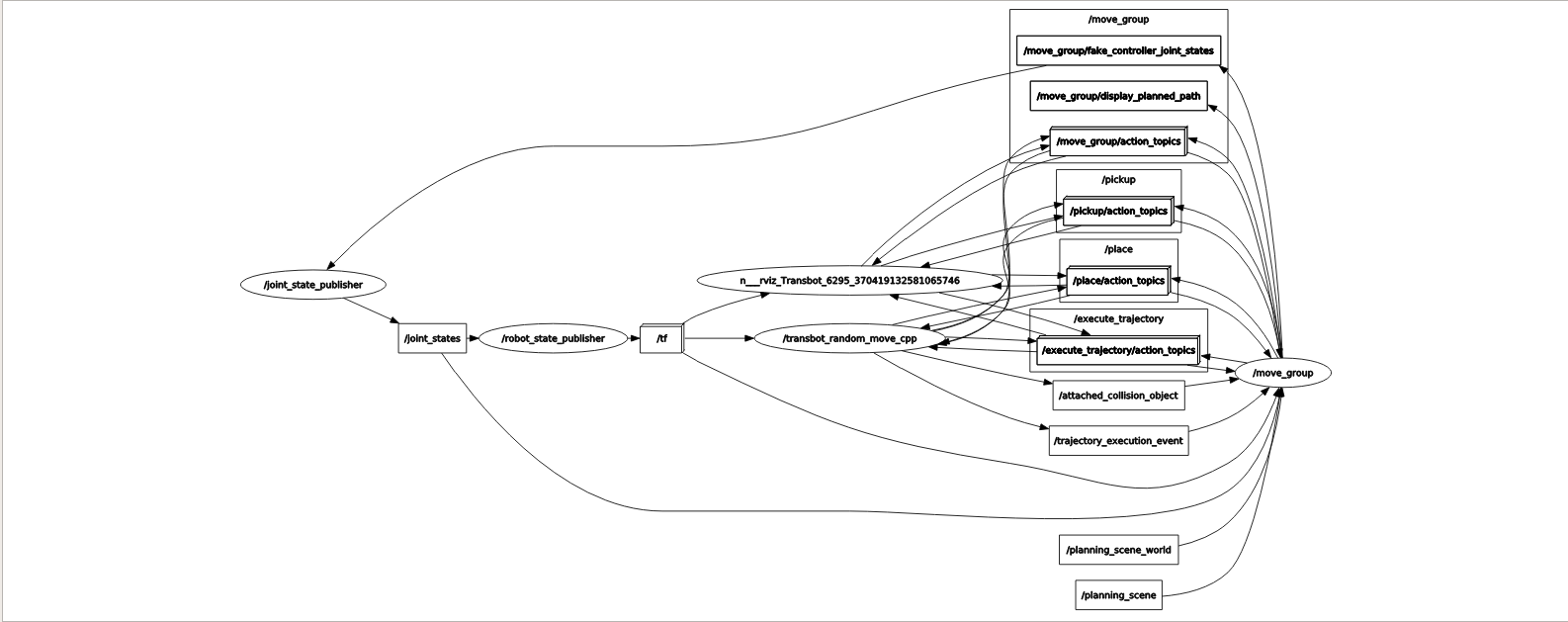
0302

MoveIt control the real machine
MoveIt kinematics design

COMPANY

  • About us
  • Team Style
  • Blog

LEARNING & EXPLORATION

  • Tutorials
  • Edge AI hardware
  • Educational robots
  • Embedded intelligent hardware

WHERE TO BUY

  • Yahboom Online Store
  • Amazon
  • Alibaba
  • AliExpress
  • Mercado

TECHNOLOGY SUPPORT

  • Email: support@yahboom.com

BE A DISTRIBUTOR

  • Email: sales@yahboom.com
QR Code

Copyright © 2017-2026 Yahboom. All Rights Reserved.

EN/中文