Welcome to Transbot SE repository
2.Project file structure
2 Project file structure
2 Project file structure 2.1 Project file structure 2.2 Workspace 2.3 package function package 2.4 Introduction to CMakeLists.txt 2.4.1 Overview 2.4.2 Format 2.4.3 Boost 2.4.4 catkin_package() 2.4.5 Include path and library path 2.4.6 Executable target 2.4.7 library files 2.4.8 target_link_libraries 2.4.9 Messages, Services and Actions 2.5 package.xml introduction
2.1 Project file structure
The file structure of ROS, not every folder is necessary, is designed according to business needs.
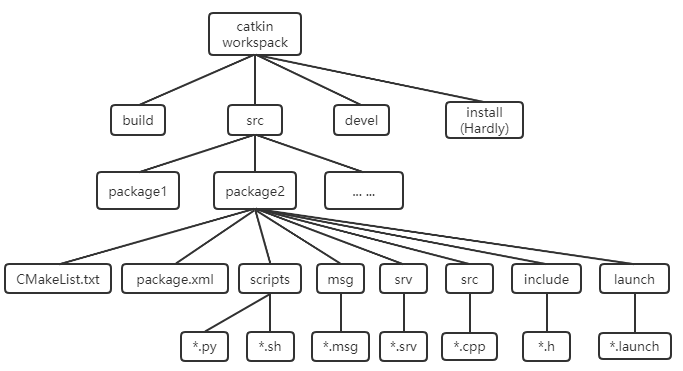
2.2 Workspace
The workspace is the place to manage and organize ROS engineering project files. It is intuitively described as a warehouse, which is loaded with various ROS project projects, which is convenient for the system to organize and manage calls. In the visual GUI is a folder. The ROS code we write ourselves is usually placed in the workspace. There are four main first-level directories under it:
- src: source space; catkin package for ROS(source code package)
- build: compilation space; cache information and intermediate files of catkin(CMake)
- devel: development space; generated object files(including header files, dynamic link libraries, static link libraries, executable files, etc.), environment variables
- install: installation space
The top-level workspace(can be named arbitrarily) and the src(must be src) folder need to be created by yourself;
- The build and devel folders are automatically created by the catkin_make command;
- The install folder is automatically created by the catkin_make install command, and is rarely used and generally not created.
Note: Be sure to go back to the top-level workspace before compiling with catkin_make. In the same workspace, function packages with the same name are not allowed; in different workspaces, function packages with the same name are allowed.
xxxxxxxxxxmkdir -p ~/catkin_ws/src # create cd catkin_ws/ # enter the workspace catkin_make # compile source devel/setup.bash # update the workspace environment 2.3 package function package
A package is a specific file structure and folder combination. Usually, the program code that realizes the same specific function is put into a package. Only CMakeLists.txt and package.xml are [ required ], and the rest of the paths are determined according to whether the package is required.
Create a feature pack
xxxxxxxxxxcd ~/catkin_ws/srccatkin_create_pkg my_pkg rospy rosmsg roscpp
[rospy], [rosmsg], and [roscpp] are dependent libraries, which can be added according to business needs, and others can be added.
file structure
xxxxxxxxxx|-- CMakeLists.txt # (Required) Compilation rules for the current package. It is usually necessary to add compile-time dependencies, executions, etc. to C++ code.| —— package.xml # (Required) Description of the package. Usually add some ros library support.| —— include folder # where c++ header files are stored| —— config folder # Store parameter configuration files| —— launch folder # Store launch files(.launch or .xml)| —— meshes folder # Store 3D models of robots or simulation scenes(.sda, .stl, .dae, etc.);| —— urdf folder # Store the model description of the robot(.urdf or .xacro);| -- rviz folder # rviz file| -- src folder # c++ source code| -- scripts folder # executable scripts; such as shell scripts(.sh), Python scripts(.py);| —— srv folder # custom service| —— msg folder # custom topic| —— action folder # custom action
2.4 Introduction to CMakeLists.txt
2.4.1 Overview
CMakeLists.txtIt was originally the rule file of the Cmake compilation system, while the Catkin compilation system basically followed the CMake compilation style, but added some macro definitions for the ROS project. So in writing, catkin's CMakeLists.txtBasically the same as CMake.
This file directly specifies which packages the package depends on, which targets to compile and generate, how to compile and so on. so CMakeLists.txtVery important, it specifies the rules from source code to object file. The catkin compilation system will first find the files under each package when it works. CMakeLists.txt, and then follow the rules to compile the build.
2.4.2 Format
CMakeLists.txtThe basic syntax is still in accordance with CMake, and Catkin has added a small number of macros to it. The overall structure is as follows:
xxxxxxxxxxcmake_minimum_required() # Required CMake version project() # package name find_package() # Find other CMake/Catkin packages needed for compilation catkin_python_setup() # Enable Python module support add_message_files() # message generator add_service_files() # service generator add_action_files() # action generator generate_message() # Generate msg/srv/action interfaces in different languages catkin_package() # Generate the cmake configuration of the current package for other packages that depend on this package to call add_library() # Used to specify the library generated by compilation. The default catkin compilation produces shared libraries. add_executable() # Generate executable binary add_dependencies() # Defines that the target file depends on other target files, ensuring that other targets have been built target_link_libraries() # Specify the libraries the executable is linked against. This is used after add_executable(). catkin_add_gtest() # test build install() # install to this machine 2.4.3 Boost
If using C++ and Boost, you need to call on Boost find_package(), and specify which aspects of Boost are used as components. For example, if you wanted to use Boost threads, you would say:
xxxxxxxxxxfind_package(Boost REQUIRED COMPONENTS thread)
2.4.4 catkin_package()
catkin_package() is a catkin CMake macro provided by This is required to specify catkin-specific information for the build system, which in turn is used to generate pkg-config and CMake files.
currently using add_library()or add_executable()any targets are declared *before * must be called This function The function has 5** optional** parameters:
INCLUDE_DIRS- export include paths for packagesLIBRARIES- Libraries exported from the projectCATKIN_DEPENDS- Others that the project depends oncatkinprojectDEPENDS- non-dependencies on which the project dependscatkinCMake project. For a better understanding, see this explanation .CFG_EXTRAS- other configuration options
Full macro documentation can be found here .
for example:
xxxxxxxxxxcatkin_package( INCLUDE_DIRS include LIBRARIES ${PROJECT_NAME} CATKIN_DEPENDS roscpp nodelet DEPENDS open resume) This means that the folder "include" in the package folder is where the header files are exported. The CMake environment variable ${PROJECT_NAME} is evaluated before being passed to project()function anything, in this case it would be "robot_brain". "roscpp" + "nodelet" are the packages that need to exist to build/run this package, and "eigen" + "opencv" are the system dependencies that need to exist to build/run this package.
2.4.5 Include path and library path
Before specifying a target, you need to specify where resources can be found for said target, especially header files and libraries:
xxxxxxxxxx- include path - where to find header files for code(most commonly C/C++)- Libraries Path - Which libraries are located in this executable target build object?- include_directories(<dir1>,<dir2>,...,<dirN>)- link_directories(<dir1>,<dir2>,...,<dirN>)
- include_directories()
The argument to include_directories should be the *_INCLUDE_DIRS variable generated by the find_package call and any other directories that need to be included. If you're using catkin and Boost, your include_directories() call should look like this:
xxxxxxxxxxinclude_directories(include ${Boost_INCLUDE_DIRS} ${catkin_INCLUDE_DIRS})
The first parameter "include" indicates that the package contains include /Directories are also part of the path.
- link_directories()
example:
xxxxxxxxxxlink_directories(~/my_libs)
CMake link_directories()Functions can be used to add additional library paths, but this is not recommended. All catkin and CMake packages are automatically added with link information when they are found_packaged, just link to target_link_libraries()in the library.
Please refer to this cmake thread to see a detailed example of usage target_link_libraries()exist link_directories().
2.4.6 Executable target
To specify the executable target that must be built, we must use add_executable()CMake functions.
xxxxxxxxxxadd_executable(myProgram src/main.cpp src/some_file.cpp src/another_file.cpp)
This will build a target executable named myProgram which is built from 3 source files: src/main.cpp, src/some_file.cpp and src/another_file.cpp.
2.4.7 library files
Should add_library()The function of CMake is to specify the library to build. By default, catkin builds shared libraries.
xxxxxxxxxxadd_library(${PROJECT_NAME} ${${PROJECT_NAME} _SRCS}) 2.4.8 target_link_libraries
use target_link_libraries()function to specify the library the executable target is linked against. This is usually in add_executable()done after the call. If ros is not found, add $ {catkin_LIBRARIES}.
syntax:
xxxxxxxxxxtarget_link_libraries(<executableTargetName>, <lib1>, <lib2>, ... <libN>)
example:
xxxxxxxxxxadd_executable(foo src/foo.cpp)add_library(moo src/moo.cpp)target_link_libraries(foo moo) -- This links foo against libmoo.so
Note that in most use cases it is not necessary to use link_directories(), because the information passes through find_package()Imported automatically.
2.4.9 Messages, Services and Actions
Message(.msg), service(.srv) and action(.action) files require a special preprocessor build step before ROS packages can be built and used. The point of these macros is to generate programming language specific files so that messages, services and actions in the programming language of their choice can be utilized. The build system will generate bindings using all available generators such as gencpp, genpy, genlisp, etc.
Three macros are provided to handle messages, services and actions respectively:
add_message_filesadd_service_filesadd_action_files
These macros must be followed by calling the resulting macro:
xxxxxxxxxxgenerate_messages()
If you have never touched CMake syntax, please read "CMake Practice": https://github.com/Akagi201/learning-cmake/blob/master/docs/cmake-practice.pdf . Mastering CMake syntax is helpful for understanding ROS projects.
2.5 package.xml introduction
- Overview
The package manifest is an XML file named package.xmlmust include the root folder with any compatibility package. package.xmlIt is also a necessary file for catkin package. It is the description file of this package. In earlier ROS versions(rosbuild compilation system), this file is called manifest.xml, used to describe the basic information of pacakge. If you see some ROS projects online that contain manifest.xml, then it is probably a project before the hydro version. pacakge.xmlContains information such as the name of the package, version number, content description, maintainer, software license, compilation and construction tools, compilation dependencies, and runtime dependencies.
package.xmlThe file build_depend must contain message_generation and run_depend must contain message_runtime.
- Format
xxxxxxxxxx<pacakge> # root tag file<name> # package name<version> # version number<description> # content description<maintainer> # maintainer<license> # software license<buildtool_depend> # Compile the build tool, usually catkin<depend> # Specify dependencies as dependencies required for compilation, export, and operation, the most commonly used<build_depend> # build dependencies<build_export_depend> # export dependencies<exec_depend> # run dependencies<test_depend> # test case dependencies<doc_depend> # Documentation dependencies
- dependencies
A package manifest with minimal labels does not specify any dependencies on other packages. A package can have six kinds of dependencies:
Build dependencies <build_depend> specifies the packages required to build this package. This is the case when any of the files in these packages are required at build time. This can include header files at compile time, library files linked to these packages or any other resources needed at build time(especially when these packages are find_package() in CMake). In a cross-compilation scenario, build dependencies target the target architecture.
Build Export Dependencies <build_export_depend> specifies the packages required to build the library against this package. This is the case when you include this header in a common header file in this package(especially when declared as(CATKIN_DEPENDS) in catkin_package() in CMake).
Execution dependencies <exec_depend> specifies the packages required to run code in this package. This is the case when you depend on shared libraries in this package(especially when declared as(CATKIN_DEPENDS) in catkin_package() in CMake).
Test dependencies <test_depend> specifies additional dependencies for unit tests only. They should not duplicate any dependencies already mentioned as build or run dependencies.
The build tool dependency <buildtool_depend> specifies the build system tools that this package needs to build itself. Usually the only build tool is catkin. In a cross-compilation scenario, the build tool dependencies are used to perform compilation on the architecture.
Documentation tool dependencies <doc_depend> specifies the documentation tools that this package requires to generate documentation.
- Additional tags
<url>- URL for information about the package, usually a wiki page on ros.org.
<author>- the author of the package
<url type="website"> http://www.ros.org/wiki/turtlesim</url><author>Yahboom</author>